1. ReadMe 작성하기
이전 프로젝트에서 README 작성부분이 많이 부족하다는 피드백을 받았다. 그래서 이번에는 README 작성을 보다 신경썼다.
🤔 readme 개선 사항
1. 명확한 목적과 개요를 작성하기
2. 기능에 관하여 구체적으로 설명하기
3. 사용예제 추가하기
이전 방식
요구사항의 진행 상황만을 표시
// 예시
개요
키오스크 프로젝트
목표 : 사용자가 선택한 메뉴를 장바구니에 추가/삭제/주문이 가능한 프로그램키오스크 LV1
- ✅ 햄버거 메뉴 출력 및 선택
- ✅ 여러 햄버거 메뉴를 출력(
Scanner사용 )- ✅ 제시된 메뉴 중 입력받은 숫자에 따라 다른 로직을 실행
- 특정 숫자
0이 입력되면 프로그램을 종료
개선 후
1. 개요, 목표, 기능 작성
일정관리 프로젝트
개요
- 작성자가 입력한
비밀번호를 이용하여 작성된일정을 수정 및 삭제할 수 있습니다.프로젝트 목표
- 일정
생성및조회기능 구현- 일정을 수정 및 할 경우
비밀번호를 통해 작성자만 수정할 수 있도록 보호주요 기능
일정 생성 및 관리
- 작성자가
할일,비밀번호를 입력 후 생성- 작성된 일정을 전체, 상세
조회기능 제공비밀번호를 통해 작성자 본인을 확인 후 처리 일정수정및삭제
2. api 명세서 작성
API 명세서
swagger API 문서 : http://localhost:8080/swagger-ui/index.html
| 기능 | 메소드 | URL | 요청 | 응답 | 상태코드 |
|---|---|---|---|---|---|
| 일정등록 | POST | api/schedules | 요청 body | 등록 정보 | 200: 정상등록 |
| 일정 전체 조회 | GET | api/schedules | 요청 param | 단건 응답 정보 | 200: 정상조회 |
| 일정 상세 조회 | GET | api/schedules/{id} | 요청 param | 다건 응답 정보 | 200: 정상조회 |
| 일정 수정 | PATCH | api/schedules/{id} | 요청 body | 수정 정보 | 200: 정상수정 |
| 일정 삭제 | PUT | api/schedules/{id} | 요청 param | - | 200: 정상삭제 |
3. DB정보 제공
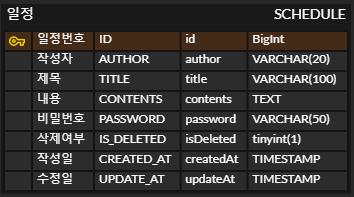
ERD
SQL
CREATE TABLE SCHEDULE
(
    ID BIGINT AUTO_INCREMENT PRIMARY KEY COMMENT '일정관리 식별자' ,
    AUTHOR VARCHAR(20) NOT NULL COMMENT '작성자' ,
    TITLE VARCHAR(100) NOT NULL COMMENT '제목' ,
    CONTENTS TEXT COMMENT '내용',
    PASSWORD VARCHAR(20) NOT NULL COMMENT '비밀번호',
    IS_DELETED TINYINT NOT NULL DEFAULT 0 COMMENT '삭제 여부 (0: 활성, 1 : 삭제)' ,
    CREATED_AT TIMESTAMP DEFAULT CURRENT_TIMESTAMP,
    UPDATE_AT TIMESTAMP DEFAULT CURRENT_TIMESTAMP ON UPDATE CURRENT_TIMESTAMP
);
🤔 TIMESTAMP와 DATETIME 선정 기준은?
✅ TIMESTAMP
- UTC 타임존을 기준으로 저장
생성/ 갱신 시간을 관리하는데 유용데이터 생성/갱신을 자동으로 관리하는 경우 사용
✅ DATETIME
- 타임존에 영향을 받지 않고 값 그대로 저장되고 조회됨
- 먼 미래 데이터를 저장하는 데 적합
- 범위가 더 넓은 날짜 데이터를 다룰 때 사용
db를 생성할때 TIMESTAMP, DATETIME 모두 날짜와 시간을 저장하기 위해 사용된다는 공통 점이 있어 작성일과 수정일을 생성 시 어느것으로 선택해야할 지 고민스러웠다.
초반에는 넓은 범위의 날짜를 저장하는 DATETIME이 적합하지 않나 생각했었다.
하지만 데이터 생성/갱신이 자동으로 관리되는 TIMESTAMP가 작성, 수정일 관리에 더욱 적합하다는 생각이 들어 TIMESTAMP로 지정하게 되었다.`
2. CRUD 생성하기
1. 일정 생성하기
조건
1. 할일, 작성자명, 비밀번호, 작성/수정일을 저장
2. 작성/수정일은 날짜와 시간을 모두 포함한 형태
3. 각 일정의 고유 식별자를 자동으로 생성 및 관리
4. 최초 입력 시, 수정일은 작성일과 동일
// Controller
    @PostMapping
    public ResponseEntity<ScheduleResponseDto> createSchedule(@RequestBody ScheduleRequestDto dto){
        return new ResponseEntity<>(scheduleService.saveSchedule(dto), HttpStatus.CREATED);
    }

// ServiceImpl
    @Override
    public ScheduleResponseDto saveSchedule(ScheduleRequestDto dto) {
        Schedule schedule = new Schedule(dto.getAuthor(), dto.getTitle(), dto.getContents(), dto.getPassword());
        return repository.saveSchedule(schedule);
    }

// Repository
    @Override
    public ScheduleResponseDto saveSchedule(Schedule schedule) {
        SimpleJdbcInsert insert = new SimpleJdbcInsert(jdbc);
        insert.withTableName("schedule").usingGeneratedKeyColumns("id");

        Map<String, Object> param = new HashMap<>();
        param.put("author", schedule.getAuthor());
        param.put("title", schedule.getTitle());
        param.put("contents", schedule.getContents());
        param.put("password", schedule.getPassword());
        param.put("is_deleted", 0);

        Number key = insert.executeAndReturnKey(new MapSqlParameterSource(param));
        return new ScheduleResponseDto(key.longValue()
                , schedule.getAuthor()
                , schedule.getTitle()
                , schedule.getContents()
        );
    }
💡 해결내용
1. Map을 이용하여 author, title, contents, password 입력
2. 작성/수정일 timestamp로 설정
3. AUTO_INCREMENT로 db를 설정하여 자동 id 생성
4. 작성/수정일 입력값 필수, 기본값현재 날짜 및 시간으로 설정
2. 전체 일정 조회
조건
1.수정일, 작성자명에 맞는 일정 목록 조회
2. 조건 중 한가지만 충족하거나 전부 충족할 가능성 존재
3. 수정일 기준 내림차순 정렬
// Controller
    @GetMapping
    public ResponseEntity<List<ScheduleResponseDto>> findAllSchedules(
            @RequestParam(required = false) String updateAt
            , @RequestParam(required = false) String author){

        return new ResponseEntity<>(scheduleService.findAllSchedules(updateAt, author), HttpStatus.OK);
    }

// ServiceImpl
    @Override
    public List<ScheduleResponseDto> findAllSchedules(String updateAt, String author) {
        return repository.findAllSchedules(updateAt, author);
    }

// Repository
    @Override
    public List<ScheduleResponseDto> findAllSchedules(String updateAt, String author) {
        StringBuilder sql = new StringBuilder("select * from schedule where is_deleted = 0 ");
        List<Object> params = new ArrayList<>();

        if(updateAt != null){
            sql.append("and date_format(update_at, '%Y-%m-%d') = ?");
            params.add(updateAt);
        }

        if (author != null) {
            sql.append("and author = ? ");
            params.add(author);
        }

        sql.append("order by update_at desc");
        return jdbc.query(sql.toString(), params.toArray(), scheduleRowMapper());
    }
💡 해결내용
1. @RequestParam을 이용하여 수정일, 작성자명 입력
2.equired = false으로 수정일, 작성자명 선택적으로 받을 수 있도록 변경
3.rder by update_at desc내림차순 정렬 설정
3.선택 일정 조회
조건
1. id을 기준으로 단건의 정보를 조회
// Controller
    @GetMapping("{id}")
    public ResponseEntity<ScheduleResponseDto> optionalFindScheduleById(@PathVariable Long id){
        return new ResponseEntity<>(scheduleService.findScheduleByIdOrElseThrow(id), HttpStatus.OK);
    }

// ServiceImpl
    @Override
    public ScheduleResponseDto findScheduleByIdOrElseThrow(Long id) {
        Schedule schedule = repository.findScheduleByIdOrElseThrow(id);
        return new ScheduleResponseDto(schedule);
    }

// Repository
    @Override
        @Override
    public Schedule findScheduleByIdOrElseThrow(Long id) {
         List<Schedule> result = jdbc.query("select * from schedule where id = ? and is_deleted = 0", scheduleRowMapperV2(), id);
        return result.stream().findAny().orElseThrow(()
                -> new ResponseStatusException(HttpStatus.NOT_FOUND, "조회된 일정이 존재하지 않습니다."));
    }
💡 해결내용
1.유효한 id값인 경우 해당 값 조회
2. 유효하지 않을 경우new ResponseStatusException(HttpStatus.NOT_FOUND, "조회된 일정이 존재하지 않습니다.")오류 생성
4.일정 수정 및 삭제
조건
1. 선택한 일정 내용 중 할일, 작성자명만 수정
2. 비밀번호가 유효할 경우 수정 또는 삭제 진행
3. 수정이 완료된 경우 수정일 변경
수정
// Controller
    @PatchMapping("{id}")
    public ResponseEntity<ScheduleResponseDto> updateSchedule(@PathVariable Long id, @RequestBody ScheduleRequestDto dto) {
        return new ResponseEntity<>(scheduleService.updateSchedule(id, dto.getTitle(), dto.getContents(), dto.getAuthor(), dto.getPassword()), HttpStatus.OK);
    }

// ServiceImpl
    @Override
    public ScheduleResponseDto updateSchedule(Long id, String title, String contents, String author, String password) {

        if(title == null ||  contents == null ||  author == null ||  password == null ){
            throw new ResponseStatusException(HttpStatus.BAD_REQUEST, "수정 요청값이 존재하지 않습니다.");
        }

        validPassword(id, password);

        int updateResult = repository.updateSchedule(id, title, contents, author, password);

        if(updateResult == 0){
            throw new ResponseStatusException(HttpStatus.NOT_FOUND, "수정된 값이 존재하지 않습니다.");
        }

        // 수정된 값으로 재조회
        Schedule updatedSchedule  = repository.findScheduleByIdOrElseThrow(id);
        return new ScheduleResponseDto(updatedSchedule);
    }

// Repository
    @Override
    public int updateSchedule(Long id, String title, String contents, String author, String password) {
        int result = jdbc.update("update schedule set title = ? , contents = ? , author = ? where id = ? and password = ? and is_deleted = 0" ,
                title, contents, author, id, password);
        return result;
    }
💡 해결내용
1. title, contents, author, password 값을 입력받아 수정 진행
2. validPassword(id, password) 비밀번호 유효여부 체크
3.ON UPDATE CURRENT_TIMESTAMP업데이트 될때마다 수정일 변경
삭제
// Controller
    @PutMapping("{id}")
    public ResponseEntity<Void> deleteSchedule(@PathVariable Long id, @RequestParam String password){
        scheduleService.deleteSchedule(id, password);
        return new ResponseEntity<>(HttpStatus.OK);
    }

// ServiceImpl
    @Override
    public void deleteSchedule(Long id, String password) {
        validPassword(id, password);
        repository.deleteSchedule(id, password);
    }

// Repository
    @Override
    public void deleteSchedule(Long id, String password) {
        jdbc.update("update schedule set  is_Deleted = 1 where id = ? and password = ? and is_deleted = 0" , id, password);
    }
💡 해결내용
1. validPassword(id, password) 비밀번호 유효여부 체크
3. 삭제완료된 경우is_deleted컬럼0->1로 변경