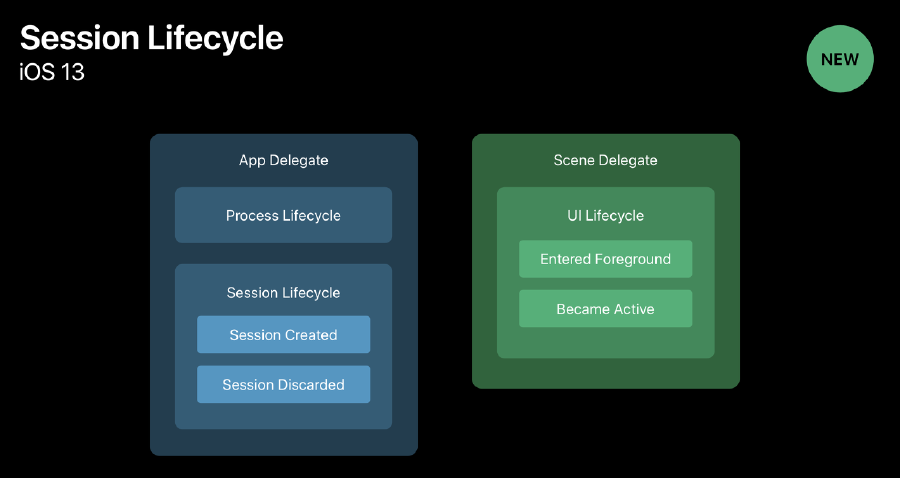
iOS 13부터는 AppDelegate와 SceneDelegate의 개념이 아래 그림과 같이 바뀌었다.
Scene
- 하나의 앱에도 여러개의 UI 인스턴스가 존재할 수 있다.
- 각 인스턴스는
UIWindowScene객체로 관리된다. - Scene에는 앱 인스턴스의 UI 를 표현하기 위해
window,viewController들을 포함하고 각 인스턴스에 대응되는UIWindowSceneDelegate객체를 가진다. - Scene들은 동시적으로 실행되고 하나의 앱에서 같은 메모리와 프로세스 공간을 공유한다.
- app switcher를 통해 여러
scene을 확인할 수 있다.
AppDelegate
iOS 12 이전에는 앱이 foreground에 들어가거나 background로 이동할 때 앱의 상태를 업데이트하는 등의 앱의 주요 생명 주기 이벤트를 관리했었지만 더이상 하지 않고 다음과 같은 역할을 수행한다.
- 앱의 가장 중요한 데이터 구조를 초기화하는 것
- 앱의
scene을 환경설정(Configuration)하는 것 - 앱 밖에서 발생한 알림(배터리 부족, 다운로드 완료 등)에 대응하는 것
- 특정한
scene,view,view controller에 한정되지 않고 앱 자체를 타겟하는 이벤트에 대응하는 것. - 애플 푸쉬 알림 서브스와 같이 실행시 요구되는 모든 서비스를 등록하는것.
AppDelegate 메소드
process변화에 호출되고 SceneDelegate는 UI적인 요소를 담당한다.
//애플리케이션이 실행된 직후 사용자의 화면에 보여지기 직전에 호출
func application(_ application: UIApplication, didFinishLaunchingWithOptions launchOptions: [UIApplicationLaunchOptionsKey: Any]?) -> Bool

//애플리케이션이 최초 실행될 때 호출되는 메소드
func application(_ application: UIApplication, willFinishLaunchingWithOptions launchOptions: [UIApplication.LaunchOptionsKey : Any]? = nil) -> Bool

//애플리케이션이 InActive 상태로 전환되기 직전에 호출
func applicationWillResignActive(_ application: UIApplication)

//애플리케이션이 백그라운드 상태로 전환된 직후 호출
func applicationDidEnterBackground(_ application: UIApplication)

//애플리케이션이 Active 상태가 되기 직전, 화면에 보여지기 직전에 호출
func applicationWillEnterForeground(_ application: UIApplication)

//애플리케이션이 Active 상태로 전환된 직후 호출
func applicationDidBecomeActive(_ application: UIApplication)

//애플리케이션이 종료되기 직전에 호출
func applicationWillTerminate(_ application: UIApplication)
SceneDelegate
화면에 표시되는 내용(Windows 또는 Scenes)들을 처리하고 앱이 표시되는 방식을 관리
SceneDelegate 메소드
// scene이 앱에 추가될 때 호출
func scene(_ scene: UIScene, willConnectTo session: UISceneSession, options connectionOptions: UIScene.ConnectionOptions)

//scene의 연결이 해제될 때 호출
func sceneDidDisconnect(_ scene: UIScene)

//app switcher에서 선택되면 inActive 상태에서 active상태로 전환
 func sceneDidBecomeActive(_ scene: UIScene)

//active상태에서 inactive로 전환시
func sceneWillResignActive(_ scene: UIScene)

//background에서 foreground로 전환시
func sceneWillEnterForeground(_ scene: UIScene)

//foreground에서 background로 전환시
func sceneDidEnterBackground(_ scene: UIScene)
앱 실행 시 호출 메소드 순서
-
[AppDelegate]
didFinishLaunchingWithOptions -
[AppDelegate]
configurationForSession -
[SceneDelegate]
willConnectToSession
- 아직 화면에는 앱이 뜨지 않은 상태이다.
- [SceneDelegate]
scene(_:willConnectTo)
- 여기서 window = UIWindow(windowScene: scene as! UIWindowScene)
- 이후 화면에 앱이 등장
-
[SceneDelegate]
willResignActive -
[SceneDelegate]
didEnterBackground -
[SceneDelegate]
didDisconnect
- 이후 앱 화면을 명시적으로 종료하면
- [AppDelegate]
didDiscardSceneSceneSessions
scene이didDisconnect됐을 경우 유저의 포커스에서 벗어난 후 다시 포커스를 받은 경우 데이터를 유지 하기 위해, 이곳에서 복구관련 정보를 획득한 앱을 여러 화면 띄울 수 있다.
참고 사이트
[iOS] AppDelegate, SceneDelegate (iOS 13 이전 이후)
[iOS] iOS13이후의 AppDelegate와 SceneDelegate

iOS와 Swift, SwiftUI를 공부하기 위해 블로그를 운영 중입니다.