👩🏼💻 CSS에서 레이아웃을 다루는 핵심 속성인 float, position, visibility, z-index, clip, columns에 대해 개념 + 예제 코드 + 특징 + 주의사항을 함께 정리!
✅ float
개념
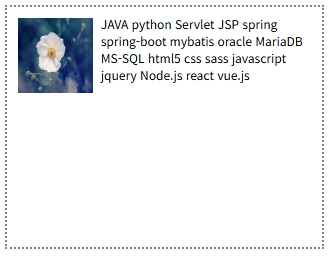
float는 요소를 왼쪽 또는 오른쪽으로 띄워 배치하며, 문서 흐름에서 벗어나 인접한 요소와 겹치거나 흐름을 방해할 수 있습니다.
float: left;
float: right;
float: none;
예제
<div class="box left">1</div>
<div class="box left">2</div>
<div class="box left">3</div>
float 해제 방법 총정리
| 방법 | 설명 | 주의사항 |
|---|---|---|
height 강제 지정 | 부모에 높이를 지정해 float 해제 | 반응형에서 유연하지 않음 |
overflow: hidden | 부모 요소가 자식 float 감쌈 | 콘텐츠가 잘릴 수 있음 |
overflow: auto | 자동으로 감싸줌 | 스크롤 바 생길 가능성 |
clear: both | 다음 요소에 float 영향을 끊음 | margin-top과 충돌 가능 |
가상요소 (::after) | clearfix 패턴으로 float 해제 | ✅ 가장 권장되는 방식 |
.clearfix::after {
  content: '';
  display: block;
  clear: both;
}<div class="container clearfix">
<div class="float-box">A</div>
<div class="float-box">B</div>
</div>float + 이미지
<img src="..." style="float: left;">
<span>텍스트가 이미지 오른쪽을 감싸게 됩니다.</span>- 이미지 주위로 텍스트 흐름을 만들 수 있음
clear로 레이아웃 충돌 방지 필요
float + 높이 문제
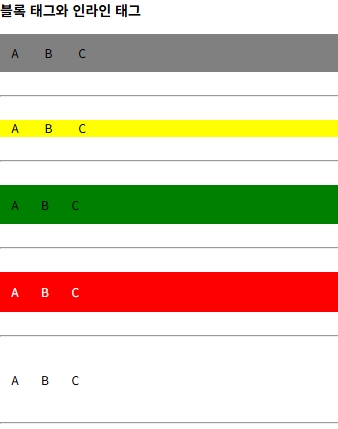
<div style="background: yellow;">
  <span style="padding: 15px;">A</span>
  <span style="padding: 15px;">B</span>
</div>span이 float 되면 부모div의 높이가 잡히지 않음- 해결:
::after,clear,overflow등 사용
✅ position
1. static (기본값)
- 요소는 문서 흐름 그대로 배치됨
position: static;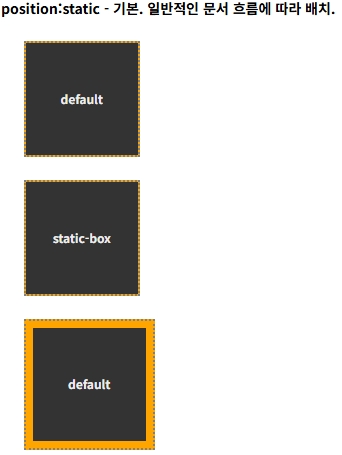
2. relative
- 원래 위치 기준으로 이동
- 시각적으로만 이동하며, 공간은 차지함
position: relative;
top: 20px;
left: 10px;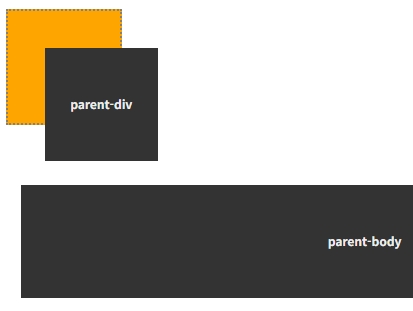
3. absolute
- 문서 흐름에서 제거됨
- 가장 가까운
relative부모를 기준으로 위치함
position: absolute;
top: 30px;
left: 50px;
주의 : 부모가
relative가 아니면body기준
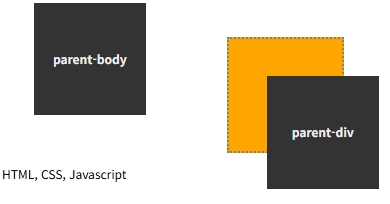
4. fixed
- 브라우저 뷰포트 기준으로 고정
- 스크롤에도 위치 유지
position: fixed;
top: 0;
left: 0;
✅ visibility
visibility: visible; /* 기본값 */
visibility: hidden;  /* 보이지 않지만 공간 유지 */
display: none과 달리 공간은 남아 있음
✅ z-index
- 요소의 Z축 순서를 지정
position이 static이 아닌 요소에서 동작
z-index: 100;<div class="box yellow" style="z-index: 100;"></div>
<div class="box green" style="z-index: 200;"></div>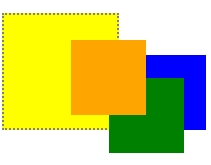
clip
- 요소의 보여지는 영역을 자름
- 반드시
absolute또는fixed와 함께 사용
clip: rect(20px, 220px, 220px, 20px);
✅ columns
개념
내용을 다단으로 분할하여 출력하는 레이아웃
columns: 3;
columns: 200px;
columns: 200px 5;- 첫 번째는 단 개수
- 두 번째는 단 너비
masonry layout (메이슨리 레이아웃)
.container {
  columns: 3 250px;
  column-gap: 1rem;
}
.item {
  break-inside: avoid;
}<div class="container">
<div class="item">콘텐츠 1</div>
<div class="item">콘텐츠 2</div>
</div>요소가 컬럼 사이에서 잘리지 않도록
break-inside: avoid를 함께 사용
✅ 요약 정리
| 속성 | 역할 | 특징 |
|---|---|---|
| float | 좌우 배치 | 문서 흐름에서 벗어남 |
| position | 위치 제어 | relative/absolute/fixed 등 |
| visibility | 보임/숨김 제어 | 공간은 유지 |
| z-index | Z축 순서 | 레이어 순서 제어 |
| clip | 자르기 | 특정 영역만 보여줌 |
| columns | 다단 출력 | 반응형 콘텐츠 분할 |
🧠 레이아웃을 안정적으로 다루기 위해서는 float 해제, position 기준 이해, z-index 충돌 방지, columns 활용 등을 종합적으로 익혀야 한다.