👩🏼💻 <img> 요소 / background / gradient / 이미지 배치 및 반복
1️⃣ 이미지 삽입과 정렬
<img> 태그 기본 사용법
<img src="coffee.jpg" alt="커피 이미지">alt: 이미지 로딩 실패 시 대체 텍스트width,height속성으로 크기 지정 가능
vertical-align 속성
img {
  vertical-align: middle;
}- 인라인 요소 기준 정렬:
top,middle,bottom등
object-fit 속성
img {
  width: 200px;
  height: 200px;
  object-fit: cover;
}| 값 | 설명 |
|---|---|
fill | 이미지 비율 무시하고 채움 |
contain | 비율 유지하며 전체 표시 |
cover | 비율 유지하며 요소 채움 |
none | 원본 크기 유지 |
scale-down | none 또는 contain 중 작은 값 |
2️⃣ 배경 이미지 스타일링
background-image
div {
  background-image: url("coffee.jpg");
}
background-repeat
background-repeat: repeat;       /* 기본값 */
background-repeat: no-repeat;    /* 반복 없음 */
background-repeat: repeat-x;     /* 수평 반복 */
background-repeat: repeat-y;     /* 수직 반복 */
background-position
background-position: center center;
background-position: right bottom;
background-position: 50% 100%;
background-attachment
background-attachment: scroll;   /* 기본값 */
background-attachment: fixed;    /* 배경 고정 */
background-size
background-size: cover;    /* 요소를 꽉 채움 (비율 유지) */
background-size: contain;  /* 요소에 맞춤 (전체 보임) */
background-size: 100% 100%; /* 강제 비율 조절 */
3️⃣ 그라디언트 (Gradient)
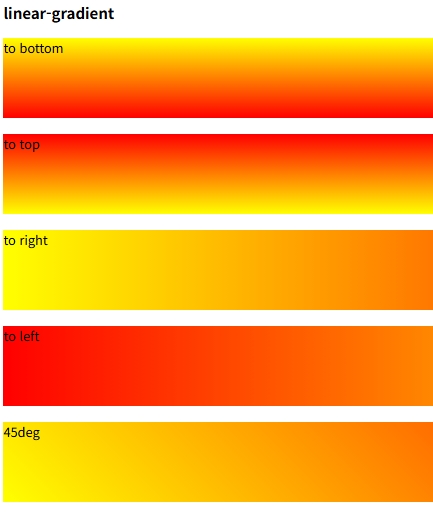
linear-gradient
background: linear-gradient(to right, red, blue);to right,to bottom,to left top등 방향 설정 가능- 색상 여러 개 지정 가능
radial-gradient
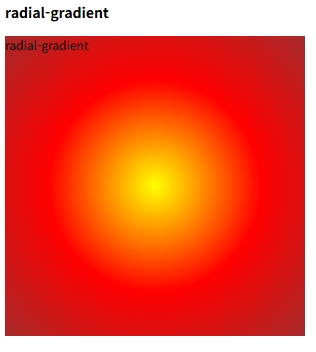
background: radial-gradient(circle, orange, purple);- 중심에서 퍼지는 원형 그라디언트
circle,ellipse형태 지정 가능
✅ 마무리 정리
<img>는 콘텐츠 이미지,background-image는 레이아웃 배경용object-fit은 이미지 비율 조절에 유용background속성은 반복, 위치, 크기, 고정 등 다양한 조합이 중요- 그라디언트는 이미지 없이도 시각적 배경을 만들 수 있는 강력한 도구