controller 관련 코드들은 main - java - hello.hellospring - controller(package) - helloController 라는 파일에 들어있다
step1) @Controller
이 클래스는 spring에서 controller 역할임을 의미
step2) public class HelloController {} 함수 안에 원하고자 하는 처리함수들을 작성해보자
step3) @GetMapping("hello")
http get 요청이 /hello 로 들어올 때 아래 메소드를 실행할 것을 의미
step4) 함수를 작성해보자
public String hello(Model model){
     model.addAttribute("data","hello!!");
     return "hello";
}-
method명인 hello 메소드는 model 객체를 파라미터로 받고,
-
data라는 이름으로 hello!!라는 값 추가
-
hello 를 반환하는데, 이는 뷰의 이름을 의미한다.(즉, html 파일명)
즉 이 뷰는 /hello 요청에 대한 응답으로 사용된다controller의 return 값에 해당하는 hello와 같은 뷰는
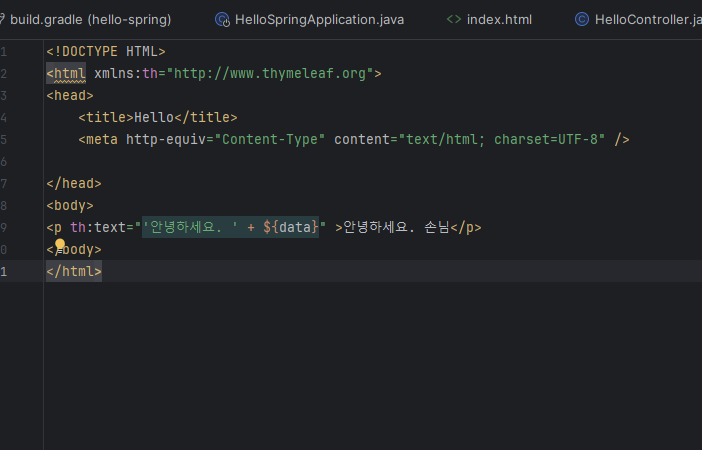
main - resources - templates - hello.html 로 저장되어 있어야 한다.
[ hello.html code ]
아래 또 다른 중요한 함수를 보자
@GetMapping("hello-mvc")
    public String helloMvc(@RequestParam(name= "name", required = false) String name, Model model){
        model.addAttribute("name",name);
        return "hello-template";
}-
@GetMapping("hell-mvc") : HTTP GET 요청이 "/hell-mvc" 경로로 들어올 때 이 메소드가 처리됨
-
@RequestParam("name") String name : helloMvc 메소드는 "name"이라는 요청 파라미터를 받음
또한 required = false 를 통해 default 값이 없어도 됨을 의미 -
이 이름을 모델에 "name"이라는 이름으로 추가한다,
-
"hello-template"을 반환하는데, 이는 다른 뷰 템플릿을 나타낸다
이 뷰는 "/hell-mvc" 요청에 대한 응답으로 사용된다
추가) @RequestParam("name") String name
-> HTTP 요청의 파라미터 값을 컨트롤러 메소드의 파라미터로 매핑하는 역할
-> @RequestParam("name"): HTTP 요청에서 "name"이라는 파라미터의 값을 가져온다는 것
클라이언트가 요청을 보낼 때 URL에 "?name=value"와 같은 형태로 파라미터를 전달 시, 해당 값을 가져옴
-> String name: 가져온 "name" 파라미터의 값을 이 변수에 저장
예를 들어, 클라이언트가 "/hell-mvc?name=John"과 같은 요청을 보냈다면,
name 변수에는 "John"이라는 값이 할당됩되며, 이후 컨트롤러 내에서 이 값을 사용 가능
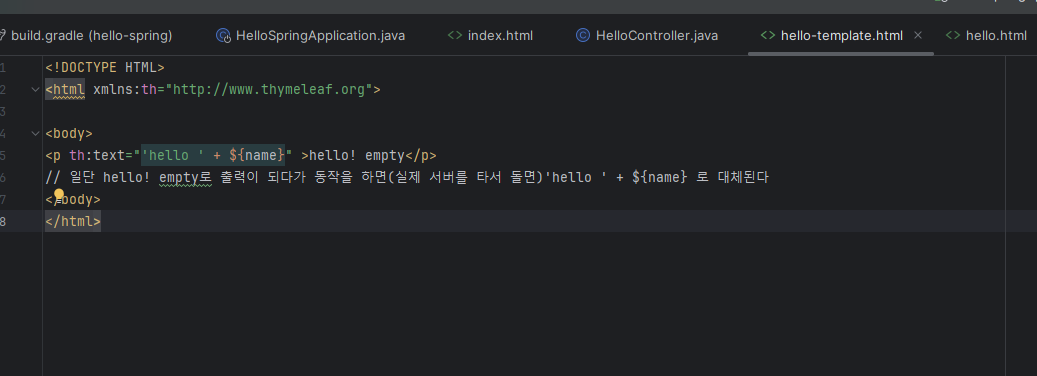
[hello-template.html code]
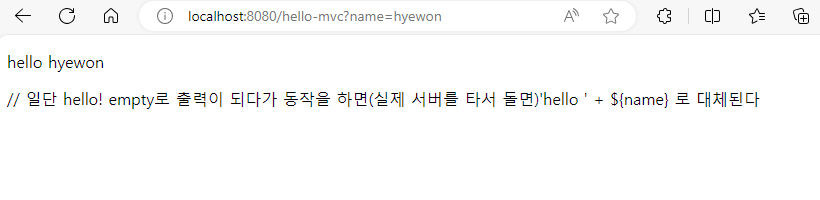
[result]
전체 코드
package hello.hellospring.controller;

import org.springframework.stereotype.Controller;
import org.springframework.ui.Model;
import org.springframework.web.bind.annotation.GetMapping;
import org.springframework.web.bind.annotation.RequestParam;

@Controller // 이 클래스는 spring에서 controller 역할을 한다
public class HelloController {

    @GetMapping("hello") // http get 요청이 /hello 로 들어올 때 이 메소드 처리
    public String hello(Model model){ // method명인 hello 메소드는 model 객체를 파라미터로 받고,
        model.addAttribute("data","hello!!"); // data라는 이름으로 hello!!라는 값 추가
        return "hello"; //hello 를 반환하는데, 이는 뷰의 이름을 의미한다.
        // 즉 이 뷰는 /hello 요청에 대한 응답으로 사용된다
    }

    @GetMapping("hello-mvc")
    public String helloMvc(@RequestParam(name= "name", required = false) String name, Model model){
        model.addAttribute("name",name);
        return "hello-template";
    }

    /*@GetMapping("hell-mvc") 어노테이션은 HTTP GET 요청이 "/hell-mvc" 경로로 들어올 때 이 메소드가 처리한다는 것을 나타냅니다.
helloMvc 메소드는 @RequestParam("name") String name을 통해 "name"이라는 요청 파라미터를 받습니다.
이 이름을 모델에 "name"이라는 이름으로 추가합니다.
마찬가지로 "hello-template"을 반환하는데, 이는 다른 뷰 템플릿을 나타냅니다. 이 뷰는 "/hell-mvc" 요청에 대한 응답으로 사용됩니다.*/
}

// @RequestParam("name") String name
// HTTP 요청의 파라미터 값을 컨트롤러 메소드의 파라미터로 매핑하는 역할
// @RequestParam("name"): HTTP 요청에서 "name"이라는 파라미터의 값을 가져온다는 것
    //즉, 클라이언트가 요청을 보낼 때 URL에 "?name=value"와 같은 형태로 파라미터를 전달하면, 해당 값을 가져옵니다.
// String name: 가져온 "name" 파라미터의 값을 이 변수에 저장

/*예를 들어, 클라이언트가 "/hell-mvc?name=John"과 같은 요청을 보냈다면,
name 변수에는 "John"이라는 값이 할당됩니다.
이후 컨트롤러 내에서 이 값을 사용할 수 있습니다.*/


// 매우 중요
// return "hello"인 경우 hello.html 이라는 뷰가 필요하겠다
// 즉 resources - template 에서 hello.html, hello-template.html을 만들어