[React Native] 카카오 로그인 - 리다이렉트 화면 노출 시간 줄이기 트러블 슈팅
0. 배경
카카오 로그인 WebView에서 인가 코드 받아오기 성공했을 시 홈으로 이동한다.
카카오 로그인 구현 중...
Access Token을 백에서 받아오기에 임시로 인가 코드 받아오기 성공하면 로그인 성공이라 가정하고
성공 시 홈으로 이동한다.
1. 문제
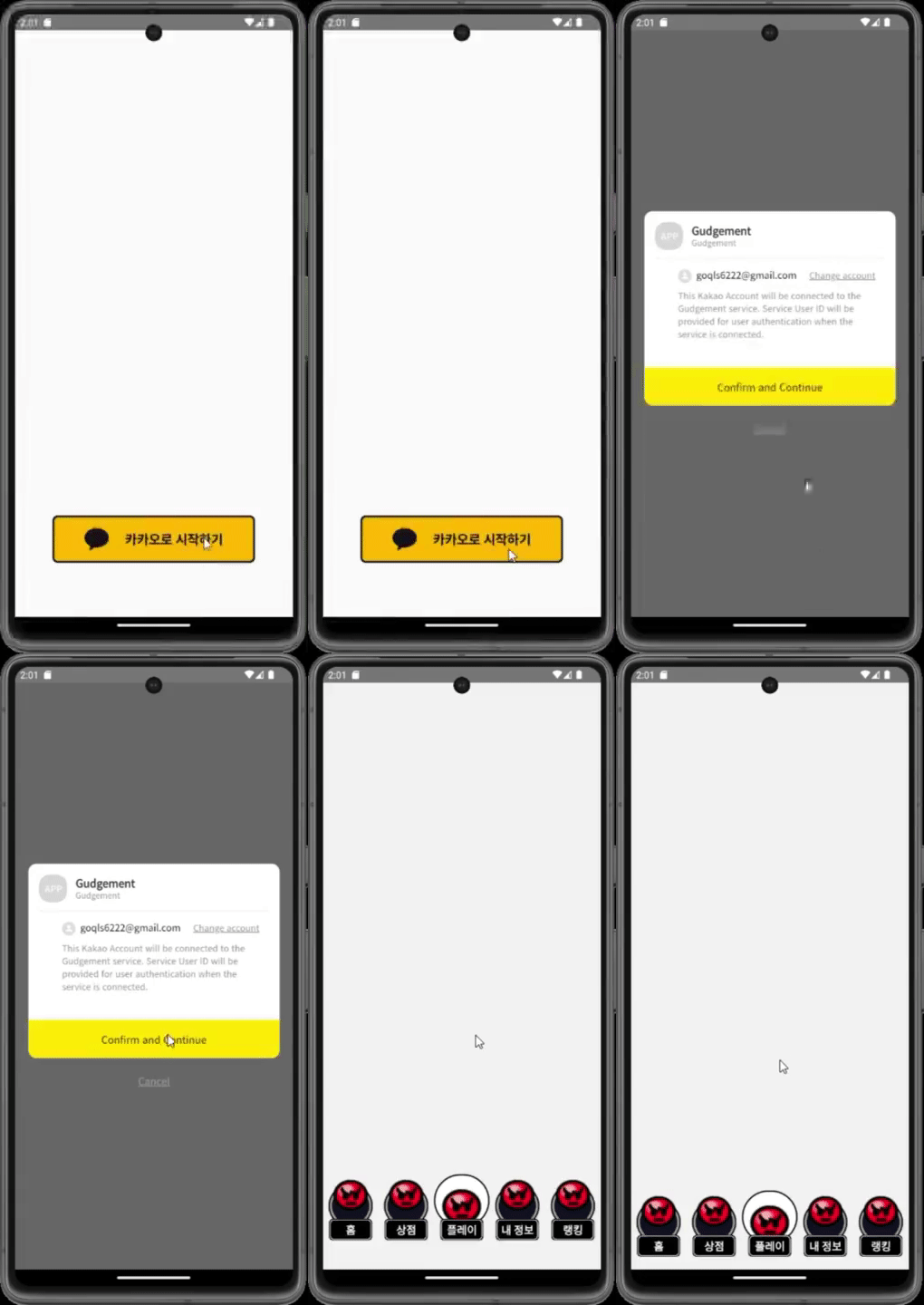
인가 코드를 추출하고 홈으로 이동하기 전에 리다이레트 화면이 1초 가량 보인다.
2. 기존 코드
import { useState } from "react";
import {
  Image,
  View,
  Text,
  Pressable,
  ImageSourcePropType,
} from "react-native";
import { WebView } from "react-native-webview";
import { KAKAO_LOGIN_REST_API_KEY, KAKAO_LOGIN_REDIRECT_URI } from "@env";
import KakaoLogoImg from "../assets/images/kakaologo.png";
// 상단에 적어 탈취하여 웹뷰에 값을 가져오기

// eslint-disable-next-line quotes
const INJECTED_JAVASCRIPT = `window.ReactNativeWebView.postMessage("messge from webView")`;

interface LoginProps {
  onLogin: () => void; // onLogin의 타입을 명시
}

function Login({ onLogin }: LoginProps) {
  const kakaoLogoImg: ImageSourcePropType = KakaoLogoImg as ImageSourcePropType;
  const [showWebView, setShowWebView] = useState(false);

  const handleLogin = () => {
    setShowWebView(true);
  };

  const getCode = async (codeUrl: string) => {
    // url에 붙어오는 code= 가있다면 뒤부터 parse하여 인가 코드 get
    const exp = "code=";
    const searchIdx = codeUrl.indexOf(exp);
    if (searchIdx !== -1) {
      const code = codeUrl.substring(searchIdx + exp.length);
      console.log(code);
      onLogin(); // 로그인 성공 시
    }
  };

  if (showWebView) {
    console.log("하하");
    return (
      <WebView
        className="flex"
        // 웹뷰 보여줄 페이지 주소
        source={{
          uri: `https://kauth.kakao.com/oauth/authorize?response_type=code&client_id=${KAKAO_LOGIN_REST_API_KEY}&redirect_uri=${KAKAO_LOGIN_REDIRECT_URI}`,
        }}
        // 웹뷰로 열리는 모든 페이지에서 실행될 자바스크립트 코드
        injectedJavaScript={INJECTED_JAVASCRIPT}
        javaScriptEnabled
        // 웹뷰에서 window.ReactNativeWebView.postMessage 함수가 호출될때 실행되는 이벤트 함수
        onMessage={event => {
          const data = event.nativeEvent.url;
          getCode(data);
        }}
      />
    );
  }

  return (
    <View className="flex flex-row justify-center items-end h-full pb-20">
      <Pressable
        onPress={handleLogin}
        className="flex flex-row justify-center items-center w-[300px] py-4 bg-buy rounded-lg border-solid border-[3px] border-darkgray"
      >
        <Image source={kakaoLogoImg} className="h-8 w-9 mr-6" />
        <Text className="text-center text-darkgray text-md font-PretendardExtraBold">
          카카오로 시작하기
        </Text>
      </Pressable>
    </View>
  );
}

export default Login;
3. 원인
3-1. 기존 코드 로직
사용자가 WebView를 통해 카카오 로그인 페이지로 이동한다.
사용자가 카카오 계정으로 로그인하고 권한 부여를 하면, 인가 코드를 포함한 리다이렉트 URL이 생성된다.
WebView은 이 URL을 받아온다.
3-2. WebView에서 발생하는 이벤트 핸들링 분석...
기존 코드에서는 onMessage 이벤트 핸들러를 사용하여
WebView 내에서 JavaScript 코드를 실행하고 그 결과를 React Native 애플리케이션으로 전달했다.
이 때, injectedJavaScript로 정의된 코드인 window.ReactNativeWebView.postMessage("messge from webView")가 실행되었다.
이로 인해 React Native 애플리케이션에서 해당 메시지를 받아 처리하는 과정에서 잠시 흰 화면이 나타날 수 있었다.
4. 성능 고려
onMessage
- 사용되는 상황
- 비동기적으로 동작하므로 코드 실행 후 결과를 기다릴 때 사용
- ex) 로그인 완료 메시지를 받아오기
기존 코드에서는 onMessage 이벤트 핸들러를 사용하여 웹뷰에서 실행된 JavaScript 코드의 결과를 받아온다.
메시지를 기다리며 비동기적으로 동작하므로 메시지가 도착할 때까지 기다려야 한다. 따라서 성능 면에서 느릴 수 있다.
그래서 새로운 코드에서는 onShouldStartLoadWithRequest를 사용하여 페이지 로드 전에 URL에서 인가 코드를 추출해 리다이렉트 화면이 나타나는 것을 방지할 수 있다.
onShouldStartLoadWithRequest
React Native 공식문서 onShouldStartLoadWithRequest
- 사용되는 상황
- 페이지 로드 전에 특정 조건을 확인하고 그에 따라 로드 여부를 결정할 때 사용
- ex) 특정 URL에서만 로드를 허용하고 나머지는 막아야할 때
- 동기적으로 실행되므로 페이지 로드를 시작하기 전에 필요한 조치를 취할 수 있음
이로 인해 더 빠르게 동작할 수 있다.
onShouldStartLoadWithRequest 이벤트 핸들러를 사용하여 페이지가 로드되기 전에 요청된 URL을 확인하고 처리한다.
페이지 로드가 시작되기 전에 인가 코드를 추출하므로 비동기적으로 실행되지 않는다.
5. 해결 방안
속도를 개선하기 위해 onShouldStartLoadWithRequest를 사용하여
페이지 로드 전에 조건을 확인하는 방식으로 변경한다.
5-1. onMessage -> onShouldStartLoadWithRequest 이벤트 핸들러로 변경
      <WebView
        className="flex"
        // 웹뷰 보여줄 페이지 주소
        source={{
          uri: `https://kauth.kakao.com/oauth/authorize?response_type=code&client_id=${KAKAO_LOGIN_REST_API_KEY}&redirect_uri=${KAKAO_LOGIN_REDIRECT_URI}`,
        }}
        onShouldStartLoadWithRequest={handleShouldStartLoad}
      />
5-2. onShouldStartLoadWithRequest의 콜백은 WebViewNavigation 형식을 사용
따라서 handleShouldStartLoad 함수의 파라미터를 WebViewNavigation 형식으로 지정해야 한다.
  const handleShouldStartLoad = (event: WebViewNavigation) => {
    const url = event.url;
    // url에 붙어오는 code= 가있다면 뒤부터 parse하여 인가 코드 get
    const exp = "code=";
    const searchIdx = url.indexOf(exp);
    if (searchIdx !== -1) {
      const code = url.substring(searchIdx + exp.length);
      console.log("인가 코드", code);
      onLogin(); // 로그인 성공 시
      return false;
    }
    return true;
  };
6. 최적화 코드
import { useState } from "react";
import {
  Image,
  View,
  Text,
  Pressable,
  ImageSourcePropType,
} from "react-native";
import { WebView, WebViewNavigation } from "react-native-webview";
import { KAKAO_LOGIN_REST_API_KEY, KAKAO_LOGIN_REDIRECT_URI } from "@env";
import KakaoLogoImg from "../assets/images/kakaologo.png";

interface LoginProps {
  onLogin: () => void; // onLogin의 타입을 명시
}

function Login({ onLogin }: LoginProps) {
  const kakaoLogoImg: ImageSourcePropType = KakaoLogoImg as ImageSourcePropType;
  const [showWebView, setShowWebView] = useState(false);

  const handleLogin = () => {
    setShowWebView(true);
  };

  const handleShouldStartLoad = (event: WebViewNavigation) => {
    const url = event.url;
    // url에 붙어오는 code= 가있다면 뒤부터 parse하여 인가 코드 get
    const exp = "code=";
    const searchIdx = url.indexOf(exp);
    if (searchIdx !== -1) {
      const code = url.substring(searchIdx + exp.length);
      console.log("인가 코드", code);
      onLogin(); // 로그인 성공 시
      return false;
    }
    return true;
  };

  if (showWebView) {
    return (
      <WebView
        className="flex"
        // 웹뷰 보여줄 페이지 주소
        source={{
          uri: `https://kauth.kakao.com/oauth/authorize?response_type=code&client_id=${KAKAO_LOGIN_REST_API_KEY}&redirect_uri=${KAKAO_LOGIN_REDIRECT_URI}`,
        }}
        onShouldStartLoadWithRequest={handleShouldStartLoad}
      />
    );
  }

  return (
    <View className="flex flex-row justify-center items-end h-full pb-20">
      <Pressable
        onPress={handleLogin}
        className="flex flex-row justify-center items-center w-[300px] py-4 bg-buy rounded-lg border-solid border-[3px] border-darkgray"
      >
        <Image source={kakaoLogoImg} className="h-8 w-9 mr-6" />
        <Text className="text-center text-darkgray text-md font-PretendardExtraBold">
          카카오로 시작하기
        </Text>
      </Pressable>
    </View>
  );
}

export default Login;
7. 코드 테스트
수정된 코드를 사용하여 애플리케이션을 실행하고 WebView가 예상대로 동작하는지 확인했다.
7-1. 인가 코드 추춯
인가 코드를 console.log로 출력했을 때 성공적으로 추출되는 것을 확인했다.

7-2. 로그인 성공 시 홈 이동
로그인 성공시 홈으로 이동하기 전에 리다이레트 화면이 보이지 않고, 바로 홈으로 이동하기 성공!
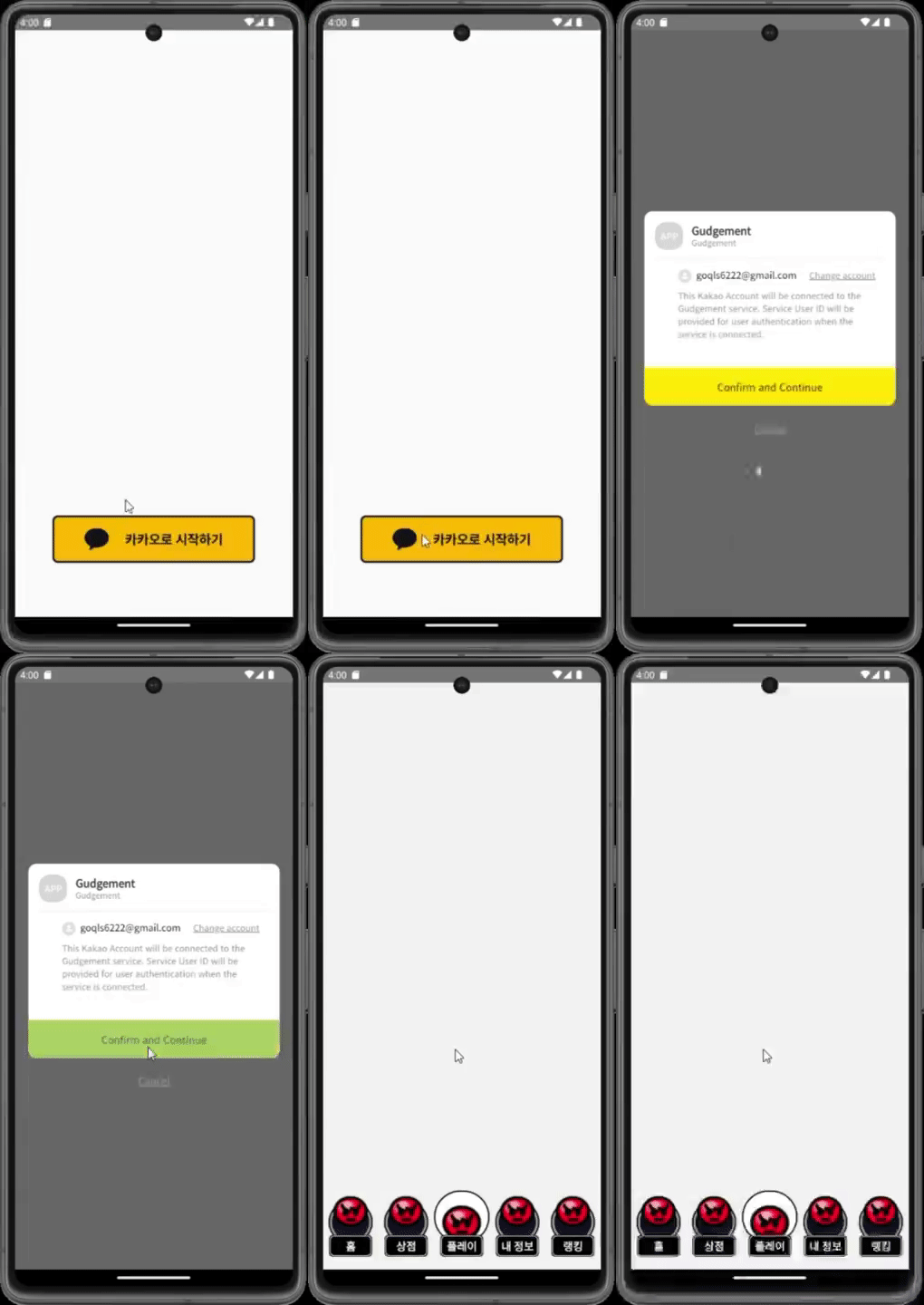
7-3. 리다이렉트 화면 노출 시간 비교 1초 -> 0.3초
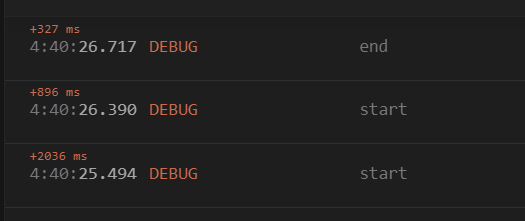
인가 코드를 받아오는 함수의 시작과 끝에 로그를 찍어서 시간이 어느정도 걸리는지 알아보았다. Reactotron 디버깅 툴을 사용했다.
- 리다이렉트 화면 노출 시간 약 1초
  const getCode = async (codeUrl: string) => {
    Reactotron.log!("start");
    // url에 붙어오는 code= 가있다면 뒤부터 parse하여 인가 코드 get
    const exp = "code=";
    const searchIdx = codeUrl.indexOf(exp);
    if (searchIdx !== -1) {
      const code = codeUrl.substring(searchIdx + exp.length);
      console.log(code);
      onLogin(); // 로그인 성공 시
      Reactotron.log!("end");
    }
};- 리다이렉트 화면 노출 시간 약 0.3초
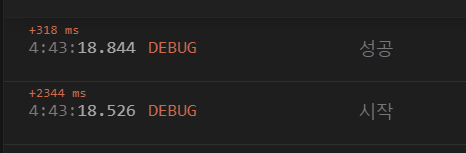
  const handleShouldStartLoad = (event: WebViewNavigation) => {
    Reactotron.log!("시작");
    const url = event.url;
    // url에 붙어오는 code= 가있다면 뒤부터 parse하여 인가 코드 get
    const exp = "code=";
    const searchIdx = url.indexOf(exp);
    if (searchIdx !== -1) {
      const code = url.substring(searchIdx + exp.length);
      console.log("인가 코드", code);
      onLogin(); // 로그인 성공 시
      Reactotron.log!("성공");
      return false;
    }
    return true;
  };
도움을 주신 옆자리에 압도적 감사🙇♀️