node.js + express + React 공부 중에 이런 오류가 떴다.
ERROR in ./node_modules/content-disposition/index.js 19:15-39

Module not found: Error: Can't resolve 'path' in 'C:\Users\kangj\Coding\planner-app\planner\node_modules\content-disposition'

BREAKING CHANGE: webpack < 5 used to include polyfills for node.js core modules by default.
This is no longer the case. Verify if you need this module and configure a polyfill for it.

If you want to include a polyfill, you need to:
	- add a fallback 'resolve.fallback: { "path": require.resolve("path-browserify") }'
	- install 'path-browserify'
If you don't want to include a polyfill, you can use an empty module like this:
	resolve.fallback: { "path": false }


ERROR in ./node_modules/cookie-signature/index.js 4:13-30

Module not found: Error: Can't resolve 'crypto' in 'C:\Users\kangj\Coding\planner-app\planner\node_modules\cookie-signature'

BREAKING CHANGE: webpack < 5 used to include polyfills for node.js core modules by default.
This is no longer the case. Verify if you need this module and configure a polyfill for it.

If you want to include a polyfill, you need to:
	- add a fallback 'resolve.fallback: { "crypto": require.resolve("crypto-browserify") }'
	- install 'crypto-browserify'
If you don't want to include a polyfill, you can use an empty module like this:
	resolve.fallback: { "crypto": false }


ERROR in ./node_modules/destroy/index.js 12:17-41

Module not found: Error: Can't resolve 'fs' in 'C:\Users\kangj\Coding\planner-app\planner\node_modules\destroy'


ERROR in ./node_modules/destroy/index.js 14:13-30

Module not found: Error: Can't resolve 'stream' in 'C:\Users\kangj\Coding\planner-app\planner\node_modules\destroy'

BREAKING CHANGE: webpack < 5 used to include polyfills for node.js core modules by default.
This is no longer the case. Verify if you need this module and configure a polyfill for it.

If you want to include a polyfill, you need to:
	- add a fallback 'resolve.fallback: { "stream": require.resolve("stream-browserify") }'
	- install 'stream-browserify'
If you don't want to include a polyfill, you can use an empty module like this:
	resolve.fallback: { "stream": false }


ERROR in ./node_modules/etag/index.js 18:13-30

Module not found: Error: Can't resolve 'crypto' in 'C:\Users\kangj\Coding\planner-app\planner\node_modules\etag'

BREAKING CHANGE: webpack < 5 used to include polyfills for node.js core modules by default.
This is no longer the case. Verify if you need this module and configure a polyfill for it.

If you want to include a polyfill, you need to:
	- add a fallback 'resolve.fallback: { "crypto": require.resolve("crypto-browserify") }'
	- install 'crypto-browserify'
If you don't want to include a polyfill, you can use an empty module like this:
	resolve.fallback: { "crypto": false }


ERROR in ./node_modules/etag/index.js 20:12-31

Module not found: Error: Can't resolve 'fs' in 'C:\Users\kangj\Coding\planner-app\planner\node_modules\etag'


ERROR in ./node_modules/express/lib/response.js 23:11-26

Module not found: Error: Can't resolve 'http' in 'C:\Users\kangj\Coding\planner-app\planner\node_modules\express\lib'

BREAKING CHANGE: webpack < 5 used to include polyfills for node.js core modules by default.
This is no longer the case. Verify if you need this module and configure a polyfill for it.

If you want to include a polyfill, you need to:
	- add a fallback 'resolve.fallback: { "http": require.resolve("stream-http") }'
	- install 'stream-http'
If you don't want to include a polyfill, you can use an empty module like this:
	resolve.fallback: { "http": false }


ERROR in ./node_modules/express/lib/response.js 29:11-26

Module not found: Error: Can't resolve 'path' in 'C:\Users\kangj\Coding\planner-app\planner\node_modules\express\lib'

BREAKING CHANGE: webpack < 5 used to include polyfills for node.js core modules by default.
This is no longer the case. Verify if you need this module and configure a polyfill for it.

If you want to include a polyfill, you need to:
	- add a fallback 'resolve.fallback: { "path": require.resolve("path-browserify") }'
	- install 'path-browserify'
If you don't want to include a polyfill, you can use an empty module like this:
	resolve.fallback: { "path": false }


ERROR in ./node_modules/express/lib/utils.js 31:18-40

Module not found: Error: Can't resolve 'querystring' in 'C:\Users\kangj\Coding\planner-app\planner\node_modules\express\lib'

BREAKING CHANGE: webpack < 5 used to include polyfills for node.js core modules by default.
This is no longer the case. Verify if you need this module and configure a polyfill for it.

If you want to include a polyfill, you need to:
	- add a fallback 'resolve.fallback: { "querystring": require.resolve("querystring-es3") }'
	- install 'querystring-es3'
If you don't want to include a polyfill, you can use an empty module like this:
	resolve.fallback: { "querystring": false }


ERROR in ./node_modules/mime/mime.js 1:11-26

Module not found: Error: Can't resolve 'path' in 'C:\Users\kangj\Coding\planner-app\planner\node_modules\mime'

BREAKING CHANGE: webpack < 5 used to include polyfills for node.js core modules by default.
This is no longer the case. Verify if you need this module and configure a polyfill for it.

If you want to include a polyfill, you need to:
	- add a fallback 'resolve.fallback: { "path": require.resolve("path-browserify") }'
	- install 'path-browserify'
If you don't want to include a polyfill, you can use an empty module like this:
	resolve.fallback: { "path": false }


ERROR in ./node_modules/mime/mime.js 3:9-22

Module not found: Error: Can't resolve 'fs' in 'C:\Users\kangj\Coding\planner-app\planner\node_modules\mime'


ERROR in ./node_modules/send/index.js 29:9-22

Module not found: Error: Can't resolve 'fs' in 'C:\Users\kangj\Coding\planner-app\planner\node_modules\send'


ERROR in ./node_modules/send/index.js 39:11-26

Module not found: Error: Can't resolve 'path' in 'C:\Users\kangj\Coding\planner-app\planner\node_modules\send'

BREAKING CHANGE: webpack < 5 used to include polyfills for node.js core modules by default.
This is no longer the case. Verify if you need this module and configure a polyfill for it.

If you want to include a polyfill, you need to:
	- add a fallback 'resolve.fallback: { "path": require.resolve("path-browserify") }'
	- install 'path-browserify'
If you don't want to include a polyfill, you can use an empty module like this:
	resolve.fallback: { "path": false }


ERROR in ./node_modules/send/index.js 43:13-30

Module not found: Error: Can't resolve 'stream' in 'C:\Users\kangj\Coding\planner-app\planner\node_modules\send'

BREAKING CHANGE: webpack < 5 used to include polyfills for node.js core modules by default.
This is no longer the case. Verify if you need this module and configure a polyfill for it.

If you want to include a polyfill, you need to:
	- add a fallback 'resolve.fallback: { "stream": require.resolve("stream-browserify") }'
	- install 'stream-browserify'
If you don't want to include a polyfill, you can use an empty module like this:
	resolve.fallback: { "stream": false }


ERROR in ./node_modules/send/index.js 45:11-26

Module not found: Error: Can't resolve 'util' in 'C:\Users\kangj\Coding\planner-app\planner\node_modules\send'

BREAKING CHANGE: webpack < 5 used to include polyfills for node.js core modules by default.
This is no longer the case. Verify if you need this module and configure a polyfill for it.

If you want to include a polyfill, you need to:
	- add a fallback 'resolve.fallback: { "util": require.resolve("util/") }'
	- install 'util'
If you don't want to include a polyfill, you can use an empty module like this:
	resolve.fallback: { "util": false }
엥? 왜이리 오류가 길어?
구글링을 해보니 npx create-react-app 명령으로 생성된 React17은 기본적으로 webpack5를 호출하는데, webpack4에 비해 내장 패키지가 많이 간소화되어 수동으로 설치해야 한다고 한다.
첫 시도:
react-scripts를 기본 5.0.0에서 4.0.3으로 변경
npm i react-scripts@4.0.3
참고: https://coding3.com/2022/02/
다시 npm start를 해보니 또 다른 오류가 떴다.
TypeError: Cannot read property 'prototype' of undefined이거도 찾아보니까 vscode에서 자동으로 import한 것때문에 생겼다고해서 찾아봤다.
리액트 컴포넌트 파일 중 하나에 이런게 있었다.
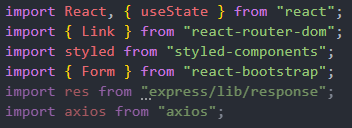
여기서 내가 추가하지 않은 res를 임포트한 것 때문에 저게 뜬 듯 하다.
두번째 시도:
//import res from "express/lib/response";지워버리니 해결쓰
이 오류가 뜬 이유는 'express/lib/response'가 node.js를 위한 모듈인데 React 쪽에 있어서 생긴 것 같다.
참고: https://velog.io/@juho00ng/TypeError-Cannot-read-property-prototype-of-undefined
react-scripts를 4.0.3 버전에서 다시 5.0.0 버전으로 바꿔도 오류없이 실행되었다.

0 to 100