
SearchBar도 서버에 저장된 레시피의 title의 값을 전송하여 출력해야하기 때문에 axios방식으로 코드를 작성하였다!
-
input의 ref속성을 사용하면 컴포넌트의 상태와 상관없이 DOM요소에 직접 접근 할 수 있기때문에 특정 DOM요소의 값을 읽어오거나 변경하는 등의 작읍을 할때 유용하다!
-
inputRef를 생성하고 해당 Ref를 input요소의 ref속에서 할당하면 inputRef.current는 해당 input요소를 가리키게 된다!
inputRef.current.value = 해당 input 요소의 value 속성
const onSearch = () => {
        const  searchText = inputRef.current.value;
         // ref를 이용해 검색어를 가져온다
        if(searchText){
            axios.get(`http://localhost:5000/recipe?query=${searchText}`)
                .then((response) => {
                    // 검색 결과에 따라 페이지를 전환합니다.
                    if (response.data.length > 0) {
                        // 검색 결과가 있으면 검색 결과 페이지로 이동합니다.
                        //window.location.href = `/search?query=${searchText}`;
                        alert(`${searchText}가 검색되었습니다.`);
                    } else {
                        // 검색 결과가 없으면 검색 결과가 없는 페이지로 이동합니다.
                        //window.location.href = '/no-result';
                        alert('검색결과가 없습니다');
                    }
                })
                .catch((error) => {
                    // 오류가 발생한 경우에는 오류 페이지로 이동합니다.
                   alert('페이지 오류');
                });
        }
        inputRef.current.value = '';
  		//검색 완료 후엔 다시 value값을 공백으로 설정.
    };


    return (
            //onSubmit속성은 form태그 안에서만 사용가능하다
            //이 속성을 사용하면 새로고침없이
          <div className='searchBox'>

                <input type="text"
                       placeholder='레시피 검색'
                       ref={inputRef}
                       className='searchInput'
                />

                <button
                    onClick={onSearch}
                    id='search-Btn'>
                    <img src='/images/searchImage.png' alt='search icon' className='search-Img'/>
                </button>


            </div>
    );
};

export default SearchBar;
searchBar.css 작성
.searchInput{
    width: 700px;
    height: 35px;
    border-radius: 5px;
    border: 1px solid #999999;
}
.searchInput{
    font-size: 25px;
    font-weight: 100;
    padding: 5px;
    text-align: center;
}
.searchInput:focus{
    outline: 1.5px solid #999999;
}
.searchInput:focus::placeholder {
    color: transparent;
}
.searchBox{
    position: relative;
    width: 700px;
    display: flex;
    margin: 0 auto;
    margin-top: 20px;
}
.search-Img{
    height: 30px;
}
.search-Img:hover{
    filter: invert(62%) sepia(87%) saturate(275%) hue-rotate(344deg) brightness(102%) contrast(98%);
}
#search-Btn{
    border: none;
    background-color: #ffffff;
    position: absolute;
    right: 15px;
    top: 7px;
    cursor: pointer;
}
이 코드를 작성할때는 api의 경로를 제대로 안적어주어서 또 한동안 애먹었다! ㅎ
⭐경로 확인 잘하기 !!! ⭐
css 작성할때도 돋보기 이미지가 마음대로 움직이지를 않아서 아주 애먹었다! css는 나름 자신 있는 언어중에 하나였는데 아직도 갈길이 멀다고 생각이 들었다..... 쉽지않아 정말 !
그래도 아주 예쁜 나의 SearchBar 😊 ❤️


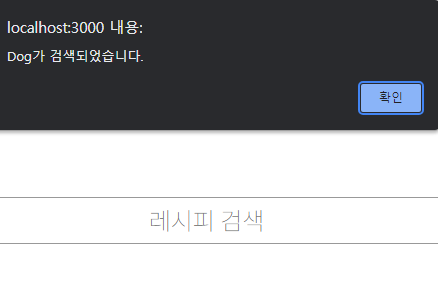
우선은 Dog가 있다면 알림창이 뜨게 구현했다! 나중에 백앤드랑 연결하게 되면 검색어와 관련된 리스트가 나오게 구현하겠지 ? ㅎ
안될때는 너 ~ ~ ~ ~ 무 스트레스 받고 딱딱 잘되면 키보드를 치는 손가락이 아주 춤을 춘다


새니의 뒤죽박죽 개발 일기📝