이번에는
Flexible & Expanded 위젯에 대해 알아볼게요
이번엔 또 뭔 위젯이야!
라고 말씀하실 수 있지만, Flexible & Expanded를 간단히 말하여
간격을 반응형 앱을 만들 때 사용할 때 쓰여서 중요하답니다.
또한, 두 위젯은 column과 row의 하위 위젯들의 사이즈를 변경할 수 있어요
FLexible 위젯
-
간격을 정해주는 위젯
-
프로퍼티 : fit, flex
-
fit
-
loose : 느슨한 -> 해당 위젯들이 공백이 생기는 경우 공백 노출
-
tight : 꽉 낀 -> 해당 위젯이 크기와 상관없이 가로/세로를 가득 채움
-
-
flex
- 다른 요소들의 합을 모두 구하고 본인이 가진 수만큼 나눠 가짐(비율대로 차지)
Expanded 위젯
-
간격을 정해주는 위젯
-
Flexible을 상속받고 있지만, fit tight로 고정되어 있음.
-
쉽게 말해 Flexible에서 fit : tight를 쓰는 경우가 많아 만든거라고 생각하시면 된다네요...허허ㅓ허허허
코드로 살펴보기
- 기존 방식
class remind extends StatelessWidget {
  const remind({super.key});

  @override
  Widget build(BuildContext context) {
    return Scaffold(
      body: SafeArea(
        child: Column(
          children: [
            Text('Flexible, Expanded 미사용'),
            SizedBox(
              height: 20,
            ),
            Row(
              children: [
                Container(
                  width: 300,
                  height: 50,
                  color: Colors.red,
                ),
                Container(
                  width: 300,
                  height: 50,
                  color: Colors.orange,
                ),
              ],
            ),
          ],
        ),
      ),

    );
  }
}-
결과
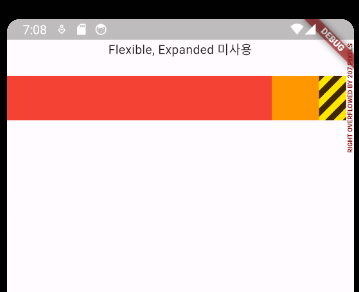
- 화면에 따라 반응하는 것이 아닌, 크기만을 지정했기에, 화면을 넘어서 이런 화면이 나옴
Flexible 사용해보기
- Flexible
 Text('Flexible, Expanded 사용'),
            SizedBox(
              height: 20,
            ),
            Row(
              children: [
                Flexible(
                  child: Container(
                    width: 100,
                    height: 50,
                    color: Colors.red,
                  ),
                ),
                Flexible(
                  child: Container(
                    width: 100,
                    height: 50,
                    color: Colors.orange,
                  ),
                ),
              ],
),-
위 코드 실행결과
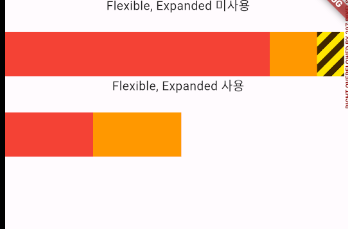
- 이렇게 표현된 이유는, Flexible의 기본 프로퍼티 때문입니다.
- loose 일 경우 공백이 있을 시 공백을 그대로 표현
- flex의 총합 2 중 1씩 나눠 갖기 때문
-
Flexible 프로퍼티 디폴트값
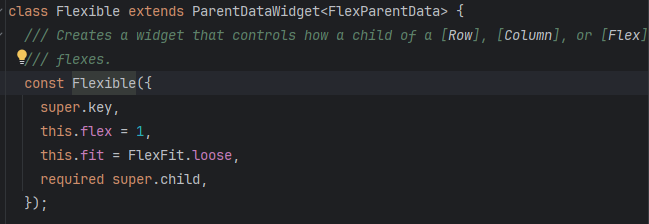
-
fit 프로퍼티 tight 사용하기
Text('Flexible fit tight 사용'),
            SizedBox(
              height: 20,
            ),
            Row(
              // loose, tight의 차이
              // loose : 느슨한 -> 해당 위젯들이 공백이 생기는 경우 공백 노출
              // tight : 꽉 낀 -> 해당 위젯이 크기와 상관없이 가로/세로를 가득 채움
              children: [
                Flexible(
                  fit: FlexFit.tight,
                  child: Container(
                    width: 100,
                    height: 50,
                    color: Colors.red,
                  ),
                ),
                Flexible(
                  fit: FlexFit.tight,
                  child: Container(
                    width: 100,
                    height: 50,
                    color: Colors.orange,
                  ),
                ),
              ],
),-
결과
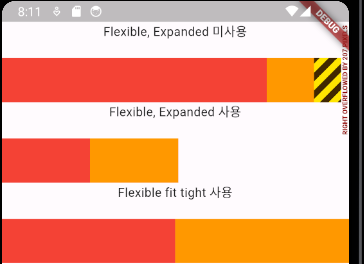
- tight 사용 결과 화면을 꽉 채운것을 알 수 있네요!
- 위젯의 크기와 상관없이 tight를 사용하면 가로/세로를 가득 채울 수 있답니다.
-
flex 프로퍼티 사용하기
Text('Flexible flex 사용'),
            SizedBox(
              height: 20,
            ),
            Row(
              children: [
                Flexible(
                  flex: 2,
                  child: Container(
                    width: 300,
                    height: 50,
                    color: Colors.red,
                  ),
                ),
                Flexible(
                  flex: 3,
                  child: Container(
                    width: 300,
                    height: 50,
                    color: Colors.orange,
                  ),
                ),
                Flexible(
                    child: Container(
                  width: 300,
                  height: 50,
                  color: Colors.yellow,
                ))
              ],
),- 결과
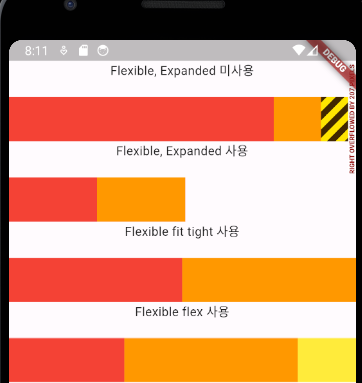
- Row 영역 내에 flex : 값들의 총 합을 구한디, 자신의 크기에 맞게 비율을 할당 받기에, 레드 2, 오렌지 3, 노랑 1의 비율로 화면이 구성된 겁니다.
Expanded
-
그냥 쉽게, Flexible fit : tight를 간단하게 하려고 쓴다라고 생각하시면 될거 같아요
-
코드
Text('Expanded 사용'),
            SizedBox(
              height: 20,
            ),
            Row(
              children: [
                // flexible fit tight 인거랑 같은 취급
                // width값 달라져도 고정~ 차이점은 없다.
                Expanded(
                  child: Container(
                    width: 100,
                    height: 50,
                    color: Colors.red,
                  ),
                ),
                Expanded(
                  child: Container(
                    width: 100,
                    height: 50,
                    color: Colors.orange,
                  ),
                ),
              ],
)- 결과
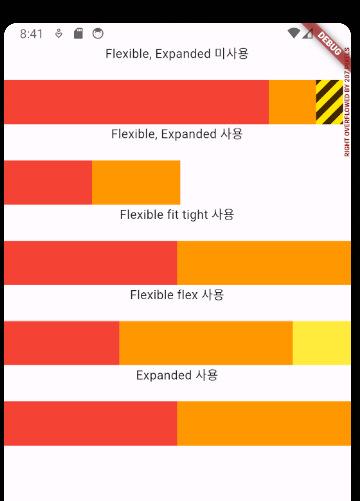
전체 코드
class Ex06Flexible extends StatelessWidget {
  const Ex06Flexible({super.key});

  @override
  Widget build(BuildContext context) {
    return Scaffold(
      body: SafeArea(
        child: Column(
          children: [
            Text('Flexible, Expanded 미사용'),
            SizedBox(
              height: 20,
            ),
            Row(
              children: [
                Container(
                  width: 300,
                  height: 50,
                  color: Colors.red,
                ),
                Container(
                  width: 300,
                  height: 50,
                  color: Colors.orange,
                ),
              ],
            ),
            Text('Flexible, Expanded 사용'),
            SizedBox(
              height: 20,
            ),
            Row(
              children: [
                Flexible(
                  child: Container(
                    width: 100,
                    height: 50,
                    color: Colors.red,
                  ),
                ),
                Flexible(
                  child: Container(
                    width: 100,
                    height: 50,
                    color: Colors.orange,
                  ),
                ),
              ],
            ),
            Text('Flexible fit tight 사용'),
            SizedBox(
              height: 20,
            ),
            Row(
              // loose, tight의 차이
              // loose : 느슨한 -> 해당 위젯들이 공백이 생기는 경우 공백 노출
              // tight : 꽉 낀 -> 해당 위젯이 크기와 상관없이 가로/세로를 가득 채움
              children: [
                Flexible(
                  fit: FlexFit.tight,
                  child: Container(
                    width: 100,
                    height: 50,
                    color: Colors.red,
                  ),
                ),
                Flexible(
                  fit: FlexFit.tight,
                  child: Container(
                    width: 100,
                    height: 50,
                    color: Colors.orange,
                  ),
                ),
              ],
            ),
            Text('Flexible flex 사용'),
            SizedBox(
              height: 20,
            ),
            Row(
              children: [
                Flexible(
                  flex: 2,
                  child: Container(
                    width: 300,
                    height: 50,
                    color: Colors.red,
                  ),
                ),
                Flexible(
                  flex: 3,
                  child: Container(
                    width: 300,
                    height: 50,
                    color: Colors.orange,
                  ),
                ),
                Flexible(
                    child: Container(
                  width: 300,
                  height: 50,
                  color: Colors.yellow,
                ))
              ],
            ),
            Text('Expanded 사용'),
            SizedBox(
              height: 20,
            ),
            Row(
              children: [
                // flexible fit tight 인거랑 같은 취급
                // width값 달라져도 고정~ 차이점은 없다.
                Expanded(
                  child: Container(
                    width: 100,
                    height: 50,
                    color: Colors.red,
                  ),
                ),
                Expanded(
                  child: Container(
                    width: 100,
                    height: 50,
                    color: Colors.orange,
                  ),
                ),
              ],
            )
          ],
        ),
      ),
    );
  }
}
예제
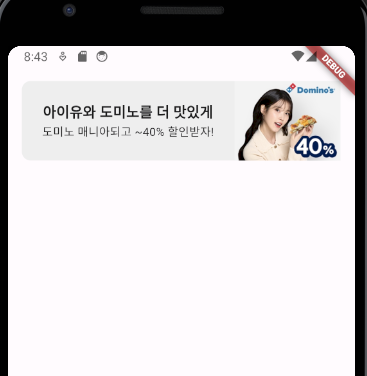
코드
class Ex07domino extends StatelessWidget {
  const Ex07domino({super.key});

  @override
  Widget build(BuildContext context) {
    return Scaffold(
      body: SafeArea(
        child: Container(
          height: 90,
          width: double.infinity,
          // 반응형
          margin: EdgeInsets.all(16),
          decoration: BoxDecoration(
              color: Colors.grey[200], borderRadius: BorderRadius.circular(10)),
          child: Row(
            children: [
              Expanded(
                flex: 2,
                child: Container(
                  margin: EdgeInsets.all(10),
                  child: Column(
                    mainAxisAlignment: MainAxisAlignment.center,
                    children: [
                      Text(
                        "아이유와 도미노를 더 맛있게",
                        style: TextStyle(
                            fontSize: 16, fontWeight: FontWeight.bold),
                        textAlign: TextAlign.start,
                      ),
                      Text("도미노 매니아되고 ~40% 할인받자!",
                          style: TextStyle(fontSize: 13),
                          textAlign: TextAlign.start)
                    ],
                  ),
                ),
              ),
              Expanded(flex: 1, child: Image.asset('image/domino.png')),
            ],
          ),
        ),
      ),
    );
  }
}
promising