인스타 알림 위에 빨간색 표시보셨을 건데
그게 스택을 이용해 만든거라고 합니다.
이번 시간에는
Stack & Positioned 위젯에 대해 알아 보겠습니다.
Stack
-
위젯을 쌓게 도와주는 위젯
-
겹치는 순서는 코드가 아래로 갈수록 화면상 가장 위에 위치합니다.
- 블럭을 쌓아도 먼저 쌓은게 밑에 있잖아요!~
-
복수 자식을 가질 수 있는 몇 안되는 위젯
-
특정 요소들의 위치는 Positioned로 조정 가능
- children : [ ]
-
사용방법
class Ex09Stack extends StatelessWidget {
  const Ex09Stack({super.key});

  @override
  Widget build(BuildContext context) {
    return Scaffold(
      body: SafeArea(
        child: Stack(
        	children: [
            Container('첫번째로 쌓일 컨테이너'),
            Container('두번째로 쌓일 컨테이너'),
            Container('세번째로 쌓일 컨테이너'),
            ]

        ),
      ),
    );
  }
}
-
사용 결과
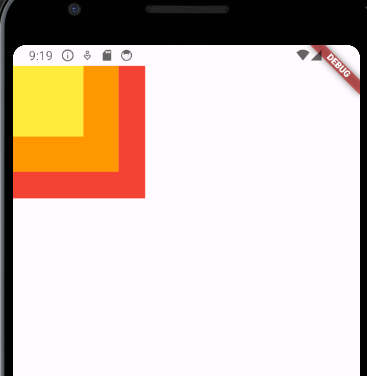
-
코드
class remind2 extends StatelessWidget {
  const remind2({super.key});

  @override
  Widget build(BuildContext context) {
    return Scaffold(
      body: SafeArea(
        child: Stack(
          children: [
            Container(
              width: 150,
              height: 150,
              color : Colors.red,
            ),
            Container(
              width: 120,
              height: 120,
              color : Colors.orange,
            ),
            Container(
              width: 80,
              height: 80,
              color : Colors.yellow,
            ),

          ],
        ),
      ),
    );
  }
}
Positioned
-
스택 내의 요소들을 위치를 조정하기 위해 존재하는 위젯
-
사용방법
class Ex09Stack extends StatelessWidget {
  const Ex09Stack({super.key});

  @override
  Widget build(BuildContext context) {
    return Scaffold(
      body: SafeArea(
        child: Stack(
        	children: [
            Positioned(
            top : 10 // 다른 위치도 추가롤 설정가능
            Container('첫번째로 쌓일 컨테이너'),
            ),
            Positioned(
            Container('두번째로 쌓일 컨테이너'),
            ),
            Positioned(
            Container('세번째로 쌓일 컨테이너'),
            ),
            ]

        ),
      ),
    );
  }
} - 실제 코드
class Ex09Stack extends StatelessWidget {
  const Ex09Stack({super.key});

  @override
  Widget build(BuildContext context) {
    return Scaffold(
      body: SafeArea(
        child: Stack(
          // alignment: Alignment.center,
          // 위젯을 쌓게 도와주는 위젯
          // 겹치는 순서는 코드가 아래로 갈수록 화면상 가장 위에 있습니다
          children: [
            // Positioned 위젯
            // stack 위젯의 하위 위젯들의 위젯 배치를 도와주는 위젯

            Positioned(
              left: 100,
              child: Container(
                width: 150,
                height: 150,
                color: Colors.red,
              ),
            ),
            Positioned(
              top: 10,
              child: Container(
                width: 120,
                height: 120,
                color: Colors.orange,
              ),
            ),
            Positioned(
              left: 20,
              child: Container(
                width: 80,
                height: 80,
                color: Colors.yellow,
              ),
            ),
            Positioned(
              left: 80,
              child: Container(

                width: 50,
                height: 50,
                color: Colors.green,
              ),
            ),
          ],
        ),
      ),
    );
  }
}- 결과
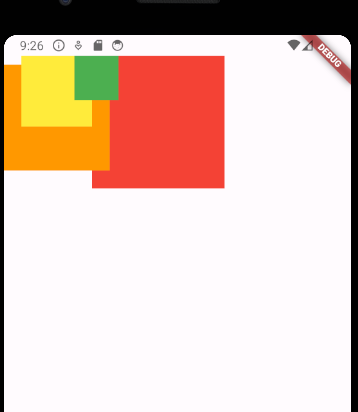
예제
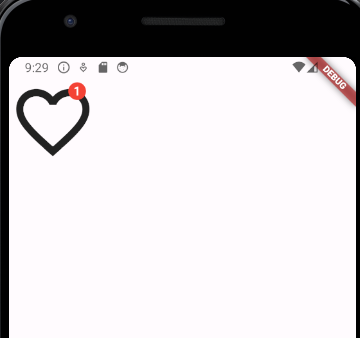
코드
class Ex10StackIcon extends StatelessWidget {
  const Ex10StackIcon({super.key});

  @override
  Widget build(BuildContext context) {
    return Scaffold(
      body: SafeArea(
        child: Stack(
          children: [
            Icon(Icons.favorite_border_sharp,
            size: 100,),

            Positioned(
              right: 10,
              top: 5,
              child: Container(
                child: Text('1',textAlign: TextAlign.center,
                style: TextStyle(
                  color: Colors.white,
                  fontWeight: FontWeight.bold
                ),),
                width: 25,
                height: 20,
                decoration: BoxDecoration(
                  shape: BoxShape.circle,
                  color: Colors.red
                ),
              ),
            )


          ],
        ),
      ),
    );
  }
}
promising