CSS Color 정의 -> Color 색상 값 지정하는 방법 6가지 -> Color Value 를 사용할 수 있는 속성
CSS Color 정의
Color
텍스트의 색상을 지정한다. 기본적으로 값이 상속된다.
속성 값
color : CSS 색상 값
inherit : 부모 요소로부터 값을 상속 받는다.
색상 값
CSS 에서 color 속성은 텍스트 글자 색을 적용할 때 사용합니다.
color 속성에 입력하는 값은 6가지 형태로 적용할 수 있습니다.
Color 색상 값 지정하는 방법 6가지
- 16진수 HEXA 코드 값
16진수 코드 값은 #과 함께 6자리로 이루어져 있습니다.
앞에서부터 각각 RR(red), GG(green), BB(blue) 로 두 자리씩 정수로 구성되며
16진수 값인 00~FF 사이에 값을 지정할 수 있습니다.
<!DOCTYPE HTML>
<html>
<head>
<title>color</title>
<style type="text/css">
    body {
        background-color : #e7e7e7;
    }
    #color1 {color: #ff0000; margin: 10px}
    #color2 {color: #00ff00; margin: 10px}
    #color3 {color: #0000ff; margin: 10px}
</style>
</head>
<body>
    <div id = "color1"> red </div>
    <div id = "color2"> green </div>
    <div id = "color3"> blue </div>
</body>
</html>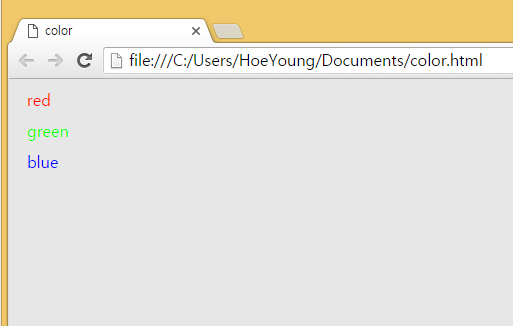
- RGB
RGB 색상 값도 주요 브라우저에서 지원합니다.
함수 형태로 되어 있으며 인수로 red, green, blue 값을 넘기면 됩니다.
인수 값은 16진수가 아닌 10진수로 0~255 사이 값 입니다.
16진수 ff는 10진수 255가 됩니다.
인수로 숫자 뿐만 아니라 % 값도 넘길 수 있습니다.
결과는 16진수로 표현한 CSS 값과 동일합니다.
 <!DOCTYPE HTML>
<html>
<head>
<title>color</title>
<style type="text/css">
    body {
        background-color : #e7e7e7;
    }
    #color1 {color: rgb(255,0,0); margin: 10px}
    #color2 {color: rgb(0,255,0); margin: 10px}
    #color3 {color: rgb(0,0,255); margin: 10px}
</style>
</head>
<body>
    <div id = "color1"> red </div>
    <div id = "color2"> green </div>
    <div id = "color3"> blue </div>
</body>
</html>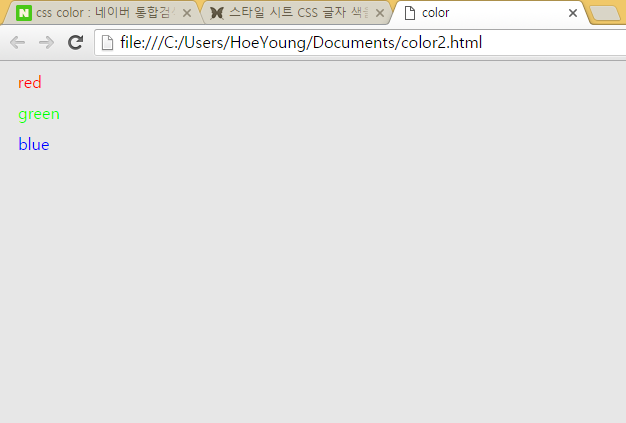
- RGBA
RGBA 는 RGB에 alpha 채널을 하나 더 추가한 것 입니다. 이것은 IE9 이상이나 파이어폭스 3 이상, 크롬, 사파리에 적용이 되는 값의 형태입니다. 알파 값은 색의 투명도, 즉 배경색과 혼합되는 정도를 말합니다.
인수의 위치는 제일 마지막이며 0과 1사이의 값을 가지게 됩니다.
0이면 완전 투명으로 글자가 안보이게 되고 1은 완전 불투명으로 아무 변화가 없습니다.
<!DOCTYPE HTML>
<html>
<head>
<title>color</title>
<style type="text/css">
    body {
        background-color : #e7e7e7;
    }
    #color1 {color: rgba(255,0,0,0.3); margin: 10px}
    #color2 {color: rgba(0,255,0,0.3); margin: 10px}
    #color3 {color: rgba(0,0,255,0.3); margin: 10px}
</style>
</head>
<body>
    <div id = "color1"> red </div>
    <div id = "color2"> green </div>
    <div id = "color3"> blue </div>
</body>
</html>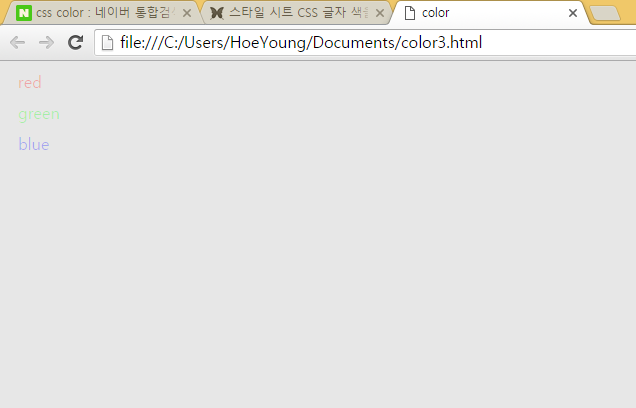
- HSL
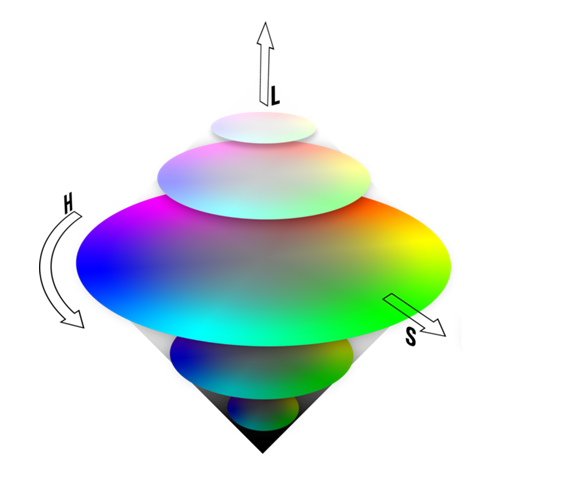
HSL 도 전 브라우저에 적용되는 것은 아닙니다. RGBA 와 마찬가지로 IE9 이상이나 파이어폭스 3 이상, 크롬, 사파리에 적용 됩니다. 형태는 hsl(색상, 채도, 명도) 로 구성됩니다.
색상(hue) 값은 가장 긴 빨강을 0도 로 했을 때 상대적인 배치 각도를 의미합니다.
그래서 값은 0 ~ 360 도 사이입니다. 0 과 360 은 red, 240 은 blue, 120 은green 이 됩니다.
채도(Saturation) 는 진한 정도를 나타내는데 0 ~ 100% 사이 값을 가집니다.
0% 는 무채색을 나타납니다. 명도(Lightness) 는 밝기 정도를 나타내는데 0 ~ 100% 사이 값을 가집니다.
0 은 검정색이고 100 은 하얀색 입니다.
<!DOCTYPE HTML>
<html>
<head>
<title>color</title>
<style type="text/css">
    body {
        background-color : #e7e7e7;
    }
    #color1 {color: hsl(120,100%,50%); margin: 10px} // h: 색상 s: 채도 l: 명도
    #color2 {color: hsl(120,100%,75%); margin: 10px}
    #color3 {color: hsl(120,60%,70%); margin: 10px}
</style>
</head>
<body>
    <div id = "color1"> red </div>
    <div id = "color2"> green </div>
    <div id = "color3"> blue </div>
</body>
</html>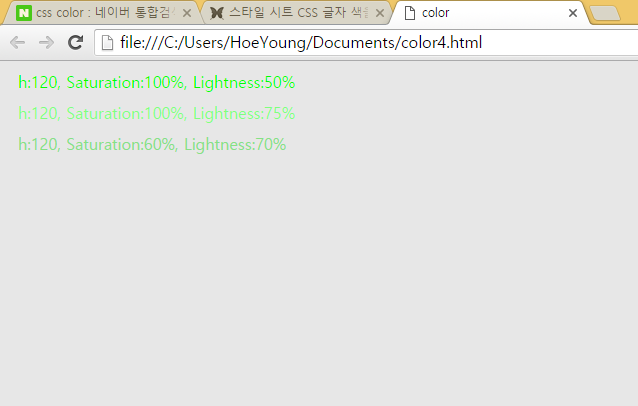
- HALA
RGBA 와 마찬가지로 IE9 이상이나 파이어폭스 3 이상, 크롬, 사파리에 적용 됩니다. 형태는 hsl(색상, 채도, 명도) 로 구성됩니다.
마지막에 들어가는 A 값은 RGBA 와 같이 투명도를 나타냅니다.
<!DOCTYPE HTML>
<html>
<head>
<title>color</title>
<style type="text/css">
    body {
        background-color : #e7e7e7;
    }
    #color1 {color: hsla(120,100%,50%,0.3); margin: 10px}
    #color2 {color: hsla(120,100%,75%,0.3); margin: 10px}
    #color3 {color: hsla(120,60%,70%,0.3); margin: 10px}
</style>
</head>
<body>
    <div id = "color1"> h:120, Saturation:100%, Lightness:50% </div>
    <div id = "color2"> h:120, Saturation:100%, Lightness:75% </div>
    <div id = "color3"> h:120, Saturation:60%, Lightness:70% </div>
</body>
</html>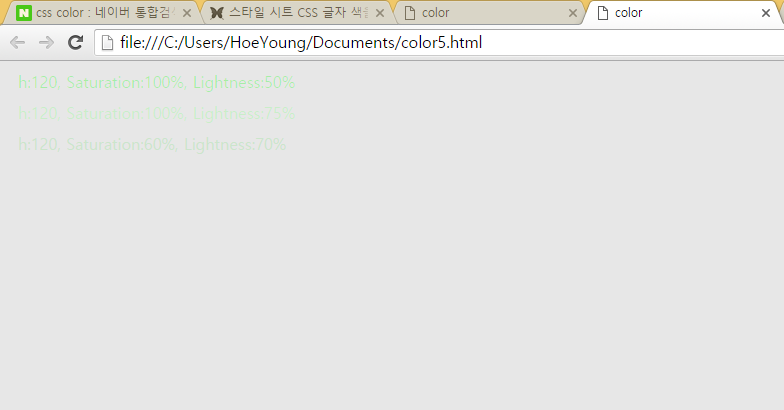
- 미리 정의된 색상 명
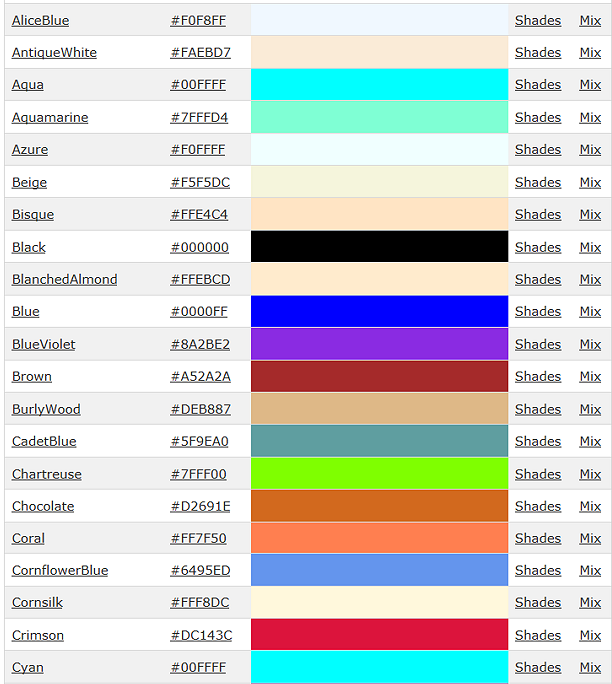
모든 브라우저에서 지원하느 색상 명은 140 개의 컬러 값이 지정되어 있습니다.
크로스 브라우징을 염두해 둔다면 색상 명으로 개발하는 것이 가독성도 높고 지원하지 않는 브라우저 때문에 멘붕(질문) 할 일이 없습니다.
하지만 지원되는 컬러 갯수가 다른 옵션에 비해 적다는 단점이 있습니다.
<!DOCTYPE HTML>
<html>
<head>
<title>color</title>
<style type="text/css">
    body {
        background-color: #e7e7e7;
    }

    #color1 {color: red; margin: 10px;}
    #color2 {color: green; margin: 10px;}
    #color3 {color: blue; margin: 10px;}
</style>
</head>
<body>
    <div id="color1">red</div>
    <div id="color2">green</div>
    <div id="color3">blue</div>
</body>
</html>
이런 것도 있다!
Color Value 를 사용할 수 있는 속성
1.font
HTML 태그에 직접 정의해서 사용하는 경우
<html>
<head>
</head>
<body>
<font color="green"> HTML </font>
<font color="#00FF00"> HTML </font>
<font color="rgb(0,255,0)"> HTML </font>
<font color="rgba(0,255,0,1)"> HTML </font>
</body>
</html>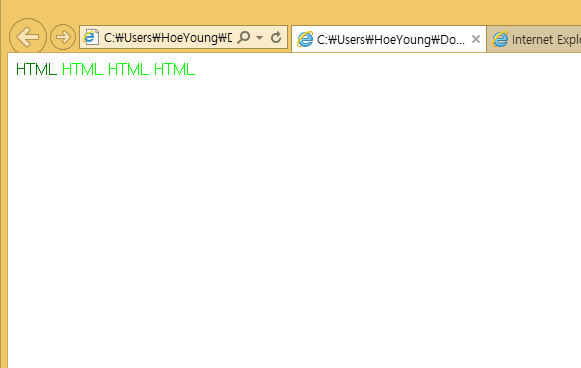
CSS 스타일시트에서 Color 속성 지정하는 경우
(윗부분 참고, 위에 나와 있음)
- background
<!DOCTYPE HTML>
<html>
<head>
<style type="text/css">
    body{
        background-color : #e7e7e7; //회색
    }
</style>
</head>
<body>

</body>
</html>- background-image
<!DOCTYPE HTML>
<html>
<head> </head>
<body>
<style type="text/css">
    #back-img1 {width:200px; height:200px; background-image:url('back_img.png')}
    #back-img2 {width:500px; height:500px; background-image:url('back_img.png')}
    #back-img3 {width:434px; height:363px; background-image:url('back_img.png')}
</style>
<div id="back-img1"> background-image </div>
<div id="back-img2"> background-image </div>
<div id="back-img3"> background-image </div>
</body>
</html>- backgroung-repeat
<!DOCTYPE HTML>
<html>
<head> </head>
<body>
<style type="text/css">
    #back-repeat1{width:1000px; height:1000px; background-image:url('back_img.png');
                    background-repeat:no-repeat;}
    #back-repeat2{width:1000px; height:1000px; background-image:url('back_img.png');
                    background-repeat:repeat;}
    #back-repeat3{width:1000px; height:1000px; background-image:url('back_img.png');
                    background-repeat:repeat-x;}
    #back-repeat4{width:1000px; height:1000px; background-image:url('back_img.png');
                    background-repeat:repeat-y;}
</style>
<div id="back-repeat1"> background-repeat : no-repeat </div>
<div id="back-repeat2"> background-repeat : repeat </div>
<div id="back-repeat3"> background-repeat-x </div>
<div id="back-repeat4"> background-repeat-y </div>
</body>
</html>- background-attachment
<!DOCTYPE HTML>
<html>
<head> </head>
<body>
<style type="text/css">
#back-attachment1 {width:1000px; height:1000px; background-image:url('back_img.png');
background-repeat:no-repeat; background-attachment:scroll;}
#back-attachment2 {width:1000px; height:1000px; background-image:url('back_img.png');
background-repeat:no-repeat; background-attachment:fixed;}
</style>
<div id="back-attachment1"> background-attachment : scroll </div>
<div id="back-attachment2"> background-attachment : fixed </div>
</body>
</html>- background-position
<!DOCTYPE HTML>
<html>
<head> </head>
<body>
<style type="text/css">
    #back-position1 {width:1000px; height:1000px; background-image:url('back_img.png');
    background-repeat:no-repeat; background-position:10px 10px;}
    #back-position2 {width:1000px; height:1000px; background-image:url('back_img.png');
    background-repeat:no-repeat; background-position:right bottom;}
    #back-position3 {width:1000px; height:1000px; background-image:url('back_img.png');
    background-repeat:no-repeat; background-position:-100px - 100px;}
    #back-position4 {width:1000px; height:1000px; background-image:url('back_img.png');
    background-repeat:no-repeat; background-position:50% center;}
</style>
<div id="back-position1"> background-position : 10px 10px </div>
<div id="back-position2"> background-position : right bottom </div>
<div id="back-position3"> background-position : -100px -100px </div>
<div id="back-position4"> background-position : 50% center </div>
</body>
</html>- background-size
<!DOCTYPE HTML>
<html>
<head> </head>
<body>
<style type="text/css">
    #back-size1 {width:1000px; height:1000px; background-image:url('back_img.png');
    background-repeat:no-repeat; background-size:auto;}
    #back-size2 {width:1000px; height:1000px; background-image:url('back_img.png');
    background-repeat:no-repeat; background-size:100px 250px;}
    #back-size3 {width:1000px; height:1000px; background-image:url('back_img.png');
    background-repeat:no-repeat; background-size:50% 100%;}
    #back-size4 {width:1000px; height:1000px; background-image:url('back_img.png');
    background-repeat:no-repeat; background-size:cover;}
    #back-size5 {width:1000px; height:1000px; background-image:url('back_img.png');
    background-repeat:no-repeat; background-size:contain;}
    #back-size6 {width:1000px; height:1000px; background-image:url('back_img.png');
    background-repeat:no-repeat; background-size:initial;}
</style>
<div id="back-size1"> background-size : auto </div>
<div id="back-size2"> background-size : 100px 250px </div>
<div id="back-size3"> background-size : 50% 100% </div>
<div id="back-size4"> background-size : cover </div>
<div id="back-size5"> background-size : contain </div>
<div id="back-size6"> background-size : initial </div>
</body>
</html>- border
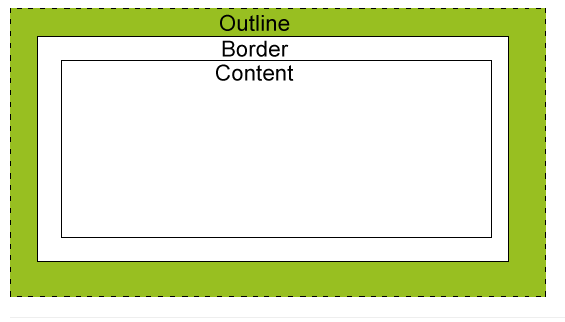
<!DOCTYPE HTML>
<html>
<head>
<style>
div{
    width:200px; border:5px; border-color:blue;
    margin:10px; padding:5px; text-align:center;
}
.bx1 {border-style:solid;}
.bx2 {border-style:dotted;}
.bx3 {border-style:dashed;}
.bx4 {border-style:double;}
.bx5 {border-style:groove;}
.bx6 {border-style:ridge;}
.bx7 {border-style:inset;}
.bx8 {border-style:outset;}
</style>
</head>
<body>
<div class="bx1"> solid </div>
<div class="bx2"> dotted </div>
<div class="bx3"> dashed </div>
<div class="bx4"> double </div>
<div class="bx5"> groove </div>
<div class="bx6"> ridge </div>
<div class="bx7"> inset </div>
<div class="bx8"> outset </div>
</body>
</html>- outline
<!DOCTYPE HTML>
<html>
<head>
<style>
div{
    width:200px; border:5px; outline-color : blue;
    margin:10px; padding:5px; text-align:center;
}
.out1 {outline-style:solid;}
.out2 {outline-style:dotted;}
.out3 {outline-style:dashed;}
.out4 {outline-style:double;}
.out5 {outline-style:groove;}
.out6 {outline-style:ridge;}
.out7 {outline-style:inset;}
.out8 {outline-style:outset;}
</style>
</head>
<body>
<div class="out1"> solid </div>
<div class="out2"> dotted </div>
<div class="out3"> dashed </div>
<div class="out4"> double </div>
<div class="out5"> groove </div>
<div class="out6"> ridge </div>
<div class="out7"> inset </div>
<div class="out8"> outset </div>
</body>
</html>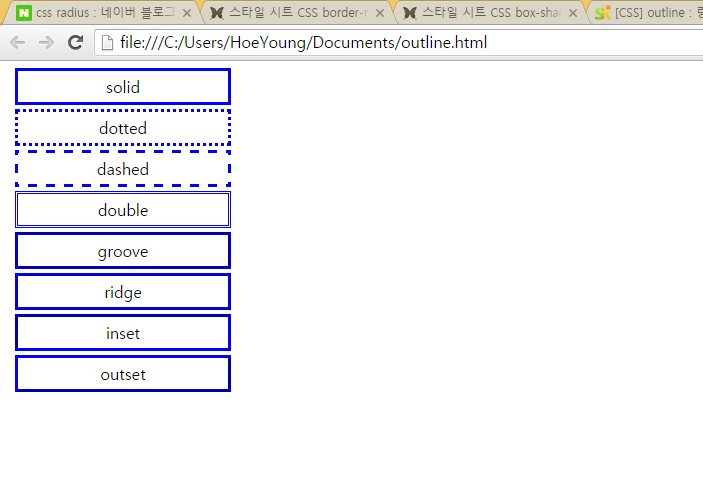
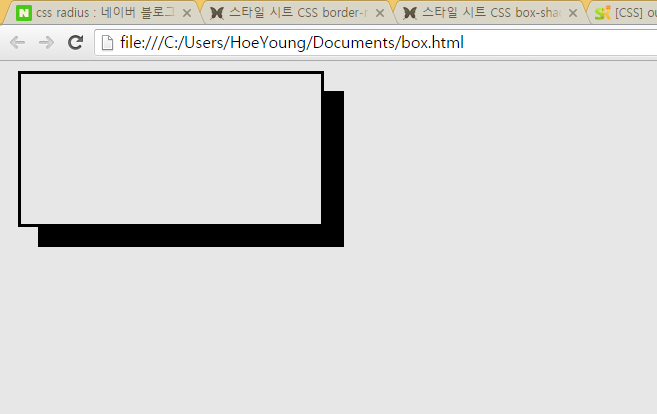
- box
<!DOCTYPE HTML>
<html>
<head>
<style type="text/css">
    body {
        background-color: #e7e7e7;
    }
    .radius1{
        width: 300px; height: 150px;
        margin: 10px; border: solid;
        background-color: #e7e7e7; // 박스 내부 색깔
    }
    .boxshadow1{
        box-shadow: 20px 20px black; // 박스의 그림자 색깔 지정 가능
    }
</style>
</head>
<body>
    <div class="radius1 boxshadow1"></div>
</body>
</html>