
배열을 문자열로, 문자열을 배열로
1. Spread Operator (스프레드 연산자) (...)
- ‼️문자열을 배열로 만들고 싶을때 사용!
// Array
var arr1 = [1, 2, 3, 4, 5];
var arr2 = [...arr1, 6, 7, 8, 9];

console.log(arr2); // [ 1, 2, 3, 4, 5, 6, 7, 8, 9 ]

// String
var str1 = 'paper block';
var str2 = [...str1];
console.log(str2); // [ "p", "a", "p", "e", "r", " ", "b", "l", "o", "c", "k" ]
2. join()
- 배열을 문자열로 만들고 싶을때 사용
const fruits = ["Apple", "Banana", "Cherry"];
const result = fruits.join();
document.writeln(result); // "Apple,Banana,Cherry"- array: 문자열로 변환하고자 하는 배열
- separator: 선택 사항으로, 배열의 요소들을 구분할 문자열 (기본값: ",")
‼️ ∴ 구분자로 빈 문자열("")을 사용하면 배열의 요소들이 연속된 하나의 문자열로 합쳐짐
ex. 프로그래머스 - 문자열 뒤집기
// 문자열 my_string이 매개변수로 주어집니다. my_string을 거꾸로 뒤집은 문자열을 return하도록 solution 함수를 완성해주세요.

const solution = (my_string) => {
    return [...my_string].reverse().join("");
}
Tip 20. 화살표 함수로 반복문을 단순하게 만들어라
- 함수를 만든다는 것을 보여주기 위해 두꺼운 화살표 => 만 사용하면 됨
- 함수를 표현하는 2가지 방식
- 함수 선언(function declaration) : 일반적인 함수 / 선언 전 사용 가능
- 함수 표현(function expression) : 화살표 함수 / 선언 전 사용 불가능
// 일반적인 함수
function key() {
  return 'abc123'
}

// 화살표 함수
const key = () => {
  return 'abc123'
}
화살표 함수
- 매개 변수가 1개인 경우, ()를 쓰지않아도 무관
- return 문이 1줄이라면, return이라고 작성하지 않아도 무관 (함수에 1줄만 있는 경우)
const formatUser = name => `${capiitalize(name)}님이 로그인하셨습니다`;Tip 21. 배열 메서드로 반복문을 짧게 작성하라
- for문, for ... of문을 적게 사용하는 것이 목표
- 배열 메서드 : 보통 한번에 1가지 기능만 수행 (ex. 배열의 길이 변경, 배열 내 데이터 형태 변경)
- BUT! 모든 걸 다 수행하는 reduce() 가 존재... ㅎ-ㅎ 사기캐지
//예시 코드
const team = [
  {
    name: 'a',
    position: 'designer'
  },
  {
    name: 'c',
    position: 'pm'
  },
  {
    name: 'b',
    position: 'manager'
  },
  {
    name: 'd',
    position: 'developer'
  },
  {
    name: 'e',
    position: 'developer'
  }
]
1. map()
- 형태는 바꿀 수 있지만 길이는 유지
- ex. 전체 팀원의 이름을 가져옴
- ['a', 'c', 'b', 'd', 'e']
2. sort()
- 형태나 길이는 변경되지 않고 순서만 바꿈
- ex. 팀원 이름을 알파벳 순으로 정렬
- [{name: 'a', position: 'designer'}, {name:'b', position: 'manager',} ...]
3. filter()
- 길이를 변경하지만 형태는 바꾸지 않음
- 참/거짓을 반환하는 함수를 인자로 받고, 배열의 항목에 전달한 함수로 평가해 참 값인 요소들만 배열로 반환
- ex. 개발자만 선택
- [{name: 'd', position: 'developer'}, {name:'e', position: 'developer',}]
const scorces = [30, 82, 70, 45];

const getNumberOfPassingScorces = (scorces) => {
    const passing = scorces.filter(scorces => scorcess > 59);
    return passing.length;
}
4. find()
- 배열을 반환하지 XXXXXXX
- 1개의 데이터가 반환되고 형태는 바뀌지 않음
- ex. 팀의 관리자를 찾습니다.
- {name: 'b', position: 'manager'}
5. forEach()
- 형태를 이용하지만 아무것도 반환하지 X
- ex. 모든 팀원에게 상여를 지급
- 'a'가 상여를 받았습니다! 'b'가 상여를 받았습니다! ... BUT 반환값은 없음.
6. reduce()
- 길이와 형태를 바꾸는 것을 비롯해 무엇이든 처리할 수 있음
- ex. 개발자와 개발자가 아닌 모든 팀원의 수를 계산
- {developers: 2, non-developers: 3}
+) 특정 배열 메서드를 호출하고, 반환된 결과는 이어지는 배열 매서드로 전달해서 사용도 가능
+) parseFloat :
//예시
const prices = ['1.0', '흥정가능', '2.15'];
const formateedPrices = prices.map(price => parseFloat(price)).filter(price => price);

// [1.o, 2.15]
Tip 22. map() 메서드로 비슷한 길이의 배열을 생성하라
- map() 메서드를 사용하기 위해 해야 할 일
- 원본 배열의 각 항목을 인수로 받아 새롭게 생성될 배열에 담실 값을 반환하는 함수를 만드는 것
- map() 메서드는 원본 배열과 같은 길이의 배열을 생성하는 경우라면 모든 곳에 사용 가능
//band라는 배열은 name, instrument가 있는 객체들의 배열

const instruments = band.map(member => member.instrument);
Tip. 23. filter()와 find()로 데이터의 부분집합을 생성하라
- 배열에 담긴 항목의 형태는 유지하면서 배열의 길이를 변경하는 방법
- ex. 특정 도시에 사는 사용자만 가져오면서 해당 사용자의 정보까지 모두 필요한 경우
1. match() 메서드
- 문자열이 정규 표현식과 일치하면 true, 불일치하면 null를 반환
- 정규 표현식에 일치하는 항목이 있으면 참 값인 배열을 반환, 그렇지 않은 경우에는 null 반환
// 이름에 'Dav'가 들어가는 사람만 분류해내기

const team = ["Michelle B", "Dave L", "Dave C", "Courtney B", "Davina M"];

const daves = team.filter(member => member.match(/Dav/));
Tip. 24. forEach()로 동일한 동작을 적용하라
- forEach()는 함수의 유효 범위를 벗어나는 작업이 필요한 경우하는 것이 좋음
- 반드시 부수적인 효과가 필요한 경우
- ex. 초대 이메일을 보내는 경우
- 이메일을 보내는 것은 부수적인 효과지만, 기존 배열의 데이터를 조작하지는 않으니까.
// sailingClub 배열에 사람들 이름이 있는 경우
// 이메일을 보내는 코드는 다음과 같음

sailingClub.forEach(member => sendEmail(member));
Tip. 25. 체이닝으로 메서드를 연결하라
- 체이닝 : 여러 개의 배열 메서드에서 배열이 반환될 때, 배열 메서드를 연이어 호출할 수 있다는 것을 의미
/*
문제 설명
- sailors라는 배열은 name, active(활성 여부), email 객체를 가지고 있는 배열
- active 상태인 회원들에게만 이메일을 보내는 코드를 작성하라
*/

// 활성화 상태인 유저들 배열로 뽑기
const activeSailors = sailors.filtor(sailor => sailor.active);

// 활성화 유저들의 이메일 가져오기
const emails = activeSailors.map(sailor => sailor.email);

// 이메일 전송 함수로 이메일들 발송
emails.forEach(email => sendEmail(email));
위와 같은 단계들을 거쳐서 값을 가져올 수 있음.
이걸 이제 체이닝으로 연결시키면 다음과 같음.
sailors
  .filter(sailor => sailor.active)
  .map(sailor => sailor.email)
  .forEach(sailor => sendEmail(sailor));
Tip. 26. reduce()로 배열 데이터를 변환하라
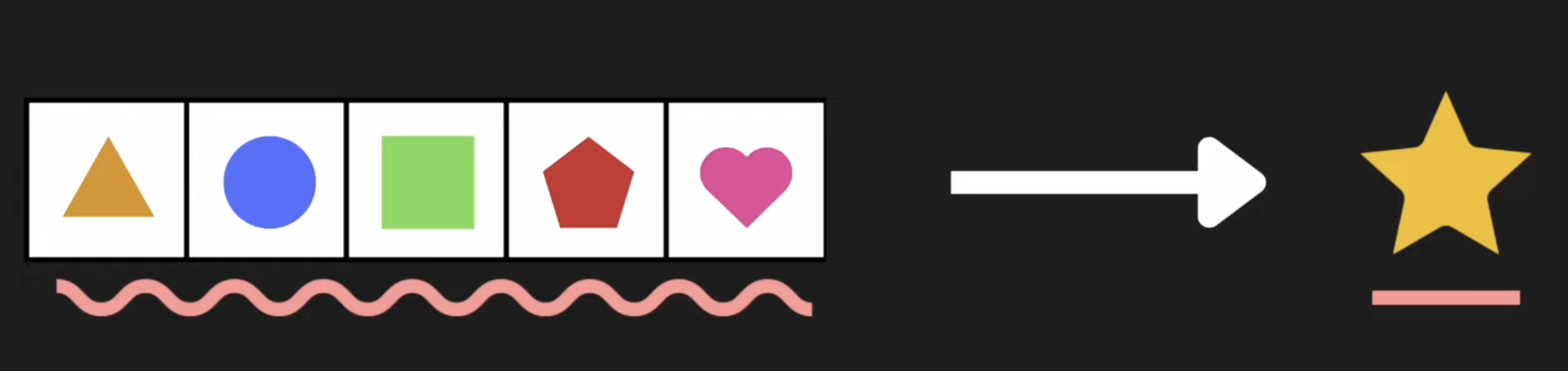
❗️reduce() 메서드
- 배열안의 모든 요소들을 사용해서 1개의 값으로 만들때 사용
- ex1. 배열의 모든 요소들을 더해서 1개의 합계값으로 만드는 경우
- ex2. 배열의 모든 요소들을 스캔해서 가장 작은 값을 찾는 경우
- 1개의 반환값을 가짐
‼️ reducer
- reduce의 인자로 전달받는 함수
- 배열의 각 요소마다 1번씩 실행이 됨
- 2가지 매개변수를 전달받음
- accumulator : 현재까지 누적된 값
- 초기값 설정 : reduce의 함수 두번째 인자에 넣어주면 됨!
- cf. 마치 useEffect의 [ ] 부분처럼
- 만약에 넣어주지 않는다면, reduce함수는 배열의 첫번째 값을 accumulator에 넣고, 배열의 두번째부터 currentIndex를 실행시켜!!!
- ex. 아래 forEach의 예제에서 total과 같은 역할
- 초기값 설정 : reduce의 함수 두번째 인자에 넣어주면 됨!
- currentValue : 현재 처리중인 요소를 의미
- ex. 아래 forEach의 예제에서 number랑 같은 의미
- accumulator : 현재까지 누적된 값
예제 1. numbers 배열안에 있는 모든 요소들을 더하자
const numbers = [1,2,3,4];

// Case1. forEach를 사용
let total = 0;

numbers.forEach(number => {
  total += number
});

// Case 2. reduce를 사용

const total = numbers.reduce((accumulator, currentValue) => {
  // 이렇게 반환된 값은 다시 누적되는 값 (accumulator)에 저장되어서 다음 currentValue에 해당되는 함수를 돌림
 return accumulator + currentValue;
}, 0);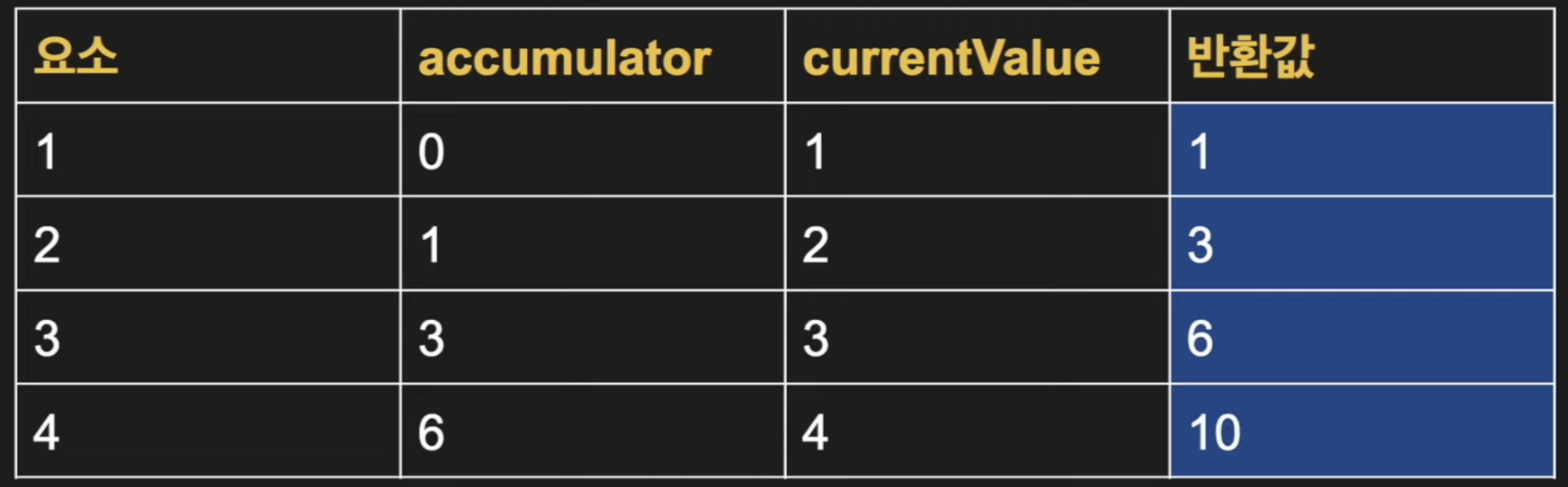
- 최종적으로 반환되는 값, 즉 total에 저장되는 값은 reduce가 반환하는 최종 반환값 (10)임.
예제 2. numbers 배열 중 가장 작은 값을 반환하자
const numbers = [10, 4, 2, 8]

// 초기값을 설정 X했으니, 초기값은 배열의 첫번째 값이 됨!
const smallest = numbers.reduce((smallNum, currentValue) => {
  if(smallNum > currentValue) {
    return currentValue;
  }
    return smallNum;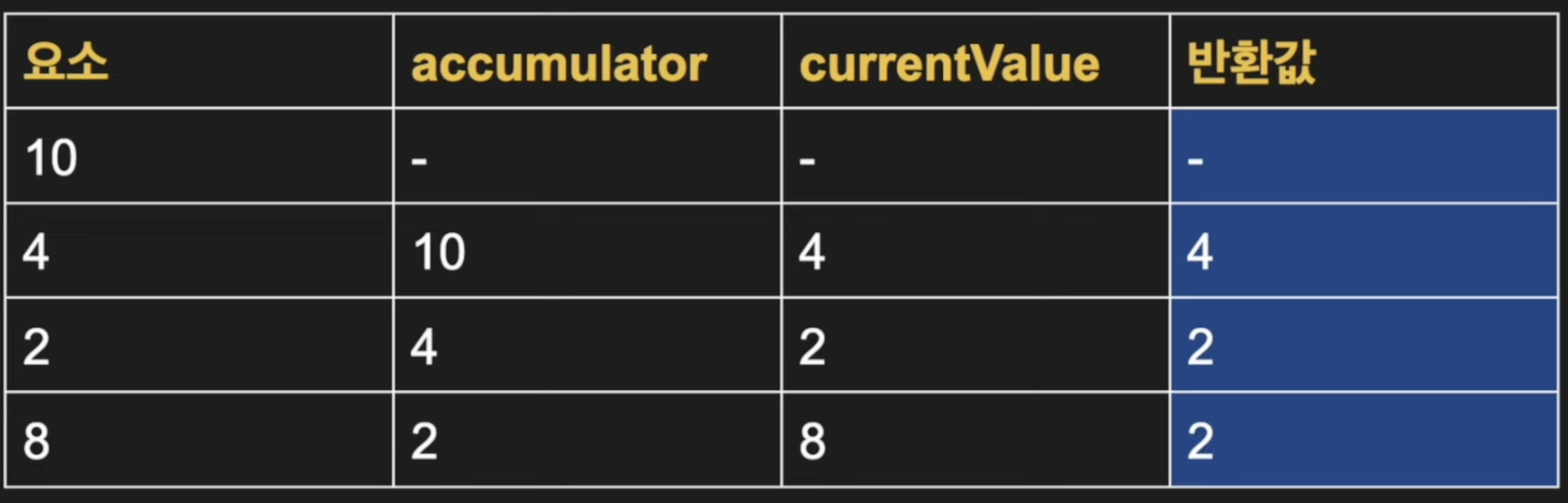
예제 3. 장바구니 안에 있는 모든 과일의 합계 구하기
const cart = [
  {
    name: '사과',
    price: 500
  },
  {
    name: '바나나',
    price: 700
  },
  {
    name: '레몬',
    price: 300
  },
];

const total = cart.reduce((accumulator, fruit)=> {
  return accumulator += fruit.price;
}, 0);
예제 4. 원래 배열에서 다 2배한 값들로 배열 새로 만들기 (프로그래머스)
const solution = (numbers) => {
    return numbers.reduce((accumulator, currentValue)=> {
        return [...accumulator, currentValue * 2];
    }, []);
}
참고자료
배열 자르기 slice()
- 배열의 일부분을 잘라내어,새로운 배열로 리턴하기 위해서는 slice() 함수를 사용
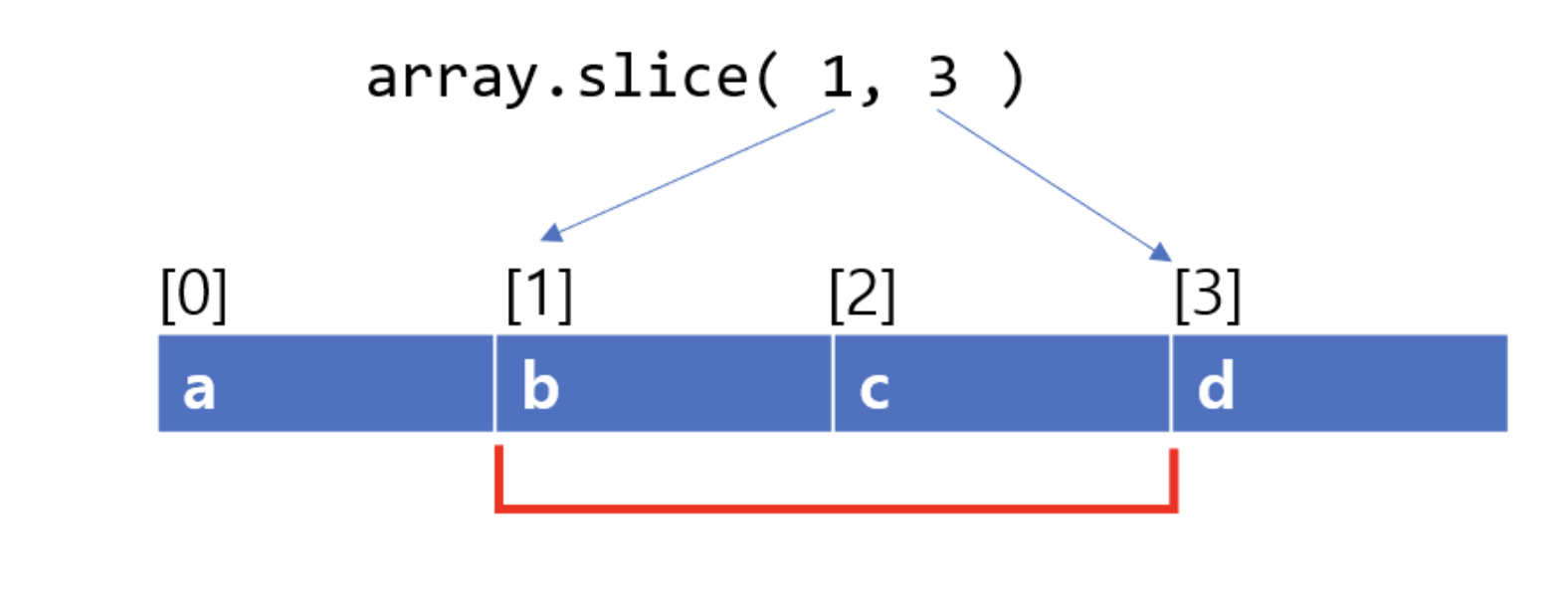
1. 파라미터
- start : 잘라낼 배열의 시작점
- end : 잘라낼 배열의 종료 index / 해당 index는 포함되지 않음 / 값이 없으면 끝까지를 의미