가시다님의 KANS [3기] 스터디 내용을 정리한 포스트 입니다.
1. Istio 소개
서비스 매시(Service Mesh)는 마이크로서비스 아키텍처에서 서비스 간의 통신을 관리하고 최적화하기 위한 인프라 계층입니다. 각 서비스 사이의 데이터 트래픽을 제어하고 보안, 모니터링, 로깅 등의 기능을 일관되게 처리합니다.
서비스 매시는 마이크로서비스 아키텍처의 복잡한 통신 문제를 해결하기 위해 등장했습니다.
-
마이크로서비스 아키텍처의 확산
• 전통적인 모놀리식 아키텍처에서는 모든 기능이 하나의 애플리케이션으로 통합되어 있지만, 마이크로서비스 아키텍처는 애플리케이션을 여러 개의 독립적인 서비스로 분리합니다. 이로 인해 각 서비스가 별도로 개발, 배포 및 확장될 수 있어 유연성과 확장성이 향상되었습니다. -
복잡한 서비스 간 통신
• 마이크로서비스가 많아지면서 서비스 간의 통신이 복잡해졌습니다. 서비스들이 서로 통신하기 위해서는 로드 밸런싱, 서비스 디스커버리, 보안(예: 인증 및 암호화), 트래픽 관리 등이 필요해집니다. 이런 작업을 모든 서비스에서 직접 구현하는 것은 매우 번거롭고, 복잡성을 증가시킵니다. -
관찰 가능성(Observability) 요구 증가
• 각 서비스의 성능, 오류, 지연 시간 등을 모니터링하고 추적하는 일이 점점 더 중요해졌습니다. 마이크로서비스는 여러 개의 서비스가 서로 통신하기 때문에 문제 발생 시 이를 추적하는 것이 어려워졌습니다.
-
서비스 메시의 등장
• 이런 문제를 해결하기 위해 서비스 메시가 등장했습니다. 서비스 메시는 각 마이크로서비스에 대한 네트워크 트래픽을 관리하고 모니터링하는 프록시(예: Envoy)를 각 서비스에 붙여서, 트래픽 제어, 보안, 모니터링, 로깅 등의 기능을 중앙에서 일관되게 처리하도록 돕습니다.
• 개발자는 비즈니스 로직에만 집중할 수 있고, 네트워크 관련 복잡한 로직은 서비스 메시가 처리하게 됩니다.
결국 서비스 메시는 마이크로서비스 아키텍처에서 발생하는 통신 문제를 자동화하고 일관성 있게 관리할 수 있도록 도입된 기술입니다.
- 동작 개념
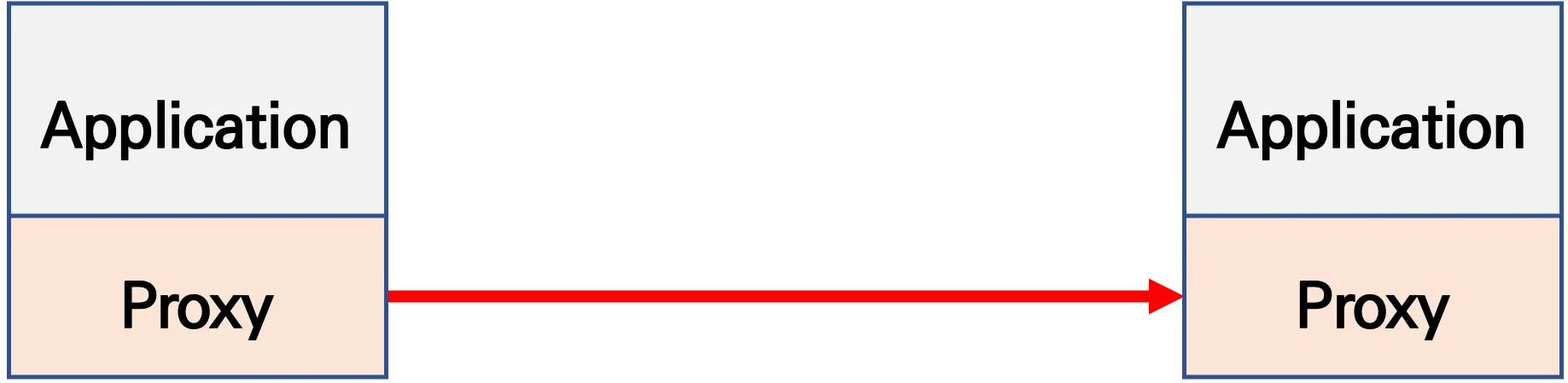
파드 간 통신 경로에 프록시를 놓고 트래픽 모니터링이나 트래픽 컨트롤
-
기존 통신 환경

-
애플리케이션 수정 없이, 모든 애플리케이션 통신 사이에 Proxy 를 두고 통신
- 파드 내에 사이드카 컨테이너로 주입되어서 동작
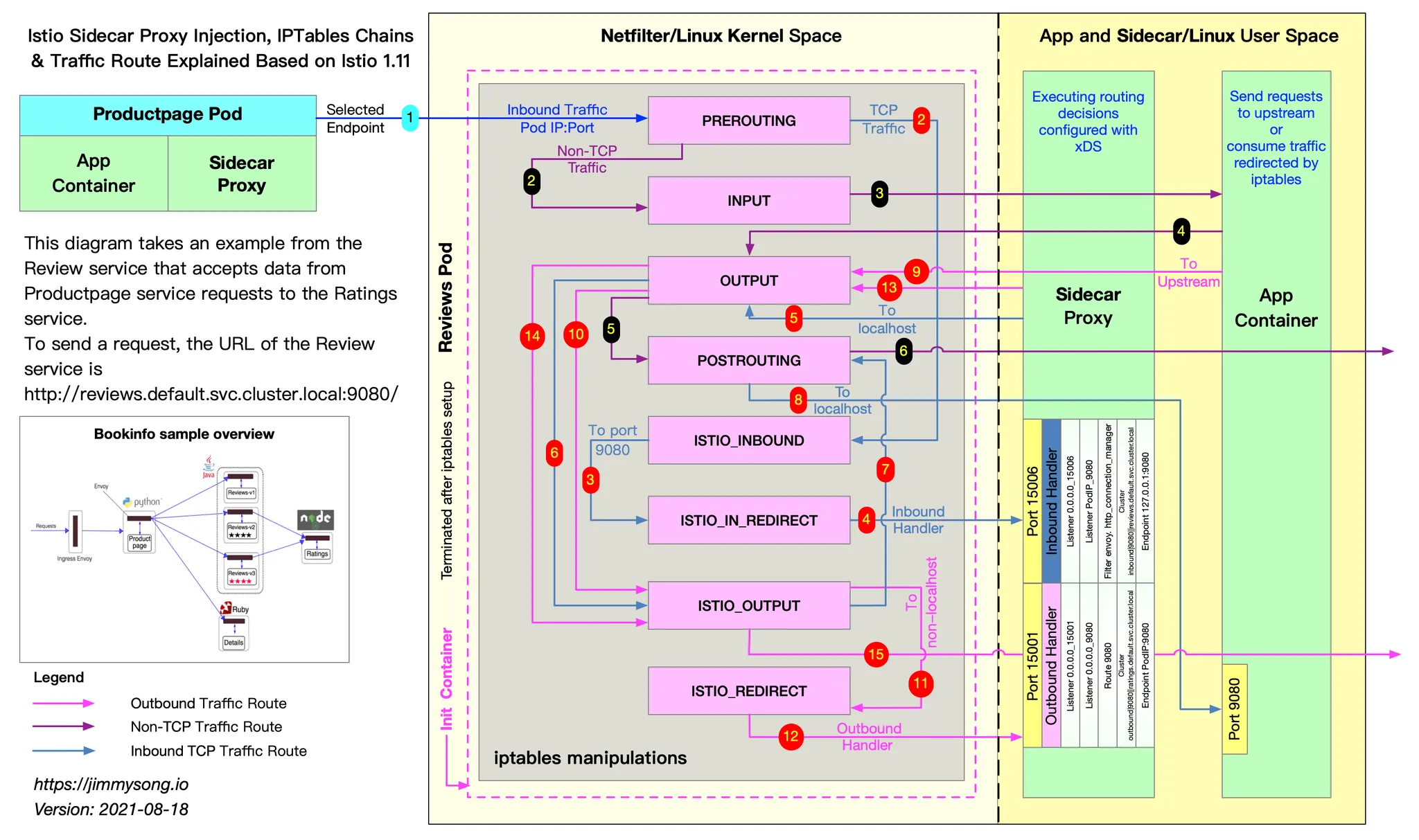
- Proxy 컨테이너가 Application 트래픽을 가로채야됨 → iptables rule 구현
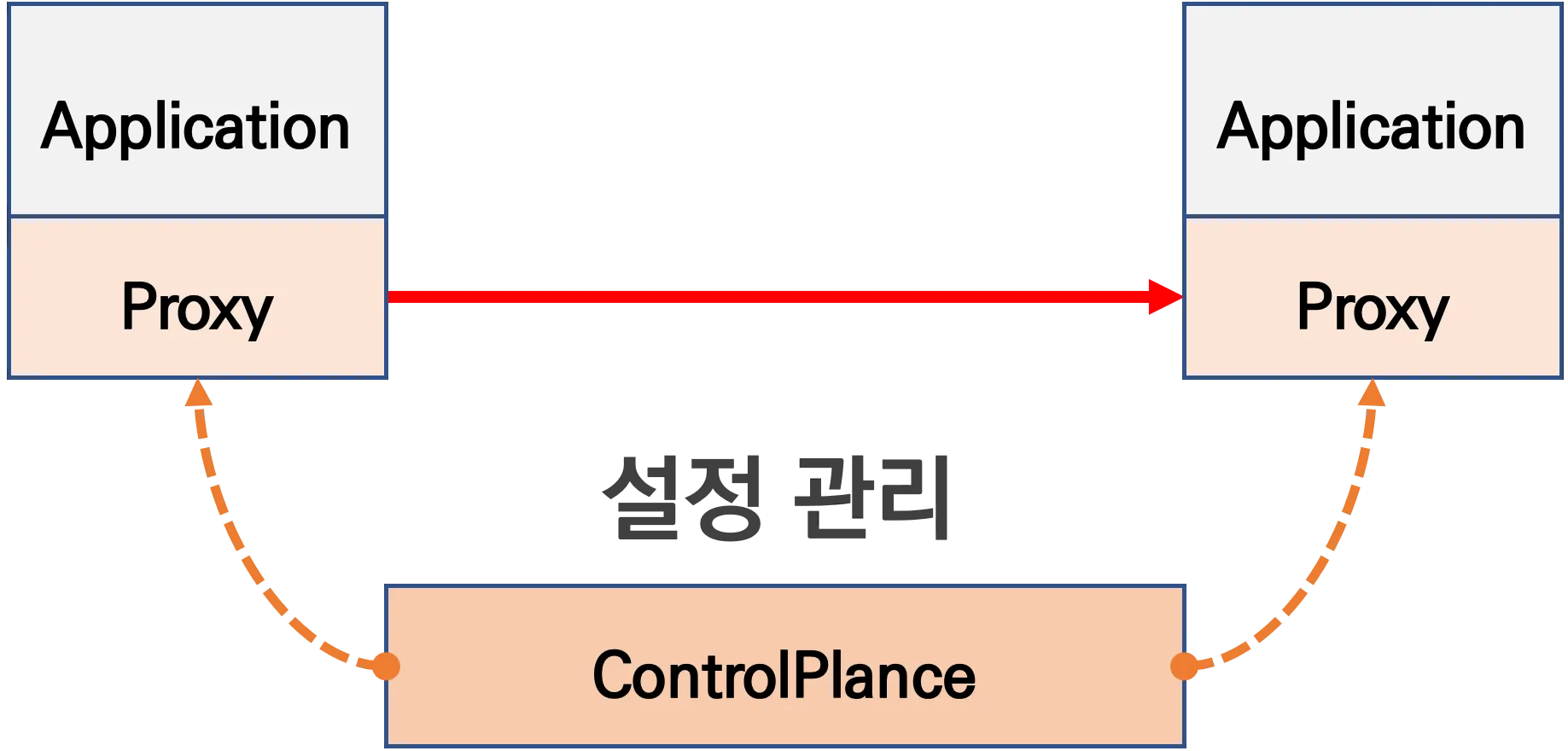
- Proxy 는 결국 DataPlane 이니, 이를 중앙에서 관리하는 ControlPlane을 두고 중앙에서 관리
-
Proxy 는 중앙에서 설정 관리가 잘되는 툴을 선택. 즉, 원격에서 동적인 설정 관리가 유연해야함 → 풍부한 API 지원이 필요 ⇒ Envoy
- '구글 IBM 리프트(Lyft)'가 중심이 되어 개발하고 있는 오픈 소스 소프트웨어이며, C++ 로 구현된 고성능 Proxy 인 엔보이(Envoy)
- 네트워크의 투명성을 목표, 다양한 필터체인 지원(L3/L4, HTTP L7), 동적 configuration API 제공, api 기반 hot reload 제공
-
중앙에서 어떤 동작/설정을 관리해야 될까? 라우팅, 보안 통신을 위한 mTLS 관련, 동기화 상태 정보 등
-
트래픽 모니터링 : 요청의 '에러율, 레이턴시, 커넥션 개수, 요청 개수' 등 메트릭 모니터링, 특정 서비스간 혹은 특정 요청 경로로 필터링
-
트래픽 컨트롤 : 트래픽 시프팅(Traffic shifting), 서킷 브레이커(Circuit Breaker), 폴트 인젝션(Fault Injection), 속도 제한(Rate Limit)
- 트래픽 시프팅(Traffic shifting) : 예시) 99% 기존앱 + 1% 신규앱 , 특정 단말/사용자는 신규앱에 전달하여 단계적으로 적용하는 카니리 배포 가능
- 서킷 브레이커(Circuit Breaker) : 목적지 마이크로서비스에 문제가 있을 시 접속을 차단하고 출발지 마이크로서비스에 요청 에러를 반환 (연쇄 장애, 시스템 전제 장애 예방)
- 폴트 인젝션(Fault Injection) : 의도적으로 요청을 지연 혹은 실패를 구현
- 속도 제한(Rate Limit) : 요청 개수를 제한
- Istio 구성요소와 envoy
컨트롤 플레인(istiod) , 데이터 플레인(istio-proxy > envoy)
- istiod : Pilot(데이터 플레인과 통신하면서 라우팅 규칙을 동기화, ADS), Gally(Istio 와 K8S 연동, Endpoint 갱신 등), Citadel(연결 암호화, 인증서 관리 등)
- Istio proxy : Golang 으로 작성되었고 envoy 래핑한 Proxy, istiod와 통신하고 서비스 트래픽을 통제, 옵저버빌리티를 위한 메트릭 제공
2. Envoy
Envoy Proxy는 고성능의 오픈 소스 엣지 및 서비스 프록시로, 특히 마이크로서비스와 클라우드 네이티브 애플리케이션에서 많이 사용됩니다. 처음에는 Lyft에서 개발되었고, 현재는 CNCF(Cloud Native Computing Foundation)의 프로젝트로 관리되고 있습니다.
Envoy는 가볍고 확장 가능하며, 대규모 시스템에서 네트워크 트래픽을 관리하는 데 최적화된 도구입니다.
주요 특징은 다음과 같습니다.
- 서비스 간 통신 관리: 마이크로서비스 간의 네트워크 트래픽을 효율적으로 제어합니다. 로드 밸런싱, 서비스 디스커버리, 트래픽 분배 등의 기능을 제공합니다.
- HTTP/2 및 gRPC 지원: 최신 프로토콜을 지원하며, 다양한 트랜스포트 계층에서 트래픽을 최적화할 수 있습니다.
- 관찰 가능성: 분산 트레이싱, 모니터링, 로깅 기능을 통해 서비스 간의 통신 상태를 쉽게 추적할 수 있습니다.
- 보안: 트래픽 암호화(TLS), 인증 및 인가 등을 제공하여 통신 보안을 강화합니다.
- 서비스 메시의 프록시 역할: Istio와 같은 서비스 메시에서 기본 데이터 플레인으로 사용되며, 각 마이크로서비스 앞에 배치되어 모든 트래픽을 제어합니다.
- Istio 구성요소와 envoy
컨트롤 플레인(istiod) - ADS 를 이용한 Configuration 동기화 - 데이터 플레인(istio-proxy → envoy)
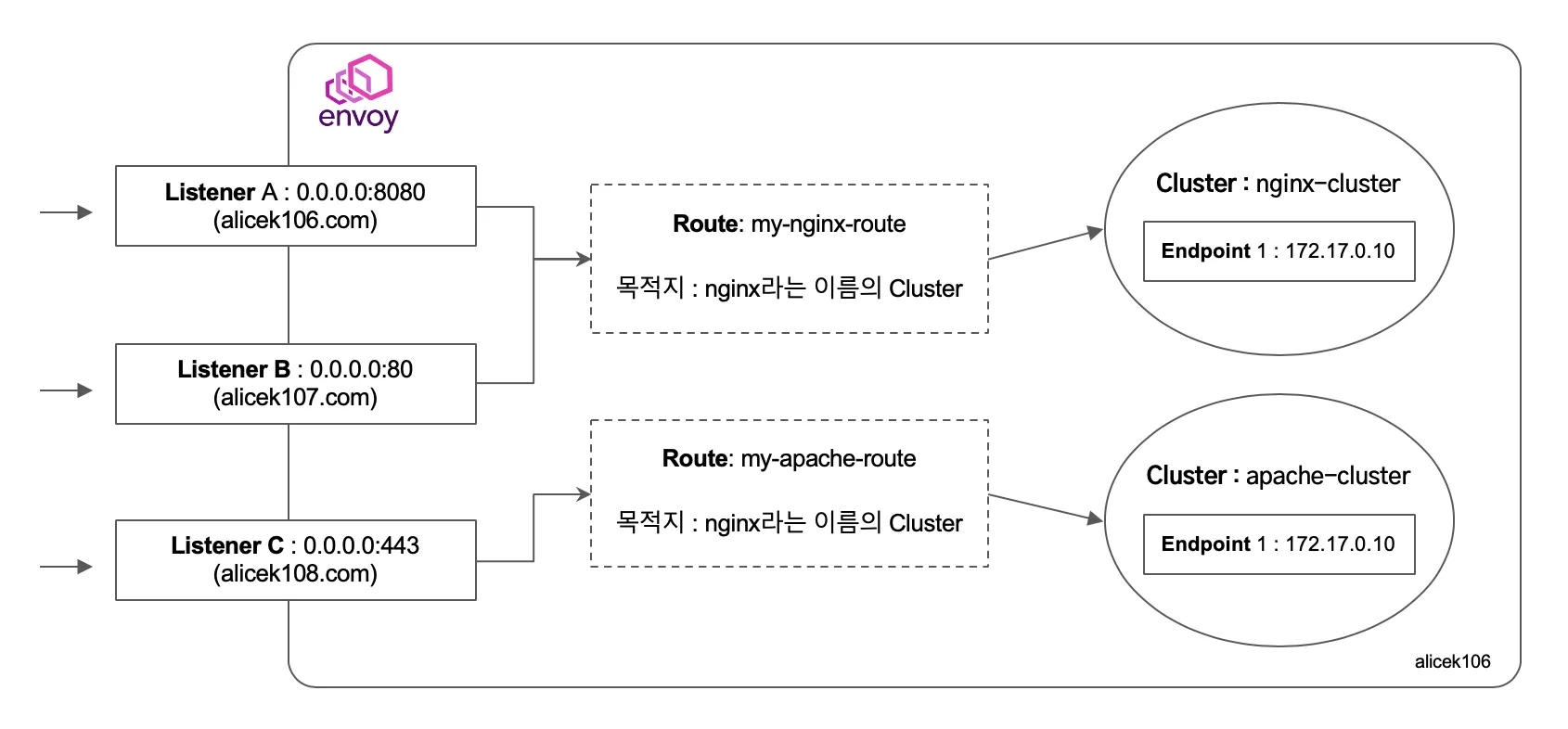
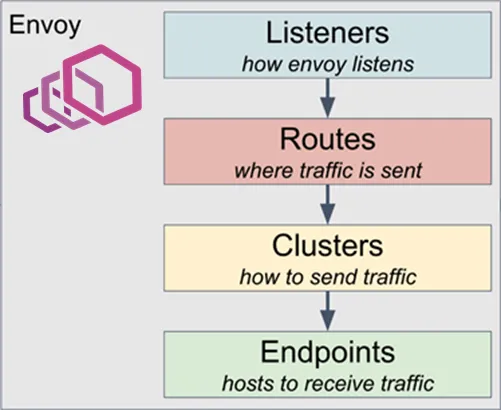
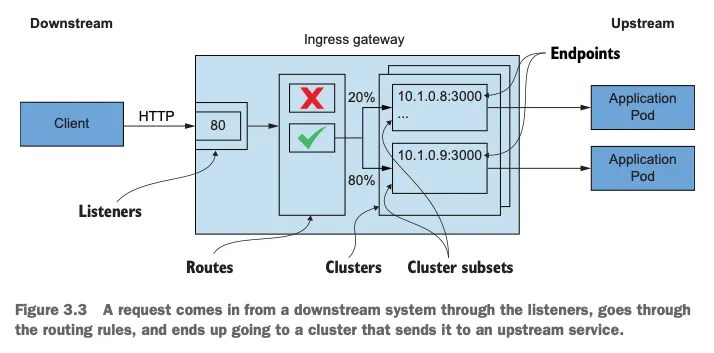
- Cluster : envoy 가 트래픽을 포워드할 수 있는 논리적인 서비스 (엔드포인트 세트), 실제 요청이 처리되는 IP 또는 엔드포인트의 묶음을 의미.
- Endpoint : IP 주소, 네트워크 노드로 클러스터로 그룹핑됨, 실제 접근이 가능한 엔드포인트를 의미. 엔드포인트가 모여서 하나의 Cluster 가 된다.
- Listener : 무엇을 받을지 그리고 어떻게 처리할지 IP/Port 를 바인딩하고, 요청 처리 측면에서 다운스트림을 조정하는 역할.
- Route : Listener 로 들어온 요청을 어디로 라우팅할 것인지를 정의. 라우팅 대상은 일반적으로 Cluster 라는 것에 대해 이뤄지게 된다.
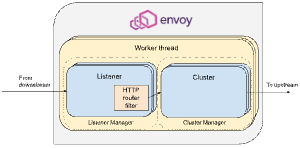
- Filter : Listener 로부터 서비스에 트래픽을 전달하기까지 요청 처리 파이프라인
- UpStream : envoy 요청을 포워딩해서 연결하는 백엔드 네트워크 노드 - 사이드카일때 application app, 아닐때 원격 백엔드
- DownStream : An entity connecting to envoy, In non-sidecar models this is a remote client
Envoy는 구성을 동적으로 관리하기 위한 강력한 API를 제공이 중요합니다.
-
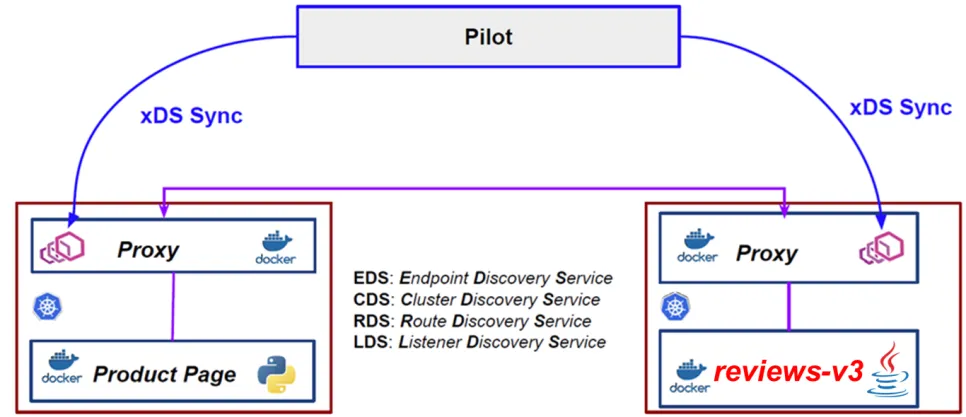
Service Mesh 솔루션이나, Gateway API 구현체들을 Enovy를 내부적으로 사용하고 있으며, Envoy가 제공하는 동적 구성을 위한 API (xDS Sync API)를 이용하여 다양한 네트워크 정책을 구성하게 됩니다.
-
Envoy의 xDS Sync API는 아래와 같은 레이어에서 동작하게 됩니다.
- LDS - Listener Discovery Service
- RDS - Route Discovery Service
- CDS - Cluseter Discovery Service
- EDS - Endpoint Discovery Service
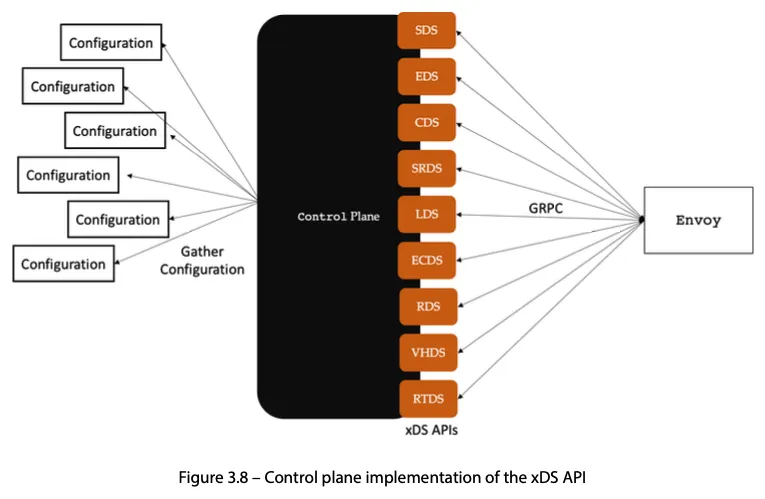
2.1 Envoy 설치 및 proxy 실습
트레픽을 envoy의 공식페이지로 리다이렉션 하는 것을 확인 할 수 있다.
- Envoy 설치
# 설치
wget -O- https://apt.envoyproxy.io/signing.key | sudo gpg --dearmor -o /etc/apt/keyrings/envoy-keyring.gpg
echo "deb [signed-by=/etc/apt/keyrings/envoy-keyring.gpg] https://apt.envoyproxy.io focal main" | sudo tee /etc/apt/sources.list.d/envoy.list
sudo apt-get update && sudo apt-get install envoy -y

# 확인
envoy --version
envoy  version: cc4a75482810de4b84c301d13deb551bd3147339/1.31.2/Clean/RELEASE/BoringSSL
- Envoy proxy 실습
# (터미널1) 데모 config 적용하여 실행
curl -O https://www.envoyproxy.io/docs/envoy/latest/_downloads/92dcb9714fb6bc288d042029b34c0de4/envoy-demo.yaml
envoy -c envoy-demo.yaml


# (터미널2) 정보 확인
ss -tnlp
State    Recv-Q  Send-Q    Local Address:Port   Peer Address:Port    Process
LISTEN   0       4096      0.0.0.0:10000        0.0.0.0:*            users:(("envoy",pid=8007,fd=18),("envoy",pid=8007,fd=16))

# 접속 테스트
curl -s http://127.0.0.1:10000 | grep -o "<title>.*</title>"

# 외부 접속 정보 출력
echo -e "http://$(curl -s ipinfo.io/ip):10000"
http://13.125.239.50:10000

--------------------
# 자신의 PC 웹브라우저에서 외부 접속 정보 접속 확인!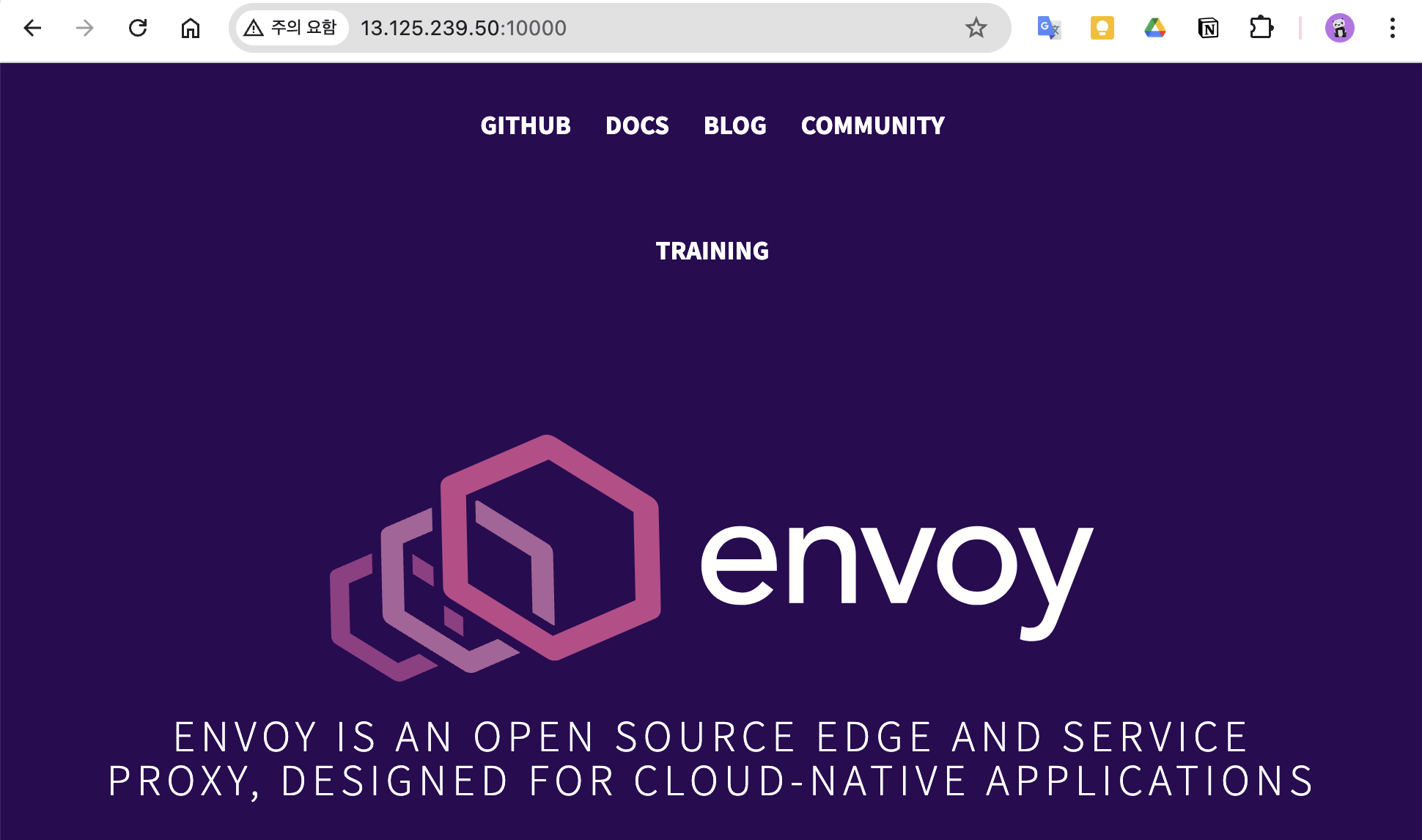
# k3s-s 에서 접속 테스트
curl -s http://192.168.10.200:10000 | grep -o "<title>.*</title>"
--------------------
# 연결 정보 확인
ss -tnp

# (터미널1) envoy 실행 취소(CTRL+C) 후 (관리자페이지) 설정 덮어쓰기 - 링크
cat <<EOT> envoy-override.yaml
admin:
  address:
    socket_address:
      address: 0.0.0.0
      port_value: 9902
EOT
envoy -c envoy-demo.yaml --config-yaml "$(cat envoy-override.yaml)"

# envoy 관리페이지 외부 접속 정보 출력
echo -e "http://$(curl -s ipinfo.io/ip):9902"
http://13.125.239.50:9902

--------------------
# 자신의 PC 웹브라우저에서 관리 페이지 외부 접속 정보 접속 확인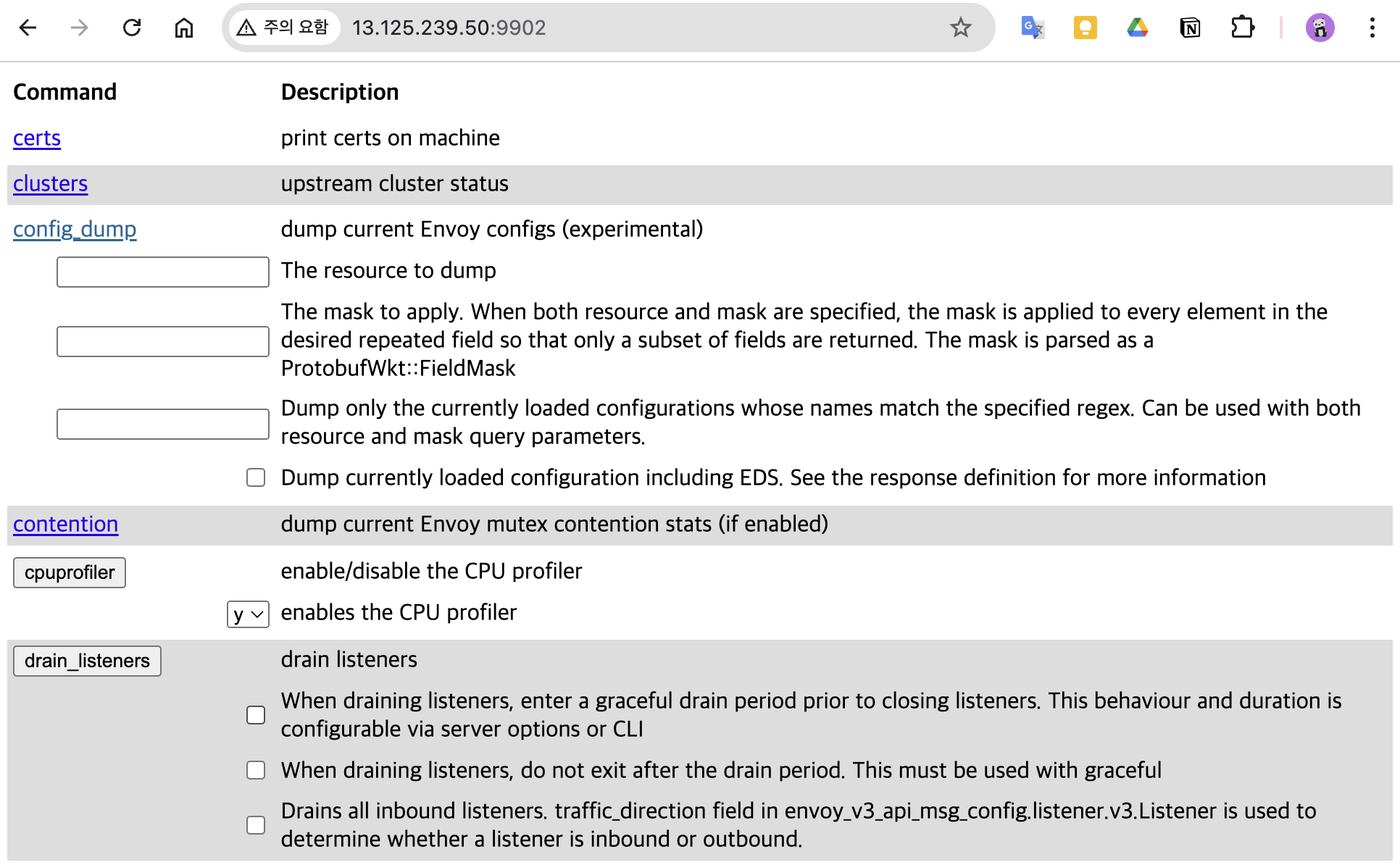
3. Istio 설치(Sidecar mode)
3.1 Istio Sidecar mode 설치
3.1.1 istioctl 설치
# istioctl 설치
export ISTIOV=1.23.2
echo "export ISTIOV=1.23.2" >> /etc/profile
curl -s -L https://istio.io/downloadIstio | ISTIO_VERSION=$ISTIOV TARGET_ARCH=x86_64 sh -
tree istio-$ISTIOV -L 2 # sample yaml 포함
cp istio-$ISTIOV/bin/istioctl /usr/local/bin/istioctl
istioctl version --remote=false

# (default 프로파일) 컨트롤 플레인 배포 - 링크 Customizing
# The istioctl command supports the full IstioOperator API via command-line options for individual settings or for passing a yaml file containing an IstioOperator custom resource (CR).
istioctl profile list
istioctl profile dump default
istioctl profile dump --config-path components.ingressGateways
istioctl profile dump --config-path values.gateways.istio-ingressgateway
istioctl profile dump demo

istioctl profile dump demo > demo-profile.yaml
vi demo-profile.yaml # 복잡성을 줄이게 실습 시나리오 환경 맞춤
--------------------
    egressGateways:
    - enabled: false
--------------------

istioctl install -f demo-profile.yaml
✔ Istio core installed ⛵️
✔ Istiod installed 🧠
✔ Ingress gateways installed 🛬
✔ Installation complete
3.1.2 설치 확인
# 설치 확인 : istiod, istio-ingressgateway
kubectl get all,svc,ep,sa,cm,secret -n istio-system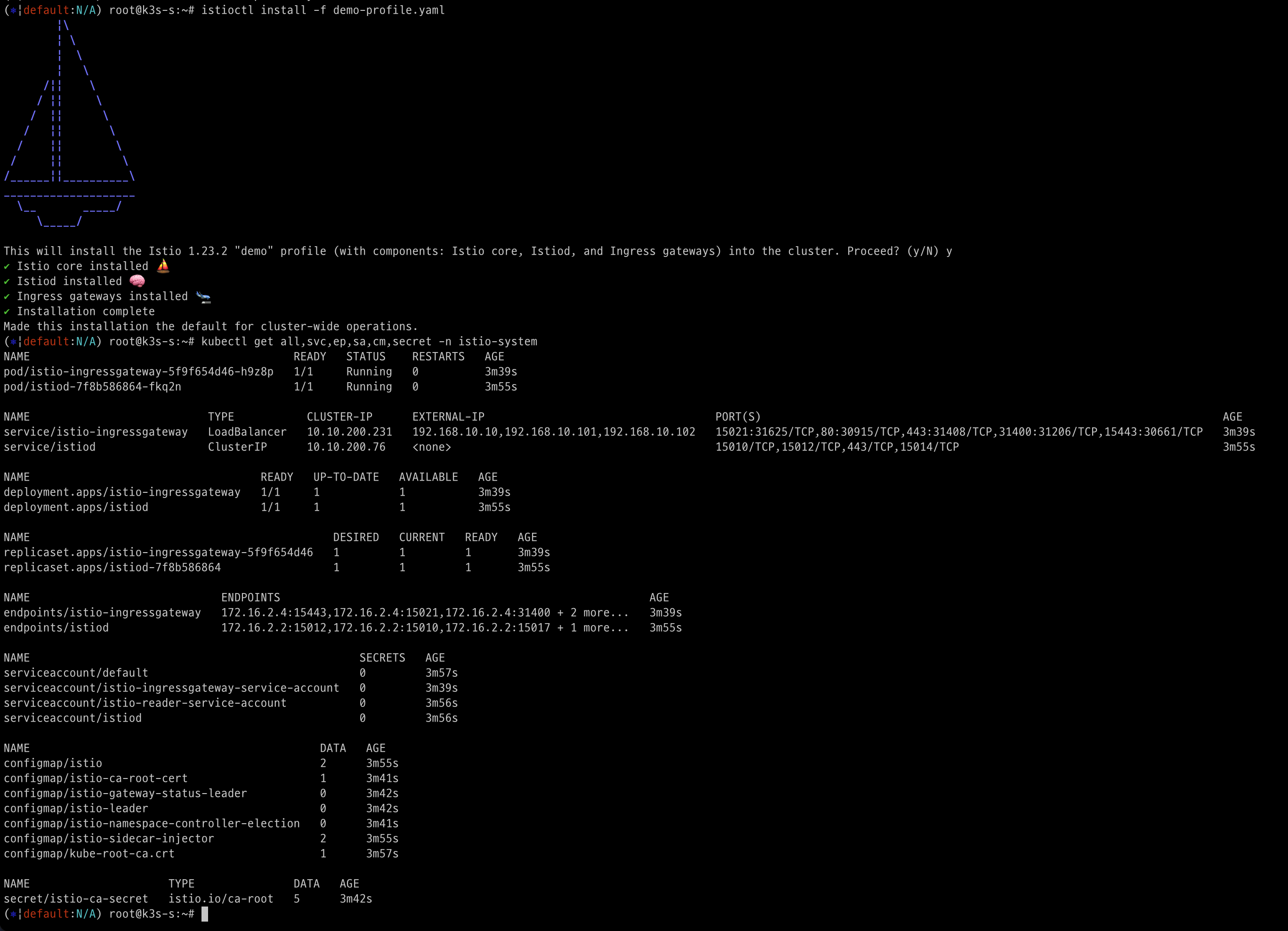
kubectl get crd | grep istio.io | sort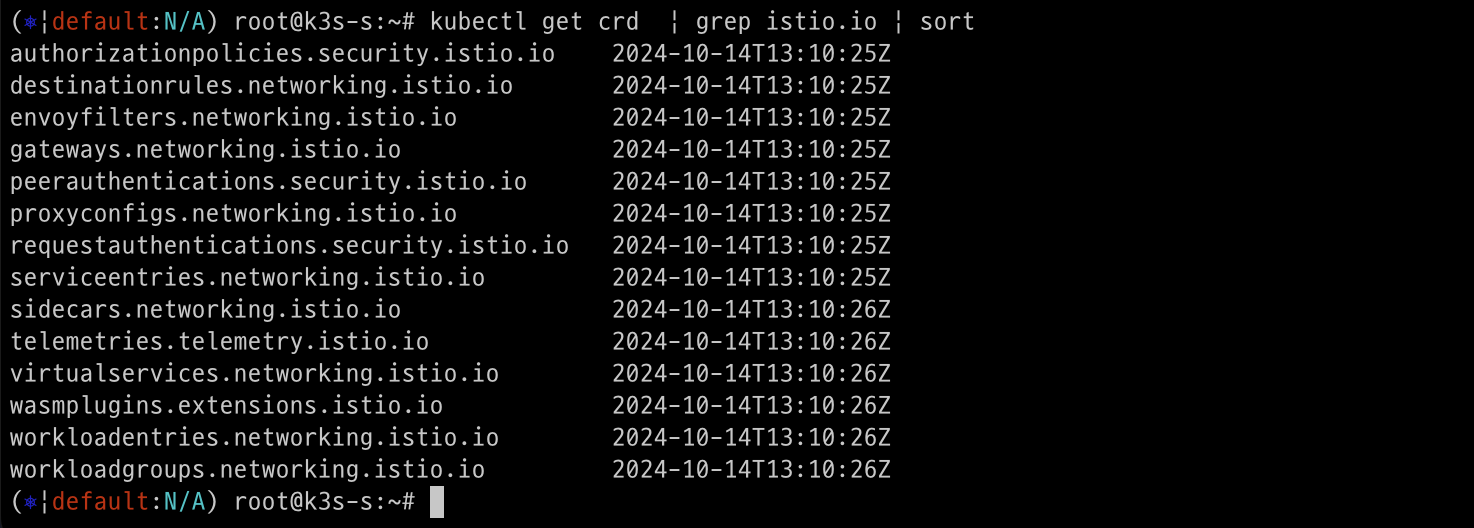
# istio-ingressgateway 의 envoy 버전 확인
kubectl exec -it deploy/istio-ingressgateway -n istio-system -c istio-proxy -- envoy --version
envoy  version: 6c72b2179f5a58988b920a55b0be8346de3f7b35/1.31.2-dev/Clean/RELEASE/BoringSSL

# istio-ingressgateway 서비스 NodePort로 변경
kubectl patch svc -n istio-system istio-ingressgateway -p '{"spec":{"type":"NodePort"}}'
service/istio-ingressgateway patched

# istio-ingressgateway 서비스 확인
kubectl get svc,ep -n istio-system istio-ingressgateway
NAME                           TYPE       CLUSTER-IP      EXTERNAL-IP   PORT(S)                                                                      AGE
service/istio-ingressgateway   NodePort   10.10.200.231   <none>        15021:31625/TCP,80:30915/TCP,443:31408/TCP,31400:31206/TCP,15443:30661/TCP   6m13s

NAME                             ENDPOINTS                                                        AGE
endpoints/istio-ingressgateway   172.16.2.4:15443,172.16.2.4:15021,172.16.2.4:31400 + 2 more...   6m13s

## istio-ingressgateway 서비스 포트 정보 확인
kubectl get svc -n istio-system istio-ingressgateway -o jsonpath={.spec.ports[*]} | jq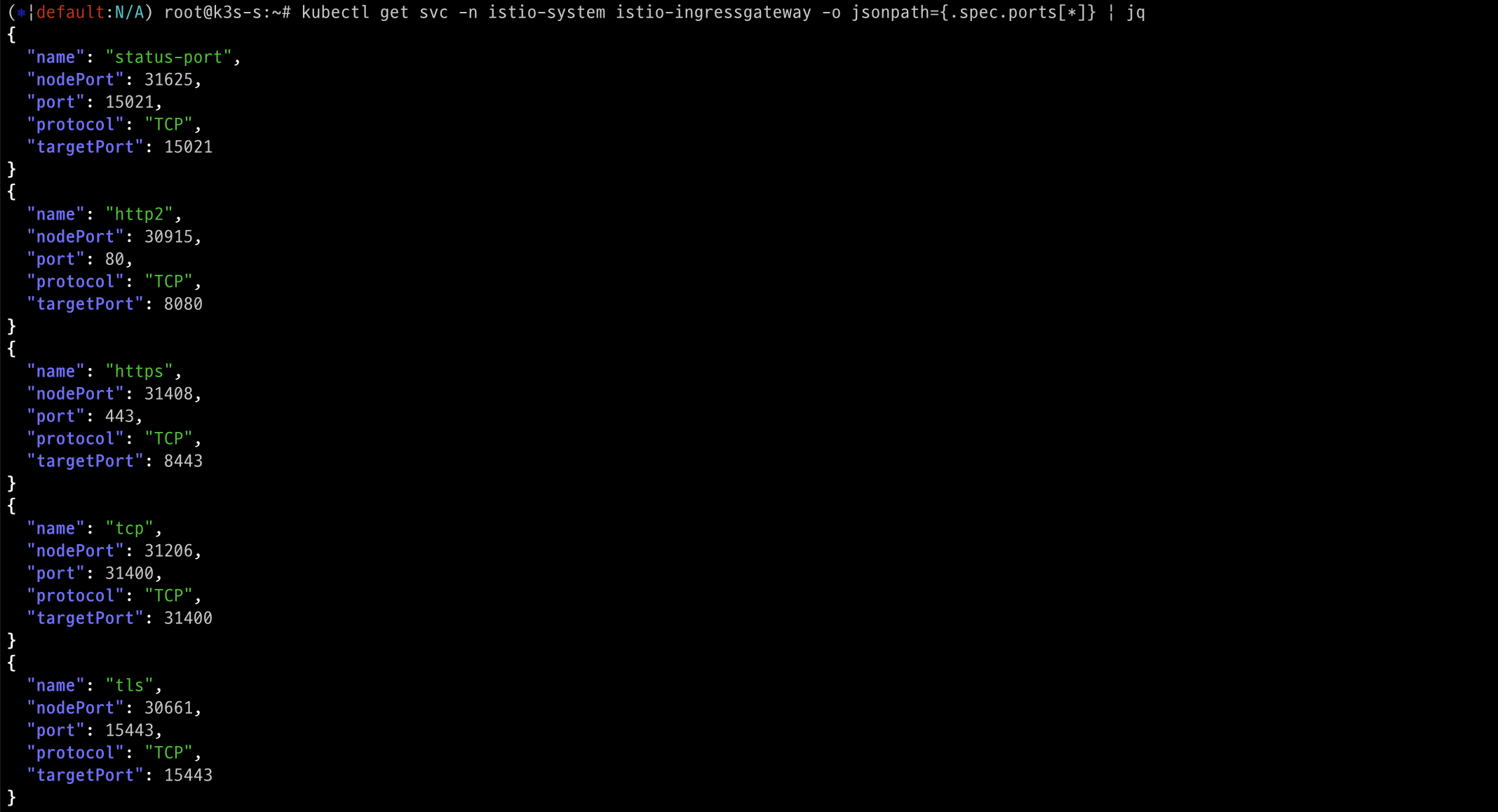
## istio-ingressgateway 디플로이먼트 파드의 포트 정보 확인
kubectl get deploy/istio-ingressgateway -n istio-system -o jsonpath={.spec.template.spec.containers[0].ports[*]} | jq
kubectl get deploy/istio-ingressgateway -n istio-system -o jsonpath={.spec.template.spec.containers[0].readinessProbe} | jq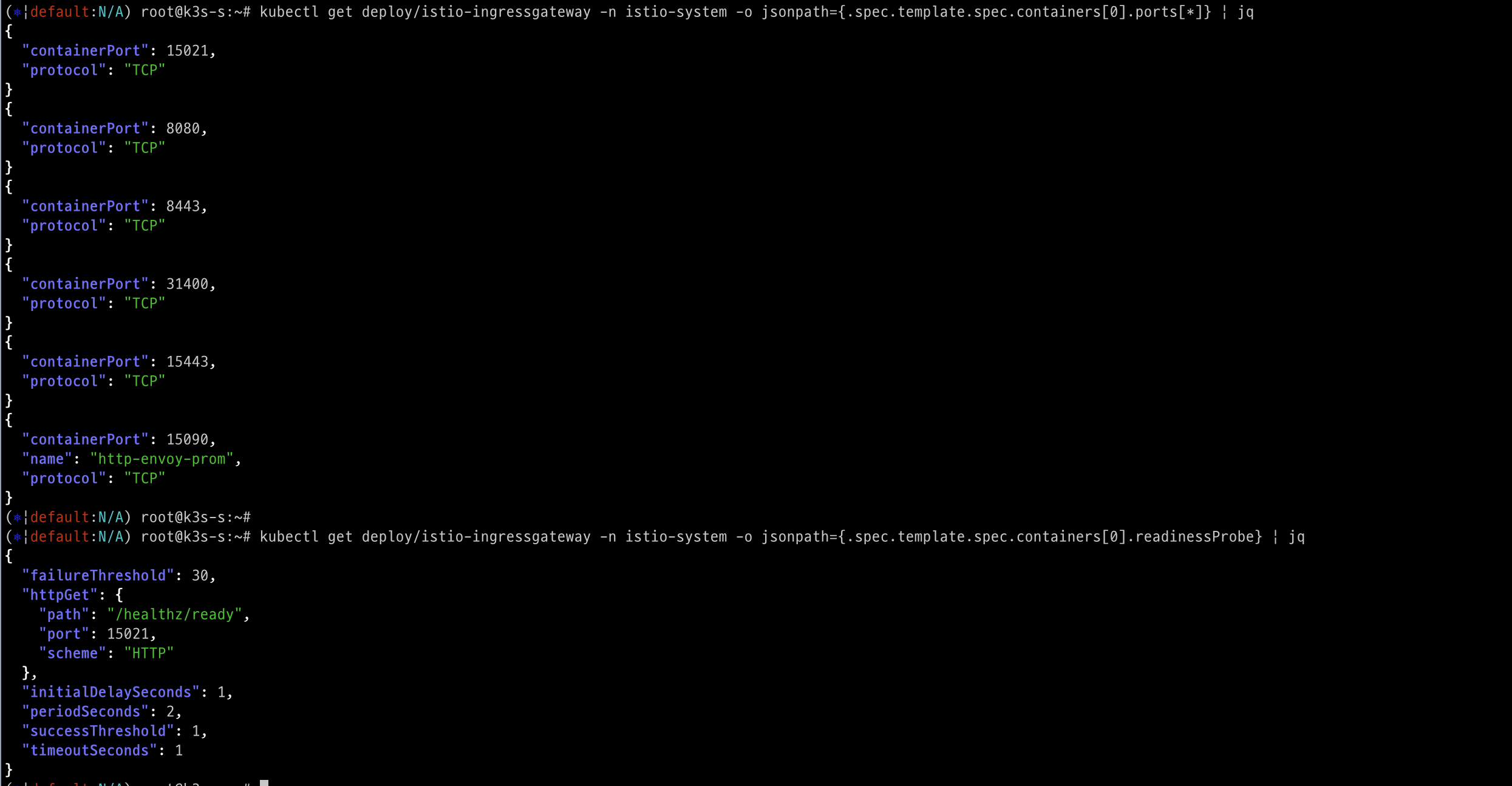
# istiod 디플로이먼트 정보 확인
kubectl exec -it deployment.apps/istiod -n istio-system -- ss -tnlp
kubectl exec -it deployment.apps/istiod -n istio-system -- ss -tnp
kubectl exec -it deployment.apps/istiod -n istio-system -- ps -ef
UID          PID    PPID  C STIME TTY          TIME CMD
istio-p+       1       0  0 05:27 ?        00:00:07 /usr/local/bin/pilot-discovery discovery --monitoringAddr=:15014 --log_output_l
# istio-ingressgateway 디플로이먼트 정보 확인
kubectl exec -it deployment.apps/istio-ingressgateway -n istio-system -- ss -tnlp
kubectl exec -it deployment.apps/istio-ingressgateway -n istio-system -- ss -tnp
kubectl exec -it deployment.apps/istio-ingressgateway -n istio-system -- ps -ef
istio-p+       1       0  0 05:27 ?        00:00:01 /usr/local/bin/pilot-agent proxy router --domain istio-system.svc.cluster.local
istio-p+      15       1  0 05:27 ?        00:00:11 /usr/local/bin/envoy -c etc/istio/proxy/envoy-rev.json --drain-time-s 45 --drai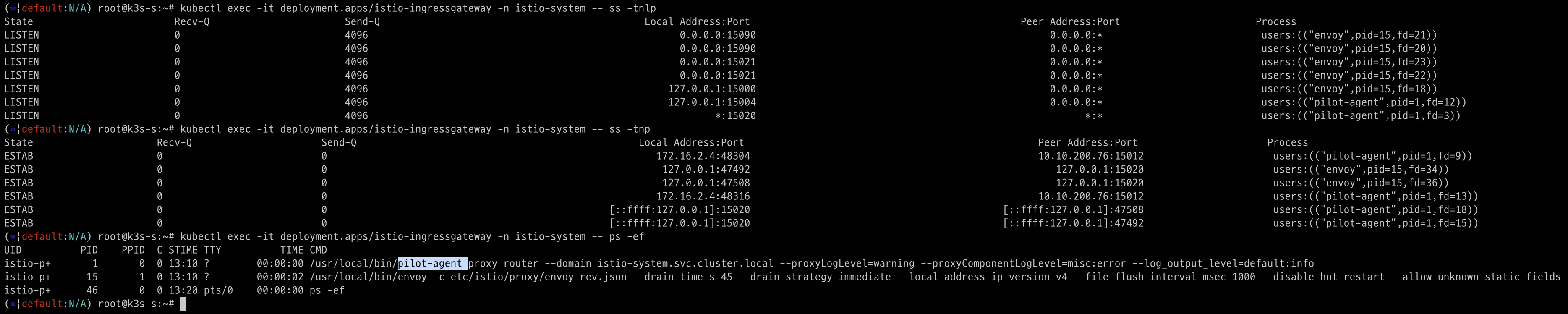
kubectl exec -it deployment.apps/istio-ingressgateway -n istio-system -- cat /etc/istio/proxy/envoy-rev.json
kubectl exec -it deployment.apps/istio-ingressgateway -n istio-system -- ss -xnlp
kubectl exec -it deployment.apps/istio-ingressgateway -n istio-system -- ss -xnp

# istio-ingressgateway 서비스 externalTrafficPolicy 설정 : 점검
kubectl patch svc -n istio-system istio-ingressgateway -p '{"spec":{"externalTrafficPolicy": "Local"}}'
3.2 Istio 접속 테스트를 위한 변수 지정
- k3s
IGWHTTP=32287
MYDOMAIN=www.kgetall.click

echo -e "192.168.10.10 $MYDOMAIN" >> /etc/hosts
echo -e "export MYDOMAIN=$MYDOMAIN" >> /etc/profile- testpc
IGWHTTP=32287
MYDOMAIN=www.kgetall.click

echo -e "192.168.10.10 $MYDOMAIN" >> /etc/hosts
echo -e "export MYDOMAIN=$MYDOMAIN" >> /etc/profile- mypc(MacOS)
IGWHTTP=32287
ISTIONODEIP=43.201.108.148
MYDOMAIN=www.kgetall.click

echo "$ISTIONODEIP $MYDOMAIN" | sudo tee -a /etc/hosts
4. Istio 통한 외부 노출
4.1 Nginx 디플로이먼트와 서비스 배포
cat <<EOF | kubectl create -f -
apiVersion: apps/v1
kind: Deployment
metadata:
  name: deploy-websrv
spec:
  replicas: 1
  selector:
    matchLabels:
      app: deploy-websrv
  template:
    metadata:
      labels:
        app: deploy-websrv
    spec:
      terminationGracePeriodSeconds: 0
      containers:
      - name: deploy-websrv
        image: nginx:alpine
        ports:
        - containerPort: 80
---
apiVersion: v1
kind: Service
metadata:
  name: svc-clusterip
spec:
  ports:
    - name: svc-webport
      port: 80
      targetPort: 80
  selector:
    app: deploy-websrv
  type: ClusterIP
EOF

# 사이드카 컨테이너 배포 확인
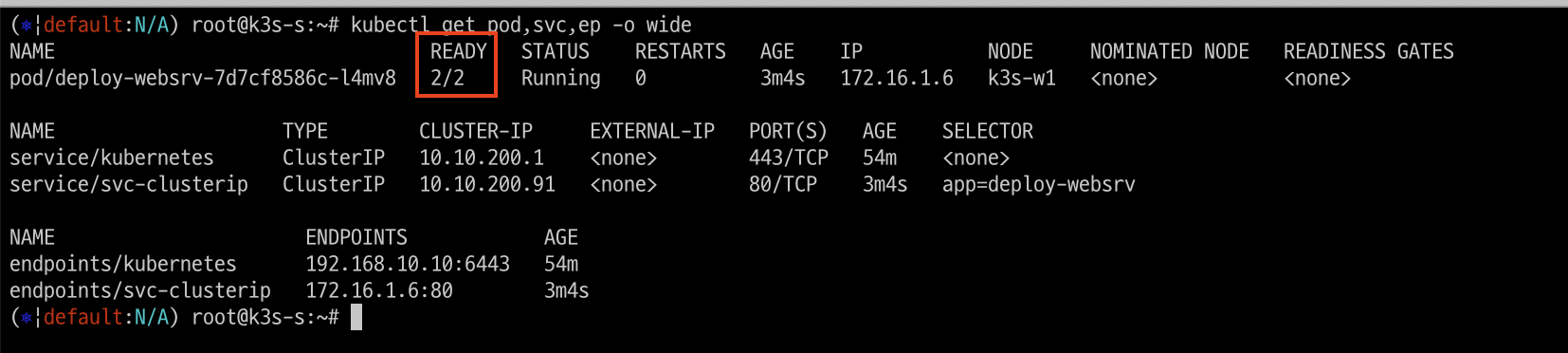
kubectl get pod,svc,ep -o wide
NAME                             READY   STATUS    RESTARTS   AGE   IP           NODE     NOMINATED NODE   READINESS GATES
deploy-websrv-7d7cf8586c-rhhv8   2/2     Running   0          29s   172.16.2.6   k3s-w2   <none>           <none>
...
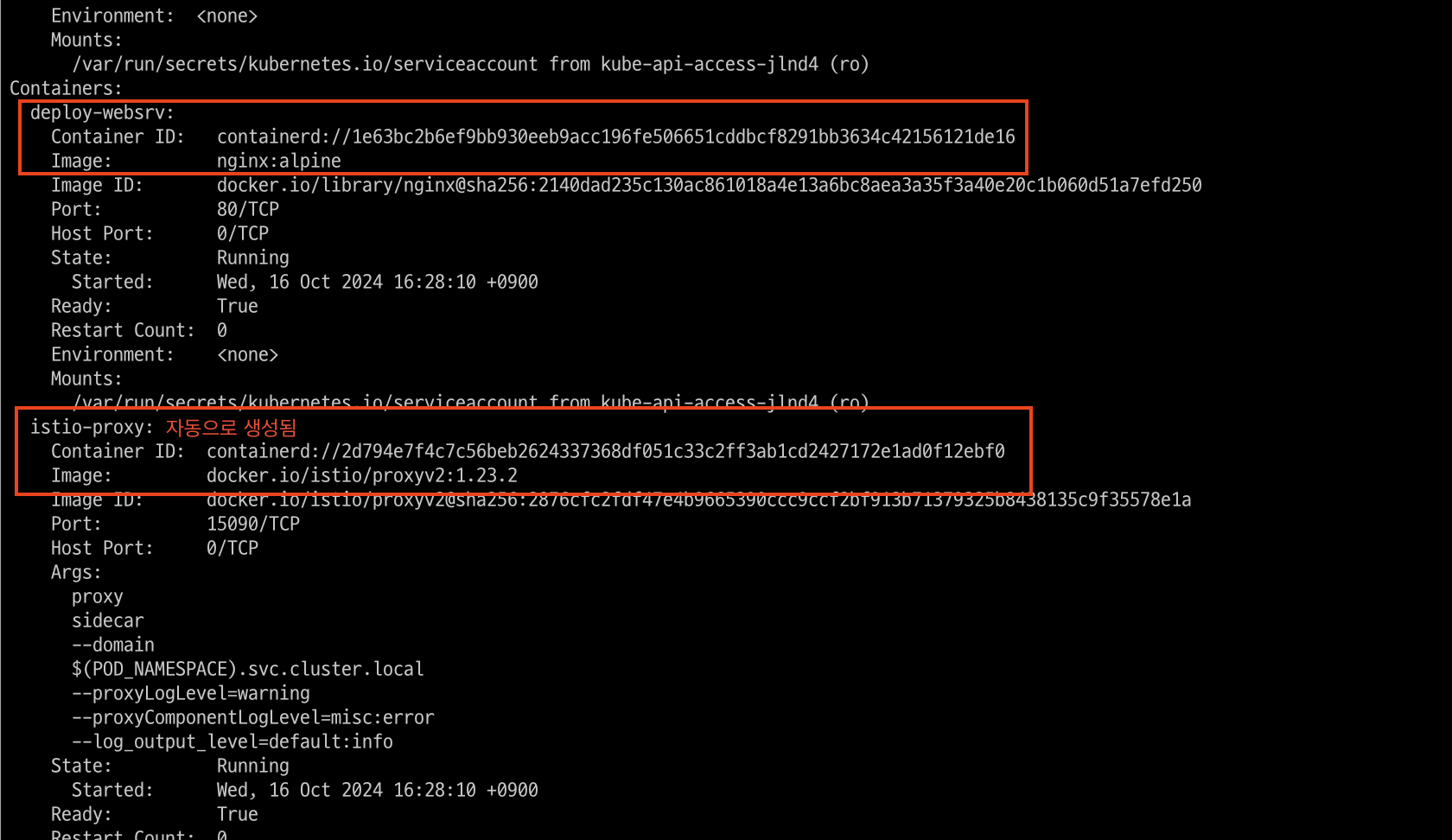
생성된 파드를 보면 2개의 컨테이너가 생성되었습니다.
describe 명령어로 상세히 보면 istio-proxy 컨테이너가 자동으로 생성된 것을 볼 수 있습니다.
4.2 Istio Gateway/VirtualService 설정
- 클라이언트 PC → (Service:NodePort) Istio ingressgateway 파드 → (Gateway, VirtualService, Service 는 Bypass) → Endpoint(파드 : 사이드카 - Application 컨테이너)
- Gateway : 지정한 인그레스 게이트웨이로부터 트래픽이 인입, 프로토콜 및 포트, HOSTS, Proxy 등 설정 가능
- VirtualService : 인입 처리할 hosts 설정, L7 PATH 별 라우팅, 목적지에 대한 정책 설정 가능 (envoy route config)
4.2.1 Istio Gateway/VirtualService 생성
Istio Gateway와 VirtualService 생성합니다.
- Istio Gateway와 VirtualService 생성
cat <<EOF | kubectl create -f -
apiVersion: networking.istio.io/v1
kind: Gateway
metadata:
  name: test-gateway
spec:
  selector:
    istio: ingressgateway
  servers:
  - port:
      number: 80
      name: http
      protocol: HTTP
    hosts:
    - "*"
---
apiVersion: networking.istio.io/v1
kind: VirtualService
metadata:
  name: nginx-service
spec:
  hosts:
  - "$MYDOMAIN"
  gateways:
  - test-gateway
  http:
  - route:
    - destination:
        host: svc-clusterip
        port:
          number: 80
EOF- 생성 확인
# Istio Gateway(=gw)/VirtualService(=vs) 설정 정보를 확인
kc explain gateways.networking.istio.io
kc explain virtualservices.networking.istio.io
kubectl api-resources  | grep istio

# gw와 virtual service 확인
kubectl get gw,vs
NAME                                       AGE
gateway.networking.istio.io/test-gateway   21s

NAME                                               GATEWAYS           HOSTS                AGE
virtualservice.networking.istio.io/nginx-service   ["test-gateway"]   ["www.kgetall.click"]   53s

istioctl proxy-status
istioctl ps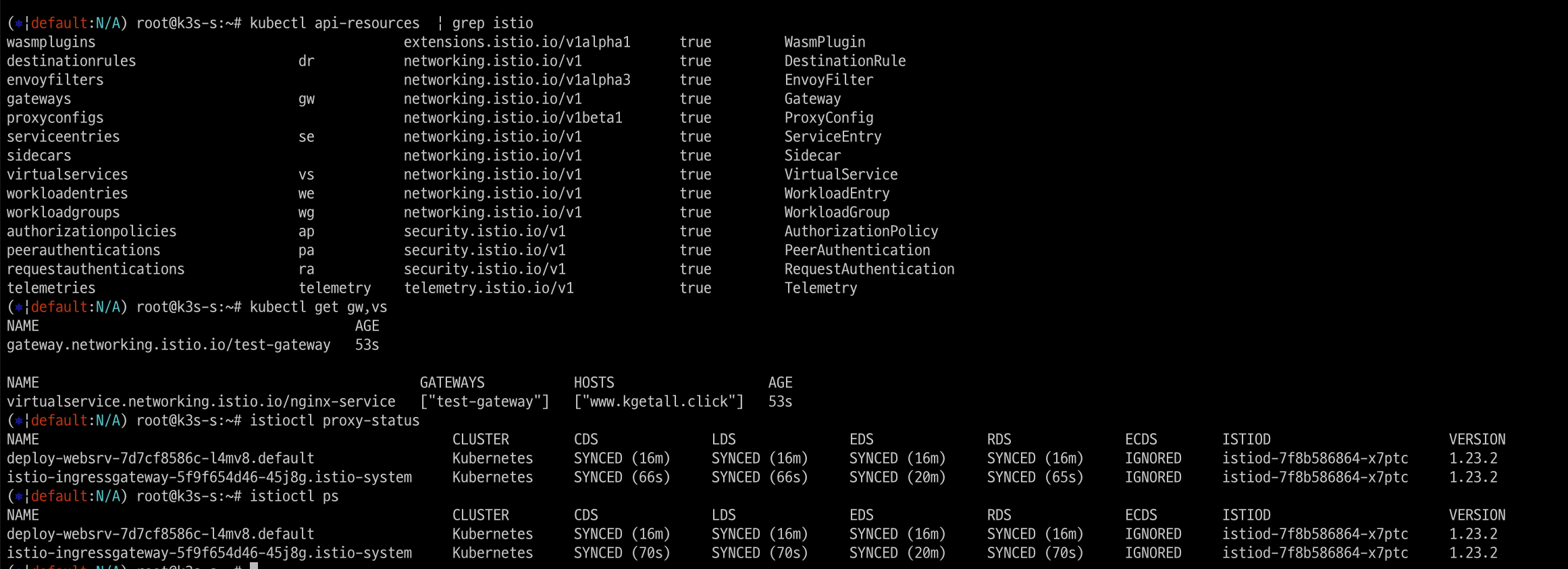
4.3 Istio 를 통한 Nginx 파드 접속 테스트
- 외부(자신의PC)에서 접속 테스트
curl -s $MYDOMAIN:$IGWHTTP | grep -o "<title>.*</title>"- 출력 로그 정보 확인
kubetail -n istio-system -l app=istio-ingressgateway -f
kubetail -l app=deploy-websrv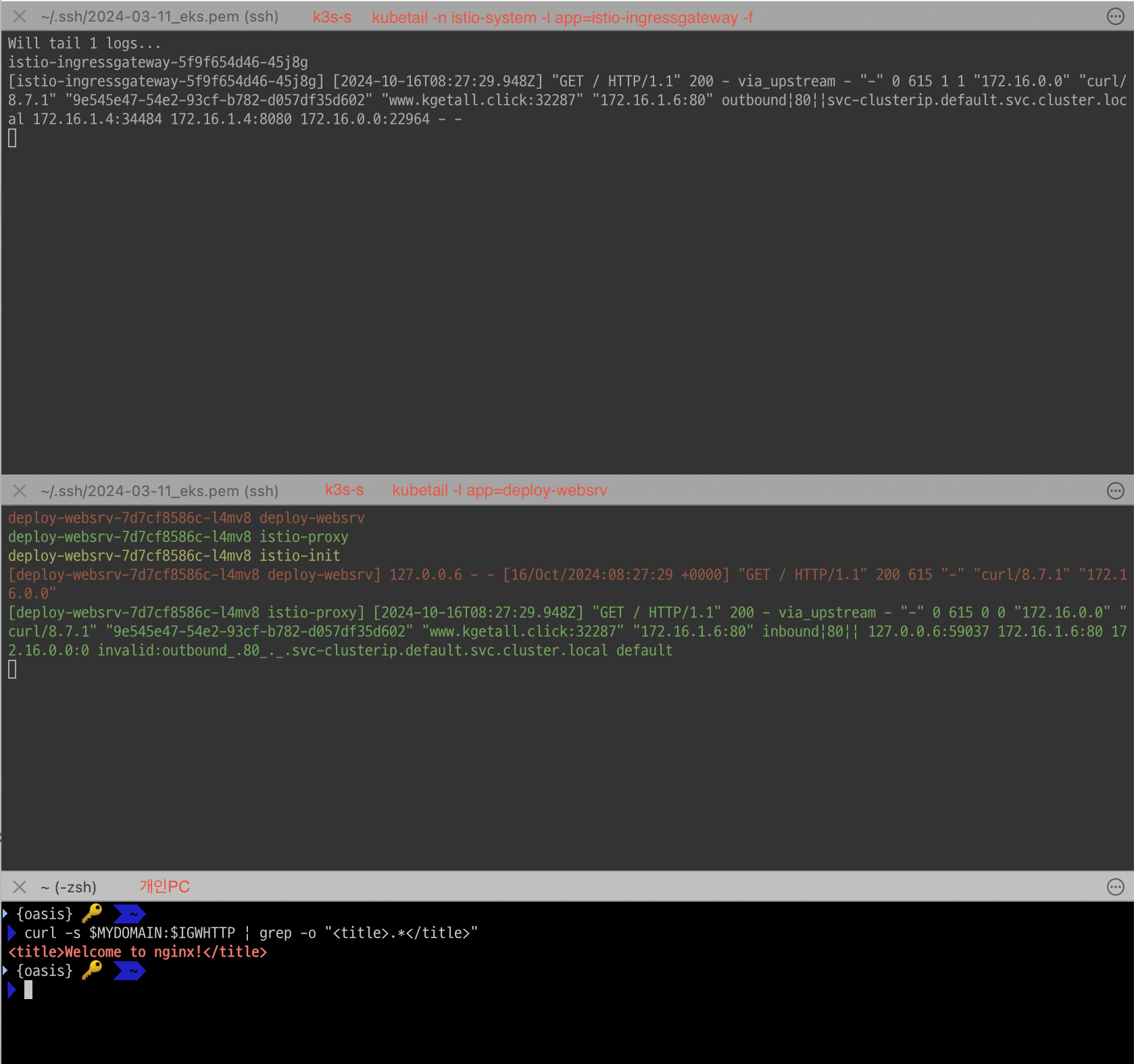
4.4 Istio Controlplane과 Istio Proxy 통신
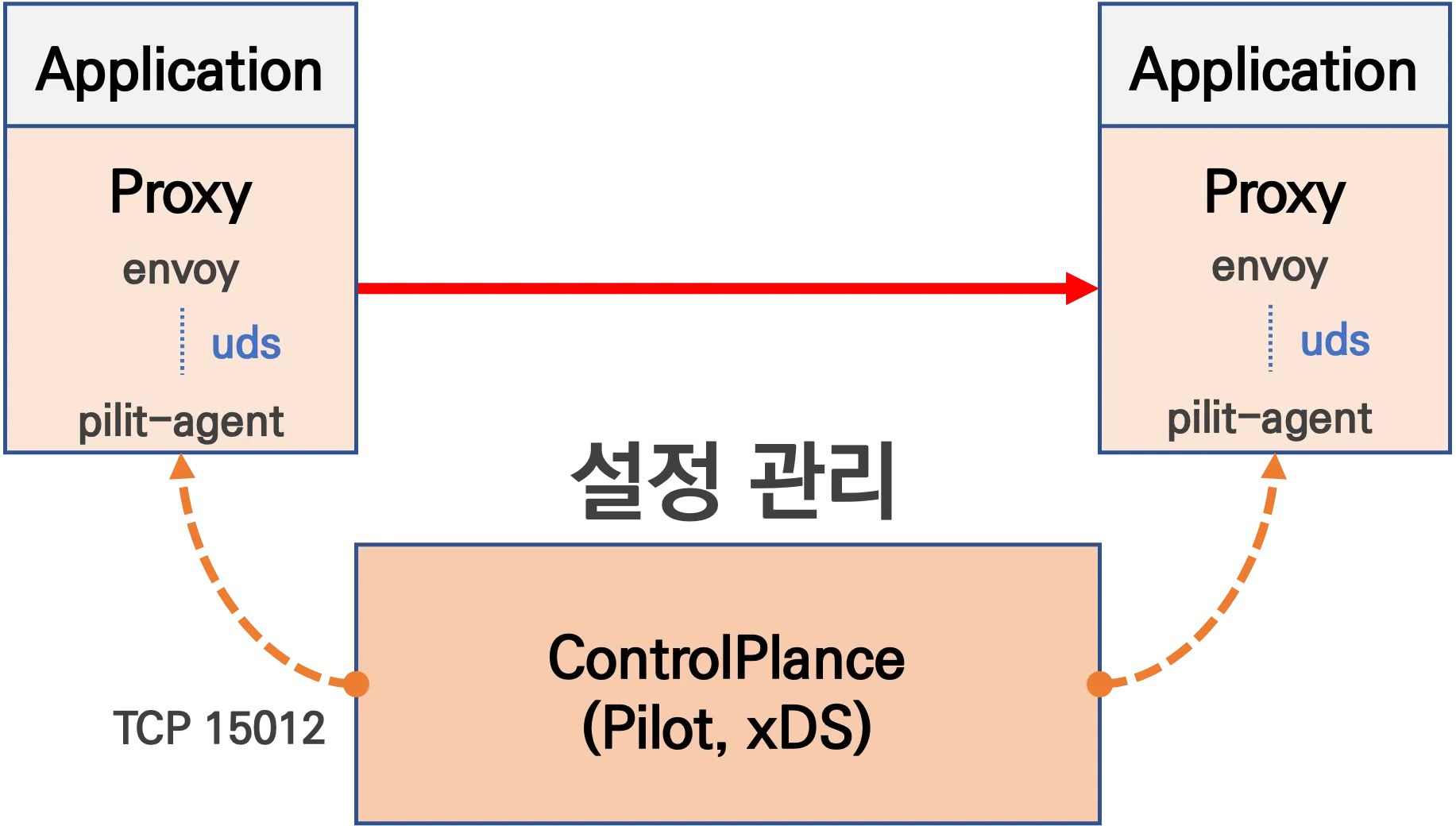
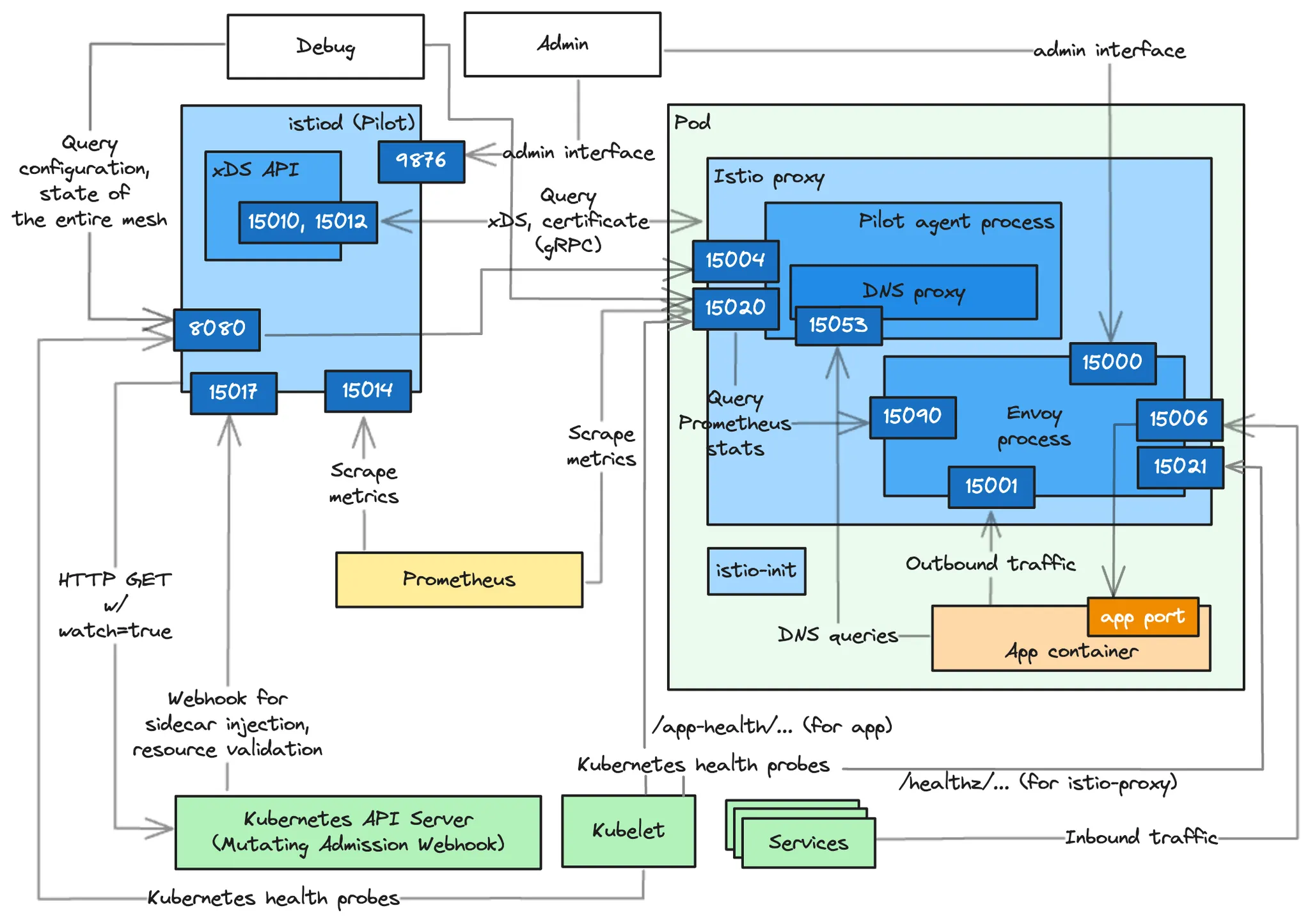
- Management 서비스(Istiod)와 통신하면서 configuration 을 갱신 : Istod - [Istop-proxy ↔ envoy]
- ControlPlane과 Istio-proxy내 pilot-agent가 TCP 15012 Port를 통해서 설정을 전달하고
- Istio-proxy내 pilot-agent과 envoy간에는 유닉스 도메인 소켓 통신으로 설정이 공유됨
# istio-proxy 사용자 정보 확인 : uid(1337):gid(1337) 확인 -> iptables rule 에서 사용됨
kubectl exec -it deploy/deploy-websrv -c istio-proxy -- tail -n 3 /etc/passwd
ubuntu:x:1000:1000:Ubuntu:/home/ubuntu:/bin/bash
tcpdump:x:100:102::/nonexistent:/usr/sbin/nologin
istio-proxy:x:1337:1337::/home/istio-proxy:/bin/sh

# envoy 설정 정보 확인 : dynamic_resources , static_resources - listeners  : 출력되는 IP가 누구인지 확인 해보자
kubectl exec -it deploy/deploy-websrv -c istio-proxy -- cat /etc/istio/proxy/envoy-rev.json
kubectl exec -it deploy/deploy-websrv -c istio-proxy -- ss -nlp
kubectl exec -it deploy/deploy-websrv -c istio-proxy -- ss -np
kubectl exec -it deploy/deploy-websrv -c istio-proxy -- netstat -np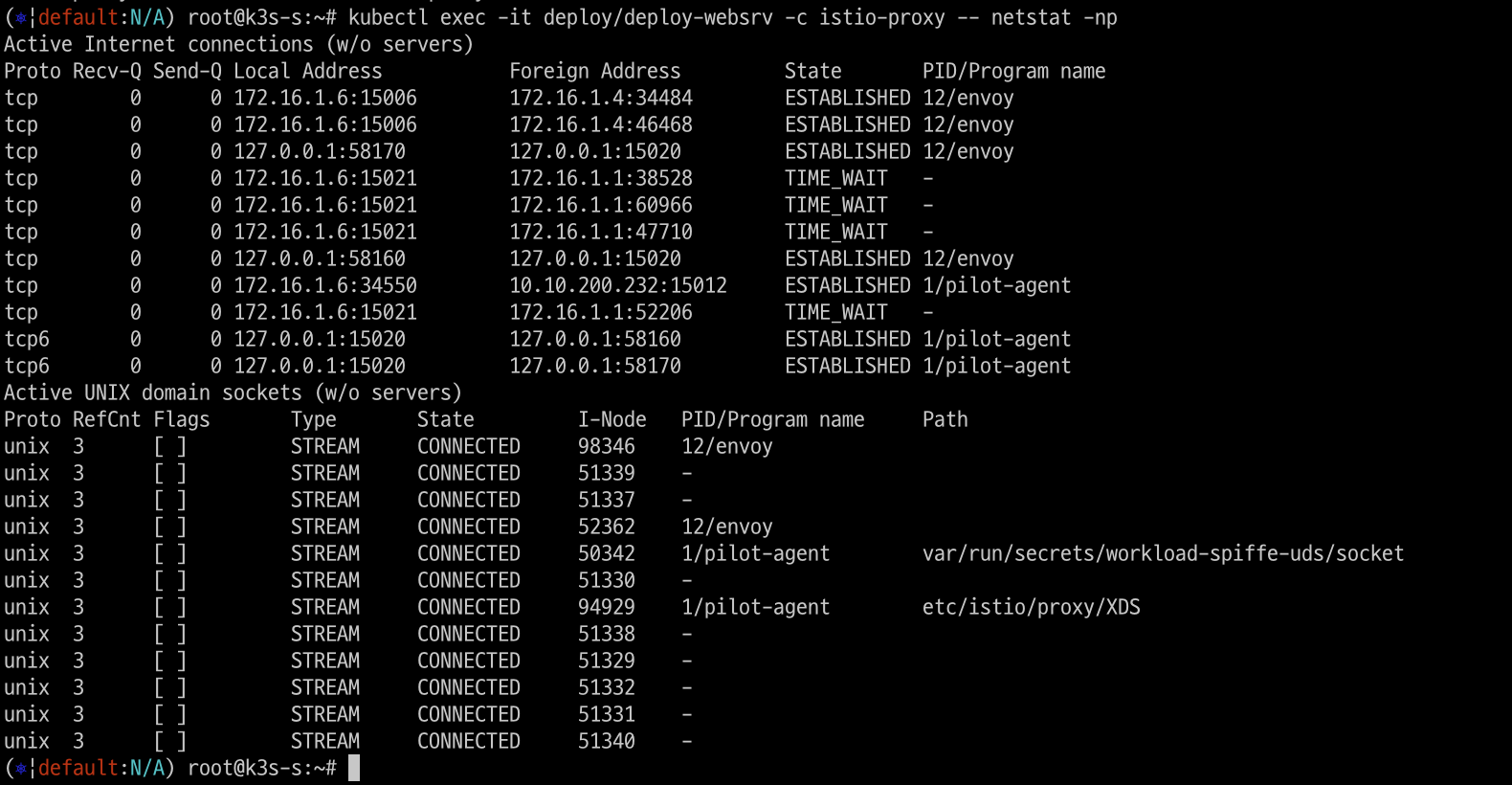
# istio-proxy에서 pilot-agent와 envoy 프로세스가 구동되는 것을 확인
kubectl exec -it deploy/deploy-websrv -c istio-proxy -- ps -ef
UID          PID    PPID  C STIME TTY          TIME CMD
istio-p+       1       0  0 07:28 ?        00:00:01 /usr/local/bin/pilot-agent proxy sidecar --domain default.svc.cluster.local --proxyLogLevel=warning --prox
istio-p+      12       1  0 07:28 ?        00:00:19 /usr/local/bin/envoy -c etc/istio/proxy/envoy-rev.json --drain-time-s 45 --drain-strategy immediate --loca
istio-p+      40       0 50 09:16 pts/0    00:00:00 ps -ef


# 출력되는 IP가 누구인지 확인 해보자
kubectl get pod,svc -A -owide
kubectl exec -it deploy/deploy-websrv -c istio-proxy -- netstat -antp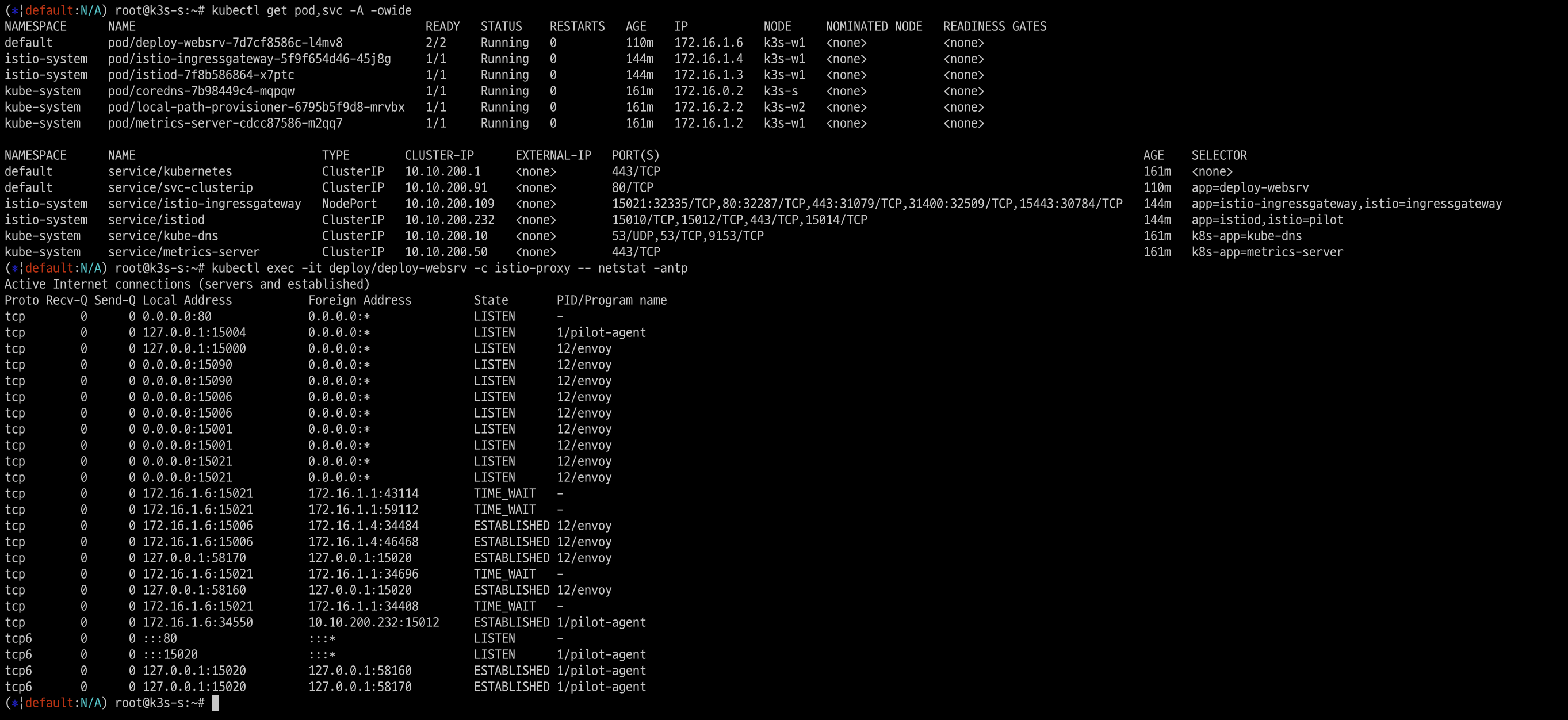
# istiod 정보 같이 확인 : 출력되는 IP가 누구인지 확인 해보자
kubectl get pod,svc -A -owide
kubectl exec -it deploy/istiod -n istio-system -- ps -ef
kubectl exec -it deploy/istiod -n istio-system -- netstat -antp
kubectl exec -it deploy/istiod -n istio-system -- ss -nlp
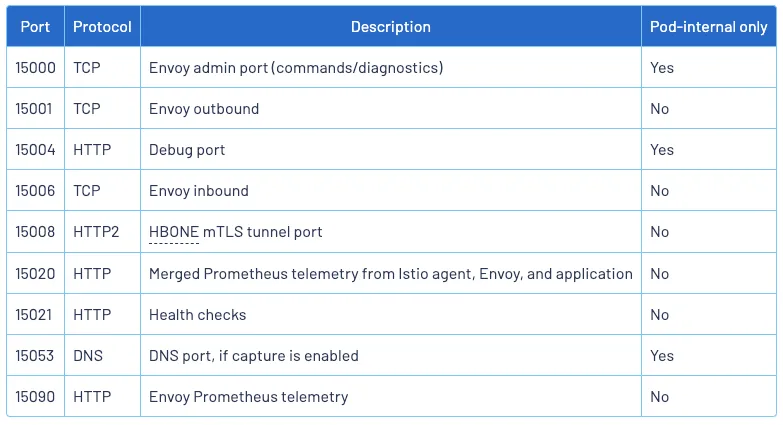
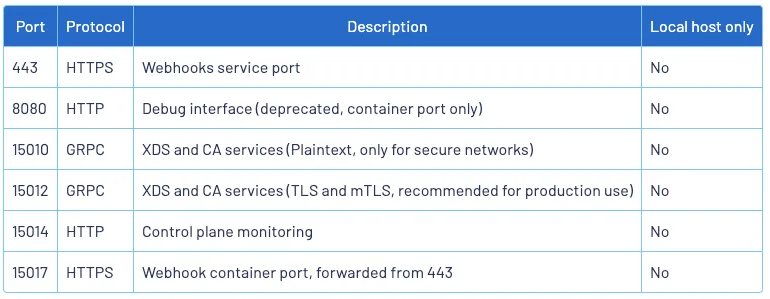
kubectl exec -it deploy/istiod -n istio-system -- ss -np- istio-proxy, Istiod 가 각각 사용하는 포트 정보
istio-proxy 사용 포트
istiod 사용 포트
5. Bookinfo 실습
5.1 Bookinfo 개요
Istio 기능을 테스트 하기 위해서 4개의 마이크로서비스로 구성(Productpage, reviews, ratings, details)된 실습 환경을 구성해봅니다.
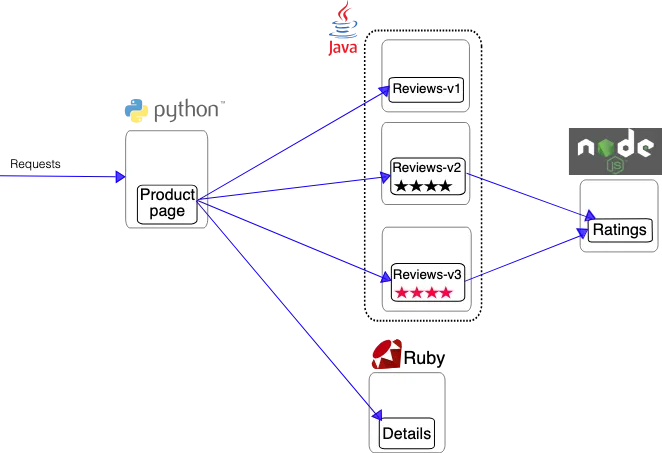
Bookinfo 실습환경은 대략적으로 아래와 같은 구성입니다.
- ProductPage 페이지에서 요청을 받으면, 도서 리뷰를 보여주는 Reviews 서비스와 도서 상세 정보를 보여주는 Details 서비스에 접속
- ProductPage 는 Reviews 와 Details 결과를 사용자에게 응답
- Reviews 서비스는 v1, v2, v3 세 개의 버전이 있고 v2, v3 버전의 경우 Ratings 서비스에 접소갛여 도서에 대한 5단계 평가를 가져옴
5.1.1 Bookinfo 애플리케이션 배포
# 모니터링
watch -d 'kubectl get pod -owide;echo;kubectl get svc'

# Bookinfo 애플리케이션 배포
echo $ISTIOV
cat ~/istio-$ISTIOV/samples/bookinfo/platform/kube/bookinfo.yaml
kubectl apply -f ~/istio-$ISTIOV/samples/bookinfo/platform/kube/bookinfo.yaml

# 확인
kubectl get all,sa

# product 웹 접속 확인
kubectl exec "$(kubectl get pod -l app=ratings -o jsonpath='{.items[0].metadata.name}')" -c ratings -- curl -sS productpage:9080/productpage | grep -o "<title>.*</title>"

# 로그
kubetail -l app=productpage -f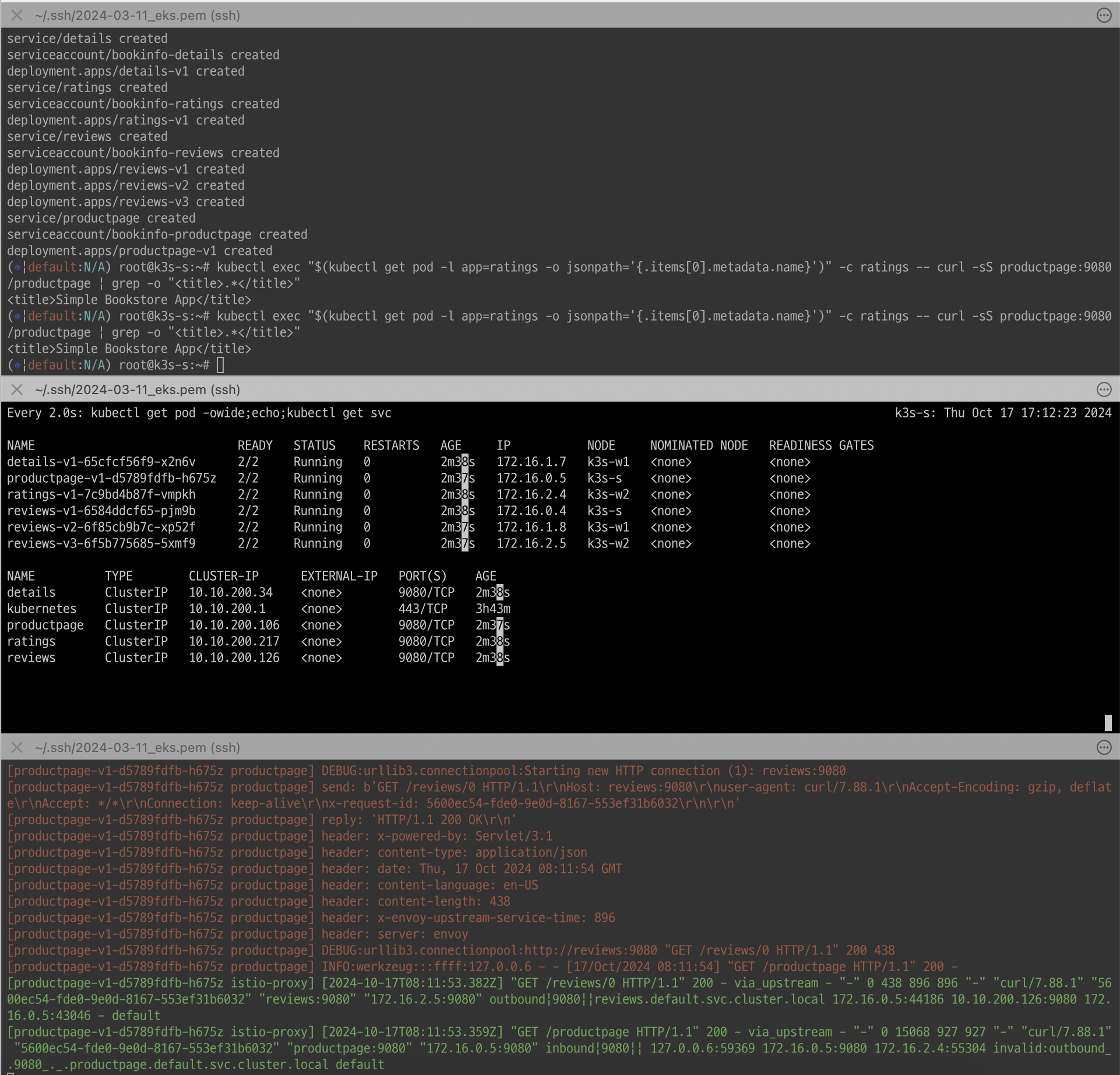
5.1.2 Istio 를 통한 인입 기본 설정
5.1.2.1 Istio Gateway/VirtualService 설정
# Istio Gateway/VirtualService 설정
cat ~/istio-$ISTIOV/samples/bookinfo/networking/bookinfo-gateway.yaml
kubectl apply -f ~/istio-$ISTIOV/samples/bookinfo/networking/bookinfo-gateway.yaml

# 확인
kubectl get gw,vs
istioctl proxy-status
NAME                                                   CLUSTER        CDS                LDS                EDS                RDS                ECDS        ISTIOD                      VERSION
details-v1-65cfcf56f9-4drsk.default                    Kubernetes     SYNCED (7m4s)      SYNCED (7m4s)      SYNCED (6m57s)     SYNCED (7m4s)      IGNORED     istiod-7f8b586864-mv944     1.23.2
istio-ingressgateway-5f9f654d46-c4g7s.istio-system     Kubernetes     SYNCED (3m7s)      SYNCED (3m7s)      SYNCED (6m57s)     SYNCED (3m7s)      IGNORED     istiod-7f8b586864-mv944     1.23.2
productpage-v1-d5789fdfb-5cr6m.default                 Kubernetes     SYNCED (6m59s)     SYNCED (6m59s)     SYNCED (6m57s)     SYNCED (6m59s)     IGNORED     istiod-7f8b586864-mv944     1.23.2
ratings-v1-7c9bd4b87f-9q4nv.default                    Kubernetes     SYNCED (7m3s)      SYNCED (7m3s)      SYNCED (6m57s)     SYNCED (7m3s)      IGNORED     istiod-7f8b586864-mv944     1.23.2
reviews-v1-6584ddcf65-rqgp7.default                    Kubernetes     SYNCED (7m2s)      SYNCED (7m2s)      SYNCED (6m57s)     SYNCED (7m2s)      IGNORED     istiod-7f8b586864-mv944     1.23.2
reviews-v2-6f85cb9b7c-h6m7p.default                    Kubernetes     SYNCED (7m2s)      SYNCED (7m2s)      SYNCED (6m57s)     SYNCED (7m2s)      IGNORED     istiod-7f8b586864-mv944     1.23.2
reviews-v3-6f5b775685-rprpb.default                    Kubernetes     SYNCED (6m58s)     SYNCED (6m58s)     SYNCED (6m57s)     SYNCED (6m58s)     IGNORED     istiod-7f8b586864-mv944     1.23.2

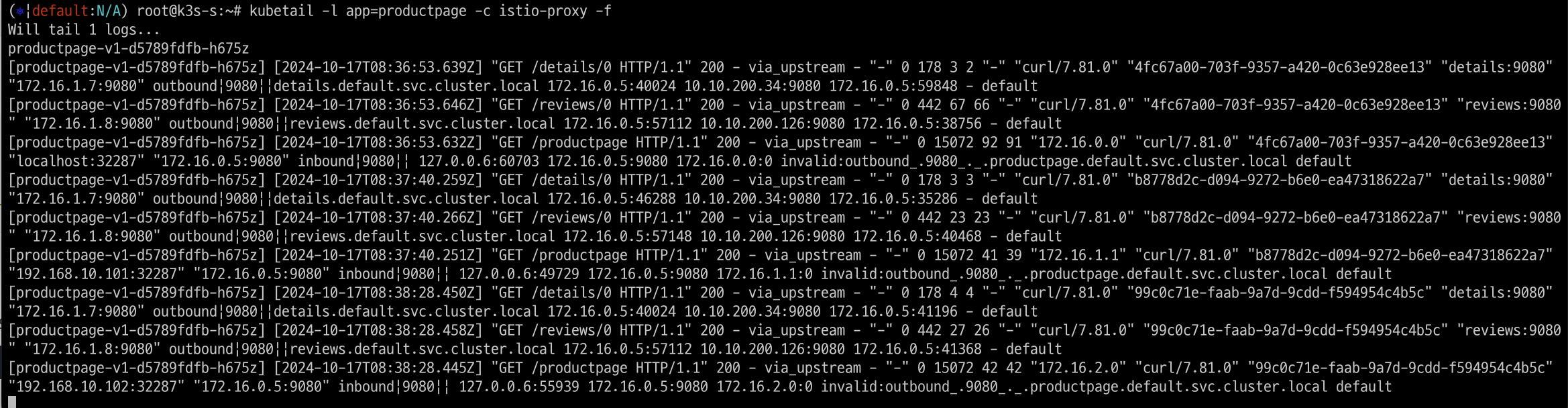
# productpage 파드의 istio-proxy 로그 확인 Access log 가 출력 - Default access log format : 링크
kubetail -l app=productpage -c istio-proxy -f
5.1.2.2 Istio 를 통한 productpage 접속(반복) 테스트 & 웹 브라우저 접속 테스트
- k3s-s NodePort 접속 확인
#
export IGWHTTP=$(kubectl get service -n istio-system istio-ingressgateway -o jsonpath='{.spec.ports[1].nodePort}')
echo $IGWHTTP
32287

# 접속 확인
kubectl get svc -n istio-system istio-ingressgateway
NAME                   TYPE       CLUSTER-IP      EXTERNAL-IP   PORT(S)                                                                      AGE
istio-ingressgateway   NodePort   10.10.200.109   <none>        15021:32335/TCP,80:32287/TCP,443:31079/TCP,31400:32509/TCP,15443:30784/TCP   25h

curl -s http://localhost:$IGWHTTP/productpage
curl -s http://192.168.10.101:$IGWHTTP/productpage
curl -s http://192.168.10.102:$IGWHTTP/productpage
모든 노드 포트로 정상 접속됩니다.
# 정보 확인
echo $MYDOMAIN
www.kgetall.click

cat /etc/hosts
192.168.10.10 www.kgetall.click

#
curl -s http://$MYDOMAIN:$IGWHTTP/productpage
도메인 주소로도 정상 접속됩니다.

- 자신의 PC에서 접속 확인
#
echo $MYDOMAIN $IGWHTTP
cat /etc/hosts

#
curl -v -s $MYDOMAIN:$IGWHTTP/productpage
#
aws ec2 describe-instances --query "Reservations[*].Instances[*].{PublicIPAdd:PublicIpAddress,InstanceName:Tags[?Key=='Name']|[0].Value,Status:State.Name}" --filters Name=instance-state-name,Values=running --output text
정상 접속 확인됨

- testpc 에서 접속 실행
# istio ingress gw 를 통한 접속 테스트
curl -s $MYDOMAIN:$IGWHTTP/productpage | grep -o "<title>.*</title>"
while true; do curl -s $MYDOMAIN:$IGWHTTP/productpage | grep -o "<title>.*</title>" ; echo "--------------" ; sleep 1; done
for i in {1..100};  do curl -s $MYDOMAIN:$IGWHTTP/productpage | grep -o "<title>.*</title>" ; done
정상 접속 확인됨

- PC 에서 웹 브라우저를 통해서 확인
http://NodeIP:NodePort/productpage 로 접속 후 새로고침 수행하여 별점 부분이 변경되는지 확인해본다.
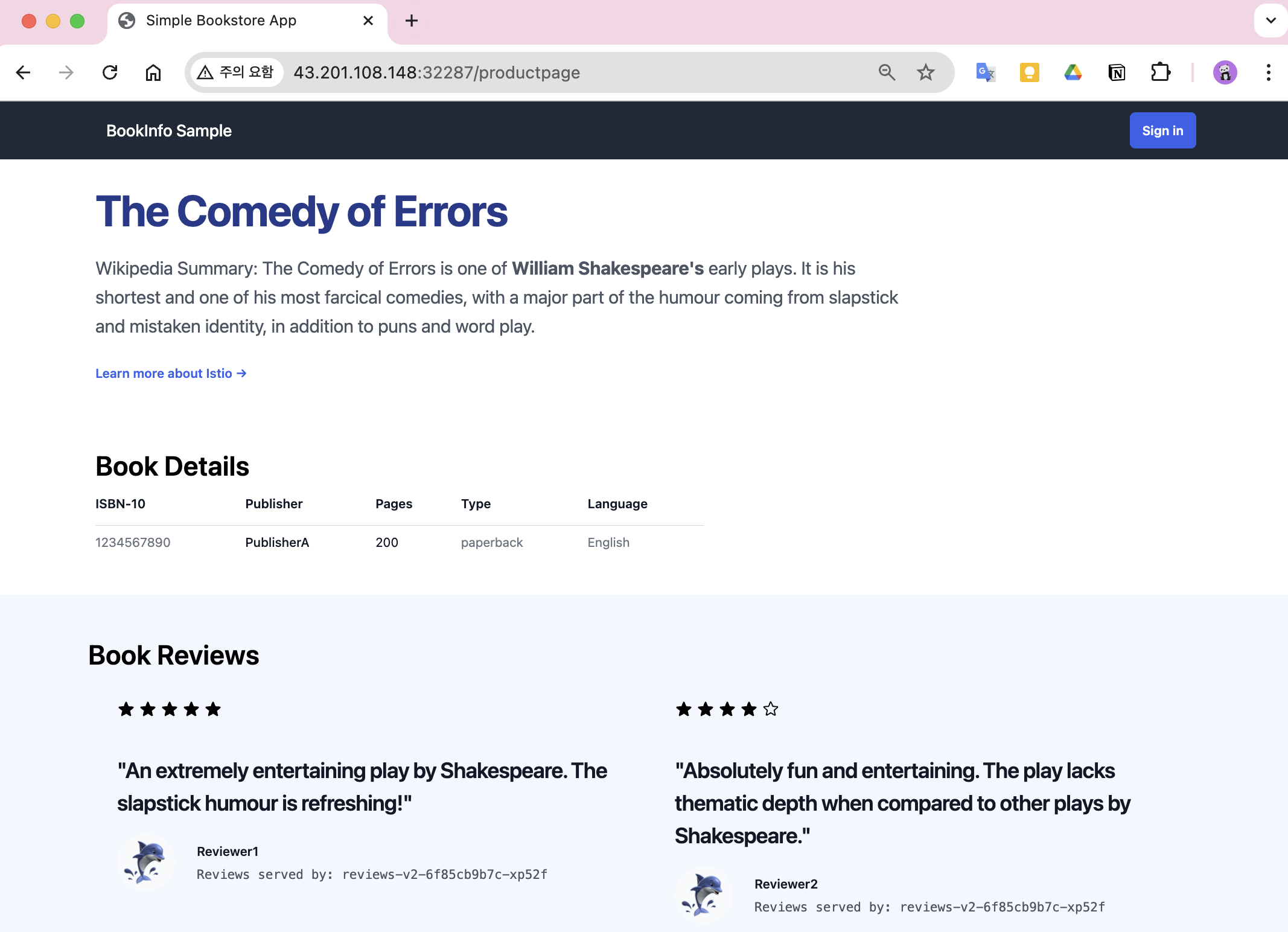
reviewer 앱이 바뀌면서 별점의 색상이 변경됨


5.2 모니터링 설정
Kiali Dashboard를 구성해서 Istio를 모니터링 해보겠습니다.
5.2.1 kiali 소개
Kiali는 Kubernetes 환경에서 Istio와 같은 서비스 메시(Service Mesh)를 시각화하고 모니터링하는 도구입니다. Kiali는 복잡한 마이크로서비스 아키텍처를 쉽게 이해하고 관리할 수 있도록 도와주며, 주로 Istio의 트래픽 흐름을 시각적으로 표시하고 네트워크 상태를 모니터링하는 데 사용됩니다.
주요기능은
1.	서비스 메시 시각화: Kiali는 Kubernetes 클러스터 내의 서비스 간 트래픽 흐름을 시각적으로 보여줍니다. 이를 통해 각 서비스 간의 관계와 통신 상태를 쉽게 파악할 수 있습니다.
2.	트래픽 모니터링 및 분석: 실시간으로 네트워크 트래픽을 분석하고, 트래픽의 성능 문제나 이상 현상을 감지할 수 있습니다.
3.	서비스 상태 및 성능: 각 마이크로서비스의 상태와 성능을 모니터링할 수 있으며, Latency(지연), Error Rate(오류율) 같은 메트릭을 제공하여 문제를 조기에 감지하고 해결할 수 있게 돕습니다.
4.	Istio 구성 관리: Istio 리소스(가령 VirtualService, DestinationRule 등)를 관리하고 편집할 수 있는 인터페이스를 제공합니다.
5.	Grafana 및 Jaeger 통합: Kiali는 Grafana나 Jaeger와 통합되어 시각화 대시보드와 트레이스 추적 데이터를 제공하여 더욱 깊이 있는 분석이 가능합니다.
Kiali는 Kubernetes 환경에서 Istio와 같은 서비스 메시를 사용하는 경우 매우 유용한 도구로, 마이크로서비스 아키텍처의 관리 복잡성을 줄이고 문제를 시각적으로 파악할 수 있도록 도와줍니다.
5.2.2 Kiali 및 Addon 설치
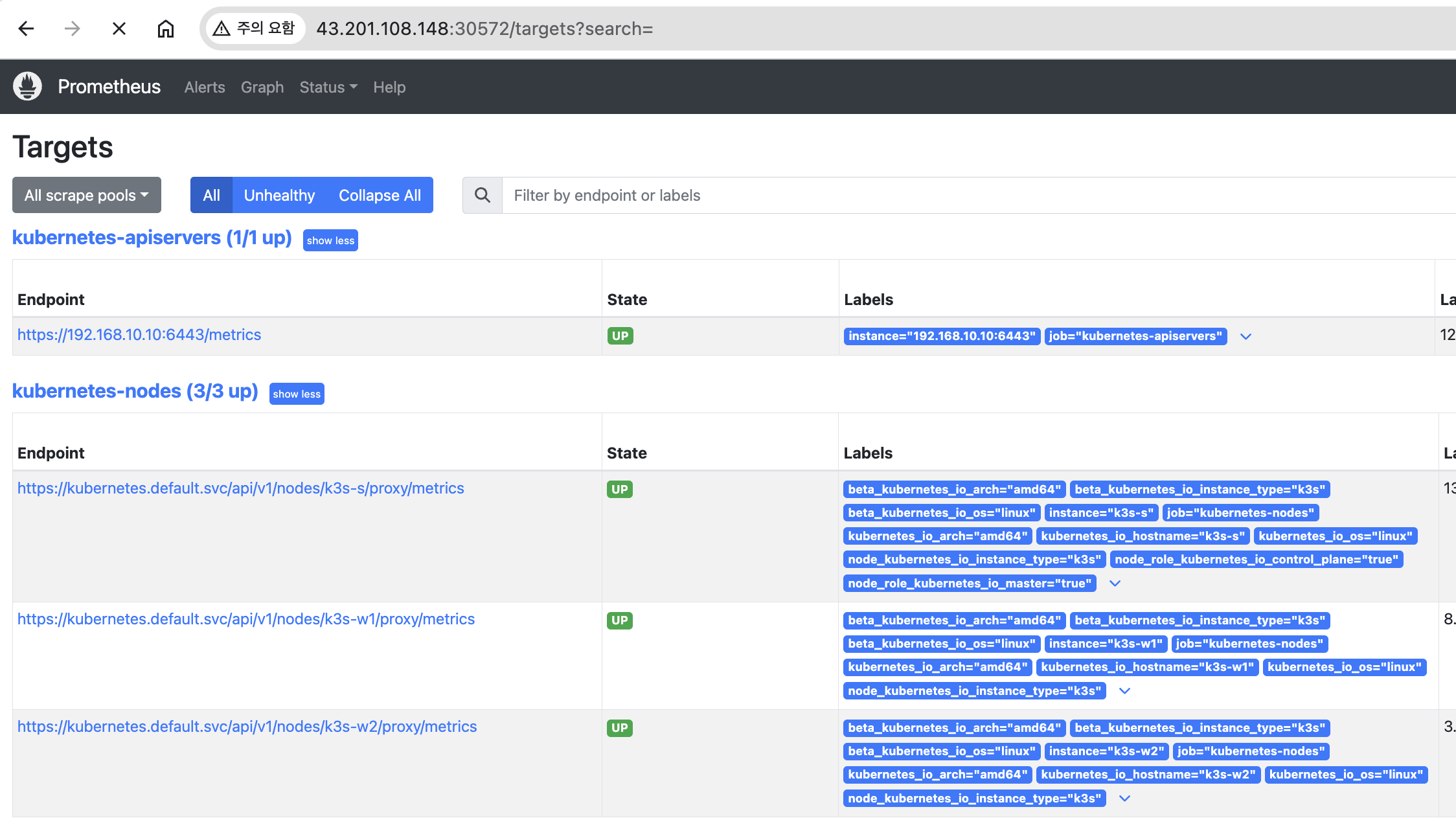
Kiali 대시보드와 Prometheus, Grafana, and Jaeger addon을 설치합니다.
# Install Kiali and the other addons and wait for them to be deployed. : Kiali dashboard, along with Prometheus, Grafana, and Jaeger.
tree ~/istio-$ISTIOV/samples/addons/
kubectl apply -f ~/istio-$ISTIOV/samples/addons # 디렉터리에 있는 모든 yaml 자원을 생성
kubectl rollout status deployment/kiali -n istio-system

# 확인
kubectl get all,sa,cm -n istio-system
kubectl get svc,ep -n istio-system

# kiali 서비스 변경
kubectl patch svc -n istio-system kiali -p '{"spec":{"type":"NodePort"}}'

# kiali 웹 접속 주소 확인
KIALINodePort=$(kubectl get svc -n istio-system kiali -o jsonpath={.spec.ports[0].nodePort})
echo -e "KIALI UI URL = http://$(curl -s ipinfo.io/ip):$KIALINodePort"

# Grafana 서비스 변경
kubectl patch svc -n istio-system grafana -p '{"spec":{"type":"NodePort"}}'

# Grafana 웹 접속 주소 확인 : 7개의 대시보드
GRAFANANodePort=$(kubectl get svc -n istio-system grafana -o jsonpath={.spec.ports[0].nodePort})
echo -e "Grafana URL = http://$(curl -s ipinfo.io/ip):$GRAFANANodePort"

# Prometheus 서비스 변경
kubectl patch svc -n istio-system prometheus -p '{"spec":{"type":"NodePort"}}'

# Prometheus 웹 접속 주소 확인
PROMENodePort=$(kubectl get svc -n istio-system prometheus -o jsonpath={.spec.ports[0].nodePort})
echo -e "Prometheus URL = http://$(curl -s ipinfo.io/ip):$PROMENodePort"-
Prometheus
-
grafana dashboard
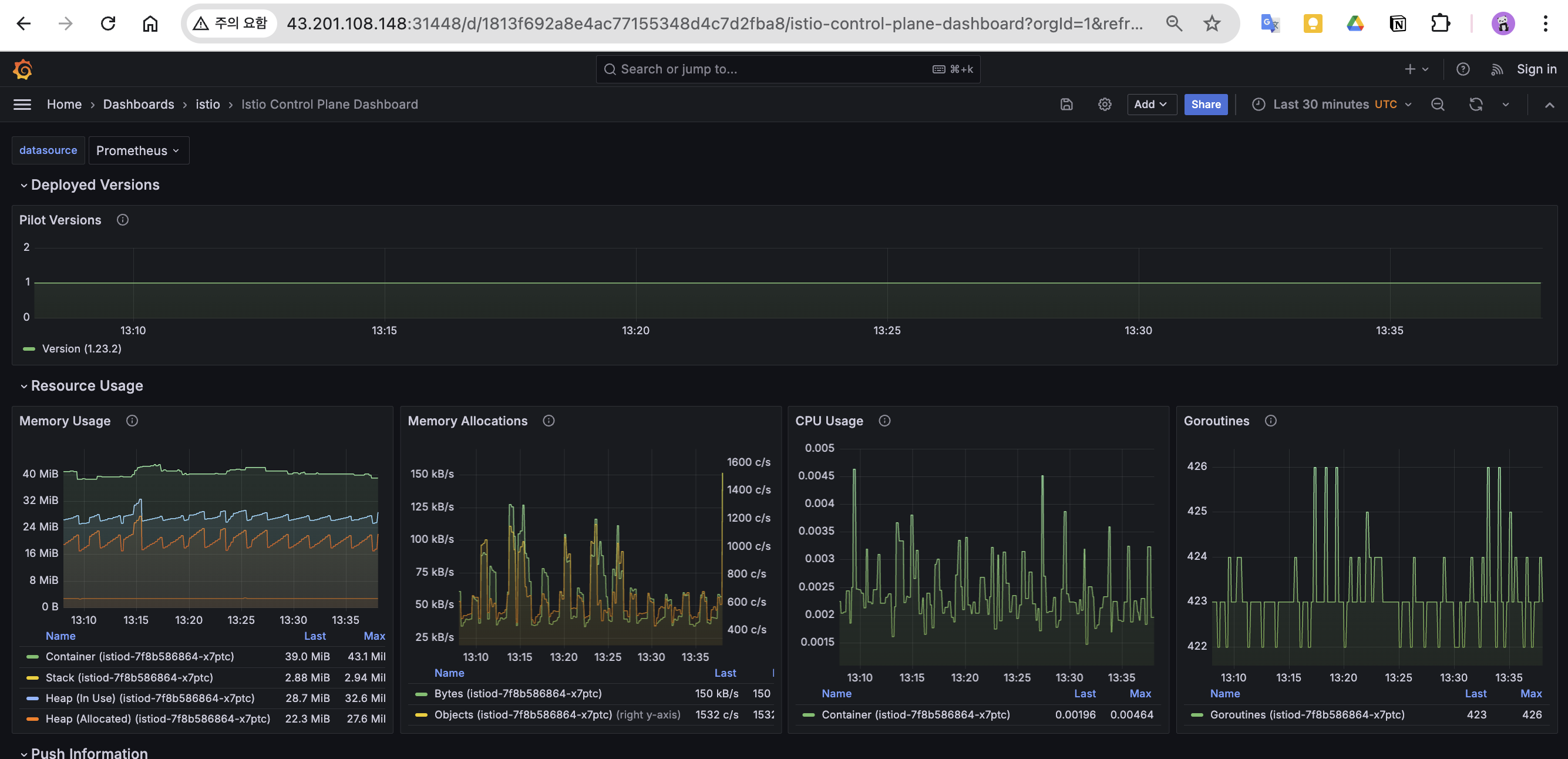
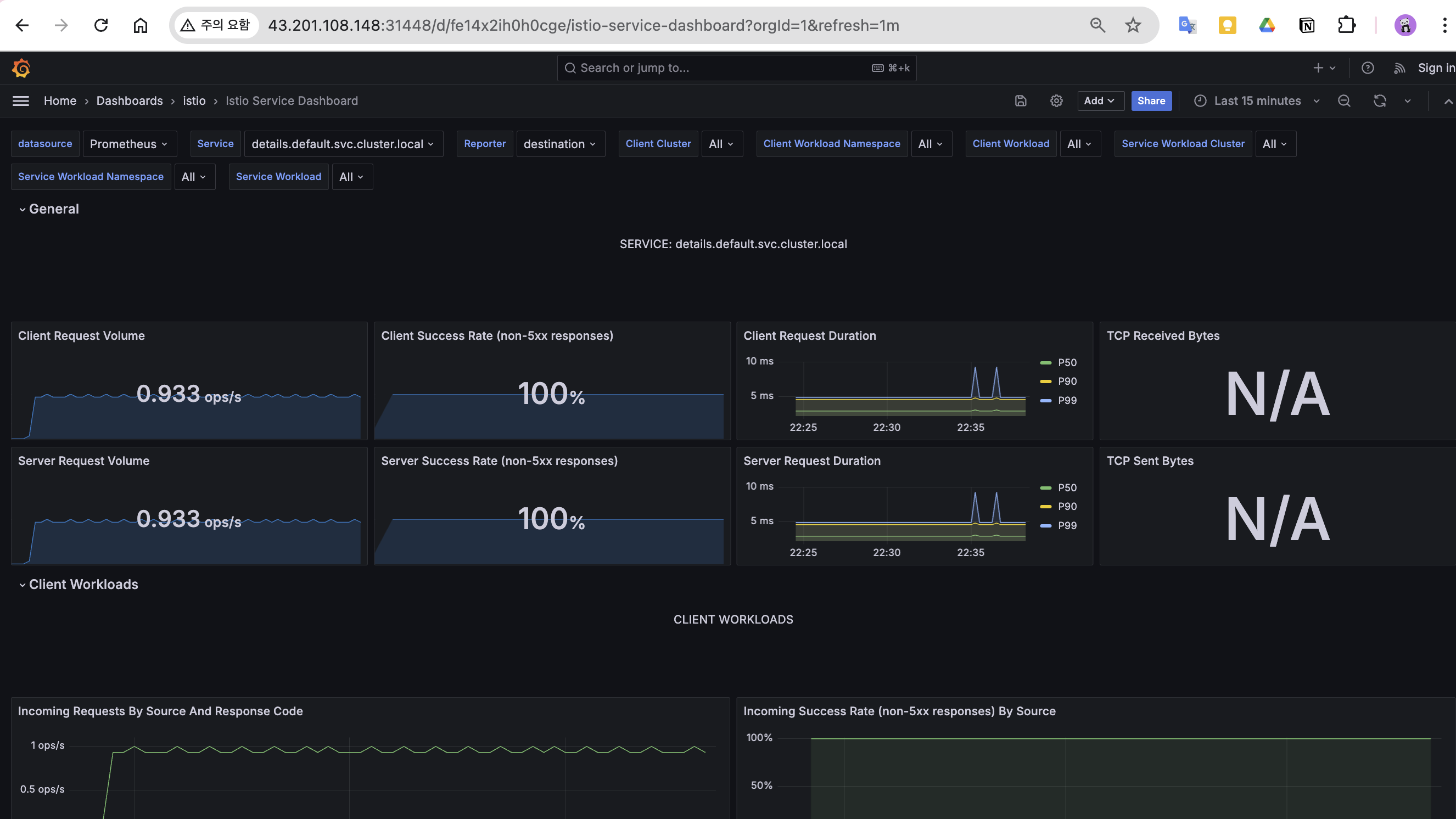
-
Kiali dashboard
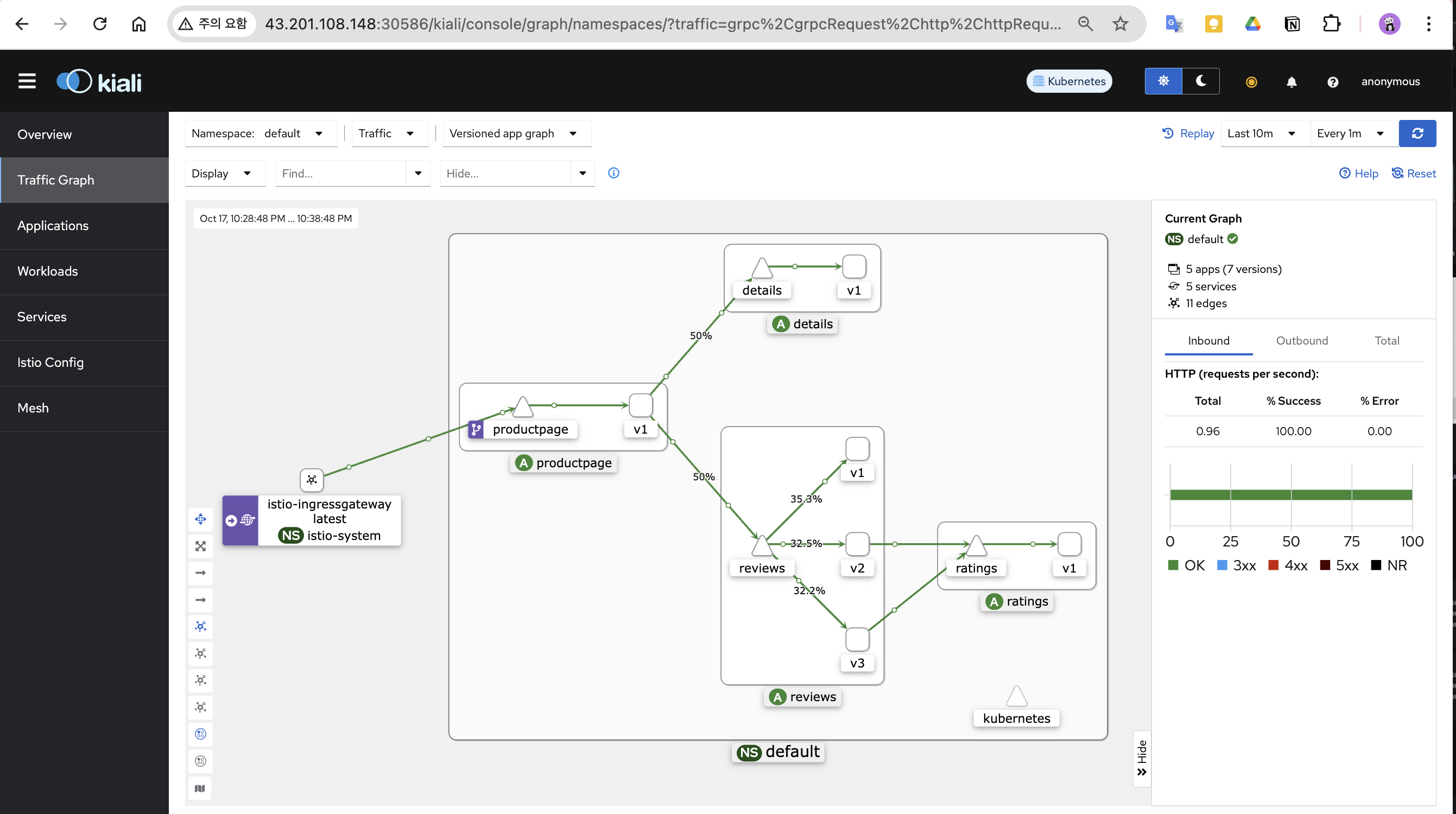
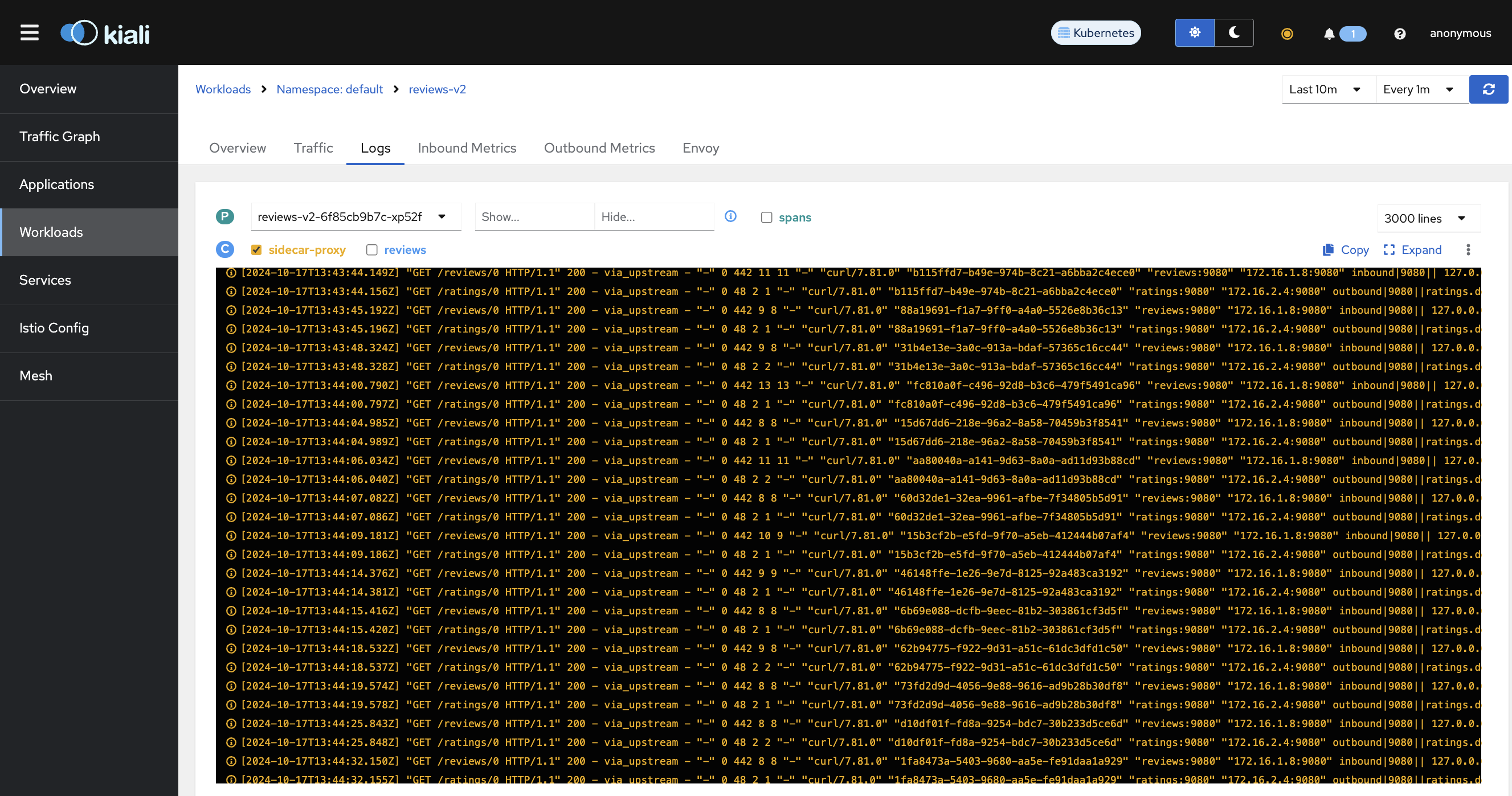
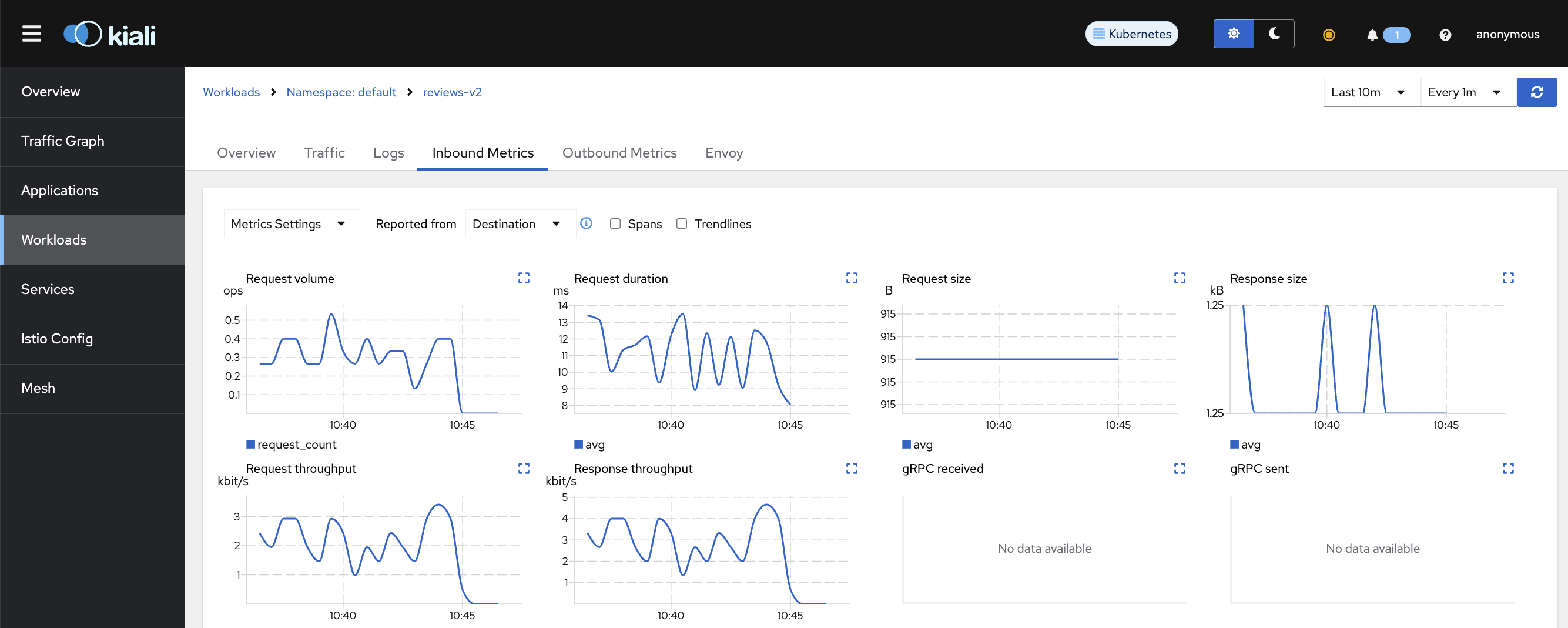
5.3 Traffic Management
트래픽 컨트롤은 VirtualService 와 DestinationRule 설정을 통해서 동작합니다.
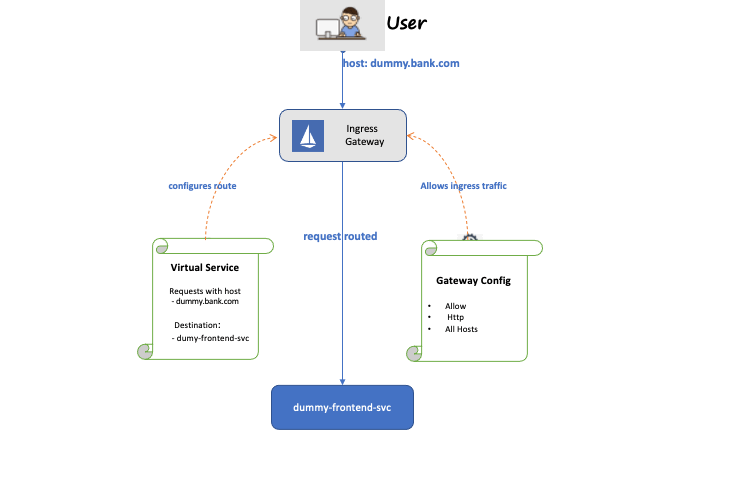
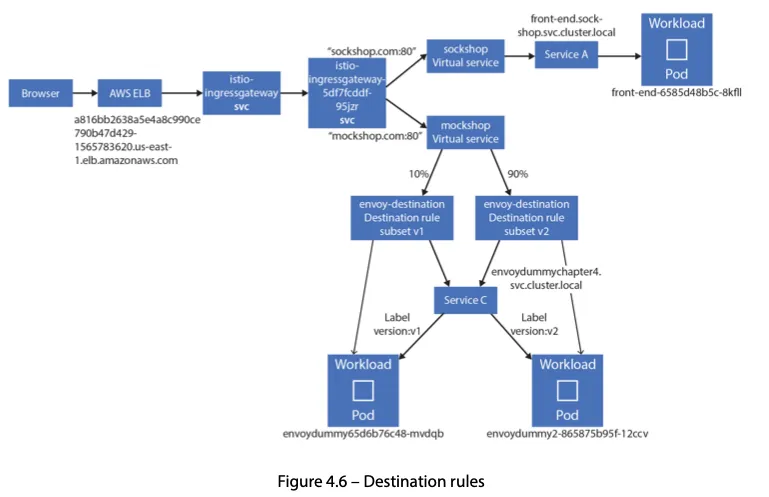
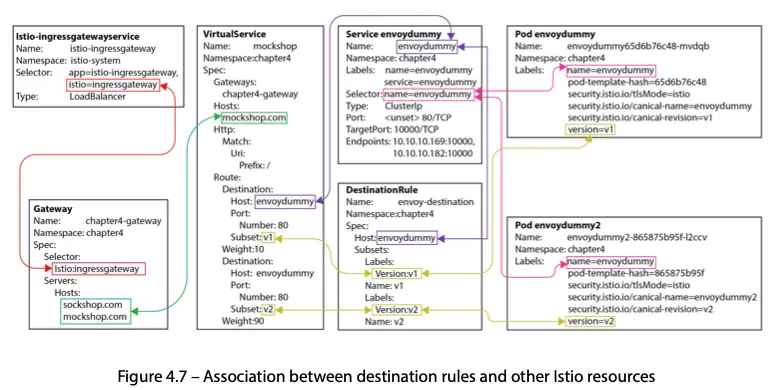
- 동작 소개 : 클라이언트 PC → Istio ingressgateway 파드 → (Gateway, VirtualService + DestinationRule) → Cluster(Endpoint - 파드)
- Gateway : 지정한 인그레스 게이트웨이로부터 트래픽이 인입, 프로토콜 및 포트, HOSTS, Proxy 등 설정 가능
- VirtualService : 인입 처리할 hosts 설정, L7 PATH 별 라우팅, 목적지에 대한 정책 설정 가능 (envoy route config) - 링크
- 사용 예시 : 헤더 매칭에 따라서, 각기 다른 destination 으로 라우팅
apiVersion: networking.istio.io/v1alpha3 kind: **VirtualService** metadata: name: reviews spec: hosts: - reviews http: - **match**: - headers: end-user: exact: jason route: - **destination**: host: reviews subset: **v2** - route: - **destination**: host: reviews subset: **v3** - VirtualService 는 DestinationRule 에서 설정된 서브셋(subset)을 사용하여 트래픽 컨트롤을 할 수 있다
- hosts 필드 : 목적지 주소 - IP address, a DNS name (FQDN), 혹은 k8s svc 이름 , wildcard (”*”) prefixes
- Routing rules : HTTP 경우 - Match 필드(예, 헤더) , Destination(istio/envoy 에 등록된 대상, subnet 에 DestinationRule 활용)
- HTTPRoute : redirect , rewrite , fault(장애 주입) , mirror(복제, 기본 100%) , corsPolicy(CORS 삽입) , headers(헤더 조작) 등 - 링크
- Routing rule precedence : Routing rules are evaluated in sequential order from top to bottom - 위에서 순차적 적용
- 사용 예시 : 헤더 매칭에 따라서, 각기 다른 destination 으로 라우팅
- DestinationRule : 실제 도착지(서비스와 1:1 연결)의 정교한 정책(부하분산, 연결 옵션, 서킷 브레이크, TLS 등)을 설정 - 링크
- 사용 예시 : 3개의 subsets for the
my-svcdestination service 에 3개의 subsets 이 있고, 이중 v1/v3 은 RAMDOM 이고 v2 는 ROUND_ROBINapiVersion: networking.istio.io/v1alpha3 kind: DestinationRule metadata: name: my-destination-rule spec: host: my-svc trafficPolicy: loadBalancer: simple: RANDOM **subsets**: - name: v1 labels: version: v1 - name: v2 labels: version: v2 trafficPolicy: loadBalancer: simple: ROUND_ROBIN - name: v3 labels: version: v3 - Load balancing options : Round robin(기본값) , Random , Weighted , Least requests - 링크
- Destination Rule : TrafficPolicy , Subset , ConnectionPoolSettings 등 - 링크
- 서브셋(subsets)을 정의할 수 있어 마이크로서비스 버전별로 라우팅할 때 사용한다
- 사용 예시 : 3개의 subsets for the
5.3.1 기본 Destination Rule 적용
# 샘플 파일들 확인
cd ~/istio-$ISTIOV/samples/bookinfo/networking
tree

# 기본 DestinationRule 적용
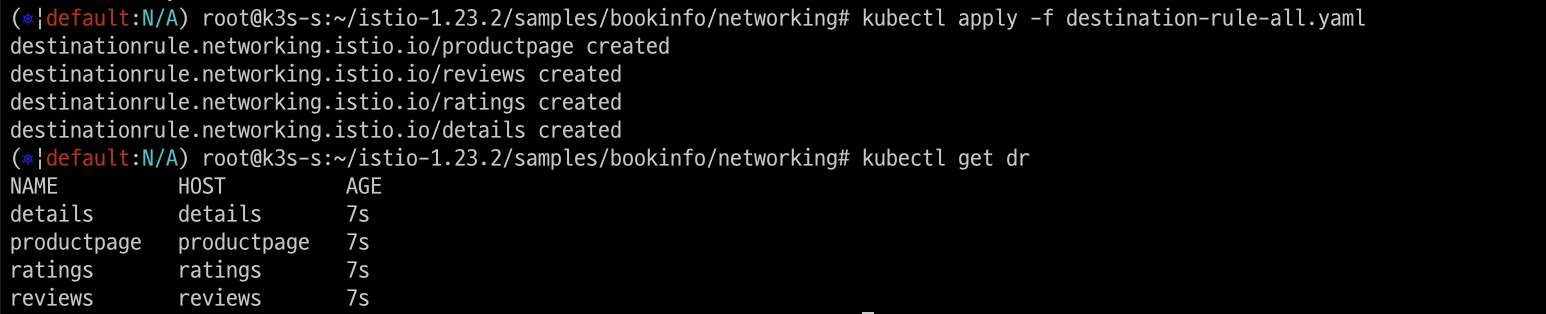
kubectl apply -f destination-rule-all.yaml

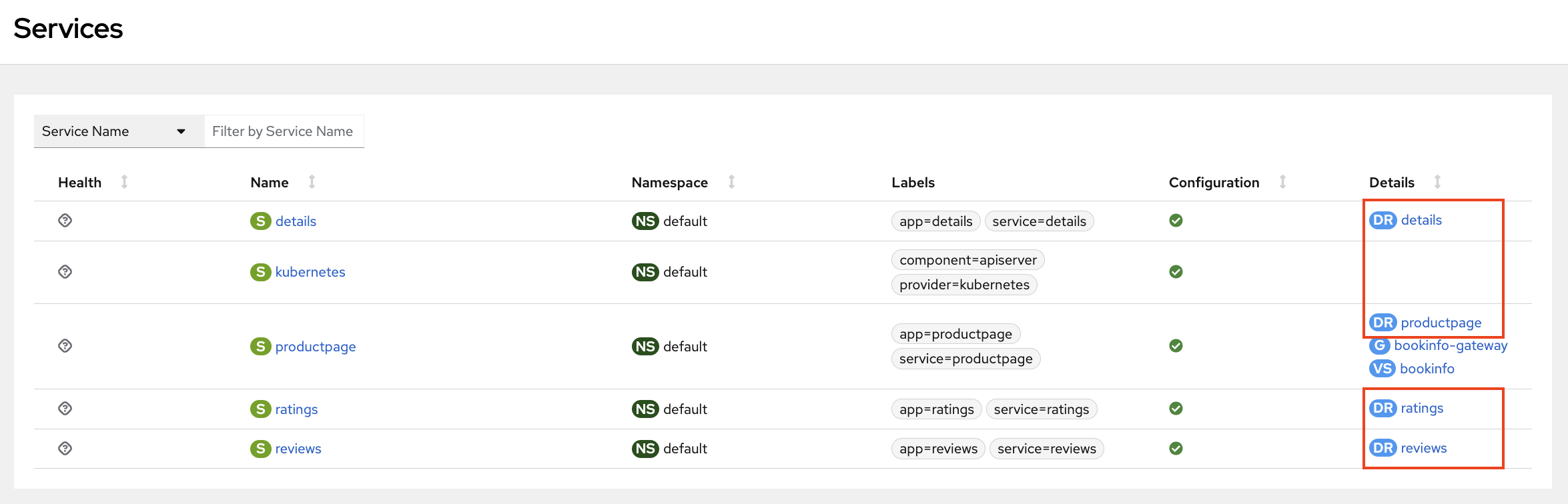
# DestinationRule 확인 dr(=destinationrules) : KIALI Services 확인 시 GW, VS, DR 확인
kubectl get dr
NAME          HOST          AGE
details       details       16m
productpage   productpage   16m
ratings       ratings       16m
reviews       reviews       16m
Destination Rule 이 추가됨
5.3.2 서비스 모두 v1 의 서브셋(subset) 에 전송하는 정책 테스트
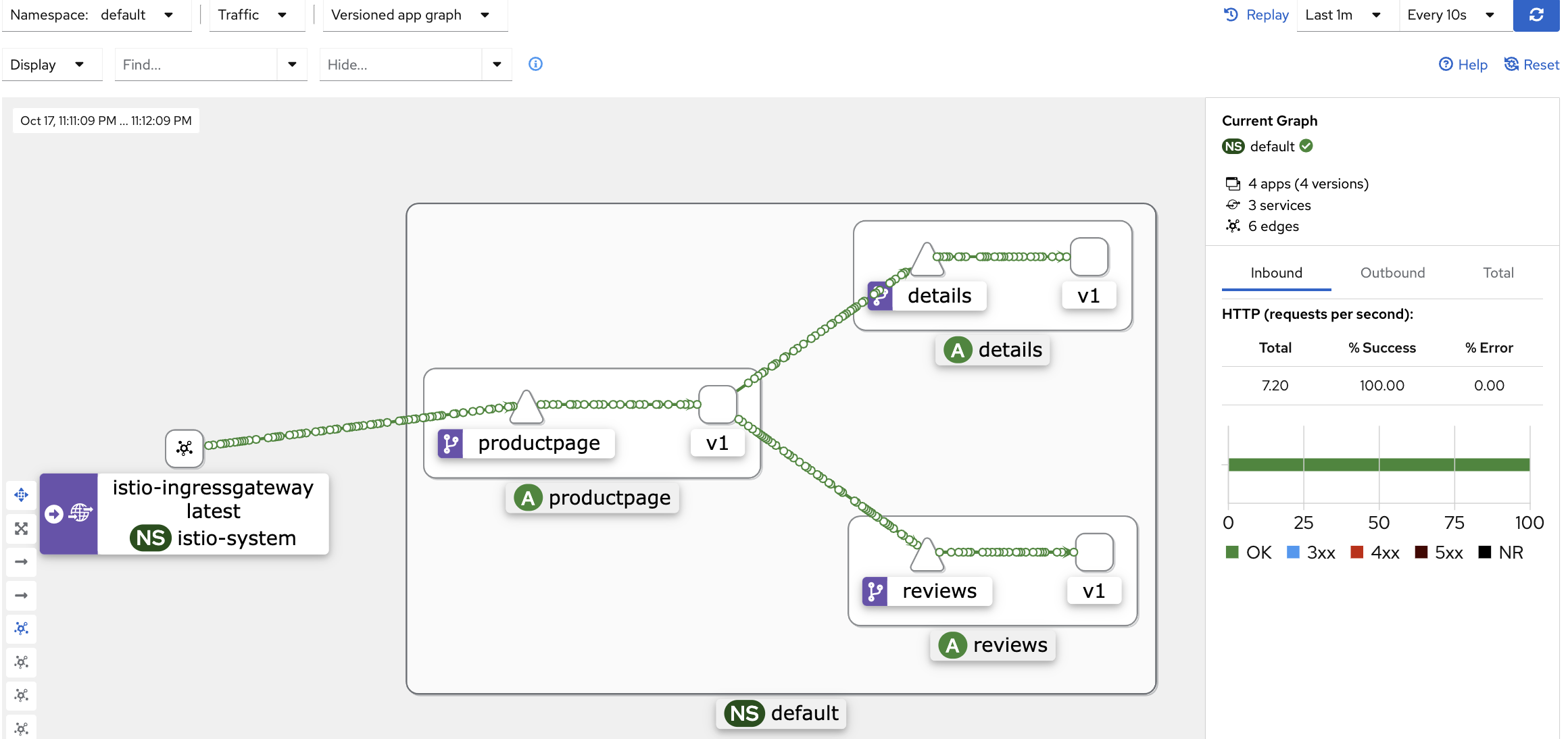
모든 서비스가 review1으로만 요청되도록 virtualservices 적용하고 kiali dashboard에서 확인해 봅니다.
# istio vs(virtualservices) 확인
kubectl get vs
NAME       GATEWAYS               HOSTS   AGE
bookinfo   ["bookinfo-gateway"]   ["*"]   85m

# 모든 마이크로서비스에 대해 v1 의 서브셋(subset) 에 전송되게 virtualservices 적용
kubectl apply -f virtual-service-all-v1.yaml

# istio vs(virtualservices) 확인 >> KIALI 에서 reviews v2,v3 향하는 트래픽 경로가 사라진다!
kubectl get virtualservices
NAME          GATEWAYS               HOSTS             AGE
bookinfo      ["bookinfo-gateway"]   ["*"]             85m
details                              ["details"]       9s
productpage                          ["productpage"]   9s
ratings                              ["ratings"]       9s
reviews                              ["reviews"]       9s
모든 트래픽이 reviews v1로만 흘러가는 것을 확인 할 수 있다.
5.3.3 Fault Injection
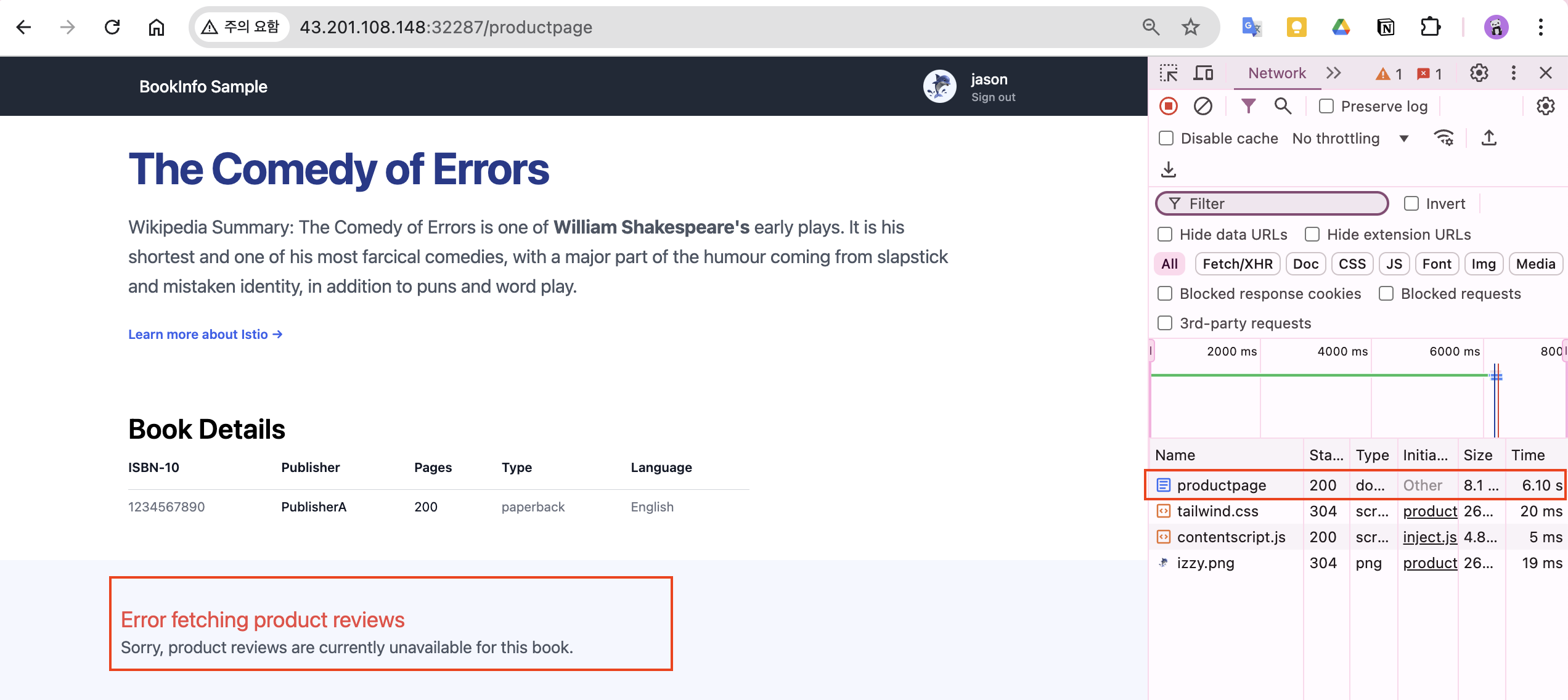
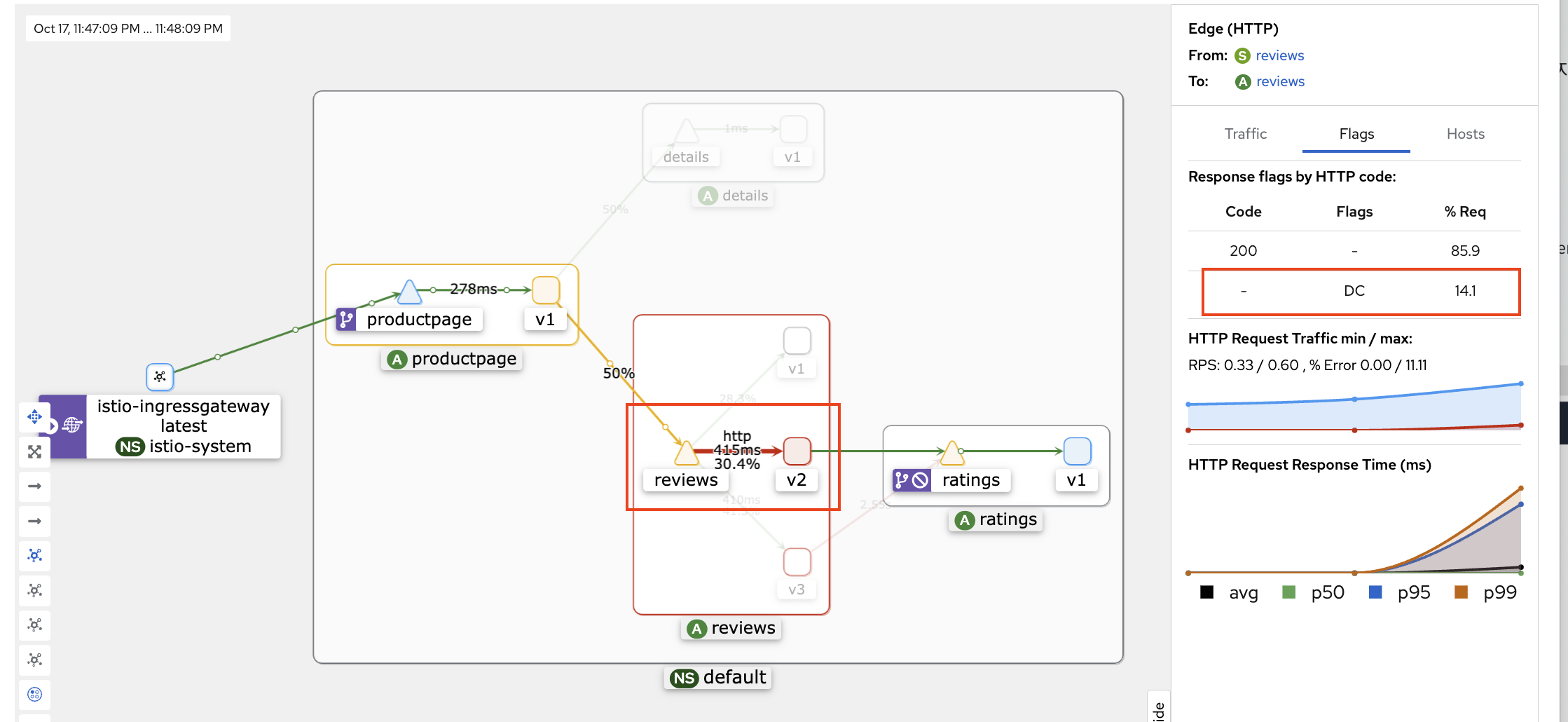
다음 정책을 적용시켜 의도적으로 지연(Latency)를 발생시켜 봅니다.
virtual-service-ratings-test-delay.yaml : end-user 가 jason 는 ratings v1 에 7초 지연 발생, 그외 사용자는 ratings v1 정상 연결
# virtualservices 적용
kubectl apply -f virtual-service-ratings-test-delay.yaml

# 로그 확인 : product 입장에서 접속 사용자(clinet) 연결을 끊어버림 0 DC downstream_remote_disconnect
kubetail -l app=productpage -f
5.4 Security 보안
많은 보안 사고 중에 내부자에 의한 정보유출이 많습니다. 내부로 부터의 유출을 막기위한 zero-trust 환경을 구축하기 위해서 Service Mesh를 활용하는 방법을 알아보겠습니다.
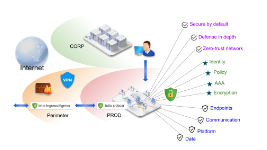
- To defend against man-in-the-middle attacks, they need traffic encryption.
- To provide flexible service access control, they need mutual TLS and fine-grained access policies.
- To determine who did what at what time, they need auditing tools.
구성요소
- A Certificate Authority (CA) for key and certificate management
- The configuration API server distributes to the proxies:
- Sidecar and perimeter proxies work as Policy Enforcement Points (PEPs) to secure communication between clients and servers.
- A set of Envoy proxy extensions to manage telemetry and auditing
아키텍처
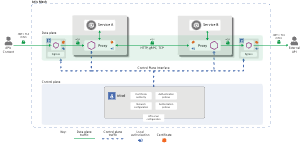
- The control plane handles configuration from the API server and configures the PEPs in the data plane.
- The PEPs are implemented using Envoy. The following diagram shows the architecture.
5.4.1 Authentication (Auto mutual TLS) 실습
-
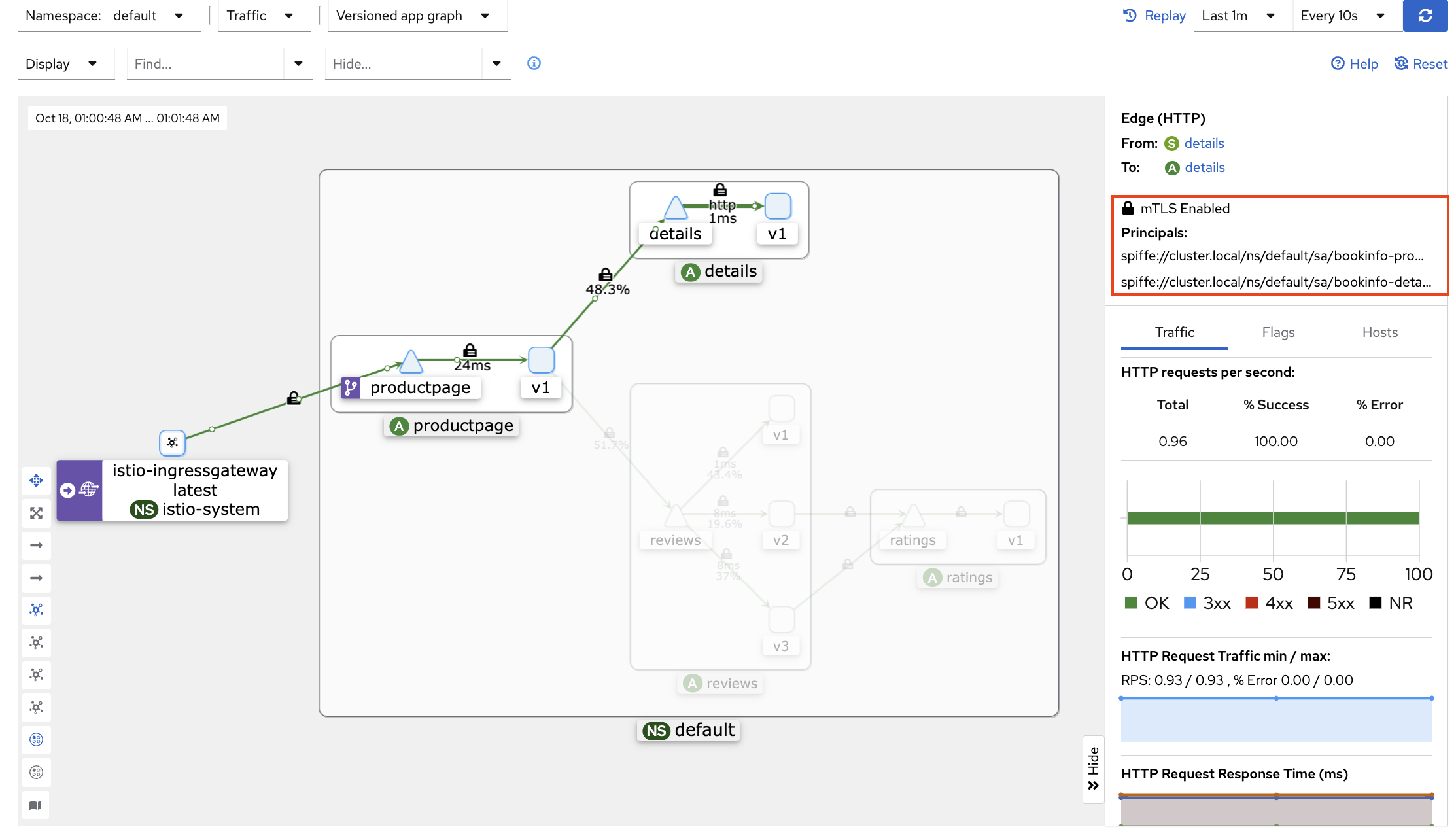
kiali 에서 Display(Security 체크) 후 자물쇠 클릭 후 오른쪽 창에 정보 확인
-
test 네임스페이스 생성 후 파드 생성(sidecar 미적용) 후 ratings 접속
# 네임스페이스 생성
kubectl create ns test

# 파드 생성
cat <<EOF | kubectl create -f -
apiVersion: v1
kind: Pod
metadata:
  name: netpod
  namespace: test
spec:
  containers:
  - name: netshoot-pod
    image: nicolaka/netshoot
    command: ["tail"]
    args: ["-f", "/dev/null"]
  terminationGracePeriodSeconds: 0
EOF

# 확인 : sidecar 미적용
kubectl get pod -n test

# ratings 서비스 확인
kubectl get svc ratings

# ratings 접속 시도 : 성공
kubectl exec -it -n test netpod -- curl ratings.default:9080/health ;echo
{"status":"Ratings is healthy"}

# 로그 확인
kubetail -l app=ratings -f
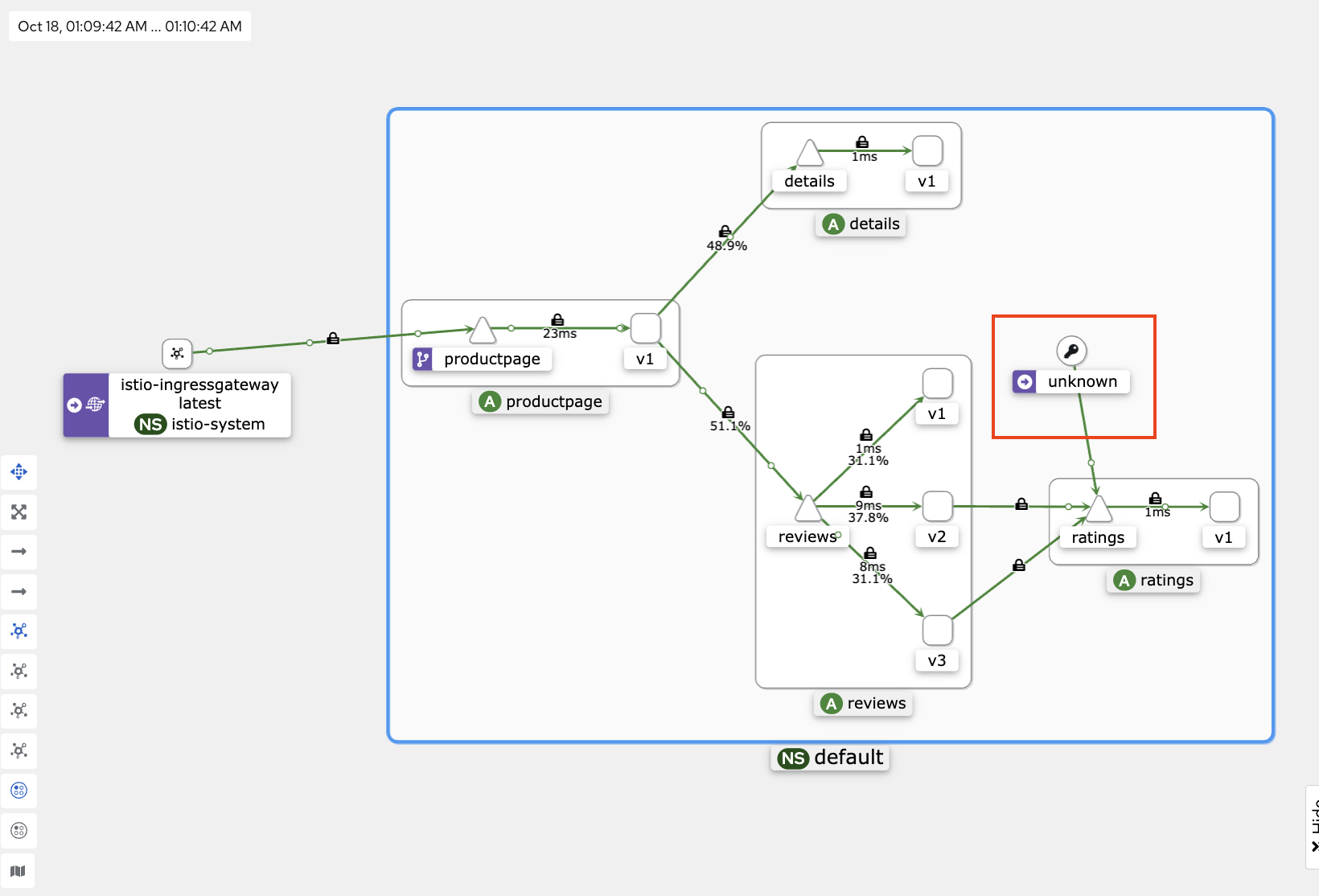
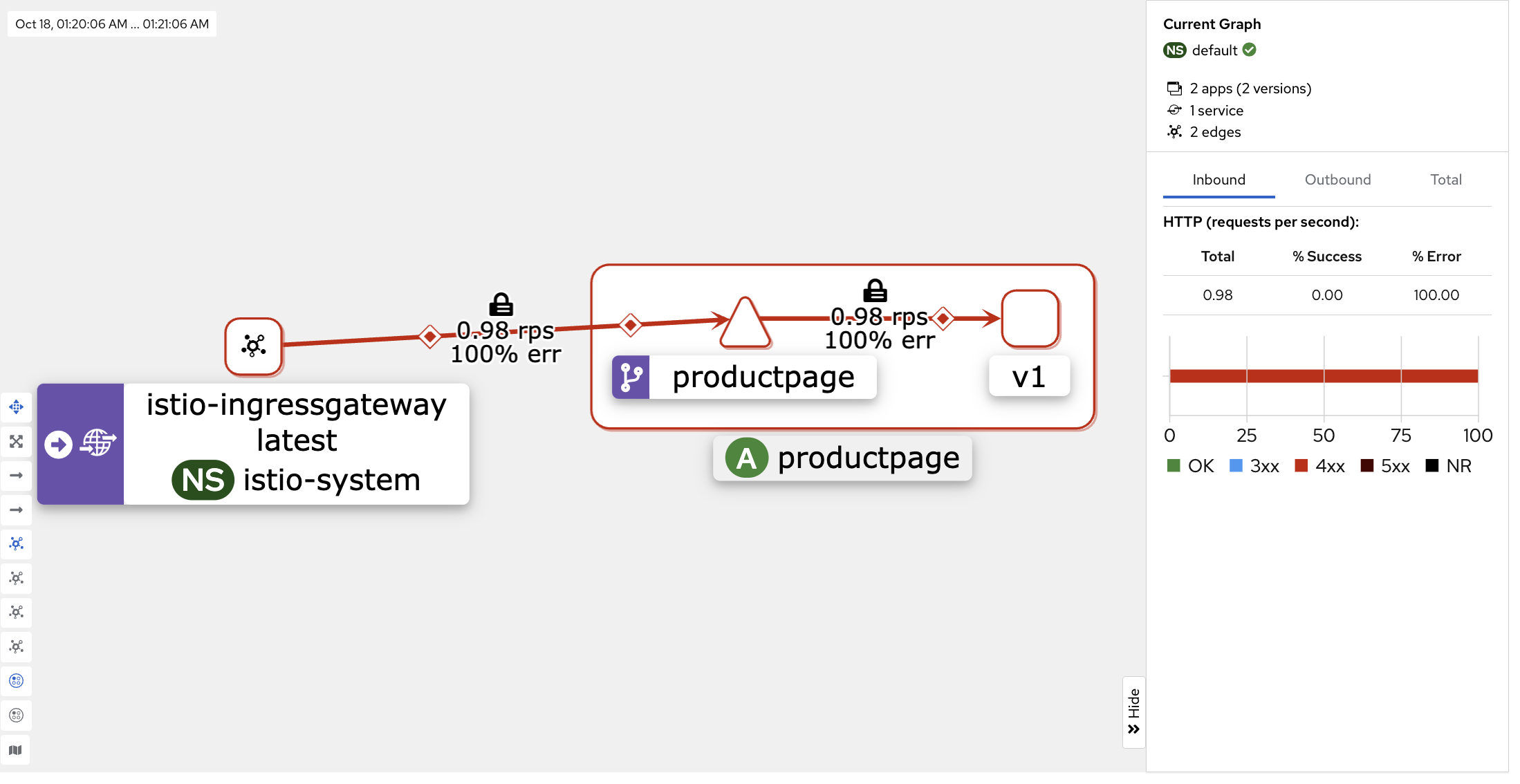
netpod가 ratings 접속을 시도한 이후 kiali dashboard에서 정상 접속되는 것으로 표시되는 것을 볼 수 있다.
# Peer authentication 설정 변경 : PERMISSIVE(mTLS 사용/미사용 모두 허용) → STRICT(반드시 mTLS 사용, 미사용 시 거부)
cat <<EOF | kubectl create -f -
apiVersion: security.istio.io/v1beta1
kind: PeerAuthentication
metadata:
  name: default-strict
spec:
  mtls:
    mode: STRICT
EOF

# ratings 접속 시도 : 실패!
kubectl exec -it -n test netpod -- curl ratings.default:9080/health ;echo
curl: (56) Recv failure: Connection reset by peer
command terminated with exit code 56

kubetail -l app=ratings -f
[ratings-v1-b6994bb9-v6grn istio-proxy] [2022-02-14T20:36:39.136Z] "- - -" 0 NR filter_chain_not_found - "-" 0 0 0 - "-" "-" "-" "-" "-" - - 172.16.184.3:9080 172.16.116.4:49054 - -
mTLS 미사용 시 거부 정책을 적용 한 이후 ratings 접속 시도가 실패된다.

5.4.2 AuthoriationPolicy & 실습
- allow-nothing policy that rejects all requests to the workload
# The spec: field of the policy has the empty value {}. That value means that no traffic is permitted, effectively denying all requests
kubectl apply -f - <<EOF
apiVersion: security.istio.io/v1
kind: AuthorizationPolicy
metadata:
  name: allow-nothing
  namespace: default
spec:
  {}
EOF

# 확인
kubectl get AuthorizationPolicy
NAME            AGE
allow-nothing   49s

kubetail -l app=productpage
[productpage-v1-6b746f74dc-dm4j6 istio-proxy] [2022-02-14T20:57:11.113Z] "GET /productpage HTTP/1.1" 403 - rbac_access_denied_matched_policy[none] - "-" 0 19 0 - "192.168.10.254" "curl/7.68.0" "3fdcdeb7-9cdb-9a38-8867-7d114590aacb" "www.gasida.dev:30959" "-" inbound|9080|| - 172.16.184.6:9080 192.168.10.254:0 outbound_.9080_._.productpage.default.svc.cluster.local -

# productpage 의 listeners 의 pc 정보 확인
istioctl pc listener $(kubectl get pod -l app=productpage -o jsonpath={.items[0].metadata.name}).default -o json
- Run the following command to create a productpage-viewer policy to allow access with GET method to the productpage workload
# The policy does not set the from field in the rules which means all sources are allowed, effectively allowing all users and workloads
kubectl apply -f - <<EOF
apiVersion: security.istio.io/v1beta1
kind: AuthorizationPolicy
metadata:
  name: "productpage-viewer"
  namespace: default
spec:
  selector:
    matchLabels:
      app: productpage
  action: ALLOW
  rules:
  - to:
    - operation:
        methods: ["GET"]
EOF
kubectl get AuthorizationPolicy

# 확인 : productpage 는 200 ok 이지만, reviews/details 는 403 에러
kubetail -l app=productpage
[productpage-v1-6b746f74dc-dm4j6 istio-proxy] [2022-02-14T21:01:59.712Z] "GET /productpage HTTP/1.1" 200 - via_upstream - "-" 0 3769 17 17 "192.168.10.254" "curl/7.68.0" "fda48ae7-db01-9c09-bf9b-cc899ad2729b" "www.gasida.dev:30959" "172.16.184.6:9080" inbound|9080|| 127.0.0.6:47075 172.16.184.6:9080 192.168.10.254:0 outbound_.9080_._.productpage.default.svc.cluster.local default
[productpage-v1-6b746f74dc-dm4j6 istio-proxy] [2022-02-14T21:01:59.720Z] "GET /reviews/0 HTTP/1.1" 403 - via_upstream - "-" 0 19 0 0 "-" "curl/7.68.0" "fda48ae7-db01-9c09-bf9b-cc899ad2729b" "reviews:9080" "172.16.184.5:9080" outbound|9080||reviews.default.svc.cluster.local 172.16.184.6:53392 10.97.9.166:9080 172.16.184.6:42446 - default
[productpage-v1-6b746f74dc-dm4j6 istio-proxy] [2022-02-14T21:02:00.754Z] "GET /details/0 HTTP/1.1" 403 - via_upstream - "-" 0 19 0 0 "-" "curl/7.68.0" "320fad93-02e7-9cf1-bee5-d559e26411a3" "details:9080" "172.16.184.4:9080" outbound|9080||details.default.svc.cluster.local 172.16.184.6:49584 10.99.131.153:9080 172.16.184.6:56512 - default

kubetail -l app=reviews
[reviews-v2-7bf8c9648f-rqrl7 istio-proxy] [2022-02-14T21:06:21.178Z] "GET /reviews/0 HTTP/1.1" 403 - rbac_access_denied_matched_policy[none] - "-" 0 19 0 - "-" "curl/7.68.0" "7a9b7e7f-7e74-99d7-ae51-cb687bf1af6d" "reviews:9080" "-" inbound|9080|| - 172.16.184.5:9080 172.16.184.6:53388 outbound_.9080_._.reviews.default.svc.cluster.local -
[reviews-v3-84779c7bbc-xsrdq istio-proxy] [2022-02-14T21:06:21.323Z] "GET /reviews/0 HTTP/1.1" 403 - rbac_access_denied_matched_policy[none] - "-" 0 19 0 - "-" "curl/7.68.0" "7a9b7e7f-7e74-99d7-ae51-cb687bf1af6d" "reviews:9080" "-" inbound|9080|| - 172.16.158.8:9080 172.16.184.6:37382 outbound_.9080_._.reviews.default.svc.cluster.local -

kubetail -l app=details
[details-v1-79f774bdb9-ddwrv istio-proxy] [2022-02-14T21:07:20.742Z] "GET /details/0 HTTP/1.1" 403 - rbac_access_denied_matched_policy[none] - "-" 0 19 0 - "-" "curl/7.68.0" "0602ede6-02b4-9599-9924-afb5bf4f6812" "details:9080" "-" inbound|9080|| - 172.16.184.4:9080 172.16.184.6:49584 outbound_.9080_._.details.default.svc.cluster.local -
[details-v1-79f774bdb9-ddwrv istio-proxy] [2022-02-14T21:07:21.774Z] "GET /details/0 HTTP/1.1" 403 - rbac_access_denied_matched_policy[none] - "-" 0 19 0 - "-" "curl/7.68.0" "d74cd4f2-8991-943a-807c-408e9dd92f96" "details:9080" "-" inbound|9080|| - 172.16.184.4:9080 172.16.184.6:49566 outbound_.9080_._.details.default.svc.cluster.local -
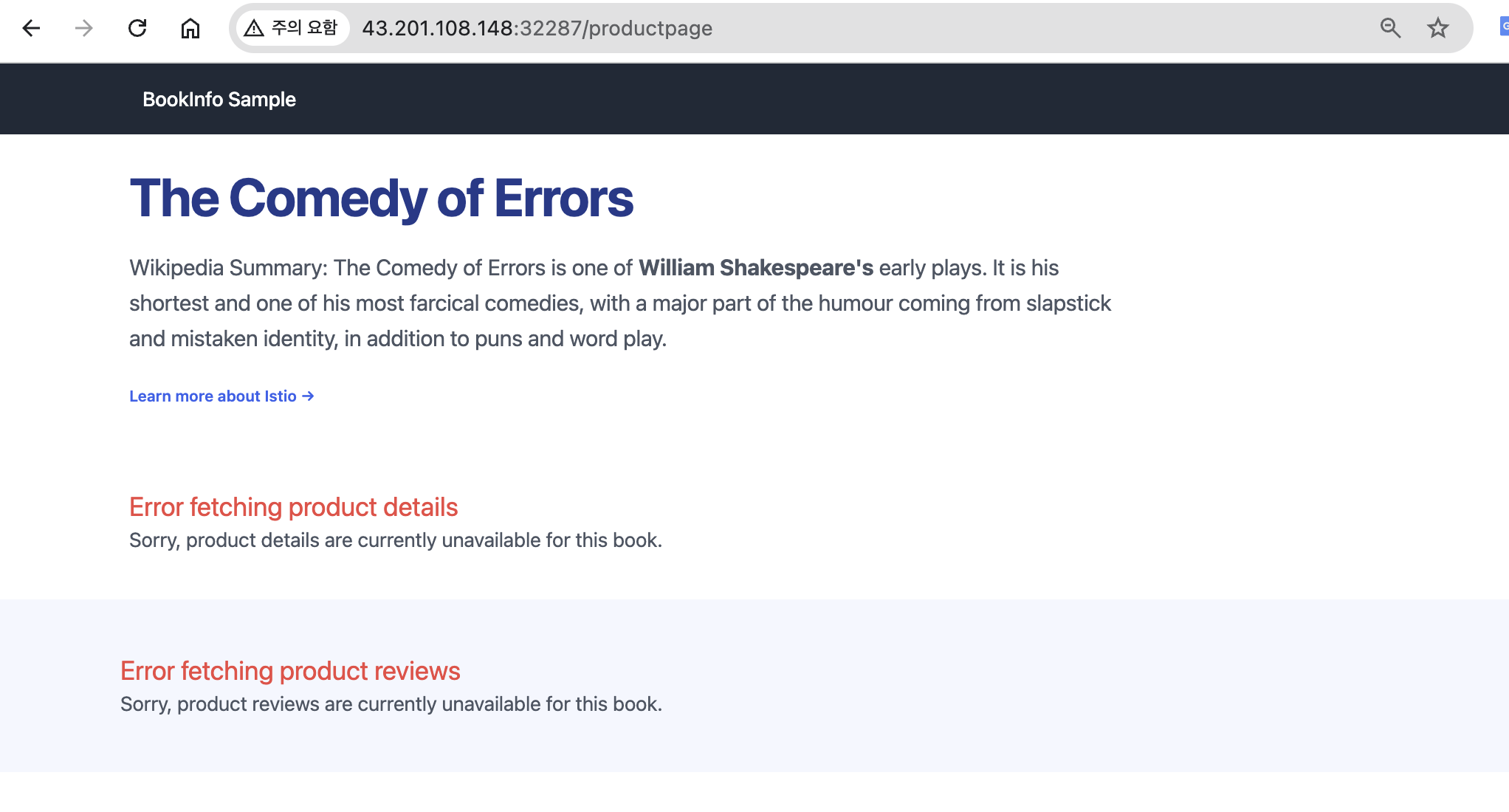
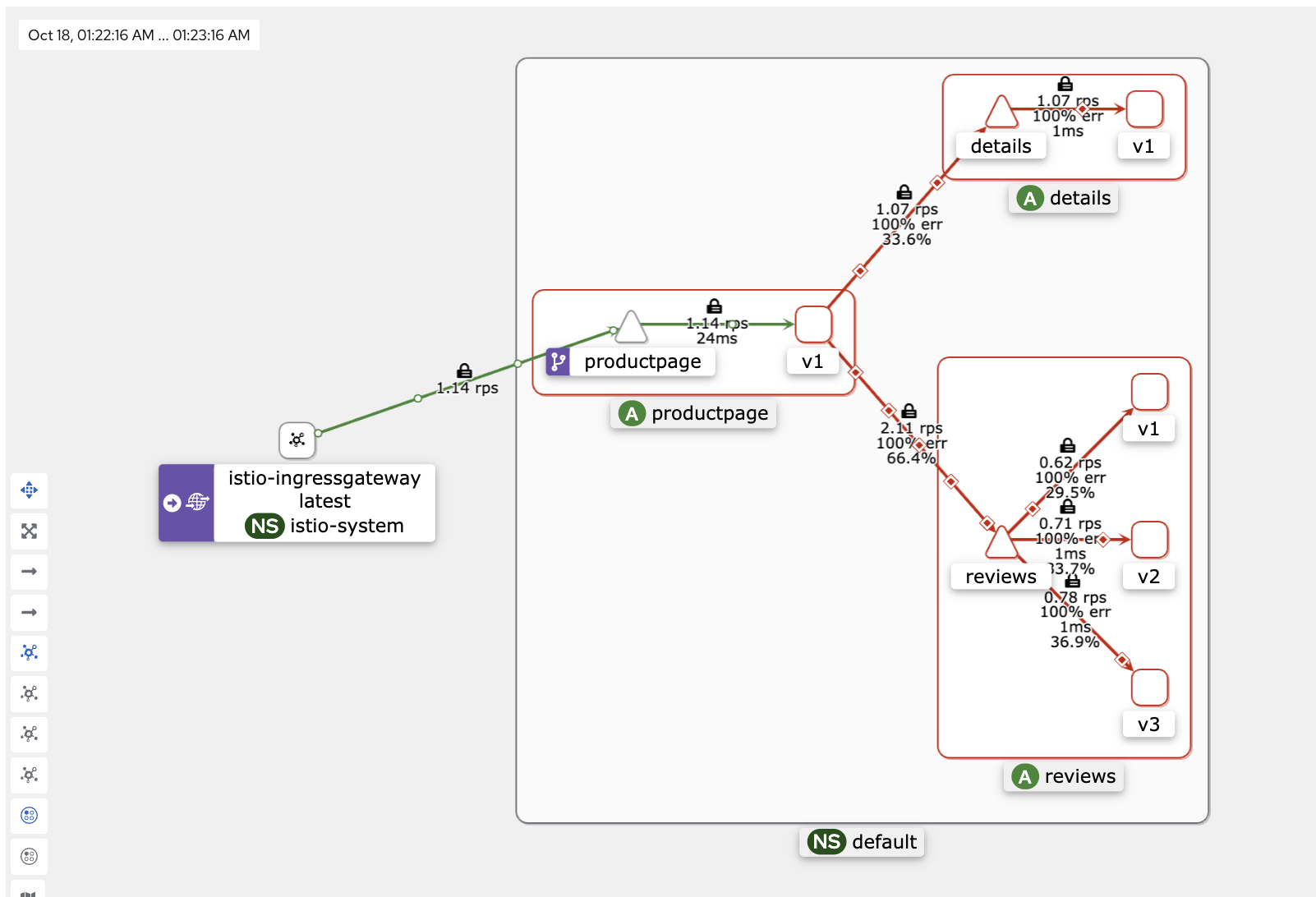
details와 reviews로의 접근은 안됩니다.
- Run the following command to create the details-viewer policy to allow the productpage workload
# which issues requests using the cluster.local/ns/default/sa/bookinfo-productpage service account, to access the details workload through GET methods:
# Secure name(SPIFFE)에 principals 가 소스(productpage)는 details 페이지에 GET 요청 허용!
kubectl apply -f - <<EOF
apiVersion: security.istio.io/v1beta1
kind: AuthorizationPolicy
metadata:
  name: "details-viewer"
  namespace: default
spec:
  selector:
    matchLabels:
      app: details
  action: ALLOW
  rules:
  - from:
    - source:
        principals: ["cluster.local/ns/default/sa/bookinfo-productpage"]
    to:
    - operation:
        methods: ["GET"]
EOF

# 확인
kubectl get AuthorizationPolicy
NAME                 AGE
allow-nothing        16m
details-viewer       5s
productpage-viewer   11m

kubetail -l app=details
[details-v1-79f774bdb9-ddwrv details] 127.0.0.6 - - [14/Feb/2022:21:13:47 UTC] "GET /details/0 HTTP/1.1" 200 178
[details-v1-79f774bdb9-ddwrv details] - -> /details/0
[details-v1-79f774bdb9-ddwrv istio-proxy] [2022-02-14T21:13:47.025Z] "GET /details/0 HTTP/1.1" 200 - via_upstream - "-" 0 178 1 0 "-" "curl/7.68.0" "338ca5ef-9acc-9ff7-9d65-56ad6883bc14" "details:9080" "172.16.184.4:9080" inbound|9080|| 127.0.0.6:56951 172.16.184.4:9080 172.16.184.6:54422 outbound_.9080_._.details.default.svc.cluster.local default

kubetail -l app=reviews
kubetail -l app=productpage
details는 접근되지만 reviews로의 접근은 안됩니다.
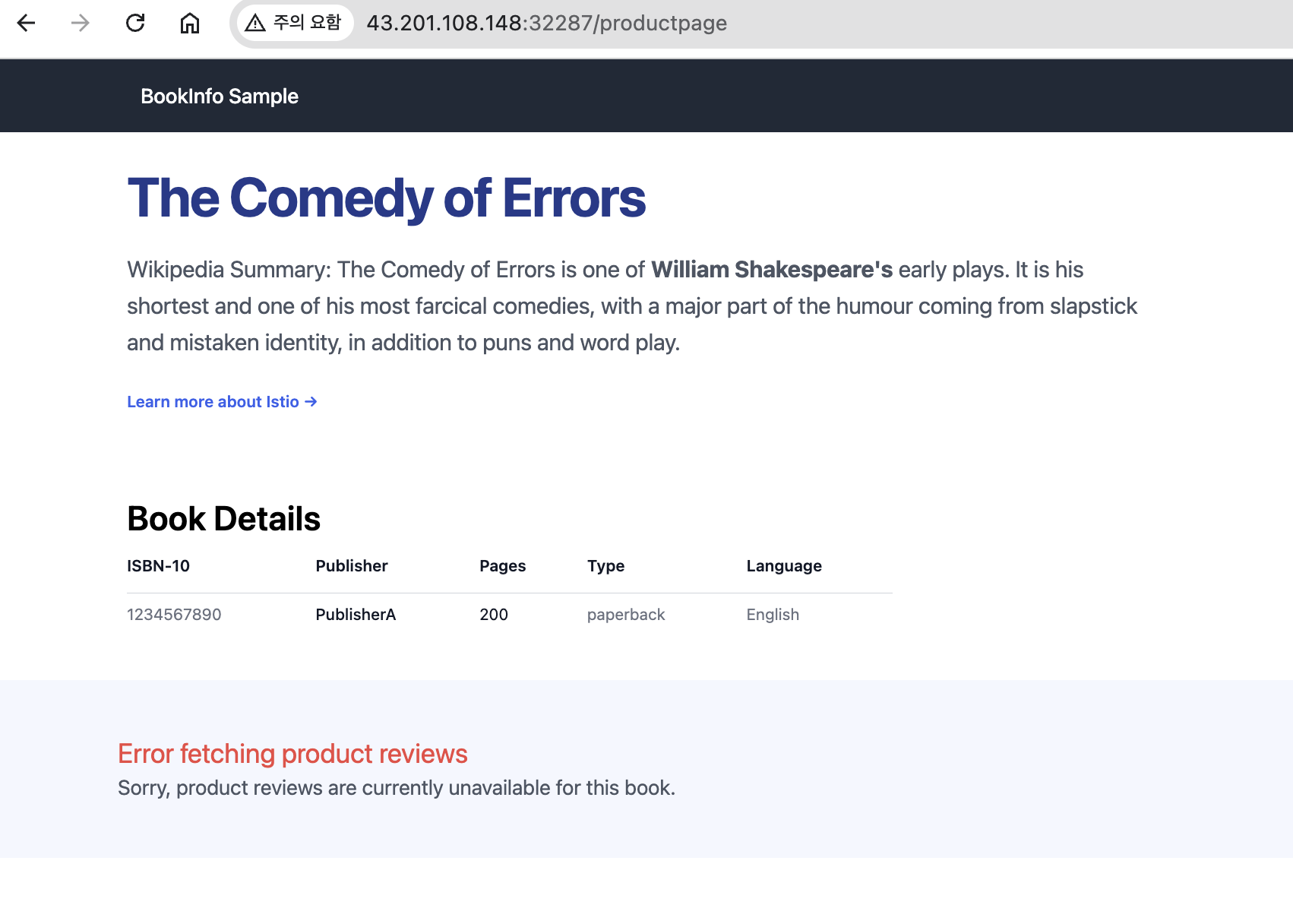
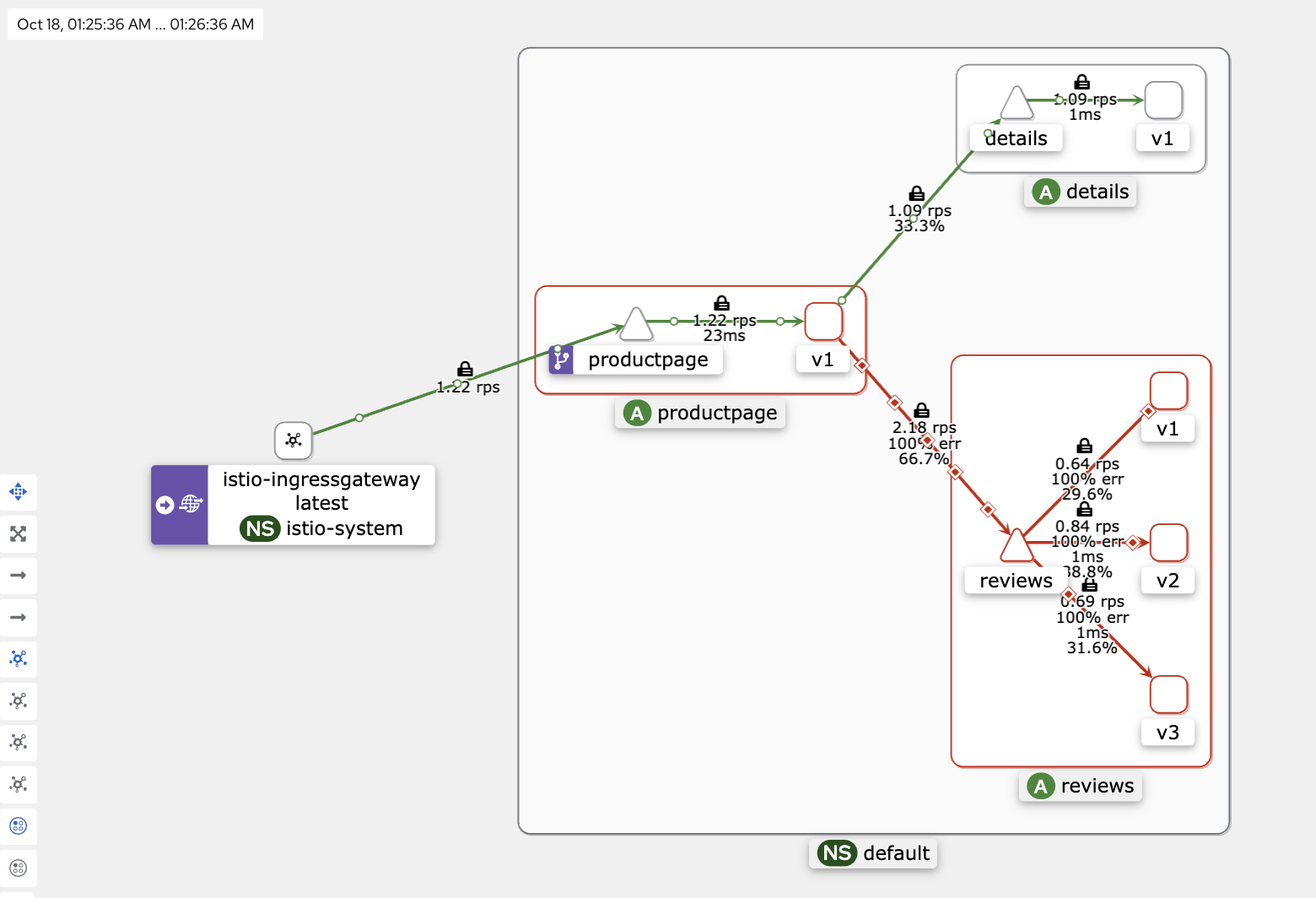
- Run the following command to create a policy reviews-viewer to allow the productpage workload
# which issues requests using the cluster.local/ns/default/sa/bookinfo-productpage service account, to access the reviews workload through GET methods
# Secure name(SPIFFE)에 principals 가 소스(productpage)는 reviews 페이지에 GET 요청 허용!
kubectl apply -f - <<EOF
apiVersion: security.istio.io/v1beta1
kind: AuthorizationPolicy
metadata:
  name: "reviews-viewer"
  namespace: default
spec:
  selector:
    matchLabels:
      app: reviews
  action: ALLOW
  rules:
  - from:
    - source:
        principals: ["cluster.local/ns/default/sa/bookinfo-productpage"]
    to:
    - operation:
        methods: ["GET"]
EOF

# 확인
kubectl get AuthorizationPolicy
NAME                 AGE
allow-nothing        20m
details-viewer       4m3s
productpage-viewer   15m
reviews-viewer       33s

kubetail -l app=ratings
kubetail -l app=details
kubetail -l app=reviews
kubetail -l app=productpage
reviews는 접근되지만 ratings로의 접근은 안됩니다.
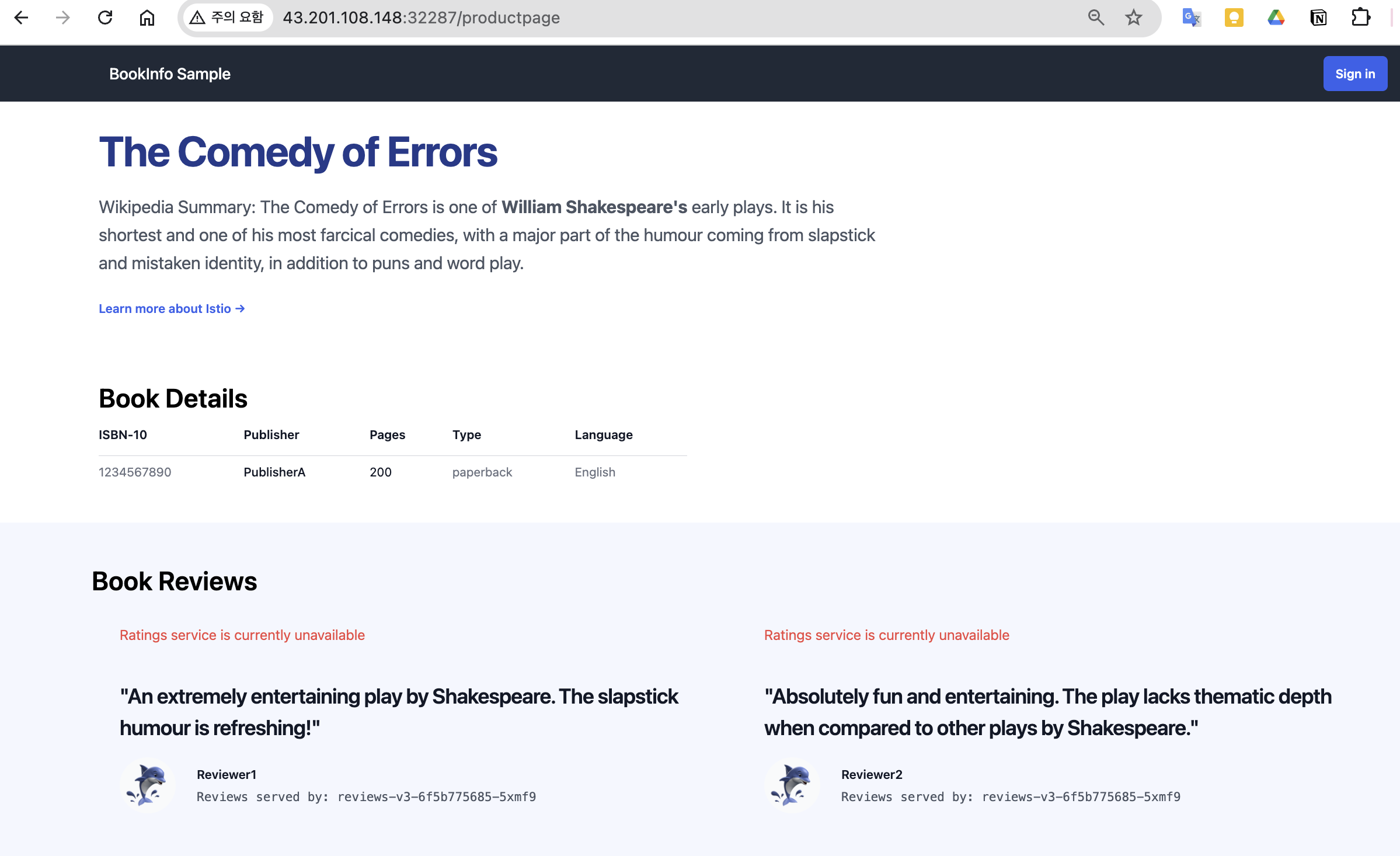
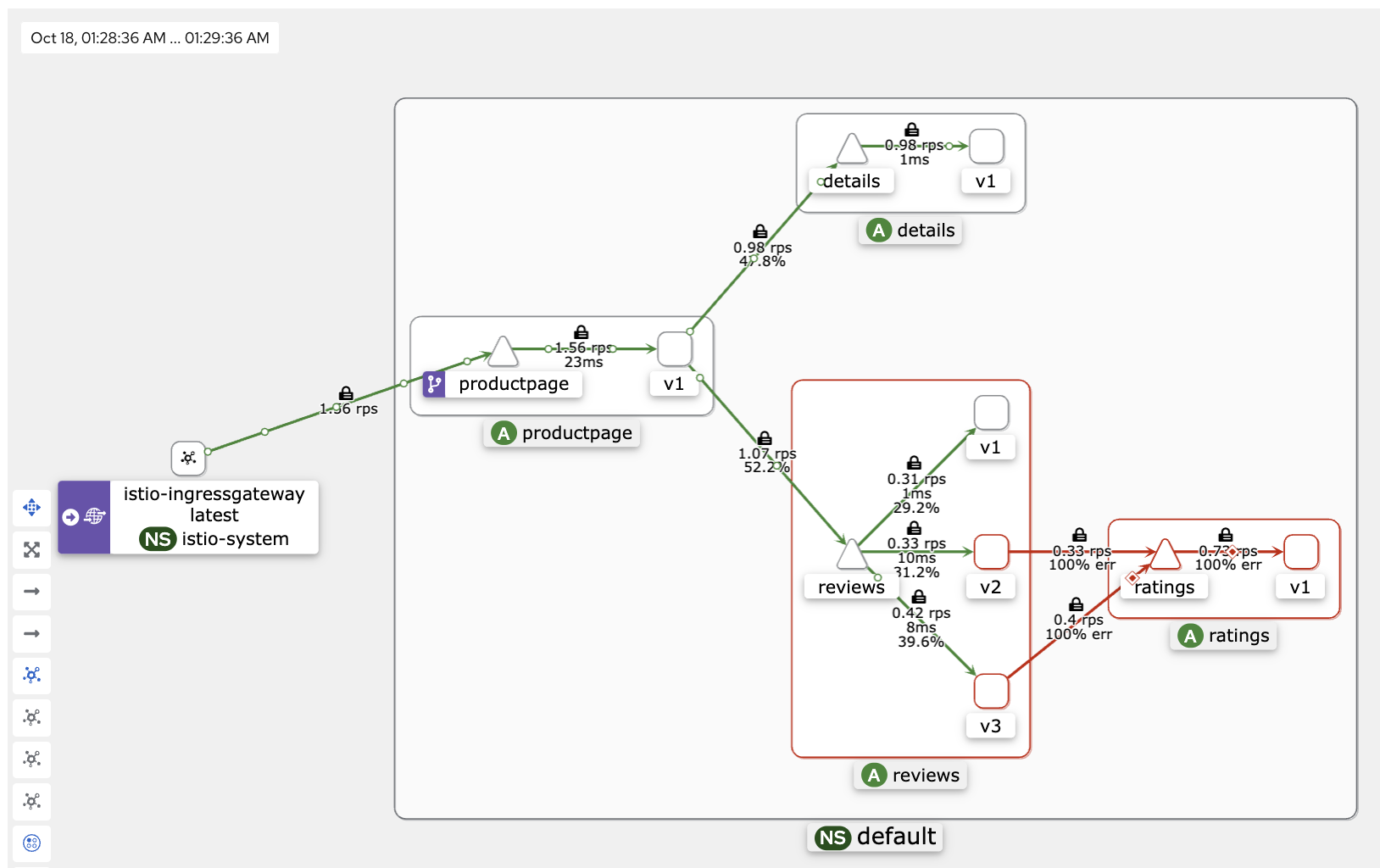
6. Istio 트래픽 흐름
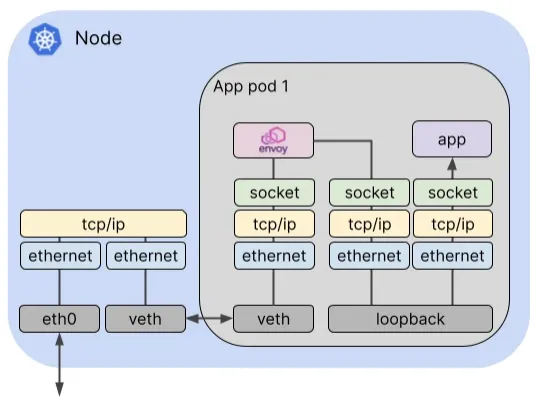
- Istio 통신 : 호스트의 tcp/ip 와 iptables 과 파드 내에 iptables 와 envoy 를 경유
- 달리기에 비유하자면, Istio 가 없을 경우를 운동장 한바퀴라면, istio 사용 시 대략 운동장 세바퀴라고 볼 수 있습니다.
- Istio 사용 시 장점도 있지만, 없을 경우 대비 비용(지연 추가, 프로세싱 추가, 복잡한 구조 등)이 추가됩니다.
6.1 실습을 위한 환경 설정 및 배포
- Istio 접속 테스트를 위한 변수 지정
k3s-s)
# istio ingress gw NodePort(HTTP 접속용) 변수 지정 : 아래 ports[0] 은 어떤 용도의 포트일까요?
export IGWHTTP=$(kubectl get service -n istio-system istio-ingressgateway -o jsonpath='{.spec.ports[1].nodePort}')
echo $IGWHTTP
IGWHTTP=<각자 자신의 NodePort>

## istio-ingressgateway 파드가 배치된 노드의 유동 공인 IP 확인
aws ec2 describe-instances --query "Reservations[*].Instances[*].{PublicIPAdd:PublicIpAddress,InstanceName:Tags[?Key=='Name']|[0].Value,Status:State.Name}" --filters Name=instance-state-name,Values=running --output text
k3s-s	3.38.151.222	running
k3s-w1	15.165.75.117	running
k3s-w2	3.39.223.99	running
testpc	54.180.243.135	running

# /etc/hosts 파일 수정
MYDOMAIN=<각자 자신의 www 도메인> # 단, 사용하고 있지 않는 공인 도메인을 사용 할 것
MYDOMAIN=www.gasida.dev
echo "<istio-ingressgateway 파드가 있는 워커 노드> $MYDOMAIN" >> /etc/hosts

MYDOMAIN=<각자 자신의 www 도메인>
export MYDOMAIN=www.gasida.dev
echo -e "192.168.10.10 $MYDOMAIN" >> /etc/hosts
echo -e "export MYDOMAIN=$MYDOMAIN" >> /etc/profile

# istio ingress gw 접속 테스트 : 아직은 설정이 없어서 접속 실패가 된다
curl -v -s $MYDOMAIN:$IGWHTTP- 실습을 위한 환경 설정 및 배포 : nginx-app 로 향하는 통신의 경우 peer 간 mtls 끄기
cat <<EOF | kubectl create -f -
apiVersion: v1
kind: Pod
metadata:
  name: nginx-pod
  labels:
    app: nginx-app
spec:
  terminationGracePeriodSeconds: 0
  containers:
  - name: nginx-container
    image: nginx
    ports:
    - containerPort: 80
---
apiVersion: v1
kind: Service
metadata:
  name: svc-nginx
spec:
  ports:
    - name: svc-nginx
      port: 80
      targetPort: 80
  selector:
    app: nginx-app
  type: ClusterIP
---
apiVersion: networking.istio.io/v1alpha3
kind: Gateway
metadata:
  name: test-gateway
spec:
  selector:
    istio: ingressgateway
  servers:
  - port:
      number: 80
      name: http
      protocol: HTTP
    hosts:
    - "*"
---
apiVersion: networking.istio.io/v1alpha3
kind: VirtualService
metadata:
  name: nginx-service
spec:
  hosts:
  - "$MYDOMAIN"
  gateways:
  - test-gateway
  http:
  - route:
    - destination:
        host: svc-nginx
        port:
          number: 80
EOF
# 모니터링
watch -d "kubectl get svc -n istio-system -l app=istio-ingressgateway;echo;kubectl get pod -n istio-system -o wide -l app=istio-ingressgateway;echo;kubectl get pod -owide nginx-pod"
watch -d "kubectl get pod -n istio-system -o wide -l app=istio-ingressgateway;echo;kubectl get pod -owide nginx-pod"testpc 에서 아래 실행
# istio ingress 를 통한 접속
curl -s -v $MYDOMAIN:$IGWHTTP
curl -s $MYDOMAIN:$IGWHTTP | grep -o "<title>.*</title>"
while true; do curl -s $MYDOMAIN:$IGWHTTP | grep -o "<title>.*</title>" ; echo "--------------" ; sleep 1; done
while true; do curl -s $MYDOMAIN:$IGWHTTP | grep -o "<title>.*</title>" ; echo "--------------" ; sleep 0.1; done- istio-proxy peer 간 mtls 끄기
# 서비스 중 app: nginx-app 로 향하는 통신의 경우 peer 간 mtls 끄기(istio-ingressgw 와 목적지 워커노드의 파드에 istio-proxy 간)
cat <<EOF | kubectl create -f -
apiVersion: security.istio.io/v1beta1
kind: PeerAuthentication
metadata:
  name: "example-workload-policy"
spec:
  selector:
     matchLabels:
       app: nginx-app
  portLevelMtls:
    80:
      mode: DISABLE
EOF- Client IP 확인을 위한 추가 설정
# istio-ingressgateway 서비스 externalTrafficPolicy 설정 : 점검
kubectl patch svc -n istio-system istio-ingressgateway -p '{"spec":{"externalTrafficPolicy": "Local"}}'

# testpc 에 /etc/hosts 에 istio-ingressgateway 파드가 배포된 ec2의 private ip 로 도메인 변경
vi /etc/hosts
6.2 클라이언트(요청) → 파드(인입)
트래픽 흐름
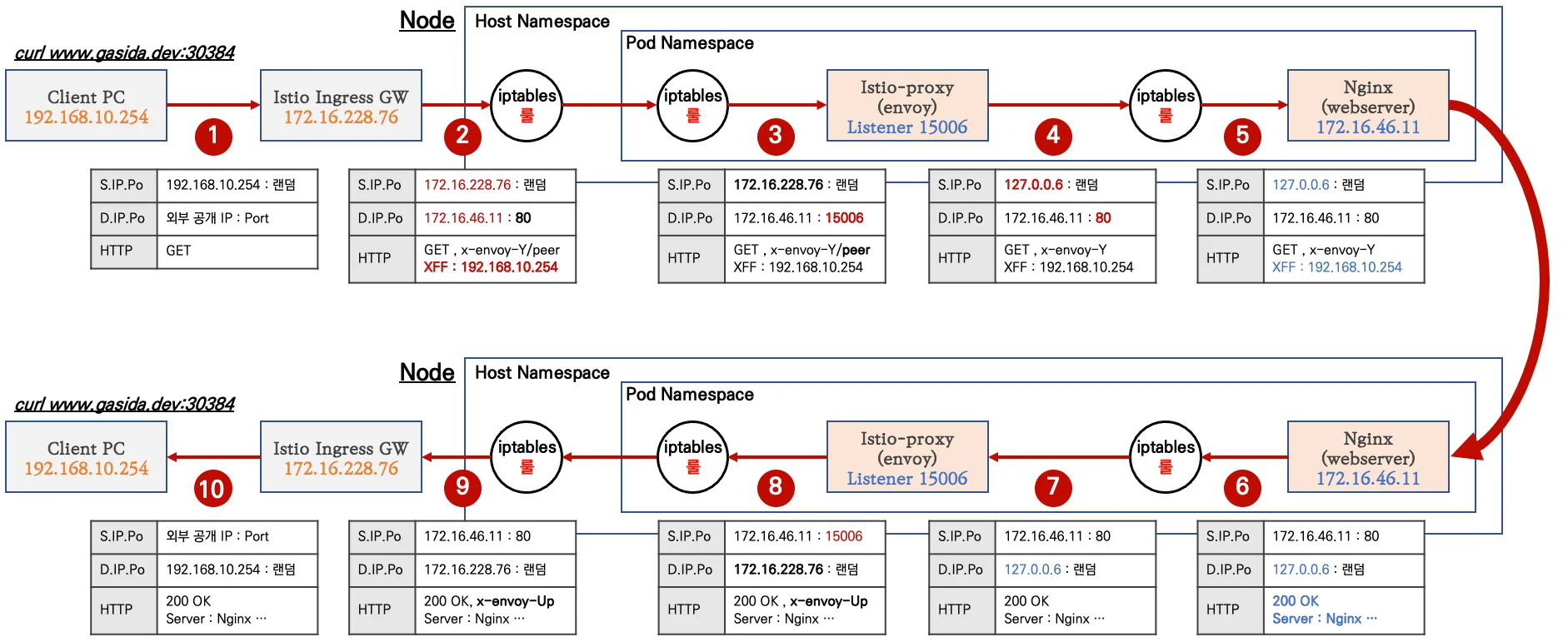
- 외부 클라이언트 PC에서 k8s 클러스터 내부의 웹 서버 파드로 인입 시 트래픽 흐름입니다.
- 기존 패킷 내용 중 변경 전(굵음)과 변경 후(빨간 색)으로 표현하였습니다.

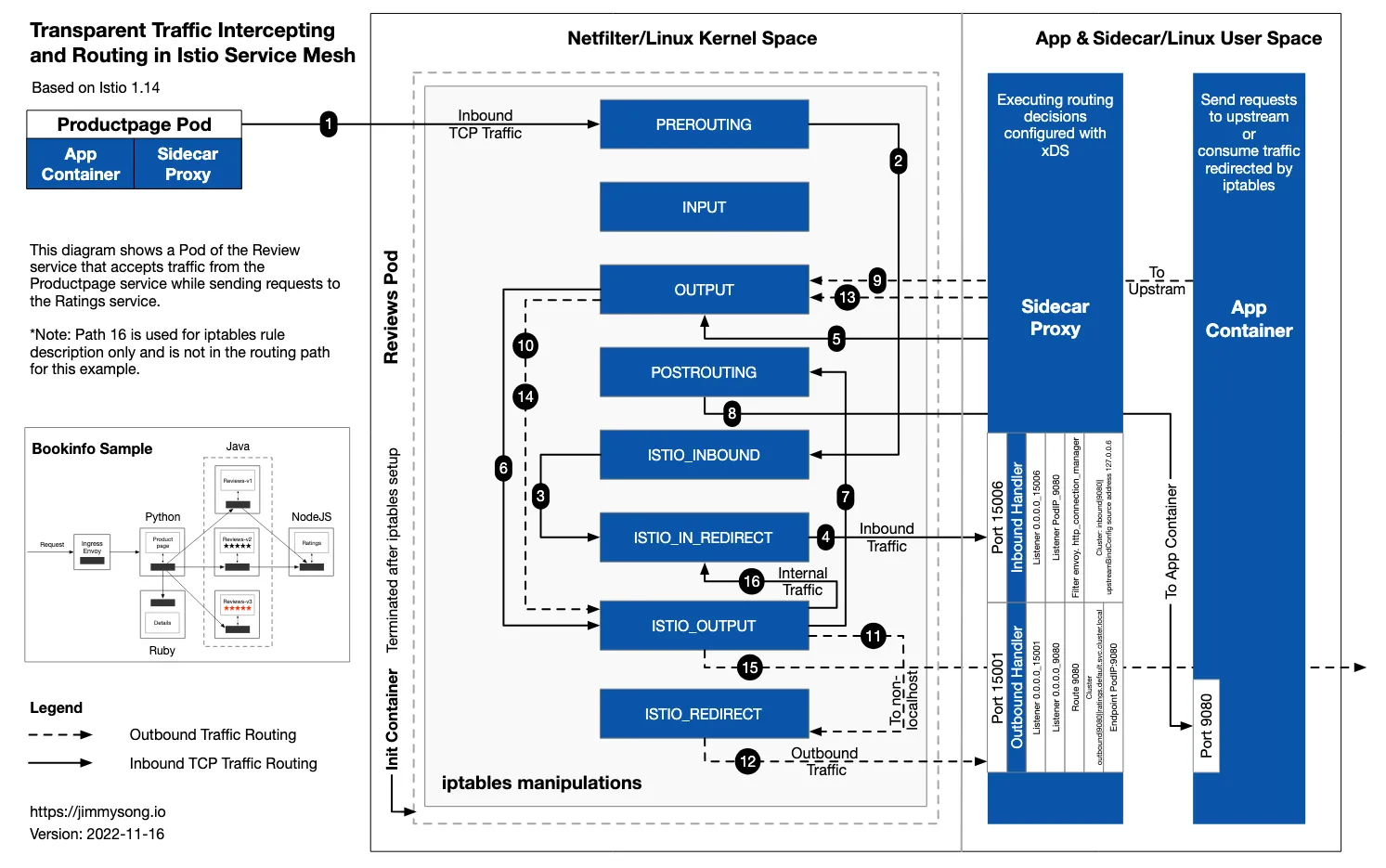
파드 내 IPTables 적용 흐름 : 아래 (1) ~ (8) 까지의 과정을 먼저 설명합니다.
6.3 파드(리턴 트래픽) → 클라이언트
트래픽 흐름
- nginx (웹 서버)컨테이너에서 리턴 트래픽(응답, 200 OK)를 클라이언트에 전달합니다.
- IPTables CT(Connection Table)에 정보를 참고해서 역변환 등이 적용되어 전달됩니다.

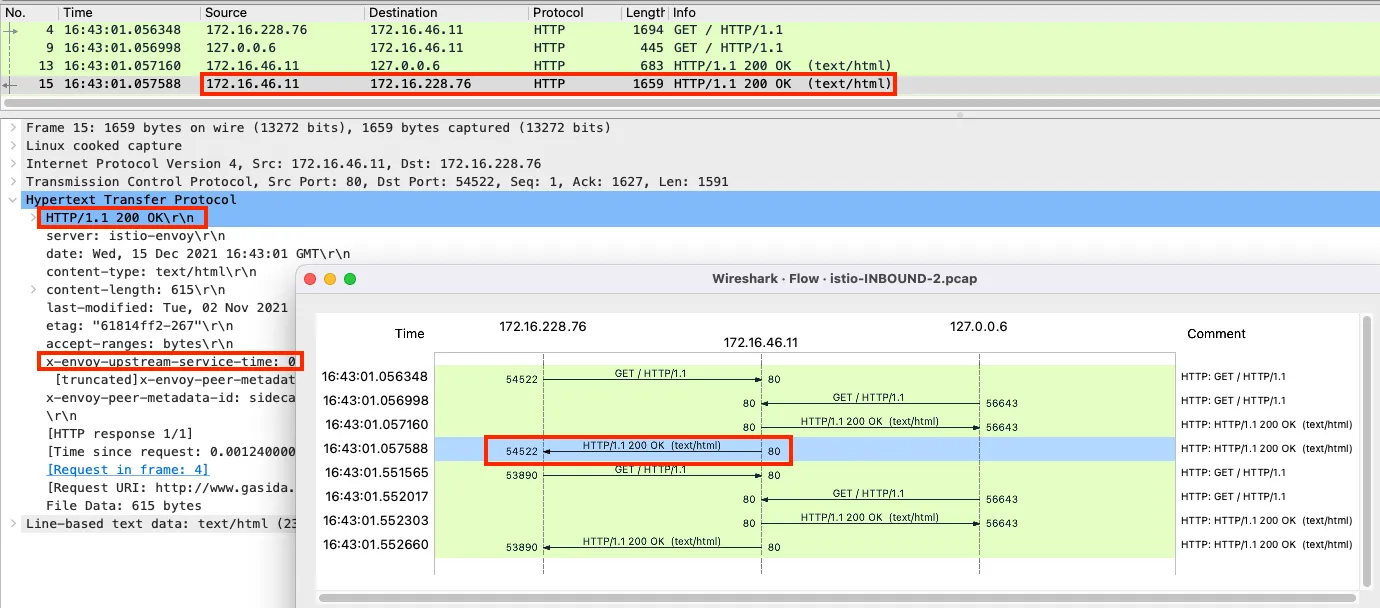
8번 과정의 패킷
- 200 OK 응답이며, 'Istio-proxy' 에 의해서 x-envoy-upstream-Y 헤더가 추가되어 있습니다.
6.4 파드(요청) → 외부 웹서버
트래픽 흐름
- 파드에서 업데이트 나 패치 다운로드 처럼 외부 웹서버 나 인터넷 연결 과정에서의 트래픽의 흐름입니다.
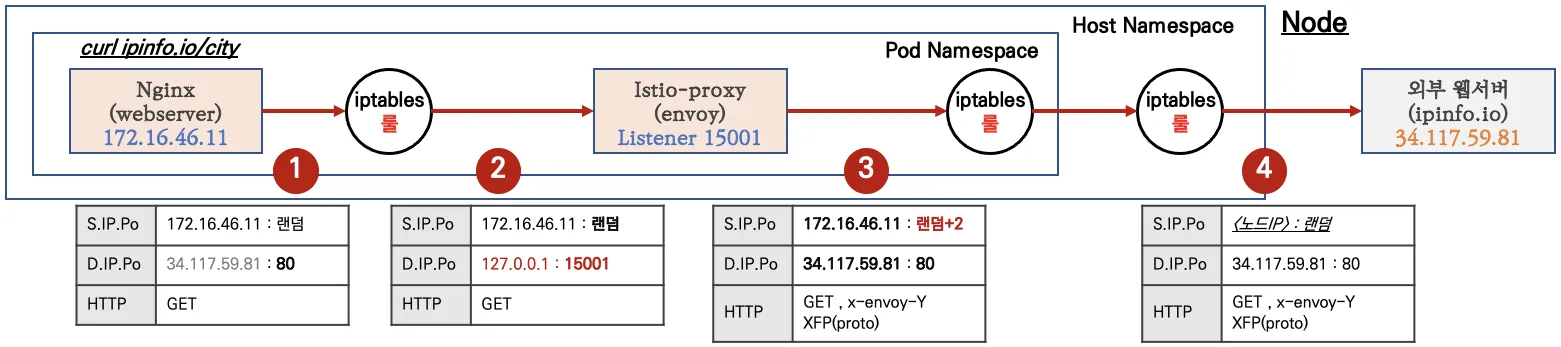
파드 내 IPTables 적용 흐름 : 아래 (9) ~ (15) 까지의 과정을 먼저 설명합니다.