자료구조(Data Structure)란?
-
프로그램에서 사용할 많은 데이터(data)를
메모리 상에서 관리하는 여러 방법들 -
자료구조의 종류중에서 구현하고자 하는 프로그램에 맞는
최적의 자료구조를 활용해야 하므로 자료구조에 대한 이해가 중요하다.
자료구조의 장점
-
효율적인 자료구조는 성능좋은 알고리즘의 기반이 된다.
-
효율적인 자료의 관리는 프로그램의 수행속도와 밀접한 관련이 있다.
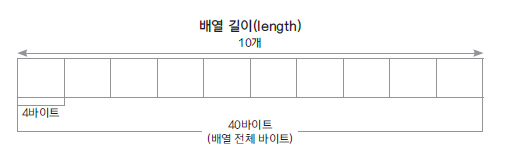
배열(Array)
-
선형 자료구조(자료를 한 줄로 관리)의 종류
-
동일한 데이터 타입을 순서에 따라 관리하는 자료구조
-
정해진 크기의 메모리를 먼저 할당받아 사용한다.(크기가 정해져 있다.)
-
배열의 i번째 요소를 찾는 인덱스 연산이 빠르다.
-
요소의 추가와 제거시 다른 요소들의 이동이 필요하다.
-
jdk 클래스 : ArrayList, Vector
배열 구현
MyArray.java
public class MyArray{
	int[] intArr; // int형 배열
    int count; // 개수

    public int ARRAY_SIZE;
    public static final int ERROR_NUM = -999999999;

    // 기본 생성자 : 배열 길이를10으로 초기화한다.
    public MyArray(){
    	count = 0;
      ARRAY_SIZE = 10;
      intArr = new int[ARRAY_SIZE];
    }

    // size를 파라미터로 받는 생성자 생성
    public MyArray(int size){
      count = 0; // 배열이 생성만 된 것으므로 count = 0
      ARRAY_SIZE = size; // 배열 크기 = 파라미터로 받은 size의 값
      intArr = new int[ARRAY_SIZE]; // intArr = ARRAY_SIZE크기의 배열의 메모리 주소 참조
    }

    // 배열의 요소추가
    public void addElement(int num){
    	// count가 배열의 크기와 같거나 크다면 메세지 출력, 메서드 강제종료
    	if(count >= ARRAY_SIZE){
        	System.out.println("not enough memory");
            return;
        }
        // 배열의 요소(num)를 순차적(count++)으로 할당한다.
        intArr[count++] = num;
    }

    // 배열의 특정 인덱스(position)에 요소(num)추가
    public void insertElement(int position, int num){

        if(count >= ARRAY_SIZE){
        	System.out.println("not enough memory");
            return;
        }

        // 인덱스 값으로 음수 or 배열의 크기보다 큰 값을 받을 경우 error
        if(position < 0 || position > count){
        	System.out.println("insert Error");
        }

        // i : 배열의 맨 끝 인덱스부터 시작
        for(int i = count -1; i > position; i--){
        	// i가 특정 인덱스와 같아질때까지
            // 기존 배열의 요소들은 특정 인덱스부터 순차적으로 한칸씩 밀린다.
        	intArr[i+1] = intArr[i];
        }

        // 배열의[특정 인덱스] = 요소(num) 할당
        intArr[position] = num;

        count++;
    }

    // 배열의 특정 인덱스(position)의 요소 삭제
    public int removeElement(int position){
    	int ret = ERROR_NUM;

        // isEmpty()메서드 결과가 true라면 배열은 비어있다는 뜻
        if(isEmpty()){
        	System.out.println("There is no element");
            return ret;
        }

        // 삭제하려는 인덱스가 음수 or 배열의 크기와 같거나 크다면 index error
        if(position < 0 || position >= count){
        	System.out.println("remove Error");
            return ret;
        }

        ret = intArr[position];

        // i : 특정 인덱스부터 시작
        for(int i = position; i<count -1; i++){
        	// i가 배열의 끝 인덱스와 같아질때까지
            // 기존 배열의 요소들은 특정 인덱스부터 순차적으로 한칸씩 당겨온다.
        	intArr[i] = intArr[i+1];
        }
        count--;
        return ret;
    }


    public int getSize(){
    	return count;
    }

    public boolean isEmpty(){
    	return count == 0;
    }

    // 특정 인덱스 요소 return
    public int getElement(int position){
    	if(position < 0 || position > count-1){
        	System.out.println("위치 오류. 현재 리스트의 개수 :  " + count +"개");
            return ERROR_NUM;
        }

        return intArr[position];
    }

    public void printAll(){
    	if(count == 0){
        	System.out.println("출력할 내용 없음");
        }

        for(int i=0; i<count; i++){
        	System.out.println(intArr[i]);
        }
    }

    // 배열 요소 모두 삭제
    public void removeAll(){
    	for(int i=0; i<count; i++){
        	intArr[i] = 0;
        }
    }
}
MyArrayTest.java
public class MyArrayTest {
  public static void main(String[] args) {
		MyArray array = new MyArray();
		array.addElement(10);
		array.addElement(20);
		array.addElement(30);
		array.insertElement(1, 50);
		array.printAll();

		System.out.println("===============");
		array.removeElement(1);
		array.printAll();
		System.out.println("===============");

		array.addElement(70);
		array.printAll();
		System.out.println("===============");
		array.removeElement(1);
		array.printAll();

		System.out.println("===============");
		System.out.println(array.getElement(2));
  }
}

// result
10
50
20
30
===============
10
20
30
===============
10
20
30
70
===============
10
30
70
===============
70
MyObjectArray
public class MyObjectArray {
  private int count;
  private Object[] array;
  public int ARRAY_SIZE;

  public MyObjectArray(){
    ARRAY_SIZE = 10;
    array = new Object[ARRAY_SIZE];
  }

  public MyObjectArray(int size){
    ARRAY_SIZE = size;
    array = new Object[ARRAY_SIZE];
  }
}