🧰 유용한 메서드들
✅ each(): 반복 처리
$('.item').each(function(index, element) {
    console.log(index, $(element).text());
});
✅ attr(), prop(): 속성 제어
$('#link').attr('href', 'https://example.com');
$('#checkbox').prop('checked', true);| 메서드 | 설명 |
|---|---|
attr() |
HTML 속성(attribute)을 가져오거나 설정 |
prop() |
DOM 프로퍼티(property)를 가져오거나 설정 |
대부분의 경우 checkbox, radio의 체크 상태처럼 실제 상태 값을 바꾸려면 prop()을 사용해야 합니다.
✅ remove(), empty(), detach()
$('#box').remove();      // 요소와 이벤트 제거
$('#box').empty();       // 요소 안의 자식들만 제거
$('#box').detach();      // 요소 제거 + 데이터, 이벤트 보존
💬 클래스 다루기
$('#target').addClass('active');
$('#target').removeClass('active');
$('#target').toggleClass('active');
$('#target').hasClass('active');
🔁 이벤트 위임
$(document).on('click', '.dynamic-btn', function() {
    alert('동적 버튼 클릭됨!');
});
.click()은 기존 요소에만 적용되며, 이후 동적으로 추가된 요소에는 적용되지 않습니다.
✨ 애니메이션 효과
$('#box').fadeIn();
$('#box').fadeOut();
$('#box').slideUp();
$('#box').slideDown();
$('#box').animate({ width: "300px" }, 1000);
🔄 메서드 체이닝 (Chaining)
$('#box')
  .addClass('highlight')
  .fadeIn()
  .text('변경된 텍스트');
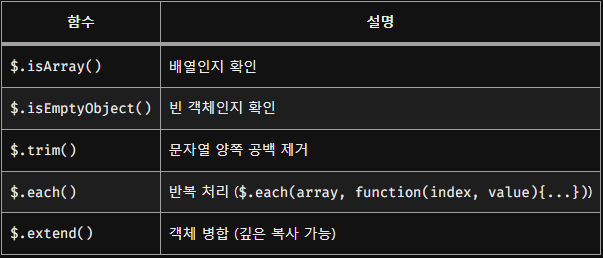
🧪 유틸리티 함수들
| 함수 | 설명 |
|---|---|
$.isArray() |
배열인지 확인 |
$.isEmptyObject() |
빈 객체인지 확인 |
$.trim() |
문자열 양쪽 공백 제거 |
$.each() |
반복 처리 ($.each(array, function(index, value){...})) |
$.extend() |
객체 병합 (깊은 복사 가능) |
const defaultOption = { dark: false };
const userOption = { dark: true };
const merged = $.extend({}, defaultOption, userOption);
🚨 jQuery 사용 시 주의점
- DOM 접근을 반복하지 말고 캐싱해서 사용
- 반복문 안에서는 $(this)를 변수로 저장해서 사용
- 이벤트 위임은 필수 (특히 동적 요소).
- 성능에 민감한 페이지에서는 애니메이션, 이벤트 남용 금지
- 복잡한 앱에는 React, Vue 같은 프레임워크가 더 적합

Spring, Django 개발 블로그