(1) 목표 : JAVA에서 Scanner와 Random클래스를 사용하여 루프를 통한 게임을 만드는 것을 목표로 한다.
(2) 문제 : 단어 맞추기 게임
조건) 1. 단어를 주어진 기회 안에 맞추는 게임을 만들어보자
-
컴퓨터가 랜덤으로 영어단어를 선택한다
영어단어의 자리수를 알려준다.
ex ) PICTURE = 7자리 ⇒_ _ _ _ _ _ _
-
사용자는 A 부터 Z 까지의 알파벳 중에서 하나를 입력한다.
입력값이 A-Z 사이의 알파벳이 아니라면 다시 입력을 받는다.
-
입력값이 한 글자가 아니라면 다시 입력을 받는다.
-
이미 입력했던 알파벳이라면 다시 입력을 받는다.
-
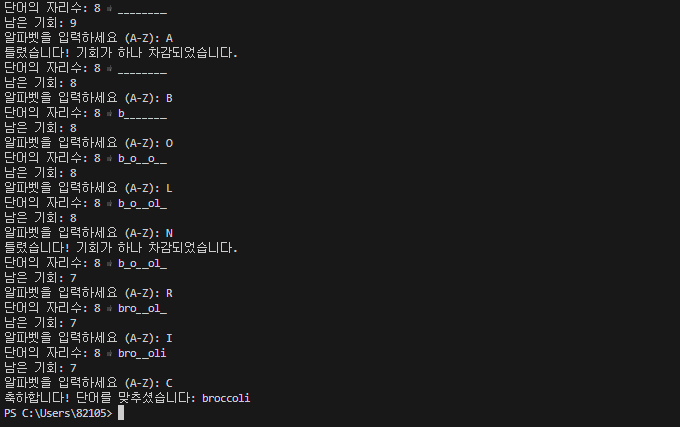
입력값이 정답에 포함된 알파벳일 경우 해당 알파벳이 들어간 자리를 전부 보여주고, 다시 입력을 받는다.
1. ex ) 정답이 eyes 인 경우에 E 를 입력했을 때
1._ _ _ _→E _ E _
-
입력값이 정답에 포함되지 않은 알파벳일 경우 기회가 하나 차감되고, 다시 입력을 받는다.
-
사용자가 9번 틀리면 게임오버된다.
-
게임오버 되기 전에 영어단어의 모든 자리를 알아내면 플레이어의 승리.
(3) 소스코드
import java.util.Random;
import java.util.Scanner;
public class WordGuessingGame {
public static void main(String[] args) {
String[] words = {
"airplane", "apple", "arm", "bakery", "banana", "bank", "bean", "belt",
"bicycle", "biography", "blackboard", "boat", "bowl", "broccoli", "bus",
"car", "carrot", "chair", "cherry", "cinema", "class", "classroom", "cloud",
"coat", "cucumber", "desk", "dictionary", "dress", "ear", "eye", "fog",
"foot", "fork", "fruits", "hail", "hand", "head", "helicopter", "hospital",
"ice", "jacket", "kettle", "knife", "leg", "lettuce", "library", "magazine",
"mango", "melon", "motorcycle", "mouth", "newspaper", "nose", "notebook",
"novel", "onion", "orange", "peach", "pharmacy", "pineapple", "plate", "pot",
"potato", "rain", "shirt", "shoe", "shop", "sink", "skateboard", "ski",
"skirt", "sky", "snow", "sock", "spinach", "spoon", "stationary", "stomach",
"strawberry", "student", "sun", "supermarket", "sweater", "teacher",
"thunderstorm", "tomato", "trousers", "truck", "vegetables", "vehicles",
"watermelon", "wind"
};
    Random random = new Random();
    String chosenWord = words[random.nextInt(words.length)];
    char[] guessedWord = new char[chosenWord.length()];
    for (int i = 0; i < guessedWord.length; i++) {
        guessedWord[i] = '_';
    }

    int chances = 9;
    StringBuilder guessedLetters = new StringBuilder();
    Scanner scanner = new Scanner(System.in);

    while (chances > 0) {
        System.out.print("단어의 자리수: " + chosenWord.length() + " ⇒ ");
        System.out.println(guessedWord);
        System.out.println("남은 기회: " + chances);
        System.out.print("알파벳을 입력하세요 (A-Z): ");

        String input = scanner.nextLine().toLowerCase();

        if (input.length() != 1 || !Character.isLetter(input.charAt(0))) {
            System.out.println("유효한 단어를 입력하세요.");
            continue;
        }

        char guessedChar = input.charAt(0);

        if (guessedLetters.indexOf(String.valueOf(guessedChar)) != -1) {
            System.out.println("이미 입력한 알파벳입니다.");
            continue;
        }

        guessedLetters.append(guessedChar);
        boolean found = false;

        for (int i = 0; i < chosenWord.length(); i++) {
            if (chosenWord.charAt(i) == guessedChar) {
                guessedWord[i] = guessedChar;
                found = true;
            }
        }

        if (!found) {
            chances--;
            System.out.println("틀렸습니다! 기회가 하나 차감되었습니다.");
        }

        if (String.valueOf(guessedWord).equals(chosenWord)) {
            System.out.println("축하합니다! 단어를 맞추셨습니다: " + chosenWord);
            break;
        }
    }

    if (chances == 0) {
        System.out.println("게임 오버! 정답은: " + chosenWord);
    }

    scanner.close();
}
}
(4) 출력결과
(5) 코드 분석
import java.util.Random;
import java.util.Scanner;
임포트 문: Random과 Scanner 클래스를 사용하기 위해 선언. Random은 랜덤 단어 선택에 사용하고, Scanner는 사용자 입력을 받는 데 사용함.
Random random = new Random();
String chosenWord = words[random.nextInt(words.length)];
랜덤 객체 생성: Random 객체를 생성하여 랜덤한 단어를 선택한다.
단어 선택: nextInt(words.length)를 사용해 0부터 배열 길이 미만의 랜덤한 정수를 생성하고, 이를 이용해 words 배열에서 단어를 선택한다.
char[] guessedWord = new char[chosenWord.length()];
for (int i = 0; i < guessedWord.length; i++) {
guessedWord[i] = '_';
}
맞춘 단어 배열: guessedWord 배열을 생성하여 정답 단어의 길이에 맞춰 언더스코어(_)로 초기화한다. 이는 사용자가 맞추어야 할 알파벳 자리수를 나타냄.
int chances = 9;
StringBuilder guessedLetters = new StringBuilder();
Scanner scanner = new Scanner(System.in);
기회 초기화: 사용자가 틀릴 수 있는 기회를 9로 설정한다.
입력된 알파벳 기록: guessedLetters는 사용자가 입력한 알파벳을 기록하기 위한 문자열 빌더.
스캐너 초기화: 사용자 입력을 받기 위해 Scanner 객체를 생성한다.
while (chances > 0) {
System.out.print("단어의 자리수: " + chosenWord.length() + " ⇒ ");
System.out.println(guessedWord);
System.out.println("남은 기회: " + chances);
System.out.print("알파벳을 입력하세요 (A-Z): ");
게임 진행: 기회가 남아 있는 동안 루프를 계속한다.
단어 자리수 출력: 선택된 단어의 길이와 현재 맞춘 상태를 출력한다.
기회 출력: 남은 기회를 표시하고, 사용자의 입력을 요청한다.
String input = scanner.nextLine().toLowerCase();입력 받기: 사용자 입력을 소문자로 변환하여 저장.
if (input.length() != 1 || !Character.isLetter(input.charAt(0))) {
System.out.println("유효한 단어를 입력하세요.");
continue;
}
유효성 검사: 입력이 한 글자가 아니거나 알파벳이 아닐 경우 오류 메시지를 출력하고 루프의 처음으로 돌아간다.
char guessedChar = input.charAt(0);
if (guessedLetters.indexOf(String.valueOf(guessedChar)) != -1) {
System.out.println("이미 입력한 알파벳입니다.");
continue;
}
알파벳 저장: 입력된 문자를 guessedChar에 저장한다.
중복 확인: 이미 입력한 알파벳인지 확인하고, 중복일 경우 오류 메시지를 출력하고 루프의 처음으로 돌아간다.
guessedLetters.append(guessedChar);
boolean found = false;
입력된 알파벳 기록: 입력된 알파벳을 guessedLetters에 추가한다.
상태 초기화: found 변수를 초기화하여 입력한 알파벳이 정답에 포함되었는지 추적한다.
for (int i = 0; i < chosenWord.length(); i++) {
if (chosenWord.charAt(i) == guessedChar) {
guessedWord[i] = guessedChar;
found = true;
}
}
정답 검사: 선택된 단어의 각 문자와 입력된 알파벳을 비교하여 맞는 경우 해당 위치에 알파벳을 표시한다. 일치하는 경우 found를 true로 설정함.
if (!found) {
chances--;
System.out.println("틀렸습니다! 기회가 하나 차감되었습니다.");
}
틀린 경우: 입력한 알파벳이 정답에 없으면 기회를 차감하고 오류 메시지를 출력한다.
if (String.valueOf(guessedWord).equals(chosenWord)) {
System.out.println("축하합니다! 단어를 맞추셨습니다: " + chosenWord);
break;
}
승리 확인: 사용자가 모든 알파벳을 맞춘 경우 승리 메시지를 출력하고 루프를 종료함.
if (chances == 0) {
System.out.println("게임 오버! 정답은: " + chosenWord);
}
기회 소진 시: 기회가 모두 소진된 경우 게임 오버 메시지와 정답을 출력함.
scanner.close();
}
스캐너 종료: 리소스를 해제하기 위해 scanner를 종료
(6) 총평
복습을 통해 scanner와 Random 클래스를 연습하였기 때문에 구현하는 틀을 미리 확인 할 수 있었다. 그러나 이문제에는 loop문과 scanner, random 문의 적절한 조화를 이루지 못할 시 코드가 스파게티 코드처럼 매우 길게 작성 될 수 있었다. 그래서 처음 문제를 받았을 때 생각에 잠겨 많은 시간이 경과 되었던 거 같다. 자바는 객체지향적 언어 이지만 이 문제는 C언어처럼 절차적으로 코드를 실행 하기 때문에 문제가 간단 했던거 같지만 다음에 공부 할 객체 지향의 특성(오버로딩, 오버라이딩, 추상클래스 등)을 공부 할 때는 더욱 많은 시간이 필요 할 것으로 보인다.