
this
js에서 함수는 호출될때 매개변수로 전달되는 인자값 말고도 암묵적으로 arguments, this를 전달받는다.
전역 공간에서의 this
전역 공간에서 this는 전역 객체를 가리킨다.
브라우저 환경
브라우저 환경일때 this는 window를 가리킨다.
window는 브라우저의 전역객체를 뜻한다.
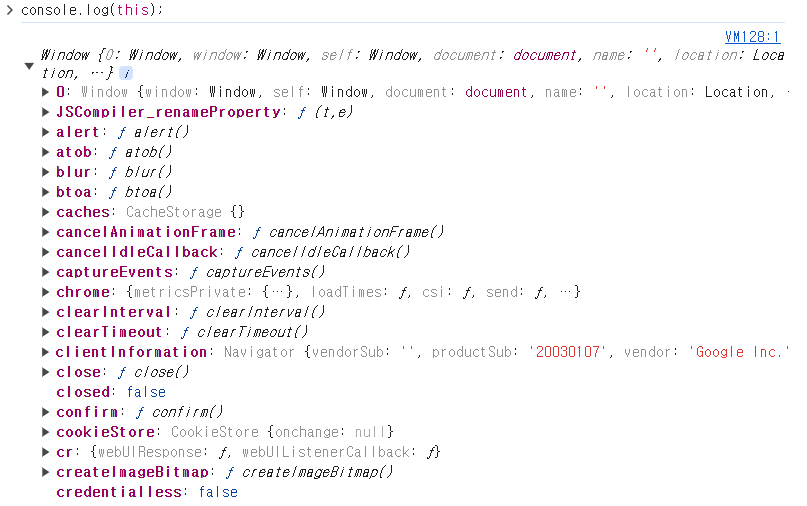
브라우저 환경에서 사용할 수 있는 기본적인 메소드들이 보인다.(alert,confirm...)
Node 환경(서버)
노드 환경일때 this는 module을 가리킨다.
모듈에 아무것도 export하지 않은 상황이면 빈 객체{}를 출력한다.
코드 📄
console.log(this); // {}node에서의 전역객체를 확인하고 싶다면 globalThis를 출력하면 된다.
globalThis는 노드의 전역객체인 global을 가리킨다.
코드 📄
console.log(globalThis);

/*
<ref *1> Object [global] {
  global: [Circular *1],
  clearImmediate: [Function: clearImmediate],
  setImmediate: [Function: setImmediate] {
    [Symbol(nodejs.util.promisify.custom)]: [Getter]
  },
  clearInterval: [Function: clearInterval],
  clearTimeout: [Function: clearTimeout],
  setInterval: [Function: setInterval],
  setTimeout: [Function: setTimeout] {
    [Symbol(nodejs.util.promisify.custom)]: [Getter]
  },
  queueMicrotask: [Function: queueMicrotask],
  structuredClone: [Function: structuredClone],
  atob: [Getter/Setter],
  btoa: [Getter/Setter],
  performance: [Getter/Setter],
  fetch: [Function: value],
  crypto: [Getter]
}
*/
노드에서 사용할 수 있는 메소드들이 보인다.(setTimeout(), setInterval()..)
함수에서의 this
함수에서의 this는 함수 호출 방식에 따라 this에 바인딩되는 객체가 달라진다.
일반 함수 호출
일반함수가 호출될 때 this는 전역 객체인 global,wiindow를 가리킨다.
코드 📄
function func(){
    console.log(this);
}
func(); // global or window 출력- this는 호스트 환경에 따라 global, window를 출력한다.
- 만약 strict-mode라면 블록 내부에 this에대한 정보가 없기 때문에 undefined된다.
내부 함수 호출
내부함수가 호출될 때 내부함수 안의 this는 전역객체를 가리킨다.
function func1(){
    console.log(`func1: ${this}`);
    function func2(){
        console.log(`func2: ${this}`);
    }
    func2();
}

func1(); // window or global 2번 출력- 기본적으로 내부함수는 일반함수,메소드,콜백함수등 어디서 선언되었든 전역객체를 가리킨다.
메소드 호출
객체의 메소드가 호출될 때 메소드 안의 this는 해당 메소드를 호출한 객체를 가리킨다.
const obj ={
    value : 10,
    func : function(){
        console.log(`method's this : ${this}`);
        console.log(`method's this.value : ${this.value}`); // 10

    }
}
obj.func();
// [object Object] , 10
프로토타입 객체의 메소드 호출
프로토타입 객체 메소드를 호출할 때 this는 해당 메소드를 호출한 객체를 가리킨다.
function Human(name){
    this.name =name;
}

const me =new Human('hyunw00');

// 프로토타입 객체의 메소드 생성
Human.prototype.getName = function(){
    return this.name;
}

console.log(me.getName());  // hyunw00

Human.prototype.name= 'kim';
console.log(Human.prototype.getName()); // kim
콜백 함수 호출
콜백 함수 안에있는 this는 전역객체를 가리킨다.
단 이벤트 핸들러 안의 콜백함수는 currentTarget을 가리킨다.
생성자 함수 호출
생성자 함수안에 있는 this는 앞으로 생성될 인스턴스를 가리킨다.
아래에는 생성자 함수 2개가 있다.
코드 📄
function Student(name){
    this.name= name;
    this.printName = function(){
        console.log(`학생의 이름은? ${this.name}`);
    }
}

function Adult(name){
    this.name= name;
}

const student =new Student('kar');
const adult =new Adult('khw');

student.printName(); // 학생의 이름은? kar
이제 _student의 printName함수를 adult의 printName함수에 할당해보자.
코드 📄
adult.printName =student.printName;
adult.printName(); // 학생의 이름은? khw- this는 함수 호출시 동적으로 결정되기 때문에 printName 함수 앞에 어떤 인스턴스가 붙냐에 따라 생성자 함수 내부의 this가 결정된다.
this를 특정 객체에 정적으로 바인딩
Function 객체의 인스턴스 메소드인 apply, call,bind를 사용하여 this를 특정 객체에 바인딩 해줄 수 있다.
apply,call의 본질적인 기능은 함수 호출이되 this를 특정객체에 정적으로 바인딩 해주는 역할을 한다.
apply(this를 바인딩할 객체, 배열)
function Person(name,age){
    this.name = name;
    this.age =age;
}

const obj ={};

Person.apply(obj,['khw',25]);
console.log(obj);- apply의 첫번째 매개변수 : this 바인딩할 객체
- apply의 두번째 매개변수: 함수에 전달할 arguments배열
apply메소드의 대표적인 용도
유사배열객체(arguments..)에 배열 메소드를 사용할 때 apply 메소드를 사용한다.
function func(){
    console.log(arguments); // [Arguments] { '0': 1, '1': 2, '2': 3 }

    // console.log(arguments.slice());  error

    const newArr =Array.prototype.slice.apply(arguments);
    console.log(newArr); // [ 1, 2, 3 ]

}
func(1,2,3);- Array.prototype.slice() 메소드를 호출하라. 단 this는 arguments 객체로 바인딩해라.
- 즉 Array.prototype.slice() 메소드를 arguments객체 자신의 메소드인 것처럼
arguments.slice() 형태로 호출하라는 것이다.
call(this를 바인딩할 객체, 배열 요소들..)
apply()와 기능은 같지만 apply()의 두번째 인자에서 배열 형태로 넘긴 것을 각각 하나의 인자로 넘긴다.
ex) Person.call(obj,'khw',25);bind(this를 바인딩할 객체)
bind() 메소드 함수에 인자로 전달한 this가 바인딩된 새로운 함수를 리턴한다.
코드 📄
function Student(name){
    this.name= name;

    this.printName = function(){
        console.log(`학생의 이름은? ${this.name}`);
    };
    // 1. bind 함수
    this.printName = this.printName.bind(this);

}
function Adult(name){
    this.name= name;
}

const student =new Student('kar');
const adult =new Adult('khw');

student.printName(); // 학생의 이름은? kar
adult.printName =student.printName;
adult.printName(); // 학생의 이름은? kar- Student 생성자의 printName 메서드에 bind함수를 써서 앞으로 만들어질 인스턴스를 this.printName 메서드의 this에 전달한다.
- bind를 했기 때문에 한번 전달되면 더이상 변하지 않는다.
화살표 함수 사용
화살표 함수는 블록 안에서의 this를 기억하고 화살표함수 밖의 제일 근접한 스코프의 this를 가리킨다.
즉 화살표 함수는 함수를 선언할 때 this에 바인딩할 객체가 정적으로 결정된다.
코드 📄
function Student(name){
    this.name= name;

// 2. 화살표함수
this.printName = ()=>console.log(`학생의 이름은? ${this.name}`);
};

function Adult(name){
    this.name= name;
}
- 화살표 함수안에 있는 this는 화살표함수 상위 스코프의 this인 Student 생성자 함수로 생성될 인스턴스를 가리킨다.
코드 📄
const student =new Student('kar');

const adult =new Adult('khw');

student.printName(); // 학생의 이름은? kar

adult.printName =student.printName;
adult.printName(); // 학생의 이름은? kar
// - 화살표함수로 printName을 정의한 순간 this가 Student 생성자함수로 생성될 인스턴스로 이미 정적 바인딩 되었기 때문에 printName앞에 다른 객체를 붙인다고 동적 바인딩 되지 않는다.
코드 📄
function Prefixer(prefix) {
    this.prefix = prefix;
  }

  Prefixer.prototype.prefixArray = function (arr) {
    return arr.map(x => `${this.prefix}  ${x}`);
  };

  const pre = new Prefixer('Hi');
  console.log(pre.prefixArray(['Lee', 'Kim']));
// [ 'Hi Lee', 'Hi Kim' ]- 화살표 함수의 this는 상위 스코프인 prefixArray 메소드 내의 this인 Prefixer 생성자로 생성될 인스턴스를 가리킨다.