정수 Integer
byte: 8bit
short: 16bit
int: 32bit
long 64bit
int 선언 시 32bit의 정수 공간 생성
Java에서 이렇게 여러가지 형태의 정수를 쓰는 이유는 메모리 사용 효율과 성능 최적화를 위해서이다. 각각의 자료형은 사용하는 메모리 크기가 다르며, 이는 처리할 수 있는 데이터의 범위에 영향을 준다.
Operator(연산자): +, /, %, - 등
Operand(피연산자)
변수 Variables
- 변수 선언(Variable declaration)
int quarters; // int 공간 생성- 변수 초기값 저장(Variable initialization assignment)
quarters = 9;- 변수 선언과 동시에 값 저장
int quarters = 9;변수를 처음으로 선언하는 동작
// Declaration
int a; // declaration
int b = 5; // declaration
a = 6; // not declaration
b = 7; // not declaration
선언한 변수에 처음으로 값을 넣기
// Initialization
int a; // not Initialization
int b = 5; // Initialization
a = 6; // Initialization
b = 7; // not Initialization
변수에 값을 넣기
// Assignment
int a; // not Assignment
int b = 5; // Assignment
a = 6; // Assignment
b = 7; // Assignment
변수 이름 작명 규칙
Java 에서는 "camel case"(ex. myQuarters)를 사용한다.
MY_QUARTERS: 상수값으로 주로 사용
실수
float: 32bit
double: 64bit
- 묵시적 타입변환(Implicit type casting)
자바에서 묵시적 타입 변환(Implicit Type Conversion) 은 더 작은 크기의 자료형이 더 큰 크기의 자료형으로 자동으로 변환되는 과정을 의미한다. 이를 자동 형 변환이라고도 하며, 개발자가 명시적으로 형 변환을 하지 않아도 컴파일러가 자동으로 처리한다.public class MathDemo{ public static void main(String[] args){ int n = 3; double r = n; // 묵시적 타입 변환 System.out.println(r); // 출력결과: 3.0 }
- 명시적 타입변환(explicit type casting)
public class MathDemo{
	public static void main(String[] args){
    	int n = 3;
 		double r = n;
 		n = (int)r + 1;
 		System.out.println(r);
}
Math 라이브러리 사용
double r = 3.14;
System.out.println(Math.sqrt(r));
System.out.println(Math.pow(r));
System.out.println(Math.abs(r));
논리값
boolean: 1bit
true 아니면 false
연산자
- !: 논리역 not
- &&: 논리곱 and
- ||: 논리합 or
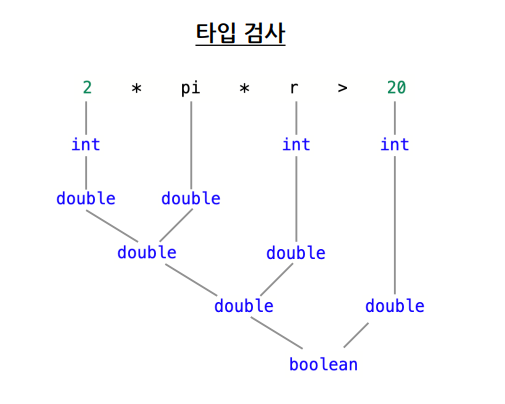
Type Checking
-
기본 타입(Primitive type)
int, double, boolean, char 등 -
객체 타입(Reference type, Object type)
String 등 객체들
public class Demo{
	public static void main(String[] args){
    	int r = 3;
        double pi = 3.14;
        System.out.println(2*pi*r>20);
}
오류 Errors
컴파일 오류(compile - time error)
- parsiong error
- type error
- declaration error
실행 오류(run - time error)
- exception error
- logic error
class ErrorsDemo {
 	public static void main(String[] args) {
 		// [compile-time errors]

 		// parsing errors
 		System.out.println((1 + 2( * 3);
		// type errors
		System.out.println(3 + true);
 		int i = true;
		System.out.println(I * 2);
 		// declaration errors
		int n = 3;
 		double n = 3.14;
 		System.out.println(n);
 		// [run-time errors]

 		// exception errors
 		int d = Integer.parseInt(args[0]);
 		System.out.println(1 / d);
 		// logic errors
 		int x = 3;
 		int y = 7;
 		System.out.println(x = y);
 	}
}
Input 사용자 입력
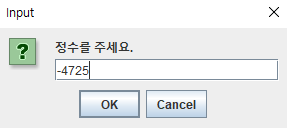
Java 에서는 Scanner를 통해 입력 출력을 하기도 하지만 GUI를 공부해보았다.
자바의 GUI(Graphical User Interface)
- GUI목적
그래픽 이용, 사용자에게 이해하기 쉬운 모양으로 정보 제공
사용자는 마우스나 키보드를 이용하여 쉽게 입력 - 자바 GUI 특징
강력한 GUI 컴포넌트 제공, 쉬운 GUI 프로그래밍 - 자바의 GUI 프로그래밍 방법
- GUI 컴포넌트와 그래픽 이용
AWT 패키지와 Swing 패키지에 제공되는 메카니즘 이용
AWT - java.awt 패키지
Swing - javax.swing 패키지
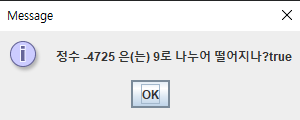
Swing의 JPane
import javax.swing.*;

public class DivisibleBy9 {
    public static void main(String[] args) {
        String message = "정수를 주세요.";
        String input = JOptionPane.showInputDialog(message);
        boolean result = Integer.parseInt(input)%9 ==0;
        JOptionPane.showMessageDialog(null, "정수 "+input+" 은(는) 9로 나누어 떨어지나?"+result);
    }
}
출력 결과: