
쓰레드란 무엇인가?
프로그램이란?
21세기를 사는 우리에게 스마트폰이나 컴퓨터 없는 일상은 상상하기 어려울 것이다.
우리가 이 전자기기를 통해 사용하는 메신저, 웹 브라우저, 게임 등은 모두 프로그램이다.
그렇다면 프로그램이란 정확히 무엇일까?
- 컴퓨터가 실행할 수 있도록 작성된 명령어들의 집합이다.
- SSD 같은 저장 장치에 보관되어 있는 실행 가능한 파일의 형태로 존재하며, 아직 실행되지 않은 정적인 상태다.
- 프로그램은 실제 실행하기 전까지는 단순한 파일에 불과하다.
프로세스란?
앞서 프로그램은 저장 장치에 있는 실행 가능한 파일이라고 했다. 그런데 우리가 아이콘을 더블클릭하거나 명령어를 입력해 프로그램을 실행시키면 그 순간 운영체제는 해당 프로그램을 메모리에 적재하고 실행을 시작한다.
이렇게 실제로 실행 중인 프로그램을 프로세스(Process)라고 부른다.
- 프로그램: 아직 실행되지 않은 정적인 명령어와 데이터의 집합
- 프로세스: 운영체제로부터 CPU 시간, 메모리, 파일 핸들 등 자원을 할당받아 실제로 동작 중인 프로그램 인스턴스이다.
자바로 비유하자면 프로그램은 클래스 프로세스는 인스턴스라고 볼 수 있다.
프로세스의 특징
- 각 프로세스는 서로 독립적인 메모리 공간을 가진다. 한 프로세스가 잘못 동작해도 다른 프로세스에 직접적인 영향을 주지 않는다.
- 모든 프로세스는 기본적으로 하나의 스레드를 가지고 시작하며 필요에 따라 ㅅ,레드를 추가로 생성할 수 있다.
스레드란?
앞서 살펴본 것처럼 프로세스는 실행 중인 프로그램이다. 그런데 프로세스 내부에서 실제로 코드를 실행하는 최소 단위를 스레드라고 한다.
프로세스가 실행을 위한 독립적인 공간이라면 스레드는 독립적인 공간에서 실제 코드를 실행하는 작업의 단위이다.
스레드의 특징
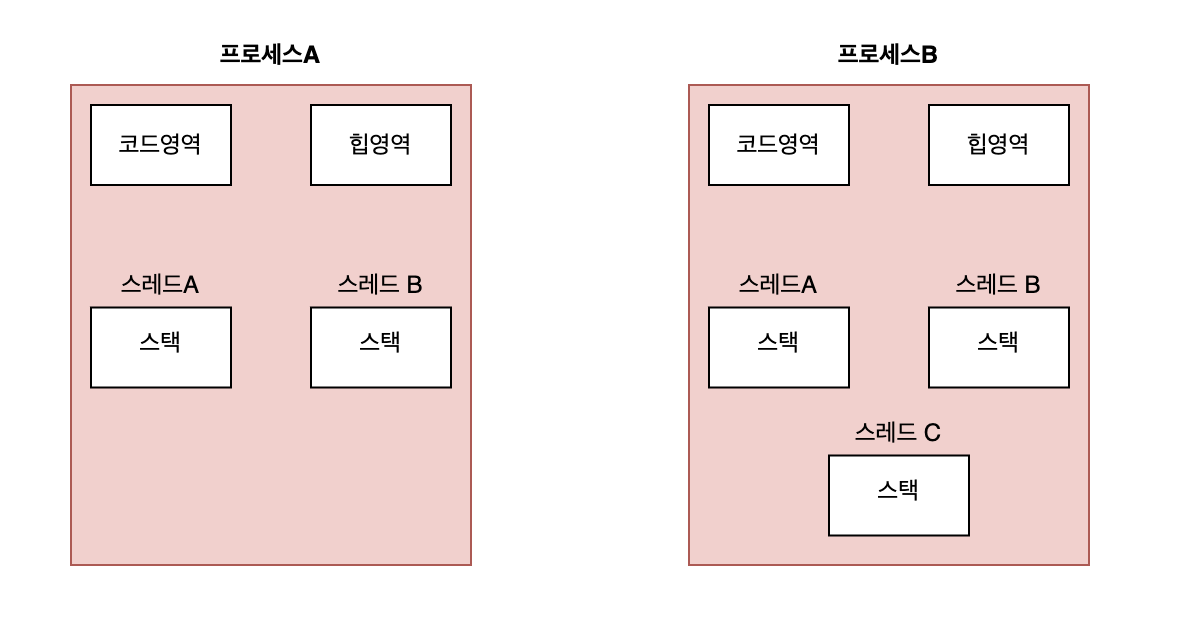
- 같은 프로세스 안의 여러 쓰레드는 힙 영역, 코드 영역 등을 공유한다.
- 각 스레드는 별도의 스택을 가진다.
비유하자면 스레드는 회사이고, 스레드는 회사에서 일하는 직원들이라고 볼 수 있다.
스레드 생성 방법
자바에서 스레드를 생성하는 방법은 크게 2가지가 있다.
Thread클래스를 상속받아run()메서드를 오버라이드하는 방법Runnable인터페이스를 구현 후 스레드 객체를 생성할때 생성자로 넘기는 방법
public class ThreadMain {
    public static void main(String[] args) {
        System.out.println(Thread.currentThread().getName() + ": 실행");

        // 스레드 상속을 통한 생성
        MyThread t1 = new MyThread();
        t1.start();

        //인터페이스 구현을 통한 생성
        Thread t2 = new Thread(new MyRunnable());
        t2.start();

        System.out.println(Thread.currentThread().getName() + ": 종료");
    }

    static class MyThread extends Thread {
        @Override
        public void run() {
            System.out.println(Thread.currentThread().getName() + ": 실행(스레드 상속)");
            System.out.println(Thread.currentThread().getName() + ": 종료(스레드 상속)");
        }
    }

    static class MyRunnable implements Runnable {

        @Override
        public void run() {
            System.out.println(Thread.currentThread().getName() + ": 실행(인터페이스 구현)");
            System.out.println(Thread.currentThread().getName() + ": 종료(인터페이스 구현)");
        }
    }
}
결과
main: 실행
main: 종료
Thread-1: 실행(인터페이스 구현)
Thread-1: 종료(인터페이스 구현)
Thread-0: 실행(스레드 상속)
Thread-0: 종료(스레드 상속)
코드를 보면 main 스레드가 시작을 출력한 뒤 t1(상속 방식)과 t2(인터페이스 방식) 스레드를 차례로 생성 및 실행하고, 마지막에 main 스레드가 종료를 출력한다.
하지만 실제 실행 결과를 보면 main 스레드의 실행과 종료 메시지가 가장 먼저 출력되었고, 이어서 t2 스레드가 t1 스레드보다 먼저 실행되어 메시지를 출력했다.
이를 통해 코드를 작성한 순서와 실제 출력 순서가 다르다는 것을 확인할 수 있다. 왜 이러한 일이 발생하는 것일까?
main 스레드는 단순히 새로운 스레드를 생성할 뿐, 자식 스레드의 작업을 기다려주지 않는다.
main스레드는t1.start(),t2.start()를 호출한 후 바로 다음 문장을 실행하고 종료 메시지를 출력한다. 자식 스레드가 끝날 때까지 대기하도록 명시하지 않는 한main스레드는 독립적으로 종료될 수 있다.
start()는 실행 예약일 뿐, 순서를 보장하지 않는다.
start()를 호출하면 새로운 스레드가 생성되어 실행 준비 상태에 들어가지만 실제로 언제CPU를 할당받아run()을 실행할지는 운영체제 스케줄러가 결정한다. 따라서t2가t1보다 먼저 실행되는 것도 가능하고 반대로 출력될 수도 있다.
Thread vs Runnable
Java에서는 왜 굳이 Thread 객체를 생성하는 방법과 Runnable 인터페이스를 생성자로 넘기는 2가지 방법을 제공하는 것일까?
상속 제약을 피하기 위해
Thread클래스를 상속받으면 다른 클래스를 상속받을 수 없다.Runnable은 인터페이스이기 때문에 자유롭게 구현하면서도 다른 클래스를 상속받을 수 있다.
실행과 동작을 분리하기 위해
Thread는 실행하는 주체이고,Runnable은 실행할 작업 내용을 담는다.- 실제로 스레드를 실행할 때 필요한 것은
run()메서드뿐이다. 따라서Thread클래스가 가진 여러 기능이 필요하지 않다면 굳이 상속받을 이유가 없다. - 이처럼 실행과 동작을 분리하면 코드의 재사용성과 유연성이 높아지고, 같은 작업(
Runnable)을 여러 스레드에서 실행할 수도 있다.
데몬스레드와 사용자 스레드
스레드는 2가지의 종류로 구분할 수 있다.
사용자 스레드
- 프로그램의 주 업무를 담당한다.
- 작업이 완료될 때까지 실행된다.
- 살아 있는 동안
JVM이 종료되지 않는다.
데몬 스레드
- 백그라운드에서 보조적인 작업을 수행한다.
- 모든 사용자 스레드가 종료되면 데몬 스레드는 자동으로 종료된다.
우리는 흔히 main 메서드가 종료되면 자바는 종료된다고 생각하지만 그렇지 않다.JVM은 데몬이 아닌 사용자 스레드가 하나라도 살아 있으면 종료되지 않는다. 아래의 코드를 통해 살펴보자
데몬 스레드의 코드
public class ThreadMain {
    public static void main(String[] args) {
        System.out.println(Thread.currentThread().getName() + ": 실행");
        Thread thread = new Thread(new MyRunnable());
        thread.setDaemon(true); //데몬 스레드로 설정
        thread.start();
        System.out.println(Thread.currentThread().getName() + ": 종료");
    }

    static class MyRunnable implements Runnable {

        @Override
        public void run() {
            System.out.println("MyRunnable 실행");
            try {
                Thread.sleep(1000);
            } catch (InterruptedException e) {
                throw new RuntimeException(e);
            }
            System.out.println("MyRunnable 종료");
        }
    }
}
데몬 스레드 여부는 setDaemon() 메서드로 설정할 수 있다.
true→ 데몬 스레드false→ 사용자 스레드(기본값)
따로 설정하지 않으면 기본적으로 사용자 스레드로 동작한다.
데몬 스레드의 결과
main: 실행
MyRunnable 실행
main: 종료
출력을 보면 MyRunnable 내부에는 sleep(1000) 이후 MyRunnable 종료를 찍도록 되어 있음에도 불구하고, 실제 실행 결과에서는 main 스레드가 종료되자마자 프로그램이 종료되어 MyRunnable 종료는 출력되지 않을 것을 볼 수 있다.
그럼 이번에는 사용자 스레드로 설정 후 결과를 살펴보자
사용자 스레드 코드
public class ThreadMain {
    public static void main(String[] args) {
        System.out.println(Thread.currentThread().getName() + ": 실행");
        Thread thread = new Thread(new MyRunnable());
        thread.setDaemon(false); //사용자 스레드로 설정
        thread.start();
        System.out.println(Thread.currentThread().getName() + ": 종료");
    }

    static class MyRunnable implements Runnable {

        @Override
        public void run() {
            System.out.println("MyRunnable 실행");
            try {
                Thread.sleep(1000);
            } catch (InterruptedException e) {
                throw new RuntimeException(e);
            }
            System.out.println("MyRunnable 종료");
        }
    }
}
사용자 스레드 결과
main: 실행
main: 종료
MyRunnable 실행
MyRunnable 종료
데몬 스레드와 다르게 사용자 스레드는 main 스레드가 종료가 출력되더라도 프로그램이 바로 종료되지 않는 것을 볼 수 있다.
JVM은 하나라도 사용자 스레드가 살아 있다면 프로세스를 종료하지 않고 계속 실행 상태를 유지한다.
따라서 위 실행 결과처럼 main 스레드가 먼저 종료된 이후에도 MyRunnable 스레드가 남아 있어 MyRunnable 종료 메시지가 출력되는 것을 확인할 수 있다.
스레드의 생명주기
스레드는 단순히 start()로 실행되고 끝나는 존재가 아니다.
생성(NEW) → 실행 대기/실행(RUNNABLE) → 종료(TERMINATED) 로 이어지는 기본 흐름 안에서 상황에 따라 대기(WAITING, TIMED_WAITING) 나 차단(BLOCKED) 같은 상태를 거칠 수 있다.
즉 스레드는 생성되어 실행되고 종료될 때까지 여러 상태를 오가며 동작한다.
이제 각 상태가 무엇을 의미하는지 하나씩 살펴보자.
NEW
- 스레드가 생성되고 아직 시작되지 않은 상태이다.
start()메서드가 호출되지 않은 상태
RUNNABLE
- 스레드가 실행될 준비가 된 상태이다.
start()메서드가 호출된 상태이며 이 경우 실행 대기 큐에 들어간다.- 자바에서
RUNNABLE상태는 실행 대기와 실제 실행을 구분하지 않는다.
WAITING
- 다른 스레드가 깨워줄 때까지 무기한 대기하는 상태이다.
Object.wait(),Thread.join()같은 메서드 호출 시WAITING상태에 들어간다.
TIMED_WAITING
WAITING과 유사하지만, 일정 시간이 지나면 자동으로 깨어나는 상태이다.Thread.sleep(ms),Thread.join(ms),Object.wait(ms)와 같은 메서드 호출 시TIMED_WAITING상태에 들어간다.
BLOCKED
- 스레드가 다른 스레드의 동기화 락을 얻기위해 기다리는 상태이다.
synchronized블록 안으로 들어가려는데 다른 스레드가 이미 락을 보유 중인 경우 이 상태에 들어간다.
TERMINATED
- 스레드의 실행이 완료된 상태이다.
- 한 번 종료된 스레드는 다시 시작할 수 없다.
이제 각 상태를 코드로 살펴보자
스레드 상태 코드-1
public class ThreadMain {
    public static void main(String[] args) throws InterruptedException {

        Thread thread = new Thread(() -> {
            try {
                Thread.sleep(3000);
                System.out.println(Thread.currentThread().getName() + ": 종료");
            } catch (InterruptedException e) {
                throw new RuntimeException(e);
            }
        });

        System.out.println("main 스레드의 상태: " + Thread.currentThread().getState());
        System.out.println("thread.start() 호출 전 상태: " + thread.getState());

        thread.start();
        Thread.sleep(1000);

        System.out.println("thread.start() 호출 후 상태: " + thread.getState());

        Thread.sleep(3000);

        System.out.println("thread.start() 호출 후 작업 완료 상태: " + thread.getState());
    }
}
실행 결과
main 스레드의 상태: RUNNABLE
thread.start() 호출 전 상태: NEW
thread.start() 호출 후 상태: TIMED_WAITING
Thread-0: 종료
thread.start() 호출 후 작업 완료 상태: TERMINATED
1. main 스레드의 상태: RUNNABLE
main스레드는 현재 실행 중이므로RUNNABLE상태로 표시된다.
2. thread.start() 호출 전 상태: NEW
- 아직
start()를 호출하지 않았으므로 스레드는NEW상태에 있다.
3. thread.start() 호출 후 상태: TIMED_WAITING
- 새로운 스레드가 실행되었고,
Thread.sleep(3000)을 만나 시간TIMED_WAITING상태에 들어갔다.
4. Thread-0: 종료
- 3초가 지나고
sleep()이 끝나면 스레드는 다시 실행 상태로 돌아와종료를 출력한다.
5. thread.start() 호출 후 작업 완료 상태: TERMINATED
run()메서드가 끝났기 때문에 스레드는 더 이상 실행되지 않으며TERMINATED상태가 된다.
지금까지 NEW, RUNNABLE, TIMED_WAITING, TERMINATED 상태에 대해 코드로 살펴보았다. 그럼 이제 남은 WAITING, BLOCKED 상태들을 코드로 확인해보자
스레드 상태 코드-2
public class ThreadMain {

    private static final Object lock = new Object();

    public static void main(String[] args) throws InterruptedException {

        // WAITING 상태에 들어가는 스레드
        Thread waitingThread = new Thread(() -> {
            synchronized (lock) {
                try {
                    sleep(3000); // 락을 반납하기전 block 스레드의 상태를 보기위해 잠시 sleep
                    System.out.println("waitingThread: wait() 호출 → WAITING 상태 진입");
                    lock.wait(); // notify가 오기 전까지 대기
                    System.out.println("waitingThread: 깨어남");
                } catch (InterruptedException e) {
                    currentThread().interrupt();
                }
            }
        });

        // BLOCKED 상태에 들어가는 스레드
        Thread blockedThread = new Thread(() -> {
            synchronized (lock) {
                System.out.println("blockedThread: lock 획득 성공");
            }
        });

        waitingThread.start();
        sleep(100);

        blockedThread.start();
        sleep(100);

        System.out.println("blockedThread 상태: " + blockedThread.getState());
        sleep(3000);

        System.out.println("waitingThread 상태: " + waitingThread.getState());

        // WAITING 스레드 깨우기
        synchronized (lock) {
            System.out.println("WAITING 스레드 깨우기");
            lock.notify();
        }

		// main 스레드가 두 스레드 종료까지 기다림
        waitingThread.join();
        blockedThread.join();

        System.out.println("waitingThread 상태: " + waitingThread.getState());
        System.out.println("blockedThread 상태: " + blockedThread.getState());
    }
}
실행 결과
blockedThread 상태: BLOCKED
waitingThread: wait() 호출 → WAITING 상태 진입
blockedThread: lock 획득 성공
waitingThread 상태: WAITING
WAITING 스레드 깨우기
waitingThread: 깨어남
waitingThread 상태: TERMINATED
blockedThread 상태: TERMINATED
1. waitingThread 시작
waitingThread가lock을 가지고sleep(3000)으로 3초간 멈춘다.(timed_waiting)- 이때는 락을 가지고 있는 상태라 다른 스레드가 임계영역에 진입할 수 없다.
2. blockedThread 상태: BLOCKED
- 이어서
blockedThread가synchronized(임계역역)에 들어가려 하지만 이미waitingThread가 락을 보유 중이므로 진입하지 못하고BLOCKED상태로 대기한다.
3. waitingThread: wait() 호출 → WAITING 상태 진입
- 3초 후
waitingThread가wait()을 호출하면서WAITING상태로 전환된다. - 이때 락을 반납하기 때문에 다른 스레드가 실행할 수 있는 기회가 생긴다.
wait()메서드는 락을 반납하고WAITING로 대기하는 메서드이다.(synchronized블록안에서만 사용할 수 있다.)
4. blockedThread: lock 획득 성공
- 락을 얻지 못해
BLOCKED상태였던blockedThread가 락을 획득하고 실행된다.
5. waitingThread 상태: WAITING
- 아직
notify()가 호출되지 않았으므로waitingThread는 여전히WAITING상태이다.
6. main: notify() 호출 → WAITING 스레드 깨우기
main스레드가notify()를 실행해waitingThread를 깨운다.notify()메서드는WAITING상태에 있는 스레드 중 하나를 깨운다.(synchronized블록안에서만 사용할 수 있다.)
7. waitingThread: 깨어남
- 다시 락을 획득한
waitingThread가 실행을 이어간다.
8. 최종 상태 확인
- 마지막으로
main스레드가join()을 통해 두 스레드가 모두 끝날 때까지 기다린다. join()메서드의 경우 해당 메서드가 종료될때 까지 대기한다(waiting상태)- 이후 두 스레드의 상태가 모두
TERMINATED로 출력된다.
스레드 종료 방법
실행 중인 스레드를 강제로 종료하려면 어떻게 해야 할까? 단순히 스레드의 stop() 메서드를 떠올릴 수 있다. 하지만 stop()은 자바에서 권장되지 않을 뿐더러 이미 Deprecated된 메서드다.
 @Deprecated(since="1.2", forRemoval=true)
    public final void stop() {
        throw new UnsupportedOperationException();
    }
그 이유는 stop()이 호출되면 스레드가 사용 중인 자원을 정리할 기회조차 없이 강제로 끊어져 버리기 때문이다. 예를 들어 파일을 쓰는 도중이나 데이터베이스 트랜잭션 중간에 stop()이 실행되면 락이 풀리지 않거나 데이터가 손상될 수 있다.
그럼 stop() 메서드를 사용하지 않고 어떻게 스레드를 종료할 수 있을까? 그 방법에 대해 알아보자
인터럽트란?
interrupt는 스레드를 안전하게 종료하거나 깨우기 위한 신호다.
중요한 점은 interrupt가 걸린다고 해서 해당 스레드가 즉시 강제로 종료되는 것은 아니다. 단지 “이제 멈추어도 된다”라는 종료 요청 신호를 보내는 것에 불과하다.(InterruptedException을 던지는 메서드를 호출하거나 또는 호출 중일 때 예외가 발생한다.)
인터럽트 관련 메서드
자바의 Thread 클래스는 인터럽트와 관련된 몇 가지 메서드를 제공한다.
interrupt()
- 다른 스레드에 인터럽트 신호를 보낸다.
- 대상 스레드가
WAITING혹은TIMED_WAITING상태에 있으면 즉시InterruptedException이 발생한다. RUNNABLE상태라면 인터럽트 플래그만true로 세워진다.
isInterrupted()
- 해당 스레드의 인터럽트 플래그가
true인지 확인한다. - 플래그를 초기화하지 않고 그대로 유지한다.
interrupted() (static 메서드)
- 스레드가 인터럽트 상태라면
true를 반환하고, 해당 스레드의 인터럽트 상태를false로 변경한다. - 스레드가 인터럽트 상태가 아니라면
false를 반환하고, 해당 스레드의 인터럽트 상태를 변경하지 않는다.
위 3가지의 메서드와 상태에 대해 아래의 코드로 확인해 보자
인터럽트 메서드 코드-1: 플래그 확인
public static void main(String[] args) throws InterruptedException {
        Thread t1 = new Thread(() -> {
            while (!interrupted()) {
            }
        });

        Thread t2 = new Thread(() -> {
            while (!Thread.currentThread().isInterrupted()) {

            }
        });

        t1.start();
        t2.start();

        sleep(1000);

        System.out.println("=== 인터럽트 전 ===");
        System.out.println("isInterrupted() 메서드의 인터럽트 상태: " + t2.isInterrupted());
        System.out.println("interrupted() 메서드의 인터럽트 상태: " + t1.isInterrupted());
        System.out.println();

        t1.interrupt();
        t2.interrupt();

        sleep(1000);

        System.out.println("=== 인터럽트 후 ===");
        System.out.println("isInterrupted() 메서드의 인터럽트 상태: " + t2.isInterrupted());
        System.out.println("interrupted() 메서드의 인터럽트 상태: " + t1.isInterrupted());
    }
실행 결과
=== 인터럽트 전 ===
isInterrupted() 메서드의 인터럽트 상태: false
interrupted() 메서드의 인터럽트 상태: false

=== 인터럽트 후 ===
isInterrupted() 메서드의 인터럽트 상태: true
interrupted() 메서드의 인터럽트 상태: false
isInterrupted()
isInterrupted()를 사용한t2스레드의 경우 인터럽트 전에는false, 인터럽트 후에는true가 출력된 것을 확인할 수 있다.isInterrupted()메서드의 경우 인터럽트의 상태만 확인하고, 상태 값을 변경하지 않기 때문에 나타나는 결과이다.
interrupted()
interrupted()를 사용한t1스레드의 경우 인터럽트 전에는false, 인터럽트 후에도false가 출력된 것을 확인할 수 있다.interrupted()메서드의 경우 인터럽트의 상태가true인 경우 해당 스레드의 인터럽트 상태를false로 변경하기 때문이다.
지금까지는 인터럽트 상태가 어떻게 동작하는지를 중심으로 살펴보았다. 다음으로 이러한 인터럽트가 실제 실행 흐름에서 어떤 식으로 동작하는지 알아보자
인터럽트 메서드 코드-2: WAITING 상태와 인터럽트
public static void main(String[] args) throws InterruptedException {
        Thread t1 = new Thread(() -> {
            while (!interrupted()) {
                try {
                    sleep(3000);
                } catch (InterruptedException e) {
                    System.out.println("interrupted(): 인터럽트 예외 발생");
                }
            }
        });

        Thread t2 = new Thread(() -> {
            while (!Thread.currentThread().isInterrupted()) {
                try {
                    sleep(3000);
                } catch (InterruptedException e) {
                    System.out.println("isInterrupted(): 인터럽트 예외 발생");
                }
            }
        });

        t1.start();
        t2.start();

        sleep(500);

        System.out.println("=== 인터럽트 전 ===");
        System.out.println("isInterrupted() 메서드의 인터럽트 상태: " + t2.isInterrupted());
        System.out.println("interrupted() 메서드의 인터럽트 상태: " + t1.isInterrupted());
        System.out.println();

        t1.interrupt();
        t2.interrupt();

        sleep(500);
        System.out.println();

        System.out.println("=== 인터럽트 후 ===");
        System.out.println("isInterrupted() 메서드의 인터럽트 상태: " + t2.isInterrupted());
        System.out.println("interrupted() 메서드의 인터럽트 상태: " + t1.isInterrupted());
    }
실행 결과
=== 인터럽트 전 ===
isInterrupted() 메서드의 인터럽트 상태: false
interrupted() 메서드의 인터럽트 상태: false

interrupted(): 인터럽트 예외 발생
isInterrupted(): 인터럽트 예외 발생

=== 인터럽트 후 ===
isInterrupted() 메서드의 인터럽트 상태: false
interrupted() 메서드의 인터럽트 상태: falsesleep()같은WAITING상태일 때interrupt()가 걸리면 즉시InterruptedException이 발생한다.- 이때 예외가 발생하면서 인터럽트 플래그는 자동으로
false로 초기화된다. - 따라서 예외가 출력된 후 최종 상태를 다시 확인해 보면 두 스레드 모두
false로 나오는 것을 확인할 수 있다.
정리하자면 자바에서 스레드를 종료할 때는 더 이상 stop() 같은 강제적인 방법을 쓰지 않는다. 그 대신 interrupt()를 통해 스레드가 자원을 정리하고 스스로 종료할 수 있도록 신호를 주는 방식을 사용해야 한다.
정리
- 프로그램이란 실행 가능한 파일을 의미한다.
- 프로세스는 실제로 실행 중인 프로그램을 의미하며 프로그램의 인스턴스이다.
- 스레드는 프로세스의 내부에서 실행되는 실행단위이며 프로세스는 1개 이상의 스레드를 가진다.
Thread생성 방법으로는new Thread()를 통한 생성과Runnable을 생성자로 넘기는 방법이 있다.- 스레드는
NEW,RUNNABLE,WAITING,TIMED_WAITING,BLOCKED,TERMINATED의 상태를 가진다. - 스레드를 종료할때는
stop()과 같은 강제 종료 대신interrupt()를 활용하여 자원을 정리하고 스스로 종료할 수 있도록 해야된다.
제가 공부한 내용을 정리한 것이라 틀린 내용이 있을 수 있습니다. 보시고 틀린 내용을 알려주시면 감사하겠습니다.
참고자료
김영한의 실전 자바 - 고급 1편