7강
Git 설정
Git Ignore 파일생성
- Git을 활성화하면 안에있는 모든것들을 추적하는데, 추적이 불필요한 파일들은 Git Ignore파일에 추가
코드링크: https://github.com/github/gitignore/blob/main/Global/JetBrains.gitignore
settings.py에 있는 SECRET_KEY 또한 노출되면 안되므로 따로 관리해야함
environ 라이브러리 활용
environ 링크 : https://django-environ.readthedocs.io/en/latest/quickstart.html
다하고 .Ignore파일에 .env파일도 추가해야함
Git 활성화 방법
Tab창 VCS -> Enable Version Controll Integration -> Git
활성화후에 빨간색 뜨는것은 추적이 되어야하는데 아직 추적이 안된것들
노란색은 추적이 안되도록 하는 파일들
- 명령어
git status - 추적해야하는데 아직 추적안된 파일들 리스트 보여줌
git add . - 모든파일들을 track 함
git commit -m "커밋메세지" - commit됨
8강
html을 사용한 장고 템플릿
HTML : Hyper Text markup Language
Extends : 미리 만들어놓은 html파일을 가져와서 이것을 바탕으로 내용을 채워나감
include : 만들고 있는 html파일이 있다면 조그만한 조각같은것을 넣는것
Extneds : 바탕 , include : 조각
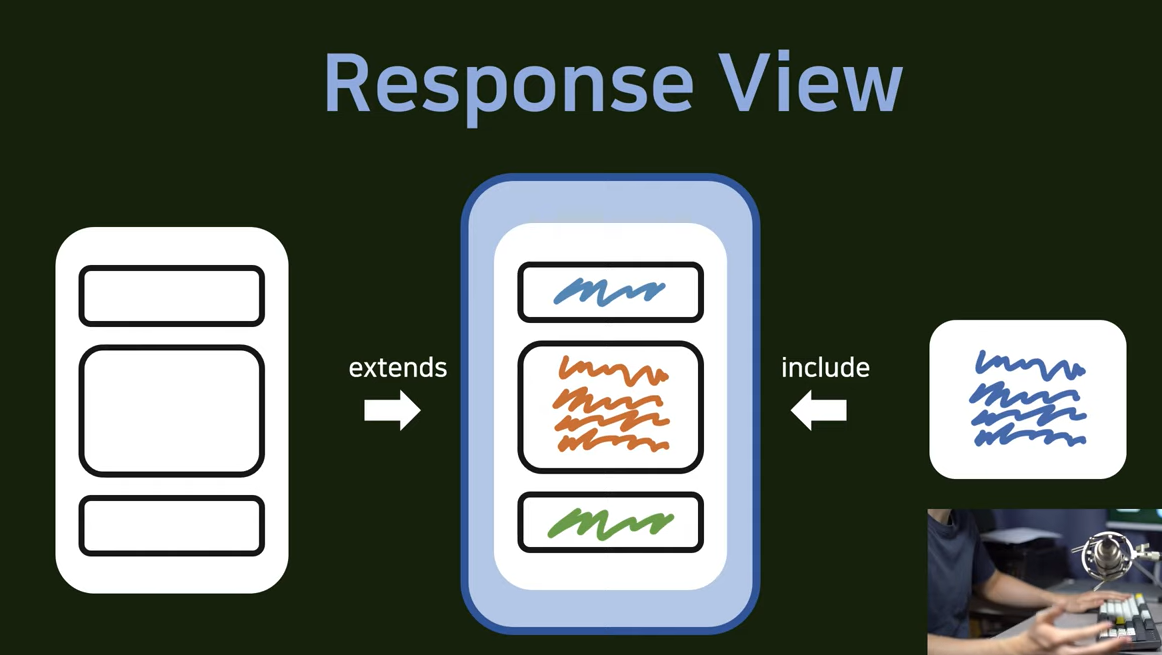
기본셋팅
base directory에 templates 폴더생성 -> base.html생성
accountapp -> views.py 수정
settings.py 에 Templates에 templates 위치 추가'DIRS': [os.path.join(BASE_DIR,'templates')],

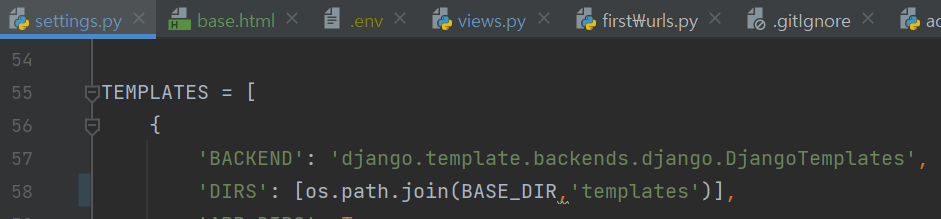
이렇게하면 django가 templates가 어딨는지 알고서 거기안에 있는 html이랑 연결시켜줄것임
9강
헤드는 따로관리 : templates에 head.html 파일 추가
base.html에 head태그 제거하고 {% include 'head.html' %} 추가
base.html
<!DOCTYPE html>
<html lang="ko">

{% include 'head.html'%}

<body>

    <div style="height: 10rem; background-color : #38df81; border-radius: 1rem; margin: 2rem;">
    </div>

    <div style="height: 20rem; background-color : #38df81; border-radius: 1rem; margin: 2rem;">
    </div>

    <div style="height: 10rem; background-color : #38df81; border-radius: 1rem; margin: 2rem;">
    </div>


</body>
</html>
가운데 div만 계속 수정됨, 그러므로 첫번째 세번째 태그는 새로 html파일을 만들어서 관리
header.html 생성 - base.html에 동일하게 include하여 추가
footer.html 생성 - base.html에 동일하게 include하여 추가
가운데부분
- extend를 사용
- account앱 내부에 따로 자체로 templates을 저장할 경로를 만들어줄것임
- accountapp에 templates dir추가 그 안에 accountapp dir 추가
(굳이 이렇게 html파일을 바로 추가 안하고 이중으로 하는 이유는 추후에 views.py에서 이 templates 파일을 사용할때 accountapp/base.html 처럼 어떤 앱에서 가져왔는지 가독성을 높이기 위함)
hello_world.html 코드
{% extends 'base.html' %}
{% block content %}
나머지는 다 base.html에서 가져오고 가운데 블럭만 수정할 수 있음.