작업 폴더 파일에서 pycashe/ 삭제
.gitignore 에서 pycashe/ 추가
HTML
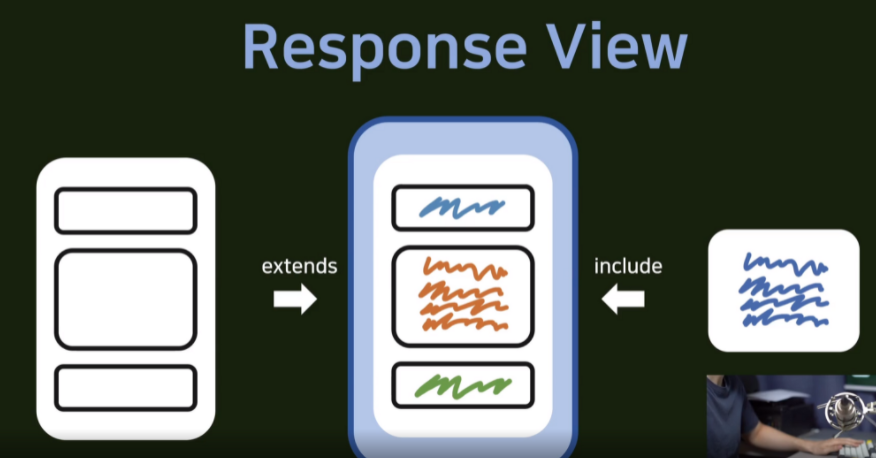
- extends : 바탕을 깔아 주는 느낌
- include : 조각을 가져와서 사용하는 느낌
- 최상위 폴더에 templates 폴더 생성
- templates→ base.html 생성
- views.py → render(request, ‘html폴더이름’)
	def hello_world(request):
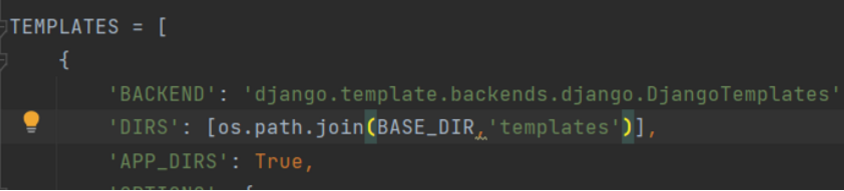
return render(request, 'base.html')- settings.py → Templates→’Dirs’설정
템플릿 폴더가 어디에 있는지 알려주면 거기서 html폴더를 찾음
9강
HTML 뼈대 만들기
- html head code 따로 관리하기
templates → head.html 파일 생성 → base.html에 있는 head 오려서 붙이기
- header.html, footer.html 생성 후 수정
- extends 구문을 사용하기 위한 block과 endblock 생성
<body>

    {%  include 'header.html' %}

    {% block content %}
    {% endblock %}
    <div style="height: 10rem; background-color: #38df81; border-radius: 1rem;margin: 2rem">

    </div>

    {% include 'footer.html' %}
</body>
- accountapp 내부에 templates를 관리할 폴더 생성
accountapp → templates 폴더 생성 → 그 안에 accountapp폴더 생성
!!번거롭겠지만 어떤 앱에서 html을 가져왔는지 가독성을 높이기 위해 이렇게 함
- block , end block을 통해 기존 base.html을 가져오고 block부분만 수정해서 hello_world.html 코드 작성
{% extends 'base.html' %}
{% block content %} #여기서 % 대신에 $써서 한참 찾았음..
    <div style="height: 10rem; background-color: #38df81; border-radius: 1rem;margin: 2rem">
        <h1>
            testing
        </h1>
    </div>
{% endblock %}
- views.py 도 수정
def hello_world(request):
    return render(request, 'accountapp/hello_world.html')

화이팅