import Foundation
- string과 같은 문자를 사용할 땐 꼭 사용해줘야 한다.
String
- swift에선 구조체를 많이 사용한다. ( 성능 측면 )
@frozen
struct String
bmi를 측정하는 코드
- switch ~ case문으로 구현
 import Foundation
func calcBMI (weight : Double, height : Double ){
    let bmi = weight / (height*height*0.0001)
    let shortenedBmi = String(format : "%.1f", bmi)
    switch bmi{
    case 0.0..<18.5:
        print("BMI:\(shortenedBmi),판정 : 저체중")
    case 18.5..<25.0:
        print("BMI:\(shortenedBmi),판정 : 정상")
    case 25.0..<30.0:
        print("BMI:\(shortenedBmi),판정 : 1단계 비만")
    case 30.0..<40.0:
        print("BMI:\(shortenedBmi),판정 : 2단계 비만")
    default :
        print("BMI:\(shortenedBmi),판정 : 3단게 비만")
    }
}
calcBMI(weight: 70.0, height: 170.0)
- class로 구현
import Foundation
class BMI {
var weight : Double
var height : Double
init(weight:Double, height:Double){
self.height = height
self.weight = weight
}
func calcBMI() -> Double{
return weight/(height*height*0.0001)
}
}
var han = BMI(weight:62.5, height:172.3)
print(han.calcBMI())- if~else문 구현
import Foundation
class BMI {
    var weight : Double
    var height : Double
    init(weight:Double, height:Double){
        self.height = height
        self.weight = weight
    }
    func calcBMI() -> String {
        let bmi=weight/(height*height*0.0001)// kg/m*m
        let shortenedBmi = String(format: "%.1f", bmi)
        var body =
        ""
        if bmi >= 40{
            body =
            "3단계 비만"
        } else if bmi >= 30 && bmi < 40 {
            body =
            "2단계 비만"
        } else if bmi >= 25 && bmi < 30 {
            body =
            "1단계 비만"
        } else if bmi >= 18.5 && bmi < 25 {
            body =
            "정상"
        } else {
            body =
            "저체중"
        }
        return "BMI:\(shortenedBmi), 판정:\(body)"
    }
}
var han = BMI(weight:62.5, height:172.3)
print(han.calcBMI())
identity inspector
- 코드에서 디자인을 변경하는 것이 일반적이지만 identity inspector에서도 변경 할 수 있다.
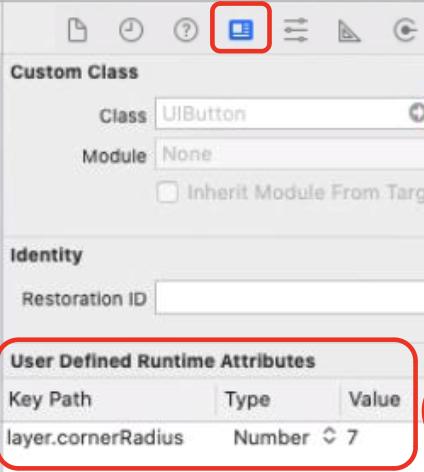
- 코드에서 실행하는 방법
//소스에서 변경하는 방법: button도 아웃렛 만들어서
button.clipsToBounds = true
button.layer.cornerRadius = 0.5 * button.bounds.size.height
숫자만 입력하게 하는 방법
- Decimal Pad = 10진수만을 입력하게 하는 키보드 타입
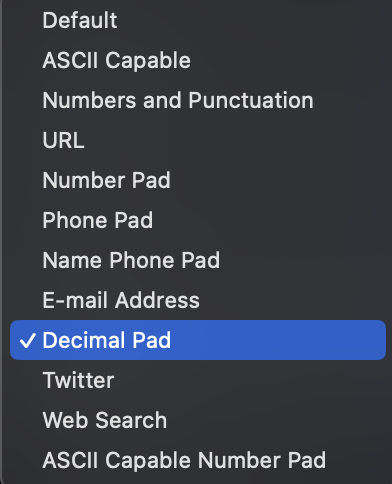
다른 여러가지의 키보드들도 존재한다.
BMI기획서 만들기 - chat gpt
기획서
- 프로젝트 생성
- 기본 UI 구현
- 간단한 BMI 계산 로직 구현
- 결과 출력 연결하기
상세 기획서
- 프로젝트 생성 및 설정
- Xcode에서 새 iOS 프로젝트를 생성할 때, Storyboard 기반으로 설정합니다.
- Single View App 템플릿을 선택하고 언어는 Swift로 지정합니다.
- Storyboard에 UI 배치하기
- UILabel: 화면에 "키(cm)"와 "몸무게(kg)" 레이블을 추가합니다.
- UITextField: 키와 몸무게를 입력받을 텍스트 필드를 추가합니다.
- 각 텍스트 필드에 placeholder 텍스트(예: “키를 입력하세요”)를 설정해 주세요.
- 키보드를 숫자 패드로 설정하려면 각 텍스트 필드의 속성에서 Keyboard Type을 Number Pad로 변경합니다.
- UIButton: “BMI 계산” 버튼을 추가하여 계산 작업을 실행할 수 있도록 합니다.
- UILabel: 계산된 BMI 값과 상태를 표시할 레이블을 추가합니다. 이 레이블은 기본적으로 빈 상태로 두고, 결과가 나타나면 업데이트하도록 합니다.
- ViewController에 연결하기
- IBOutlet 및 IBAction 추가: UI 요소와 코드 간 연결을 설정합니다.
- Assistant Editor를 열고, ViewController 파일을 함께 표시합니다.
- 각 UITextField와 결과 UILabel에 대해 @IBOutlet을 생성합니다.
- “BMI 계산” 버튼을 @IBAction으로 연결해 버튼이 눌렸을 때 특정 기능이 실행되도록 설정합니다.
- BMI 계산 로직 구현
- @IBAction 메서드에서 키와 몸무게 값을 가져와 BMI를 계산하고, 결과를 결과 UILabel에 표시합니다.

개발자 지망생