배열
- 연속된 메모리 공간에 데이터를 저장
- 인덱스를 사용하여 원소에 빠르게 접근
- 메모리 사용이 효율적
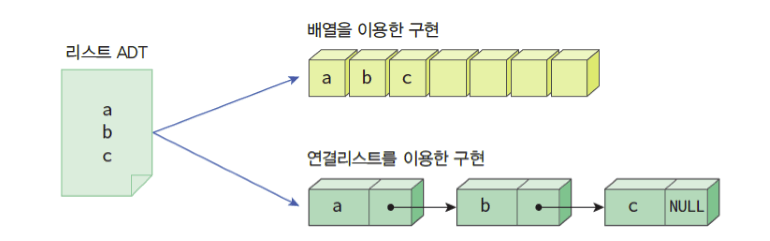
Linked List
- 연결 리스트는 데이터를 연속된 메모리 공간에 저장하지 않고, 각 데이터가 다음 데이터의 위치를 가리키는 형태로 구성된 선형 자료 구조
단일연결리스트
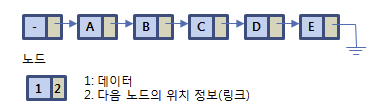
- 동적 크기
- 삽입과 삭제가 쉬움
- 메모리 효율성
# 노드 클래스 정의
class Node:
    def __init__(self, data):
        self.data = data
        self.next = None
노드생성하고 연결하기
    def append(self, data):
        if not self.head:
            self.head = Node(data)
        else:
            current = self.head
            while current.next:
                current = current.next # current.next가 존재하지 않을 때 까지 next를 한다.
            current.next = Node(data)

    def print_list(self):
        current = self.head
        while current:
            print(current.data)
            current = current.next
연결리스트의 값을 순서대로 출력하기
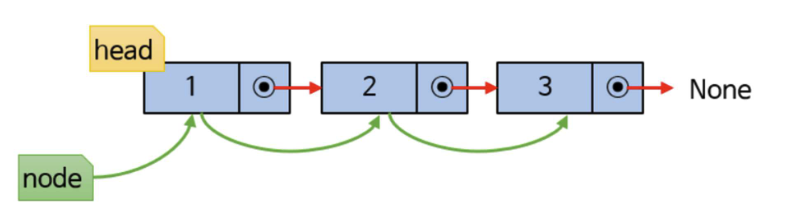
node = head

while node:
		print(node, data, end = ' ')
		node = node.nxet
연결리스트 삽입, 삭제 구현
- 방법
- 헤드 부분에 추가, 삭제
- 중간 부분에 추가, 삭제
- 꼬리 부분에 추가, 삭제
class Node:
    def __init__(self, data):
        self.data = data  # 노드가 저장하는 데이터
        self.next = None  # 다음 노드를 가리키는 포인터

class LinkedList:
    def __init__(self):
        self.head = None  # 링크드 리스트의 첫 번째 노드를 가리키는 포인터

    def append(self, data):  # 새로운 노드를 리스트의 끝에 추가
        if not self.head:  # 만약 리스트가 비어있으면
            self.head = Node(data)  # 새 노드를 head로 지정
        else:  # 리스트가 비어있지 않으면
            current = self.head
            while current.next:  # 리스트의 끝을 찾아가는 루프
                current = current.next
            current.next = Node(data)  # 리스트의 끝에 새 노드 추가

    def print_list(self):  # 리스트의 모든 노드를 출력
        current = self.head
        while current:
            print(current.data)
            current = current.next

    def insert(self, data, position):  # 새로운 노드를 리스트의 특정 위치에 삽입
        new_node = Node(data)  # 새 노드 생성
        if position == 0:  # 만약 맨 앞에 삽입하는 경우
            new_node.next = self.head  # 새 노드의 다음 노드를 현재의 head 노드로 지정
            self.head = new_node  # 새 노드를 head 노드로 지정
        else:
            current = self.head
            for _ in range(position - 1):  # 삽입할 위치의 앞 노드를 찾는 루프
                if current:
                    current = current.next
                else:
                    raise IndexError('Position out of range')  # 삽입 위치가 리스트의 길이를 초과하면 예외 발생
            if current is None:
                raise IndexError('Position out of range')  # 삽입 위치가 리스트의 길이를 초과하면 예외 발생
            new_node.next = current.next  # 새 노드의 다음 노드를 삽입 위치의 노드로 지정
            current.next = new_node  # 삽입 위치의 앞 노드의 다음 노드를 새 노드로 지정

    def delete(self, data):  # 주어진 값을 가진 노드를 리스트에서 삭제
        if self.head and self.head.data == data:  # 삭제할 노드가 head 노드인 경우
            self.head = self.head.next  # head 노드를 다음 노드로 지정
        else:
            current = self.head
            while current and current.next and current.next.data != data:  # 삭제할 노드를 찾는 루프
                current = current.next
            if current and current.next:  # 삭제할 노드를 찾은 경우
                current.next = current.next.next  # 삭제할 노드 앞의 노드의 다음 노드를 삭제할 노드의 다음 노드로 지정
            else:
                raise ValueError('Value not found in the list')  # 삭제할 노드를 찾지 못한 경우 예외 발생
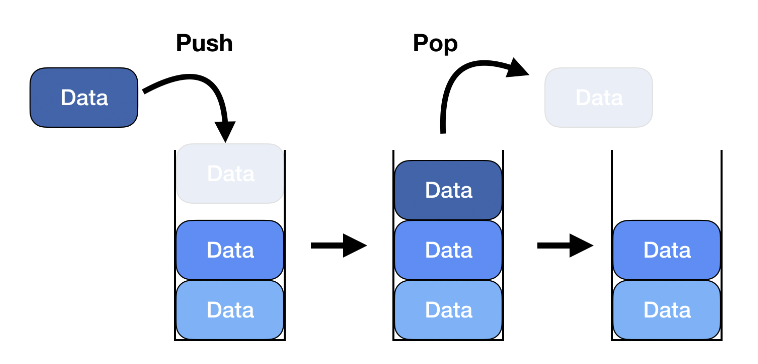
스택(Stack)
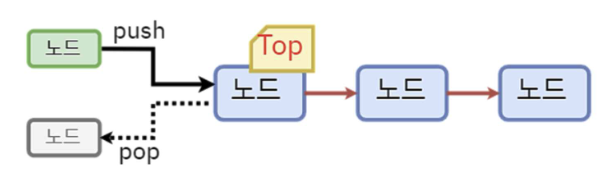
- 자료구조의 한형태로 후입선출을 원칙에 따라 데이터를 관리
-
Push(): 스택의 맨 위에 새로운 항목을 추가하는 작업
-
Pop(): 스택의 맨 위에 있는 항목을 제거하는 작업
-
Peek(): 마지막에 넣은 자료르 확인하는 작업 , POP비슷하지만 값을 제거하지는 않음
-
isEmpty: 스택이 비어 있는지 하는 작업
-
활용
- 함수 호출
- 실행 취소(undo)
- 문법 검사
- 깊이 우선 탐색(DFS)
- 표현식 평가
- 메모리 관리
스택의 예제
data_stack = list()
print(data_stack)

data_stack.append(2)
data_stack.append(10)
data_stack.append(5)
print(data_stack)

print(data_stack.pop())
print(data_stack)

temp = data_stack.pop()
print(data_stack)

print(temp)
-
빈 스택 출력:
[] -
요소를 추가한 후 스택 출력:
[2, 10, 5] -
pop()후 제거된 값과 현재 스택 출력:- 제거된 값:
5 - 현재 스택:
[2, 10]
- 제거된 값:
-
pop()후 현재 스택 출력:- 현재 스택:
[2]
- 현재 스택:
-
temp에 저장된 값 출력:10 -
마지막에는 2가 남는다.
큐(Queue)
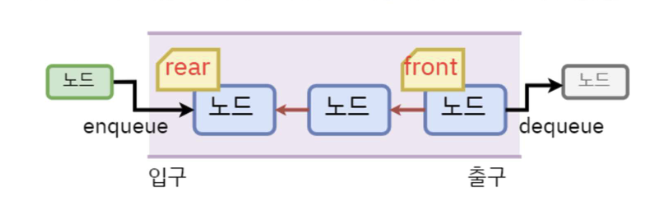
- 가장 먼저 넣은 데이터를 가장 먼저 꺼낼 수 있는 구조
- 줄을 서는 행위 유사, FIFO(First-in, First-out)
- 큐에서는 Head 대신 front라고 하며 마지막에 들어간 노드쪽을 rear
- Enqueue: 큐에 데이터를 넣는 기능, Dequeue: 큐에 데이터를 꺼내는 기능
큐의 예제
import queue

# 큐 생성
q = queue.Queue()

# 큐에 데이터 삽입 (Enqueue)
q.put("apple")
q.put("banana")
q.put("cherry")

# 큐에서 데이터 꺼내기 (Dequeue)
first_item = q.get()
print(first_item)  # "apple" 출력

second_item = q.get()
print(second_item)  # "banana" 출력

# 큐가 비어 있는지 확인
if q.empty():
    print("Queue is empty")
else:
print("Queue is not empty")- queue종류
- Queue(): 가장 일반적인 큐 자료구조를 생성
- LifoQueue(): 나중에 입력된 데이터가 먼저 출력되는 구조의 큐 자료구조를 생성(스택구조와 비슷)
- PrioritQueue(): 데이터마다 우선순위를 넣어서 우선순위가 높은순으로 데이터를 출력
파라미터와 하이퍼파라미터
파라미터
- 모델 내부에서 결정되는 변수
- 데이터릉 통해 구해지며, 모델 내부적으로 결정되는 값
- 파라미터가 모델의 능력을 결정
- 측정하거나 데이터로부터 학습
- 예측자에 의해서 수작업으로 측정되지 않음
- 학습된 모델의 일부로 저장
예) 가중치, 절편
하이퍼파라미터
- 모델링할 때 사용자가 직접 세팅해주는 값
- 모델의 파라미터값을 측정하기 위해 알고리즘 구현 과정
- 알고리즘 사용자에 의해 정해짐
- 경험에 의해 정해짐
- 예측 알고리즘 모델링의 문제점을 위해 조절
예) 신경망의 학습률과 에포크 수
자료참고
https://thecho7.tistory.com/entry/면접-꿀팁-배열Array과-링크드-리스트Linked-list의-특징
https://velog.io/@hyhy9501/5-1-Linked-List-연결-리스
https://velog.io/@hyhy9501/3-1.-스택Stack
https://velog.io/@hyhy9501/3-1.-큐Queue
https://bkshin.tistory.com/entry/머신러닝-13-파라미터Parameter와-하이퍼-파라미터Hyper-parameter

개발자를 위한 첫시작