자연어 처리
한국어 처리를 위한 패키지
- PyKospacing
- 뛰어쓰기가 되어있지 않은 문장을 뛰어쓰기 해주는 변환 딥러닝 기반 패키지
- 뛰어쓰기
- 맞춤법 검사
pip install git+https://github.com/haven-jeon/PyKoSpacing.git

from pykospacing import Spacing

spacing = Spacing()
spacing("김형호영화시장분석가는'1987'의네이버영화정보네티즌10점평에서언급된단어들을지난해12월27일부터올해1월10일까지통계프로그램R과KoNLP패키지로텍스트마이닝하여분석했다.")
"김형호 영화시장 분석가는 '1987'의 네이버 영화 정보 네티즌 10점 평에서 언급된 단어들을 지난해 12월 27일부터 올해 1월 10일까지 통계 프로그램 R과 KoNLP 패키지로 텍스트마이닝하여 분석했다."- kss
- 한국어 문장 분리 파이썬 라이브러리
- 문장 분리의 경우 형태소 분석으로 종결어미를 구분
!pip install kss
import kss

s = "회사 동료 분들과 다녀왔는데 분위기도 좋고 음식도 맛있었어요 다만, 강남 토끼정이 강남 쉑쉑버거 골목길로 쭉 올라가야 하는데 다들 쉑쉑버거의 유혹에 넘어갈 뻔 했답니다 강남역 맛집 토끼정의 외부 모습."
for sent in kss.split_sentences(s):
print(sent)- y-hanspell
- 파이썬 한글 맞춤법 검사 라이브러리, 네이버 맞춤법 검사기 사용
pip install py-hanspell
from hanspell import spell_checker

result = spell_checker.check(u'안녕 하세요. 저는 한국인 입니다. 이문장은 한글로 작성됬습니다.')
result.as_dict()  # dict로 출력
{'checked': '안녕하세요. 저는 한국인입니다. 이 문장은 한글로 작성됐습니다.',
 'errors': 4,
 'original': '안녕 하세요. 저는 한국인 입니다. 이문장은 한글로 작성됬습니다.',
 'result': True,
 'time': 0.07065701484680176,
 'words': {'안녕하세요.': 2,
           '저는': 0,
           '한국인입니다.': 2,
           '이': 2,
           '문장은': 2,
           '한글로': 0,
'작성됐습니다.': 1}}- soynpl
- 반복되는 이모티콘이나 자모 ㅎㅎㅎ, ㅋㅋ과 같은 표현들을 정규화하는 라이브러리
from soynlp.normalizer import *

print(repeat_normalize('ㅋㅋㅋㅋ', num_repeats=2))- KOMORANKOMORAN
- 여러 어절을 하나의 품사로 분석 가능
- 고유 명사 분석시 용이(맛집, 특정 이름, 영화 등)
from konlpy.tag import Komoran
import re

komoran = Komoran()

def extract_restaurant_names(text):
    # 형태소 분석
    pos = komoran.pos(text)

    # 연속된 명사 추출
    names = []
    temp = []
    for word, tag in pos:
        if tag.startswith('NN'):  # 명사인 경우
            temp.append(word)
        else:
            if temp:
                names.append(' '.join(temp))
                temp = []
    if temp:
        names.append(' '.join(temp))

    # 가능한 맛집 이름 필터링 (2음절 이상)
    restaurant_names = [name for name in names if len(name) >= 2]

    return restaurant_names

# 리뷰 데이터
reviews = [
    "성수동 카페거리에 있는 '커피한약방'에서 아인슈페너를 마셨어요. 분위기도 좋고 맛있었습니다!",
    "어제 방문한 '성수다락'은 정말 맛있었어요. 특히 티라미수가 일품이었죠.",
    "힙한 분위기의 '스윗솔트'에서 브런치를 먹었는데, 에그베네딕트가 너무 맛있었어요!",
    "성수동 맛집 '고기리 막국수'에서 막국수와 편육을 먹었습니다. 양도 많고 맛있어요.",
]

# 각 리뷰에서 맛집 이름 추출
for i, review in enumerate(reviews, 1):
    print(f"\n리뷰 {i}:")
    print(review)
    restaurant_names = extract_restaurant_names(review)
    print("추출된 가능한 맛집 이름:", restaurant_names)
Goolge Translater 활용하기
googletrans라이브러리에서Translator클래스를 가져옴translate_korean_to_english함수를 정의합니다. 이 함수는 한국어 텍스트를 입력받아 영어로 번역- 함수 내에서
Translator객체를 생성하고,translate메소드를 사용하여 텍스트를 번역
from googletrans import Translator

def translate_kr_to_en(text):
    translator = Translator()
    result = translator.translate(text, src='ko', dest='en')
    return result.text

korean_text = "안녕하세요. 오늘 날씨가 좋습니다."
english_translation = translate_kr_to_en(korean_text)

print(f"한국어: {korean_text}")
print(f"영어 번역: {english_translation}")
한국어: 안녕하세요. 오늘 날씨가 좋습니다.
영어 번역: hello. The weather is nice today.
- 언어 감지하기
# 언어 감지를 원하는 문장 설정
sentence = '你好'

translator = Translator()

# 입력한 문장 언어 감지
detected_language = translator.detect(sentence)
print(detected_language)
print(detected_language.lang)
Detected(lang=zh-CN, confidence=1)
zh-CN
단어 표현법
- 원핫 인코딩 (One-Hot Encoding)
- 각 단어를 고유한 이진 벡터로 표현하는 방법
- 벡터의 차원은 어휘 크기와 동일하며, 해당 단어의 인덱스만 1이고 나머지는 0
특징
- 간단하고 직관적
- 모든 단어가 동일한 거리를 가짐
- 어휘가 커지면 벡터의 차원이 매우 커짐
- 단어 간의 의미적 관계를 표현하지 못함
예시
-
cat: [1, 0, 0, 0]
-
dog: [0, 1, 0, 0]
-
fish: [0, 0, 1, 0]
-
bird: [0, 0, 0, 1]
-
워드 임베딩 (Word Embedding)
- 단어를 밀집된 실수 벡터로 표현하는 방법
- 의미적으로 유사한 단어들은 벡터 공간에서 서로 가깝게 위치
특징
- 낮은 차원의 벡터로 단어를 표현 (일반적으로 50~300차원)
- 단어 간의 의미적, 문법적 관계를 포착
- 전이 학습(transfer learning)에 유용
주요 기법
- Word2Vec
- CBOW (Continuous Bag of Words)
- Skip-gram
- GloVe (Global Vectors for Word Representation)
예시 (2차원으로 단순화)
cat: [0.2, 0.5]
dog: [0.1, 0.7]
fish: [-0.3, -0.2]
bird: [0.4, 0.1]
📍원핫 인코딩 vs 워드 임베딩
| 특성 | 원핫 인코딩 | 워드 임베딩 |
|---|---|---|
| 차원 | 높음 (어휘 크기) | 낮음 (50~300) |
| 밀도 | 희소 (sparse) | 밀집 (dense) |
| 의미 관계 | 표현 못함 | 표현 가능 |
| 메모리 | 비효율적 | 효율적 |
| 계산 복잡도 | 높음 | 낮음 |
import numpy as np
from gensim.models import Word2Vec
from sklearn.feature_extraction.text import CountVectorizer
from tensorflow.keras.preprocessing.text import Tokenizer
from tensorflow.keras.preprocessing.sequence import pad_sequences

sentences = [
    "I love natural language processing",
    "Word embeddings are powerful",
    "Neural networks can learn word representations"
]

# Word2Vec
# 문장을 단어 리스트로 변환
word_lists = [sentence.lower().split() for sentence in sentences]

# Word2Vec 모델 학습
model = Word2Vec(sentences=word_lists, vector_size=100, window=5, min_count=1, workers=4)

print("1. Word2Vec:")
print("'love'의 벡터 표현:", model.wv['love'][:5], "...")  # 처음 5개 요소만 출력
print("'powerful'과 가장 유사한 단어:", model.wv.most_similar('powerful', topn=3))

# 워드 임베딩
tokenizer = Tokenizer()
tokenizer.fit_on_texts(sentences)

# 시퀀스로 변환
sequences = tokenizer.texts_to_sequences(sentences)

# 패딩
padded_sequences = pad_sequences(sequences)

print("\n2. 워드 임베딩 (Keras):")
print("단어 인덱스:", tokenizer.word_index)
print("패딩된 시퀀스:", padded_sequences)

# 3. 원-핫 인코딩
vectorizer = CountVectorizer(binary=True)
one_hot = vectorizer.fit_transform(sentences).toarray()

print("\n3. 원-핫 인코딩:")
print("특성 이름:", vectorizer.get_feature_names_out())
print("원-핫 인코딩 결과:\n", one_hot)- Word2Vec:
'love'의 벡터 표현: [-0.00194422 -0.00526752 0.00944711 -0.00929873 0.00450395] ...
'powerful'과 가장 유사한 단어: [('learn', 0.1459505707025528), ('language', 0.05048206448554993), ('can', 0.04157451540231705)] - 워드 임베딩 (Keras):
단어 인덱스: {'word': 1, 'i': 2, 'love': 3, 'natural': 4, 'language': 5, 'processing': 6, 'embeddings': 7, 'are': 8, 'powerful': 9, 'neural': 10, 'networks': 11, 'can': 12, 'learn': 13, 'representations': 14}
패딩된 시퀀스: [[ 0 2 3 4 5 6][ 0 0 1 7 8 9]
[10 11 12 13 1 14]] - 원-핫 인코딩:
특성 이름: ['are' 'can' 'embeddings' 'language' 'learn' 'love' 'natural' 'networks'
'neural' 'powerful' 'processing' 'representations' 'word']
원-핫 인코딩 결과:
[[0 0 0 1 0 1 1 0 0 0 1 0 0][1 0 1 0 0 0 0 0 0 1 0 0 1]
[0 1 0 0 1 0 0 1 1 0 0 1 1]]
Word2Vec와 GloVe
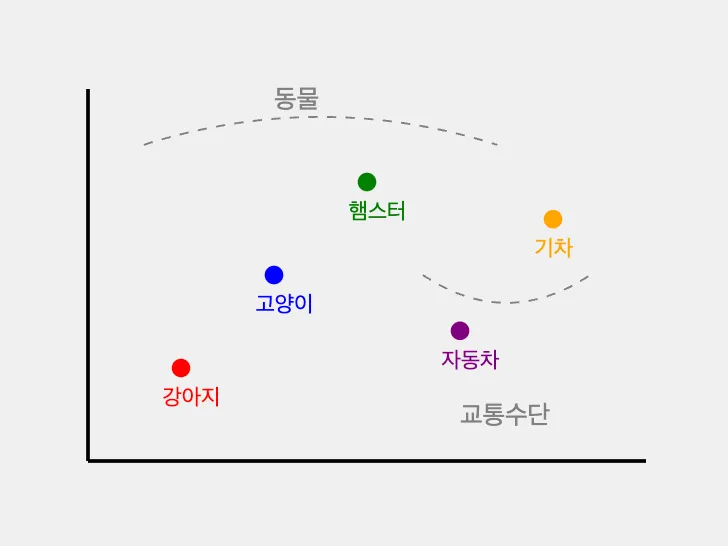
- Word2Vec
- 단어를 벡터로 표현하는 기술입니다. 비슷한 의미를 가진 단어들이 벡터 공간에서 서로 가깝게 위치하도록 만듬
- GloVe
- 사전 학습된 임베딩을 사용
TF-IDF
- TF-IDF(term frequency-inverse document frequency)란 코퍼스(corpus, 문서집합)에서 특정 한 단어가 얼마나 중요한지를 수치적으로 나타낸 가중치
TF(Term Frequency)
특정 단어가 1개의 문서 내에서 출현하는 빈도
- 계산 방법: (특정 단어 등장 횟수) / (문서의 전체 단어 수)
IDF(Inverse Document Frequency)
특정 단어가 전체 문서 집합 내에서 얼마나 공통적으로 출현하는지를 나타냄
- 계산 방법: log((전체 문서 수) / (특정 단어가 포함된 문서 수))
감성 분석
- 텍스트에 표현된 작성자의 태도, 의견, 감정을 파악하는 자연어 처리 기술
- 긍정(Positive)
- 부정(Negative)
- 중립(Neutral)
import nltk
from nltk.tokenize import word_tokenize
from nltk.corpus import stopwords
nltk.download('punkt')
nltk.download('stopwords')

# 간단한 감성 어휘 사전
sentiment_dict = {
    'good': 1, 'great': 2, 'excellent': 2, 'bad': -1, 'terrible': -2, 'awful': -2
}

def sentiment_score(text):
    tokens = word_tokenize(text.lower())
    stop_words = set(stopwords.words('english'))
    tokens = [word for word in tokens if word.isalnum() and word not in stop_words]

    score = sum(sentiment_dict.get(word, 0) for word in tokens)

    if score > 0:
        return 'Positive'
    elif score < 0:
        return 'Negative'
    else:
        return 'Neutral'

# 출력
text = "This movie was great! The acting was excellent, but the ending was terrible."
print(sentiment_score(text))
텍스트 요약 기법
- 추출적 요약 (Extractive Summarization)
- 원문에서 중요한 문장이나 구절을 그대로 추출
- 추상적 요약 (Abstractive Summarization)
- 원문의 내용을 이해하고 새로운 문장으로 요약 생성
from nltk.tokenize import sent_tokenize
from nltk.corpus import stopwords
from nltk.probability import FreqDist
nltk.download('punkt')
nltk.download('stopwords')

def simple_summarize(text, num_sentences=3):
    sentences = sent_tokenize(text)
    words = word_tokenize(text.lower())
    stop_words = set(stopwords.words('english'))
    words = [word for word in words if word.isalnum() and word not in stop_words]

    word_freq = FreqDist(words)
    sentence_scores = {sentence: sum(word_freq[word] for word in word_tokenize(sentence.lower()) if word in word_freq) for sentence in sentences}

    summary_sentences = sorted(sentence_scores, key=sentence_scores.get, reverse=True)[:num_sentences]
    summary = ' '.join(summary_sentences)

    return summary

# 출력
long_text = """Natural language processing (NLP) is a subfield of linguistics, computer science, and artificial intelligence concerned with the interactions between computers and human language, in particular how to program computers to process and analyze large amounts of natural language data. The goal is a computer capable of understanding the contents of documents, including the contextual nuances of the language within them. The technology can then accurately extract information and insights contained in the documents as well as categorize and organize the documents themselves."""

print(simple_summarize(long_text))
워드 클라우드
- 텍스트 데이터에서 단어의 빈도나 중요도를 시각적으로 표현하는 기법
from wordcloud import WordCloud
import matplotlib.pyplot as plt
from nltk.corpus import stopwords
from nltk.tokenize import word_tokenize
nltk.download('stopwords')

def generate_wordcloud(text):
    # 텍스트 전처리
    stop_words = set(stopwords.words('english'))
    words = word_tokenize(text.lower())
    words = [word for word in words if word.isalnum() and word not in stop_words]

    # 워드 클라우드 생성
    wordcloud = WordCloud(width=800, height=400, background_color='white').generate(' '.join(words))

    # 시각화
    plt.figure(figsize=(10, 5))
    plt.imshow(wordcloud, interpolation='bilinear')
    plt.axis('off')
    plt.title('Word Cloud')
    plt.show()

# 출력
text = """Natural language processing (NLP) is a subfield of linguistics, computer science, and artificial intelligence concerned with the interactions between computers and human language, in particular how to program computers to process and analyze large amounts of natural language data. The goal is a computer capable of understanding the contents of documents, including the contextual nuances of the language within them. The technology can then accurately extract information and insights contained in the documents as well as categorize and organize the documents themselves."""

generate_wordcloud(text)
개발자를 위한 첫시작