최근 promeet 프로젝트에서 카카오맵 api를 사용해 지도 표시, 마커 표시, 경로 표시, 주변 장소 검색을 구현했습니다.
이 과정을 정리해보겠습니다.
개발 환경
- vite 6.3.1
- react 19.0.0
- styled-components 6.1.18
- zustand 5.0.4
저는 단순히 지도 ui를 띄우는 MapContainer
마커 표시, 클릭 이벤트를 설정해 놓을 MarkerManager
장소 검색을 처리할 SearchPlace
컴포넌트로 나눴습니다.
1️⃣ 지도 표시
웹 서비스에서 Kakao map api를 사용하기 위해선 우선 Kakao Developers 사이트에서
내 애플리케이션 -> 애플리케이션 추가하기 로 애플리케이션을 추가하고
추가된 애플리케이션을 클릭해 앱 키 탭에서 JavaScript 키를 복사해 프로젝트의 .env 파일에 추가합니다.
- useKakaoMap.js
Kakao Maps SDK 스크립트를 동적으로 로드하고
로딩되었는지 감시하고 알려주는 훅
import { useState, useEffect } from 'react';

// 카카오맵 스크립트 로드 함수
const loadKakaoMapScript = () => {
  return new Promise((resolve, reject) => {
    if (window.kakao && window.kakao.maps && typeof window.kakao.maps.load === 'function') {
      resolve(window.kakao);
      return;
    }

    const script = document.createElement('script');
    script.src = `//dapi.kakao.com/v2/maps/sdk.js?appkey=${import.meta.env.VITE_KAKAO_JS_KEY}&autoload=false&libraries=services,clusterer,drawing`;
    script.async = true;
    script.onload = () => resolve(window.kakao);
    script.onerror = () => reject(new Error('[카카오맵 스크립트 로드 실패]'));
    document.head.appendChild(script);
  });
};

const useKakaoMap = () => {
  const [ready, setReady] = useState(false);
  const [error, setError] = useState(null);

  useEffect(() => {
    loadKakaoMapScript()
      .then((kakao) => {
        kakao.maps.load(() => {
          setReady(true);
        });
      })
      .catch((err) => {
        setError(err);
      });
  }, []);

  return { ready, error };
};

export default useKakaoMap;- MapContainer.jsx
준비된 Kakao SDK를 기반으로 실제 지도를 화면에 띄우는 UI 전용 컴포넌트
import * as S from './style';
import { useEffect, useRef } from 'react';
import { useMapActions } from '@/hooks/stores/promise/map/useMapStore';
import useKakaoMap from '@/hooks/kakao/useKakaoMap';
import DeferredLoader from '@/components/ui/DeferredLoader';

const MapContainer = ({ children, lat, lng }) => {
  const mapRef = useRef(null);
  const { setMap } = useMapActions();

  const { ready, error } = useKakaoMap();

  // 지도 생성
  useEffect(() => {
    if (error || !ready || !mapRef.current) {
      return;
    }

    try {
      const options = {
        center: new window.kakao.maps.LatLng(lat, lng), // lat, lng을 받아 중심 좌표 설정
        level: 3,
      };

      const map = new window.kakao.maps.Map(mapRef.current, options); // ref DOM에 지도 인스턴스를 생성
      setMap(map);
    } catch (error) {
      console.error('지도 생성 실패:', error);
    }
  }, [error, ready, lat, lng, setMap]);

  // 에러가 있으면 Error Boundary가 잡을 수 있도록 에러를 던짐
  if (error) {
    throw error;
  }

  // 카카오 스크립트 준비 안됐으면 로딩 컴포넌트 표시
  if (!ready) {
    return <DeferredLoader />;
  }

  return (
    <S.MapDiv id="map" ref={mapRef}>
      {children}
    </S.MapDiv>
  );
};

export default MapContainer;- MarkerManager.jsx
마커를 관리하는 컴포넌트
(단순히 하나의 장소 정보를 받아, 마커 이미지를 불러와 표시만 할 때)
import { useEffect, useRef } from 'react';
import { useMapInfo } from '@/hooks/stores/promise/map/useMapStore';
import { CATEGORY_MARKER_IMAGE } from '@/constants/place';

const MarkerManager = ({ place }) => {
  const { map } = useMapInfo();
  const markerRef = useRef(null);

  useEffect(() => {
    if (!map || !place) return;

    // 기존 마커 제거
    markerRef.current?.setMap(null);

    const position = new window.kakao.maps.LatLng(place.position.Ma, place.position.La);
    const imageSrc = CATEGORY_MARKER_IMAGE[place.type];

    const marker = new window.kakao.maps.Marker({
      position,
      image: new window.kakao.maps.MarkerImage(imageSrc, new window.kakao.maps.Size(32, 34), {
        offset: new window.kakao.maps.Point(15, 40),
      }),
      map,
    });

    markerRef.current = marker;

    return () => {
      marker.setMap(null);
    };
  }, [map, place]);

  return null;
};

export default MarkerManager;- FinalPlaceMap.jsx
장소 정보 하나를 받아 마커를 표시하는 컴포넌트
import MapContainer from '../MapContainer';
import MarkerManager from '../MarkerManager';

// 최종 약속 위치 표시하는 맵
const FinalPlaceMap = ({ place }) => {
  const lat = Number(place.position.Ma);
  const lng = Number(place.position.La);
  return (
    <MapContainer lat={lat} lng={lng}>
      <MarkerManager place={place} />
    </MapContainer>
  );
};

export default FinalPlaceMap;
지도에 마커 표시만 한다면 여기까지만 참고하시면 됩니다!
아래부터는 더 다양한 기능을 정리했습니다.
2️⃣ 마커, 클릭 이벤트, 경로 표시
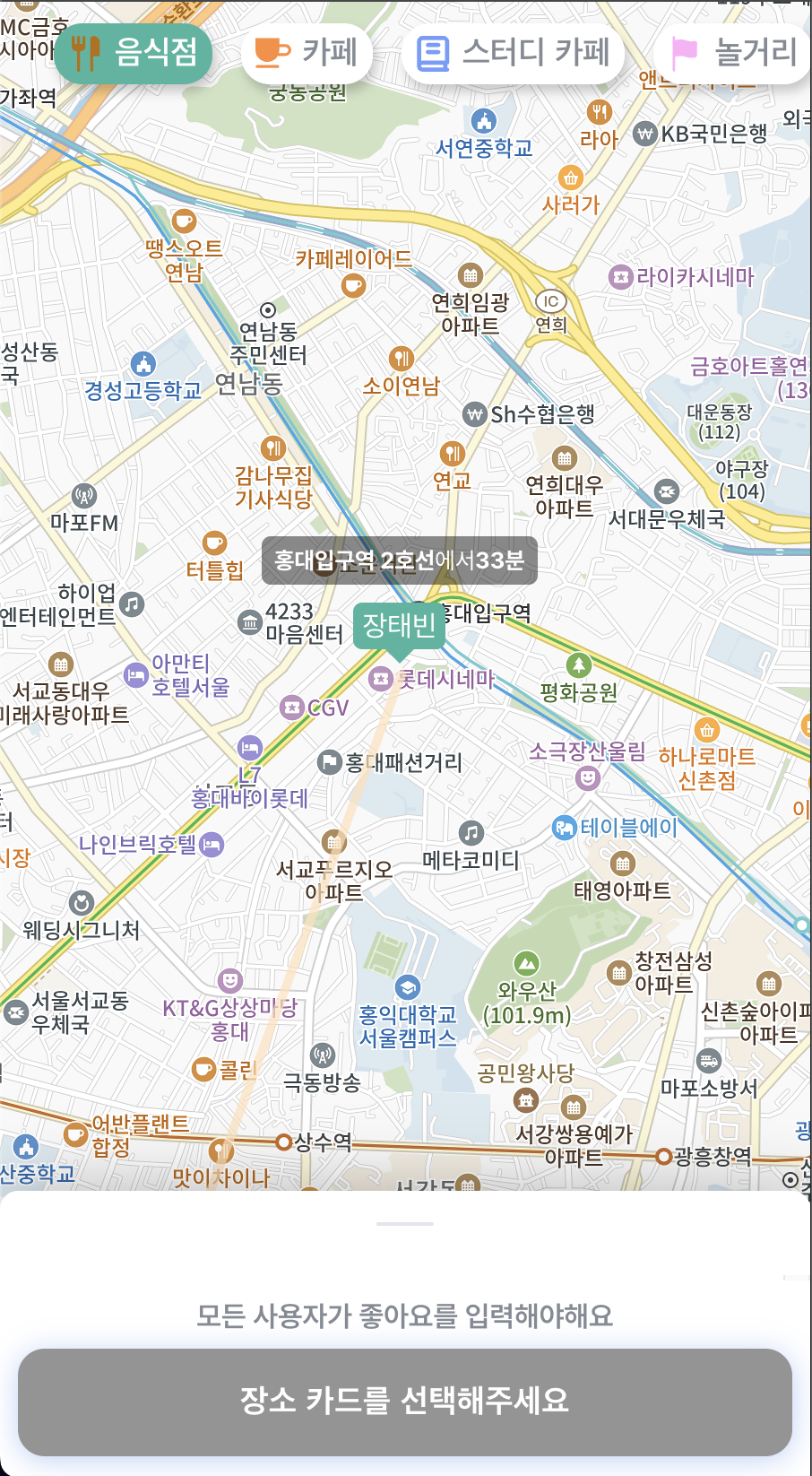
실제 애플리케이션에서는 내 위치 마커, 장소 마커, 장소 정보 오버레이, 프로필 오버레이, 경로도 표시했으며
장소 마커에 클릭 이벤트를 연결해 장소 정보 오버레이가 뜨도록 했습니다.
내 위치 마커, 장소 마커에는 이미지 마커를 사용했고,
장소 정보는 커스텀 오버레이,
경로에는 Polyline,
경로 끝 프로필에는 커스텀 오버레이를 사용했습니다.
이를 구현한 MarkerManager 컴포넌트입니다.
import './style.css';
import { useEffect, useRef, useCallback } from 'react';
import { useLocation } from 'react-router-dom';
import PropTypes from 'prop-types';
import { useMapInfo } from '@/hooks/stores/promise/map/useMapStore';
import { useMarkerInfo, useMarkerActions } from '@/hooks/stores/promise/map/useMarkerStore';
import { useBottomSheetActions } from '@/hooks/stores/ui/useBottomSheetStore';
import { CATEGORY, CATEGORY_MARKER_IMAGE, STATION_MARKER_IMAGE } from '@/constants/place';
import { MY_LOC_MARKER_IMG, MY_LOC_MARKER_ID, MAP_BS_ID, ROUTE_COLORS } from '@/constants/map';

const MarkerManager = ({ markers, routes }) => {
  const { pathname } = useLocation();
  const isSummaryPage = pathname.endsWith('/summary');

  const { map } = useMapInfo();
  const { activeMarkerId } = useMarkerInfo(); // 장소 오버레이 표시 위해 저장
  const { setActiveMarkerId, setSelectedOverlayId } = useMarkerActions(); // selectedOverlayId는 바텀 시트 열고 잠시 포커스 주는 역할
  const { setActiveBottomSheet } = useBottomSheetActions();

  // 마커 관리 refs
  const markersRef = useRef([]); // 모든 마커/polyline
  const markerMapRef = useRef(new Map()); // placeId(마커 id)와 마커 매핑
  const currentPlaceOverlayRef = useRef(null); // 모든 오버레이
  const myLocationMarkerRef = useRef(null); // 내 위치 마커는 변했을때만 바꾸기 위해 ref로 관리

  //  마커/polyline 정리 함수 ( 내 위치 마커 제외 )
  const clearMarkers = useCallback(() => {
    markersRef.current.forEach((marker) => marker?.setMap(null));
    markersRef.current = [];
    markerMapRef.current.clear();
  }, []);

  // 지도 영역 변경시 마커 표시/숨김
  const handleBoundsChanged = useCallback(() => {
    if (!map) return;
    const bounds = map.getBounds();

    markersRef.current.forEach((marker) => {
      if (!marker) return;

      const position = marker.getPosition();
      if (position) {
        markersRef.current.forEach((marker) => {
          marker.setVisible(bounds.contain(position));
        });
      }
    });
  }, [map]);

  // 마커 생성 및 관리
  useEffect(() => {
    if (!map || !markers) return;

    clearMarkers(); // 이전 마커/오버레이 삭제

    // 1. 장소 마커 생성
    markers.forEach((markerData) => {
      if (markerData.placeId === MY_LOC_MARKER_ID) return; // 내 위치 마커는 별도 처리

      const position = new window.kakao.maps.LatLng(markerData.position.Ma, markerData.position.La);
      const imageSrc = CATEGORY_MARKER_IMAGE[markerData.type];
      if (!imageSrc) return;

      const marker = new window.kakao.maps.Marker({
        position,
        image: new window.kakao.maps.MarkerImage(imageSrc, new window.kakao.maps.Size(32, 34), {
          offset: new window.kakao.maps.Point(15, 40),
        }),
        map,
      });

      if (markerData.placeId) {
        markerMapRef.current.set(markerData.placeId, marker);
        window.kakao.maps.event.addListener(marker, 'click', () =>
          setActiveMarkerId(markerData.placeId),
        );
      }

      marker.setMap(map);
      markersRef.current.push(marker);
    });

    // 2. 경로 마커 생성
    if (routes) {
      // 도착역 (중간역)
      const routeLength = routes[0].route.length;
      const lastStation = routes[0].route[routeLength - 1].station;

      routes.forEach((userRoute, index) => {
        // polyline
        const path = userRoute.route.map(
          (station) =>
            new window.kakao.maps.LatLng(station.station.position.Ma, station.station.position.La),
        );

        const polyline = new window.kakao.maps.Polyline({
          path,
          strokeWeight: 5,
          strokeColor: ROUTE_COLORS[index % ROUTE_COLORS.length],
          strokeOpacity: 0.7,
          map,
        });
        polyline.setMap(map);
        markersRef.current.push(polyline);

        // 사용자 정보 오버레이
        const firstStation = userRoute.route[0].station;
        const totalDuration = userRoute.route.reduce((acc, r) => acc + r.duration, 0);

        const userOverlay = new window.kakao.maps.CustomOverlay({
          content: `
            <div class="userInfoOverlay">
              <div class="durationContainer">
                <div class="bold">${firstStation.name}</div>
                에서
                <div class="bold"> ${totalDuration}분</div>
              </div>
              <div class="userName">${userRoute.name}</div>
            </div>
          `,
          position: new window.kakao.maps.LatLng(
            firstStation.position.Ma,
            firstStation.position.La,
          ),
          yAnchor: 1.05,
          map,
        });
        userOverlay.setMap(map);
        markersRef.current.push(userOverlay);

        // 도착역 (중간역)
        const stationPosition = new window.kakao.maps.LatLng(
          lastStation.position.Ma,
          lastStation.position.La,
        );

        // 마커
        const stationImageSize = new window.kakao.maps.Size(20, 20);
        const stationImageOption = { offset: new window.kakao.maps.Point(8, 12) };

        const stationMarkerImage = new window.kakao.maps.MarkerImage(
          STATION_MARKER_IMAGE,
          stationImageSize,
          stationImageOption,
        );

        const stationMarker = new window.kakao.maps.Marker({
          position: stationPosition,
          image: stationMarkerImage,
          map,
        });
        stationMarker.setMap(map);
        markersRef.current.push(stationMarker);

        // 오버레이
        const stationOverlay = new window.kakao.maps.CustomOverlay({
          content: `
            <div class="stationInfoOverlay">
              <div class="stationName">${lastStation.name}</div>
            </div>
          `,
          position: stationPosition,
          yAnchor: 1.6,
          map,
        });
        stationOverlay.setMap(map);
        markersRef.current.push(stationOverlay);
      });
    }

    // 3. 내 위치 마커 생성
    const myLocationMarker = markers.find((m) => m.placeId === MY_LOC_MARKER_ID);

    // 내 위치 마커 안 표시한다하면 제거
    if (!myLocationMarker) {
      if (myLocationMarkerRef.current) {
        myLocationMarkerRef.current.setMap(null);
        myLocationMarkerRef.current = null;
      }
      return;
    }

    // 기존 내위치 마커랑 새 내 위치 마커 비교해 다르면 위치 업데이트
    if (myLocationMarkerRef.current) {
      const currentPos = myLocationMarkerRef.current.getPosition();
      const newPos = new window.kakao.maps.LatLng(
        myLocationMarker.position.Ma,
        myLocationMarker.position.La,
      );

      if (currentPos.getLat() !== newPos.getLat() || currentPos.getLng() !== newPos.getLng()) {
        myLocationMarkerRef.current.setPosition(newPos);
      }
    } else {
      // 기존 내위치 마커 없다면 -> 새로 생성
      const myLocImageSize = new window.kakao.maps.Size(30, 30);
      const myLocImageOption = { offset: new window.kakao.maps.Point(20, 20) };
      const myLocMarkerImage = new window.kakao.maps.MarkerImage(
        MY_LOC_MARKER_IMG,
        myLocImageSize,
        myLocImageOption,
      );

      const myLocPosition = new window.kakao.maps.LatLng(
        myLocationMarker.position.Ma,
        myLocationMarker.position.La,
      );

      const myLocMarker = new window.kakao.maps.Marker({
        position: myLocPosition,
        image: myLocMarkerImage,
        map,
      });

      myLocMarker.setMap(map);
      myLocationMarkerRef.current = myLocMarker;
    }

    // 지도 영역 변경 이벤트 리스너 등록
    window.kakao.maps.event.addListener(map, 'bounds_changed', handleBoundsChanged);

    return () => {
      // 컴포넌트가 언마운트될 때는 모든 리소스를 정리
      window.kakao.maps.event.removeListener(map, 'bounds_changed', handleBoundsChanged);
      clearMarkers();
      // 내 위치 마커도 정리
      myLocationMarkerRef.current?.setMap(null);
      myLocationMarkerRef.current = null;
    };
  }, [map, markers, pathname, routes, clearMarkers, handleBoundsChanged, setActiveMarkerId]);

  // activeMarkerId 변경시 장소 오버레이 처리
  useEffect(() => {
    if (!map || !activeMarkerId) {
      currentPlaceOverlayRef.current?.setMap(null);
      currentPlaceOverlayRef.current = null;
      return;
    }

    const marker = markerMapRef.current.get(activeMarkerId);
    const markerData = markers.find((m) => m.placeId === activeMarkerId);
    if (!marker || !markerData) return;

    // 이전 오버레이 닫고
    if (currentPlaceOverlayRef.current) {
      currentPlaceOverlayRef.current.setMap(null);
    }

    // 생성해 추가
    const container = document.createElement('div');
    container.className = `infoContainer ${isSummaryPage ? 'isSummaryPage' : ''}`;
    container.onclick = () => {
      setSelectedOverlayId(markerData.placeId);
      setActiveBottomSheet(MAP_BS_ID);
    };

    const header = document.createElement('header');
    header.className = 'header';

    const title = document.createElement('h2');
    title.className = 'title ellipsis';
    title.textContent = markerData.name;

    const closeBtn = document.createElement('div');
    closeBtn.className = 'close';
    closeBtn.title = '닫기';
    closeBtn.textContent = '닫기';
    closeBtn.onclick = (e) => {
      e.stopPropagation();
      setActiveMarkerId(null);
      container.remove();
    };

    header.appendChild(title);
    header.appendChild(closeBtn);
    container.appendChild(header);

    const body = document.createElement('div');
    body.className = 'body';

    if (markerData.address) {
      const address = document.createElement('div');
      address.className = 'ellipsis';
      address.textContent = markerData.address;
      body.appendChild(address);
    }

    // 요약 페이지에선 전번, 링크 추가
    if (isSummaryPage) {
      if (markerData.phone) {
        const phone = document.createElement('div');
        phone.className = 'ellipsis';
        phone.textContent = markerData.phone;
        body.appendChild(phone);
      }

      if (markerData.link) {
        const link = document.createElement('a');
        link.className = 'link ellipsis';
        link.href = markerData.link;
        link.target = '_blank';
        link.textContent = markerData.link;
        body.appendChild(link);
      }
    }

    container.appendChild(body);

    const overlay = new window.kakao.maps.CustomOverlay({
      content: container,
      position: marker.getPosition(),
      yAnchor: isSummaryPage ? 1 : 1.65,
    });

    overlay.setMap(map);
    currentPlaceOverlayRef.current = overlay;
  }, [
    map,
    markers,
    activeMarkerId,
    isSummaryPage,
    setActiveMarkerId,
    setSelectedOverlayId,
    setActiveBottomSheet,
  ]);

  return null;
};

export default MarkerManager;
➡️ 결과
| 장소 마커 | 장소 오버레이 | 프로필 마커 |
|---|---|---|
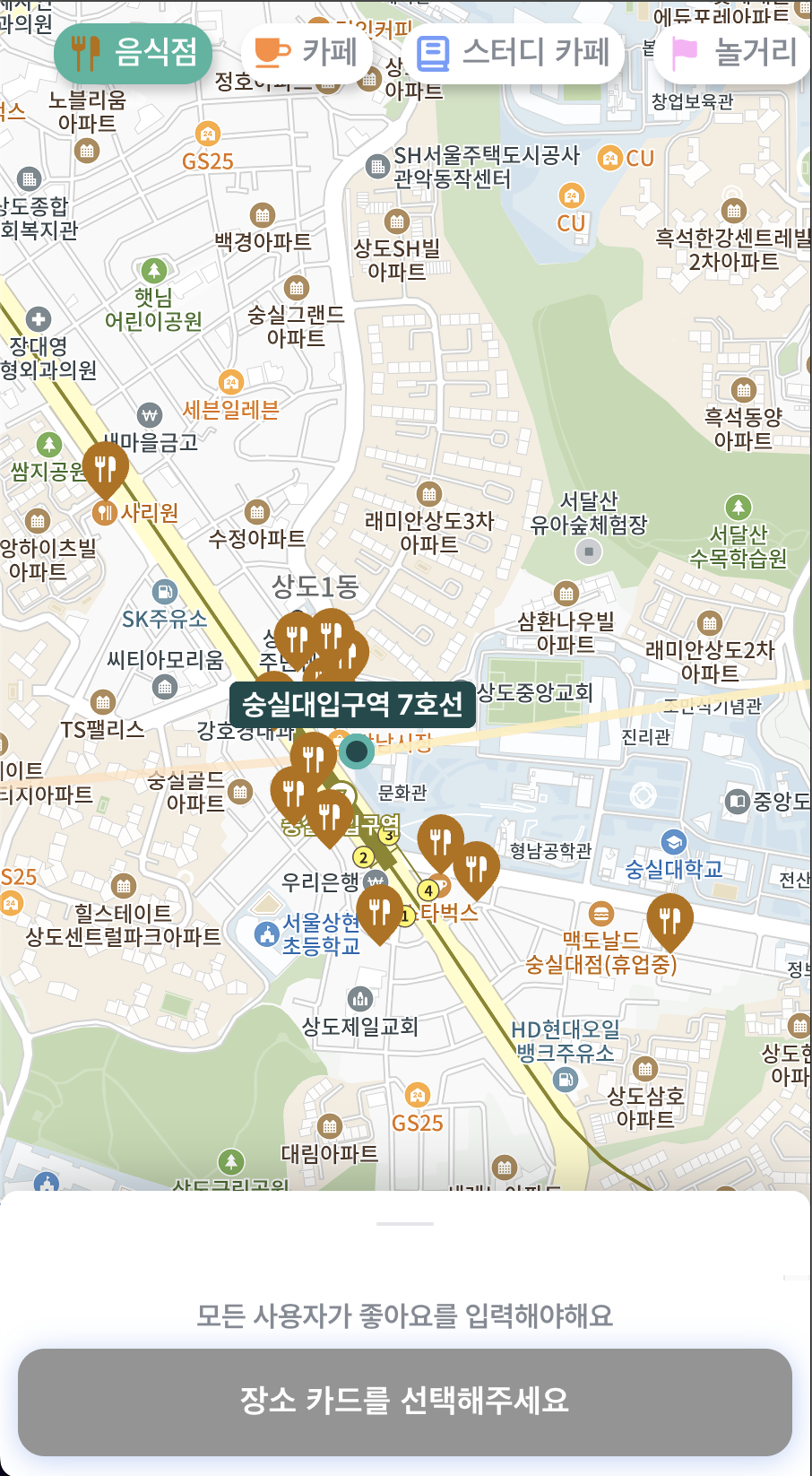 | 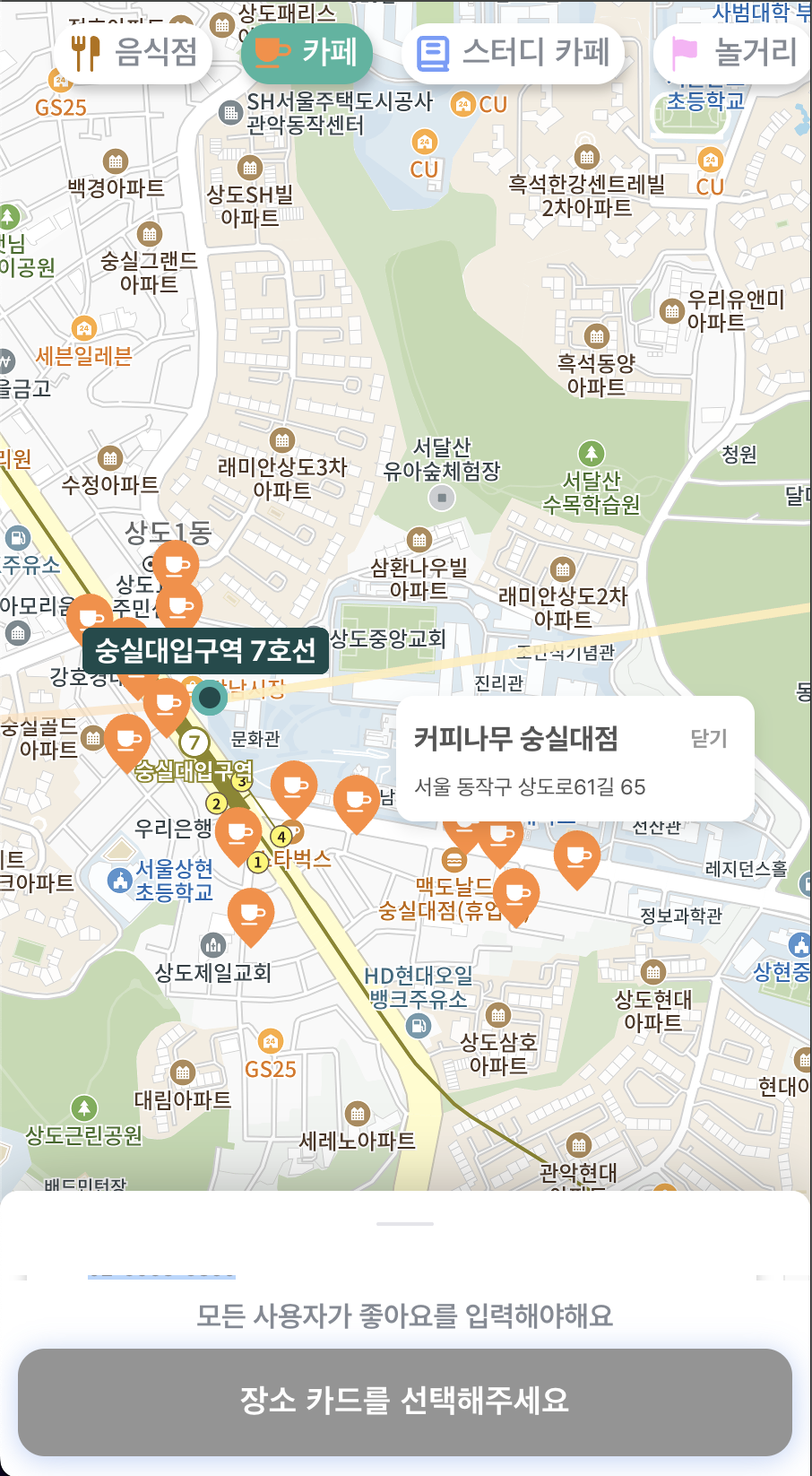 | 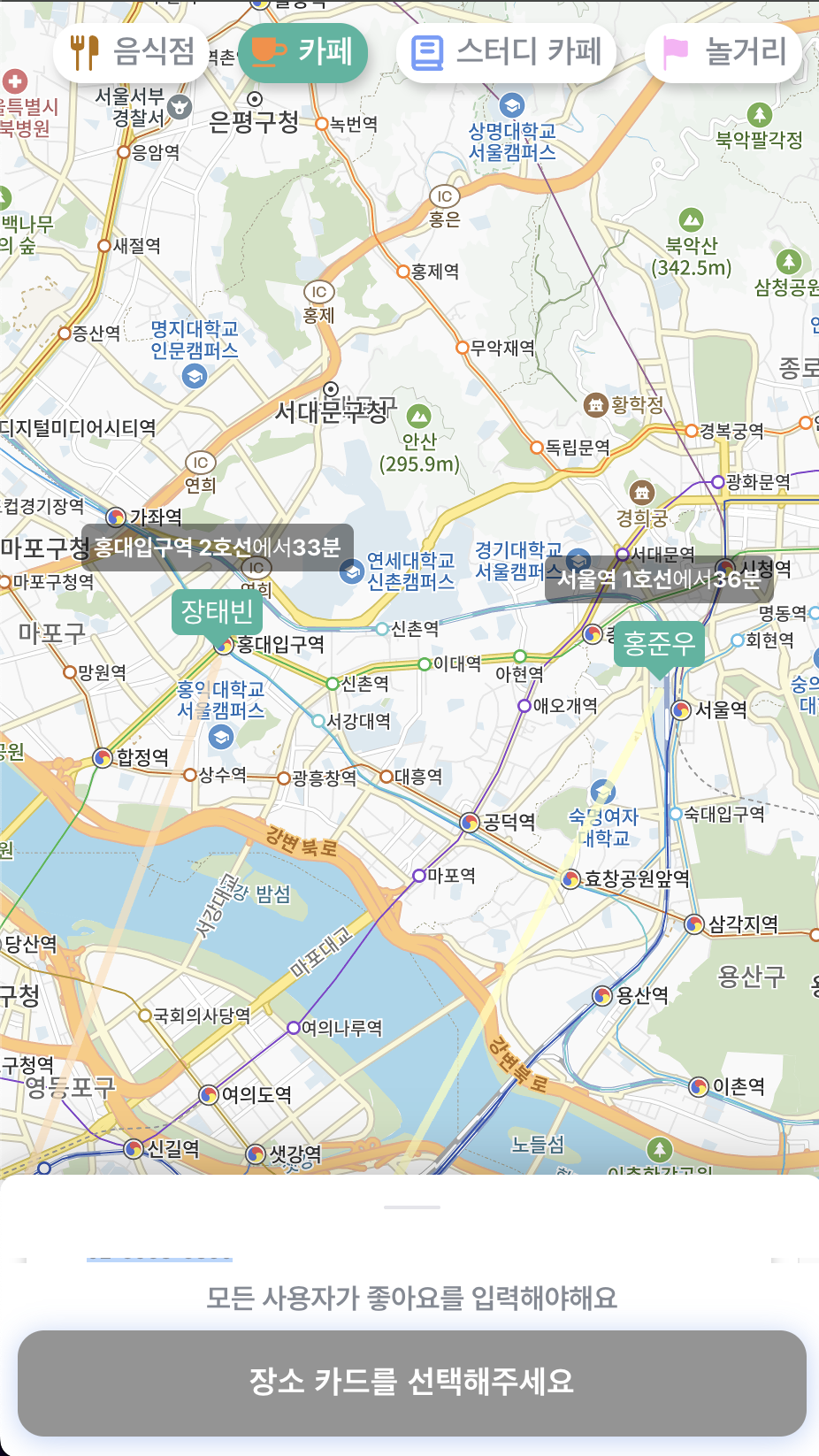 |
4️⃣ 주변 장소 검색
추가로 Kakao map API를 활용해 장소 검색 기능도 간단히 구현할 수 있습니다.
음식점, 카페, 스터디 카페, 놀거리 카테고리로 장소를 검색할 때 키워드를 사용한 장소 검색을 사용했습니다.
const useSearchPlace = (category) => {
    const { promiseDataFromServer } = usePromiseDataFromServerInfo();
    const { centerStation } = promiseDataFromServer;
    const [nearbyPlaces, setNearbyPlaces] = useState([]);
    const [isLoading, setIsLoading] = useState(false);


    // Places 서비스 초기화
    const ps = useMemo(() => {
      if (typeof window === 'undefined' || !window.kakao?.maps?.services?.Places) return null;
      return new window.kakao.maps.services.Places();
    }, []);

    // 검색 결과 처리
    const handleSearchResults = useCallback(
      (data, status) => {
        if (status === window.kakao.maps.services.Status.OK) {
          const places = data.map((place) => ({
            placeId: place.id,
            type: category,
            name: place.place_name,
            phone: place.phone,
            address: place.road_address_name ?? place.address_name,
            link: place.place_url,
            position: new window.kakao.maps.LatLng(place.y, place.x),
          }));
          setNearbyPlaces(places);
        } else if (status === window.kakao.maps.services.Status.ZERO_RESULT) {
          setNearbyPlaces([]);
        } else if (status === window.kakao.maps.services.Status.ERROR) {
          throw new Error('장소 검색 중 에러 발생');
        }
        setIsLoading(false);
      },
      [category],
    );

    // 장소 검색
    useEffect(() => {
      if (!ps || !category || !CATEGORY_LABEL[category]) return;
      setIsLoading(true);
      setNearbyPlaces([]);

      const keyword = (centerStation ?? DEFAULT_SUBWAY_STATION) + CATEGORY_LABEL[category];
      ps.keywordSearch(keyword, handleSearchResults);
    }, [centerStation, category, ps, handleSearchResults]);

    return {
      nearbyPlaces,
      isLoading,
    };
};

export default useSearchPlace;
깃허브 주소
https://github.com/Global-Media-Web-Programming/Promeet
참고 자료
- 지도 생성하기
https://apis.map.kakao.com/web/sample/basicMap/- 영역 변경 이벤트 등록하기
https://apis.map.kakao.com/web/sample/addMapBoundsChangedEvent/- 다양한 이미지 마커 표시하기
https://apis.map.kakao.com/web/sample/categoryMarker/- 마커에 클릭 이벤트 등록하기
https://apis.map.kakao.com/web/sample/addMarkerClickEvent/- 커스텀 오버레이 생성하기
https://apis.map.kakao.com/web/sample/customOverlay1/- 원, 선, 사각형, 다각형 표시하기
https://apis.map.kakao.com/web/sample/drawShape/- 키워드로 장소검색하고 목록으로 표출하기
https://apis.map.kakao.com/web/sample/keywordList/