
1초마다 숫자 올라가고, stop, reset 구현
static void updateAppWidget(Context context, AppWidgetManager appWidgetManager, int appWidgetId) {
        SharedPreferences prefs = context.getSharedPreferences("MyWidget", Context.MODE_PRIVATE);
        int number = prefs.getInt("number", 0);

        RemoteViews views = new RemoteViews(context.getPackageName(), R.layout.stop_watch);
        views.setTextViewText(R.id.timer, String.valueOf(number));

        Intent playIntent = new Intent(context, StopWatch.class);
        playIntent.setAction("PLAY_ACTION");
        PendingIntent playPendingIntent = PendingIntent.getBroadcast(context, 0, playIntent, PendingIntent.FLAG_UPDATE_CURRENT | PendingIntent.FLAG_IMMUTABLE);
        views.setOnClickPendingIntent(R.id.playButton, playPendingIntent);

        Intent stopIntent = new Intent(context, StopWatch.class);
        stopIntent.setAction("STOP_ACTION");
        PendingIntent stopPendingIntent = PendingIntent.getBroadcast(context, 1, stopIntent, PendingIntent.FLAG_UPDATE_CURRENT | PendingIntent.FLAG_IMMUTABLE);
        views.setOnClickPendingIntent(R.id.stopButton, stopPendingIntent);

        Intent resetIntent = new Intent(context, StopWatch.class);
        resetIntent.setAction("RESET_ACTION");
        PendingIntent resetPendingIntent = PendingIntent.getBroadcast(context, 2, resetIntent, PendingIntent.FLAG_UPDATE_CURRENT | PendingIntent.FLAG_IMMUTABLE);
        views.setOnClickPendingIntent(R.id.resetButton, resetPendingIntent);

        appWidgetManager.updateAppWidget(appWidgetId, views);
}- 이전 Counter 연습했던 코드를 거의 그대로 가져다 사용했다.
- 특이한점은, appWidgetId를 따로 구분해서 구현하지않고, 고정값을 사용할 예정이다.
- counter의 경우, 여러개의 위젯이 각각 구분되어 동작을 했어야했다.
- 하지만, 지금은 StopWatch의 number데이터를 위젯마다 구분시켜버리면, App에서 인지해야할 Number가 불확실하다. 마지막 위젯을 가져오는 로직을 작성했었는데, 그러면 0 ~ n - 1까지의 위젯들은 의미가 없어진다.
- 차라리 위젯데이터 한개를 모든 위젯들이 공유하는게 나은 방법이라고 생각했다.
- 그래서 appWidgetId를 구분하지 않았다.
const playTimer = () => {
		StopWatchModule.playTimer();
		setIsPlaying(true);
	};

	const stopTimer = () => {
		StopWatchModule.stopTimer();
		setIsPlaying(false);
	};

	const resetTimer = () => {
		StopWatchModule.resetTimer();
		setWidgetData("0:00:00");
		setIsPlaying(false);
	};

return (
        <View>
            ...
            <Button title="Play" onPress={() => playTimer} />
            <Button title="Stop" onPress={() => stopTimer} />
            <Button title="Reset" onPress={() => resetTimer} />
        </View>
);- React Native코드는 간단하다. playing을 상태관리해서 표시여부를 결정하고, native의 로직을 호출하는 역할이다.
@ReactMethod
    public void playTimer() {
        Intent intent = new Intent(reactContext, StopWatch.class);
        intent.setAction("PLAY_ACTION");
        reactContext.sendBroadcast(intent);
    }

    @ReactMethod
    public void stopTimer() {
        Intent intent = new Intent(reactContext, StopWatch.class);
        intent.setAction("STOP_ACTION");
        reactContext.sendBroadcast(intent);
    }

    @ReactMethod
    public void resetTimer() {
        Intent intent = new Intent(reactContext, StopWatch.class);
        intent.setAction("RESET_ACTION");
        reactContext.sendBroadcast(intent);
}- 다시 돌아와서, Native에서 액션을 받을 때 케이스를 나누어 Broadcast한다.
@Override
    public void onReceive(Context context, Intent intent) {
        super.onReceive(context, intent);

        SharedPreferences prefs = context.getSharedPreferences("MyWidget", Context.MODE_PRIVATE);
        boolean isRunning = prefs.getBoolean("isRunning" , false);
        Log.d("StopWatch", "Received action: " + intent.getAction());

        if ("PLAY_ACTION".equals(intent.getAction())) {
            if (!isRunning) {
                prefs.edit().putBoolean("isRunning", true).apply();
                if (handler == null) {
                    handler = new MyHandler(context);
                }
                handler.sendMessage(handler.obtainMessage(0));
            }
        } else if ("STOP_ACTION".equals(intent.getAction())) {
            prefs.edit().putBoolean("isRunning", false).apply();
            if (handler != null) {
                handler.removeMessages(0);
            }
        } else if ("RESET_ACTION".equals(intent.getAction())) {
            prefs.edit().putBoolean("isRunning", false).apply();
            if (handler != null) {
                handler.removeMessages(0);
            }
            prefs.edit().putInt("number", 0).apply();
        }
        updateAllWidgets(context);
}- 케이스별로 나누어 위젯을 업데이트한다.
static void updateAllWidgets(Context context) {
        AppWidgetManager appWidgetManager = AppWidgetManager.getInstance(context);
        int[] appWidgetIds = appWidgetManager.getAppWidgetIds(new ComponentName(context, StopWatch.class));
        for (int appWidgetId : appWidgetIds) {
            updateAppWidget(context, appWidgetManager, appWidgetId);
        }
}- 사용자가 위젯을 하나만 써주면 좋겠지만,, 여러 위젯들을 사용할 가능성이 있기에 모든 위젯들을 업데이트해준다.
- appWidgetId는 자동으로 시스템에서 할당되기에, 루프돌면서 체크해줘야한다.
private static class MyHandler extends Handler {
        private final WeakReference<Context> contextRef;

        MyHandler(Context context) {
            super(Looper.getMainLooper());
            contextRef = new WeakReference<>(context);
        }

        @Override
        public void handleMessage(Message msg) {
            Context context = contextRef.get();
            if (context == null) return;

            SharedPreferences prefs = context.getSharedPreferences("MyWidget", Context.MODE_PRIVATE);
            int number = prefs.getInt("number", 0);
            boolean isRunning = prefs.getBoolean("isRunning", false);

            prefs.edit().putInt("number", number + 1).apply();
            updateAllWidgets(context);

            WritableMap map = Arguments.createMap();
            map.putInt("number", number + 1);
            StopWatchModule.emitDeviceEvent("onAppWidgetUpdate", map);

            if (isRunning) {
                this.sendMessageDelayed(this.obtainMessage(0), 1000);
            }
        }

}- Handler는 UI 갱신, 시간 제한을 위해 선택한 방법이다.
- 활용처로, 특정 시간 내에 뒤로가기 키를 두번누르면 앱이 종료되는 그 경우에도 Handler를 사용한다고 한다.
- 타이머가 작동중이라면 우리는 1초 시간 제한을 걸고, Handler에 메시지를 계속 전송한다.
- handleMessage의 msg로 그 메시지를 받으면, 타이머값과 위젯의 상태를 업데이트해준다.
- 다시 말해, Handler는 타이머가 실행중이라면 1초마다 자기 자신에게 메시지를 보내 업데이트한다.
@ReactMethod
    public void getNumber(Promise promise) {
        try {
            SharedPreferences prefs = StopWatchModule.reactContext.getSharedPreferences("MyWidget", Context.MODE_PRIVATE);
            int number = prefs.getInt("number", 0);
            int hours = number / 3600;
            int minutes = (number % 3600) / 60;
            int seconds = number % 60;
            String formattedTime = String.format("%01d:%02d:%02d", hours, minutes, seconds);
            promise.resolve(formattedTime);
        } catch (Exception e) {
            promise.reject("GET_NUMBER_ERROR", e);
        }
}- int형인걸 format해줘서 넘겨준다.
테스트
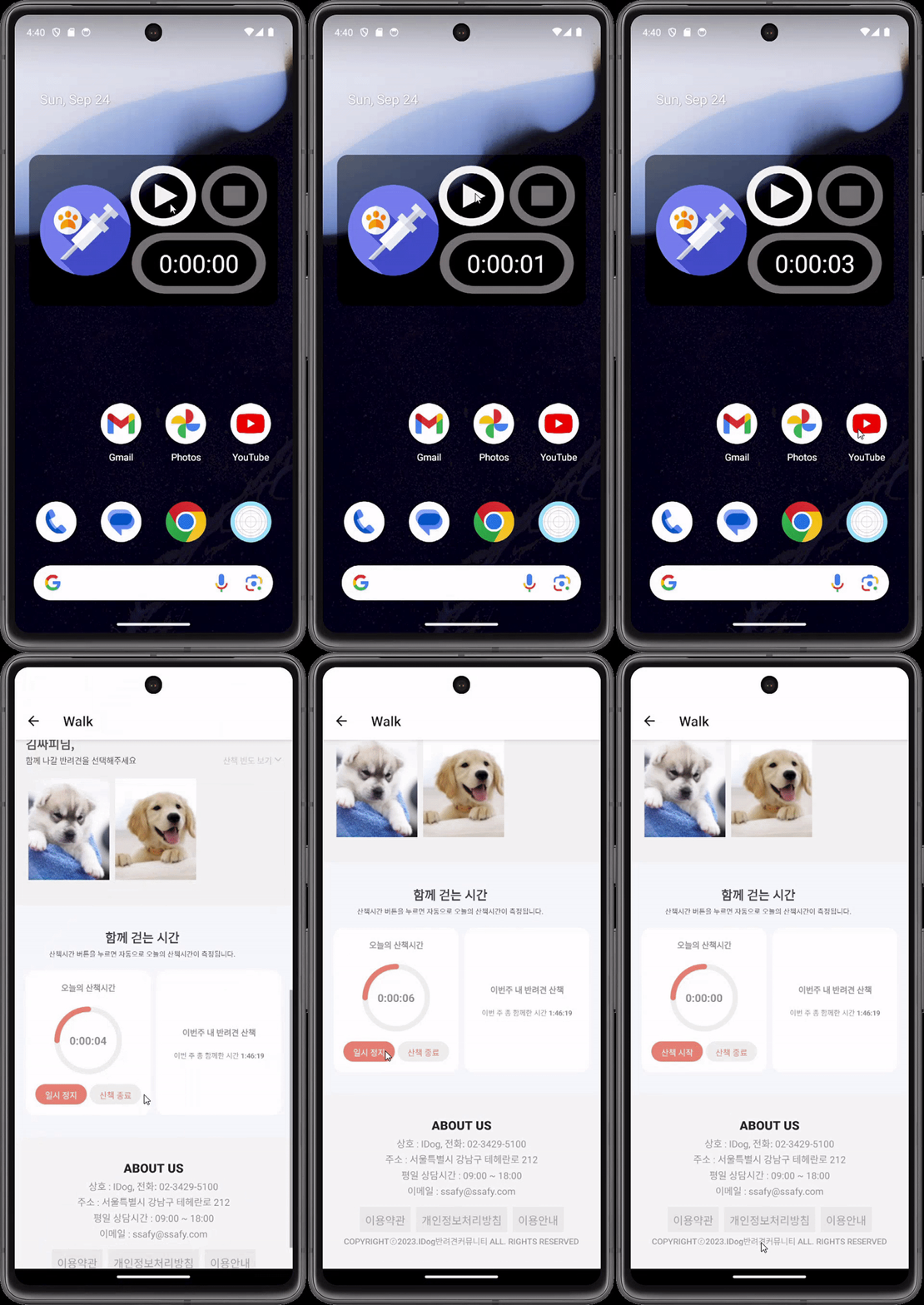
만들고 보니 디자인이 막 그리 이쁘진 않다,, ㅠㅠ 일단 잘 작동하니 백엔드 api 연결하고 다시 보자
새로운 자극을 주세요.