구조 분해 할당(객체,배열,함수), 전개 구문, 매개변수 구문
1. 객체와 배열 구조분해 할당
-
(1) 구조 분해 할당이란?
어떤 것을 복사한 이후에 변수로 '분해(destructurize)'해준다는 의미
배열의 요소를 직접 변수에 할당하는 것보다 코드 양이 줄어든다 -
(2) 객체 구조분해 할당 코드 비교
- 구조분해 할당을 사용하지 않을 때
- 구조분해 할당을 사용하지 않을 때
const user = {name: "손석구", age: 10};

console.log(user.name) // 손석구
console.log(user.age) // 10- 구조분해 할당을 사용했을 때
const user = {name: "손석구", age: 10};
const { name, age } = user
console.log(name) // 손석구
console.log(age) // 10 - (3) 배열 구조분해 할당 코드 비교
- 구조분해 할당을 사용하지 않을 때
- 구조분해 할당을 사용하지 않을 때
const games = ['배틀그라운드', '리그오브레전드'];

console.log(game[0]) // 배틀그라운드
console.log(game[1]) // 리그오브레전드- 구조분해 할당을 사용할 때배열를 구조분해 할당했을 때 순서는 배열의 index 순서와 같습니다.
// 구조분해 할당
const games = ['배틀그라운드', '리그오브레전드'];
const [battleGround, Lol] = games;

console.log(battleGround); // 배틀그라운드
console.log(Lol); // 리그오브레전드
예시 2)
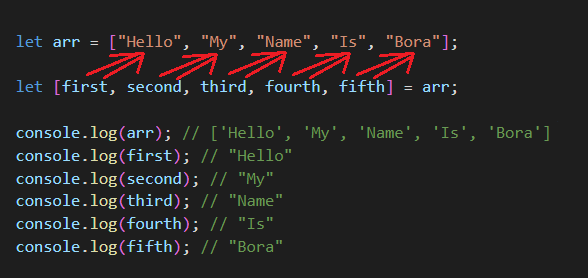
let arr = ["Hello", "My", "Name", "Is", "Bora"];
let [first, second, third, fourth, fifth] = arr;

console.log(arr); // ['Hello', 'My', 'Name', 'Is', 'Bora']
console.log(first); // "Hello"
console.log(second); // "My"
console.log(third); // "Name"
console.log(fourth); // "Is"
console.log(fifth); // "Bora"
//위와 같이 인덱스를 이용해 배열에 접근하지 않고도 변수로 사용할 수 있게 되었다.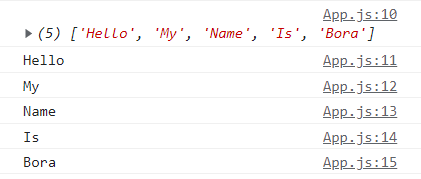
예시3)
  let arr2 = ["Julius", "Caesar", "Consul", "of the Roman Republic"];

  let [firstName, , title] = arr2;
  console.log(firstName); // 'Julius'
  console.log(title); // 'Consul'
  console.log(arr2); // "Julius", "Caesar", "Consul", "of the Roman Republic"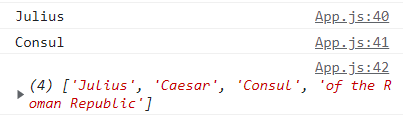
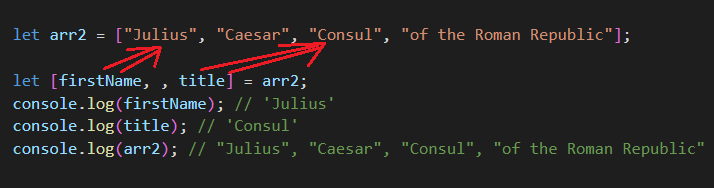
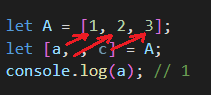
즉, 배열의 구조분해 할당을 쉽게 이해하려면
let A배열 = [ 1, 2, 3 ]
let [ a, b, c ] = A배열
서로 대칭이 되게 각각 할당이 되는 것이다. 원본에는 영향x, 중간에 빼먹어도 되고, 끝부분을 빼먹어도 된다.(앞을 빼먹을것이면.. 중간처럼 [ , , c] 이렇게 해주면 된다.
  let arr = ["Hello", "My", "Name", "Is", "Bora"];

  let [first, second, third, fourth, fifth] = arr;
아래와 같은 형태로 보면 좀더 이해가 편할 것이다.
  let [first, second, third, fourth, fifth] = ["Hello", "My", "Name", "Is", "Bora"];
기타 구조분해 할당
  let [firstname, surname] = "Bora Lee".split(" ");
  console.log(firstname); //Bora
  console.log(surname); //Lee
let guest = "Jane";
let admin = "Pete";
// 변수 guest엔 Pete, 변수 admin엔 Jane이 저장되도록 값을 교환함
[guest, admin] = [admin, guest];
[guest] = [admin]
Jane Pete
console.log(guest) // Pete 바꿔치기됨
```
## 2. 함수 인자에서 구조분해 할당
- **(1) 함수 내 구조분해 할당 코드 비교**
함수의 인자가 객체 또는 배열인 경우, 위에서 배운 방법대로 구조분해 할당하여 사용할 수 있습니다.
- 구조분해 할당을 사용하지 않을 때
```jsx
const user = {name: "손석구", age: 10};
const getUserName = (user) => {
return user.name
}
console.log(getUserName(user))
// "손석구"
```
```jsx
// user가 배열일 때
const users = ["손석구",10];
const getUserNamed = (users) => {
return users[0]
}
console.log(getUserNamed(users))
// "손석구"
```
- 구조분해 할당을 사용했을 때
```jsx
// 객체일 때
const user1 = {name: "손석구", age: 10};
const getUserName1 = ({name, age}) => {
return name;
};
console.log(getUserName(user1))
// "손석구"
```
```jsx
// 배열일 때
const users1 = ["손석구",10];
const getUserNamed2 = ([name, age]) => {
return name;
};
console.log(getUserNamed(users1))
// "손석구"
```
## 3. **spread operator (전개 구문)**
**(1) 전개 구문이란?**
기존에 있는 객체나 배열의 내용을 그대로 가져오거나 새로운 값을 덧붙여서 새로운 객체나 배열을 생성 할 수 있습니다. 기존의 데이터 (객체나 배열)에는 전혀 영향을 주지 않고 복사해서 새로운 것을 만듭니다.
```jsx
const box = {size: "big", color: "red"};
const newBox = { ...box}; // {size: "big", color: "red"}
// box를 복사합니다.(이때 기존의 데이터에는 영향x)
const newBlueBox = {...box, color: "blue" }; // {size: "big", color: "blue"}
// newbox를 복사+추가 합니다.(이때 기존의 데이터에는 영향x)4. rest operator (나머지 매개변수 구문)
(1) 나머지 매개변수 구분이란?
rest 문법은 spread와 비슷해보이지만 조금 다른 기능을 합니다. 객체나 배열에서 구조 분해 할당을 했을 때 나머지 정보를 묶어서 표현할 수 있습니다. rest 라는 키워드를 꼭 사용하지 않아도 되고, 개발자가 편한 키워드를 사용해도 됩니다.
const user2 ={id: 1, name: "둘리", age: 10, location: "seoul"};

// rest 사용
const {name, ...rest} = user2;

// 콘솔에 rest를 찍어보면, 구조분해 할당을 한 정보를 제외한 나머지 값을 보여줍니다.
console.log(rest) // {id: 1, age: 10, location: "seoul"}
lovjgb