

const toDoForm = document.getElementById("todo-form");
const toDoInput = document.querySelector("#todo-form input");
const toDoList = document.getElementById("todo-list");

function handleToDoSumbit(event){
    event.preventDefault();
    const newTodo = toDoInput.value;
    console.log(toDoInput.value);
    toDoInput.vlaue= "";
    console.log(newTodo, toDoInput.value);
}

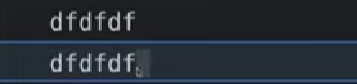
toDoForm.addEventListener("submit", handleToDoSumbit);- 이렇게 입력을 하면 두개가 나온다. 위에꺼는 dfdfdf 지만
아래꺼는 dfdfdf dfdfdf 지만 뒤에 있는 값이 empty("") 적용되었기 때문에 dfdfdf만 출력된다. - 우리가 하는건 input의 현재 value를 새로운 변수에 복사하는거다.
function deleteTodo(event){
    const li = event.target.parentElement;
    li.remove();
}

function paintToDo(newTodo){
    const li =document.createElement("li")
    const span = document.createElement("span");
    const button = document.createElement("button");
    button.innerText ="X";
    button.addEventListener("click", deleteTodo);
    li.appendChild(span);
    li.appendChild(button);
    span.innerText = newTodo;
    toDoList.appendChild(li);

    function handleToDoSumbit(event){
    event.preventDefault();
    const newTodo = toDoInput.value;
    toDoInput.vlaue= "";
    paintToDo(newTodo);
}
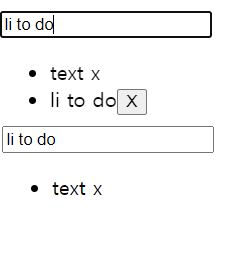
}paintToDo는 내가 입력한li to do를 밑에 하나씩 추가해주는 e 도록 해주며handleTosumbit을 통해 값이 나온다.
또한 delete 버튼을 눌렀을때deleteTodo을 통해서 X 버튼을 눌렀을때 삭제가 되도록 만든 기능이다.

처음부터 다시 기본부터 잡아보자
업뎃이 늦다?