웹데이터 분석
Beautiful Soup
- HTML과 XML 문서들의 구문을 분석하기 위한 파이썬 패키지
from bs4 import BeautifulSoup

page = open("../data/test.html", "r").read()
soup = BeautifulSoup(page, "html.parser")

print(soup.prettify())

# 태그 검색(지정된 태그 중 첫번째 항목만 검색)
soup.find("p")

# 태그 검색(지정된 태그 전부 검색)
soup.find_all("p")

# class 속성의 경우 예약어이므로 형태를 달리해야함
soup.find_all(class_="outer-text")
urllib
- 웹주소에 접근 시 필요
from urllib.request import urlopen

url = "https://finance.naver.com/marketindex/"
page = urlopen(url)

soup = BeautifulSoup(page, "html.parser")
print(soup.prettify())
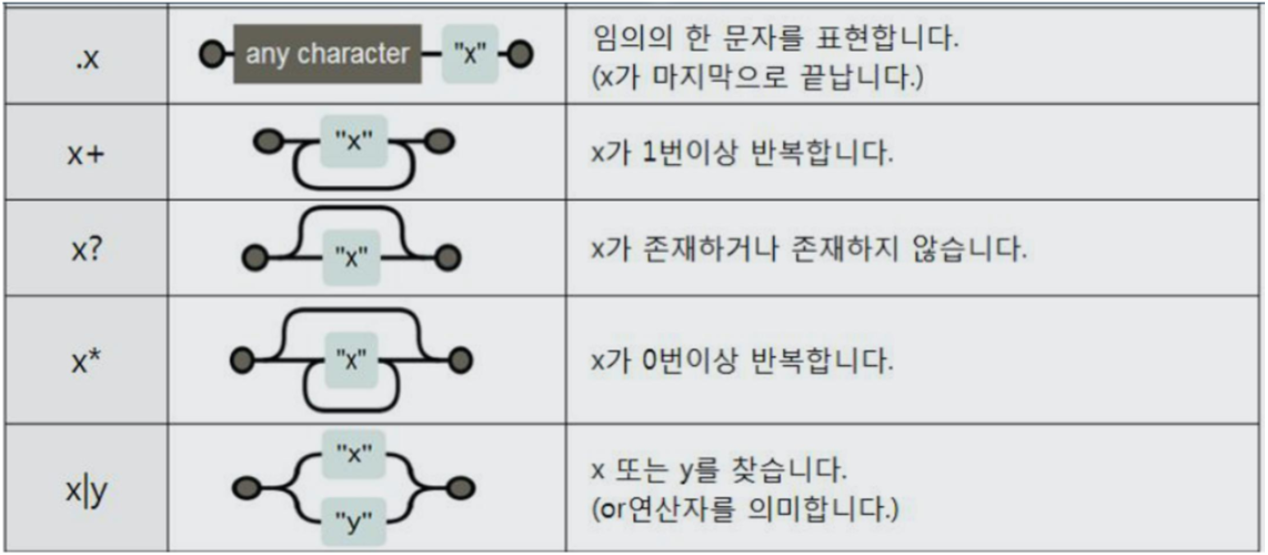
Regular Expression
- 특정한 규칙을 가진 문자열의 집합을 표현하는데 사용하는 형식 언어
import re

tmp_str = tmp_one.find(class_="sammyListing").get_text()
re.split(("\n|\r\n"), tmp_str)

...

tmp = re.search("\$\d+\.(\d+)?", price_tmp).group()
print(price_tmp[len(tmp) + 2:])
웹페이지 추출 반복
price = []
address = []

# 기존 방식대로 코딩하였다면 이런식으로 했을수도?...
# 데이터프레임의 행 정보를 index 값의 바탕으로 반복
for n in df.index:
    req = Request(df["URL"][n], headers={"User-Agent":"Mozilla/5.0"})
    html = urlopen(req).read()

    soup_tmp = BeautifulSoup(html, "lxml")
    ...

# 데이터프레임의 iterrows() 활용 행 정보 추출
# tqdm : 반복문의 진행율을 프로그레스 바 형태로 표현
for idx, row in tqdm(df.iterrows()):
    req = Request(row["URL"], headers={"User-Agent":"Chrome"})
    html = urlopen(req).read()

    soup_tmp = BeautifulSoup(html, "lxml")
KimSe's 주절주절