
03. 프로젝트 생성
프로젝트 구조
gradle- gradle을 사용하는 관련 폴더wrappergradle-wrapper.jargradle-wrapper.properties
srcmainjava- 실제 패키지 및 소스파일resources- 자바 코드 파일를 제외한 설정 파일(xml, properties) 또는 html 등
test- 테스트 코드들과 관련된 소스들이 포함
🪄 일단 gradle이 버전 설정하고 라이브러리를 땡겨오는 구나! 하는 수준으로 이해하기
build.gradle(예전엔 한땀 한땀 직접 입력했었어야 했다구,,)repositories { mavenCentral() }dependencies { }에 작성된 라이브러리를 어디선가 다운받아야 하는데,
mavenCentral에서 다운받도록 설정
plugins {
	id 'java'
	id 'org.springframework.boot' version '3.4.0'
	id 'io.spring.dependency-management' version '1.1.6'
}

group = 'hello'
version = '0.0.1-SNAPSHOT'

java {
	toolchain {
		languageVersion = JavaLanguageVersion.of(17)
	}
}

**repositories {
	mavenCentral()
}**

**dependencies** {
	implementation 'org.springframework.boot:spring-boot-starter-thymeleaf'
	implementation 'org.springframework.boot:spring-boot-starter-web'
	testImplementation 'org.springframework.boot:spring-boot-starter-test'
	testRuntimeOnly 'org.junit.platform:junit-platform-launcher'
}

tasks.named('test') {
	useJUnitPlatform()
}
스프링 부트 실행
- 스프링 부트는 톰캣 웹 서버를 내장
- 실행 시 톰캣을 자체적으로 띄우면서 스프링 부트가 같이 올라옴
2025-06-06 15:02:30.123 INFO 12345 --- [ main] o.s.b.w.embedded.tomcat.TomcatWebServer : Tomcat started on port(s): 8080 (http) with context path ''🪄 소스 라이브러리가 웹 서버를 포함하고 있음 - 임베디드
**@SpringBootApplication**
public class HelloSpringApplication {
	public static void main(String[] args) {
		SpringApplication.run(HelloSpringApplication.class, args);
	}
}
@SpringBootApplication
- Spring Boot 애플리케이션의 진입점(
main클래스)에 붙이는 핵심 어노테이션 - 내부 구성:
| 어노테이션 | 설명 |
|---|---|
@Target(...) | 어노테이션이 어디에 적용될 수 있는지를 정의 |
@Retention(...) | 어노테이션의 생명 주기를 정의 |
@Documented | Javadoc API 문서에 어노테이션이 포함되도록 설정 |
@Inherited | 부모 클래스에 정의된 어노테이션이 자식 클래스에 상속 |
✨@SpringBootConfiguration | @Configuration 를 확장한 어노테이션해당 클래스를 Spring 구성 클래스(Bean 정의용)로 간주 이 클래스 안에서 @Bean 메서드를 선언해 수동 빈 등록 가능 |
✨@EnableAutoConfiguration | Spring Boot의 핵심 기능인 자동 설정을 활성화 classpath에 존재하는 라이브러리들에 따라 Spring이 자동으로 설정 |
✨@ComponentScan | 해당 클래스가 위치한 패키지를 기준으로 하위 패키지에 존재하는 컴포넌트들을 자동으로 스캔하여 Bean으로 등록 |
04. 라이브러리 살펴보기
gradle이랑 maven이 뭐야?
-
gradle,maven은 Java단에서 자주 사용하는 빌드 도구로 아래와 같은 역할 수행- 즉, 프로젝트에 작성된 코드를 실행 가능한 형태로 만드는 자동화 도구
- 의존성 관리 - 프로젝트에 필요한 외부 라이브러리 다운로드 및 관리
- 빌드 - 소스코드 컴파일 및
.jar,.war파일로 패키징 - 테스트 자동화 - JUnit 등의 테스트 프레임워크 실행
- 플러그인 기반 확장 - Spring Boot, Docker 등 다양한 플러그인으로 확장 가능
- 멀티모듈 프로젝트 지원 - 프로젝트를 여러 모듈로 나누어 관리 가능
-
🪄
gradle,maven은 의존 관계를 관리해줌 -
spring-boot-starter-web만 필요하지만,web이 필요로하는 의존 라이브러리가 있는데,
이걸gradle,maven이 다 땡겨와줌
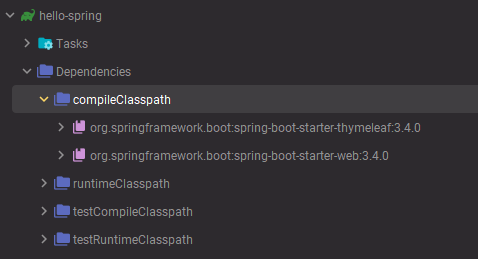
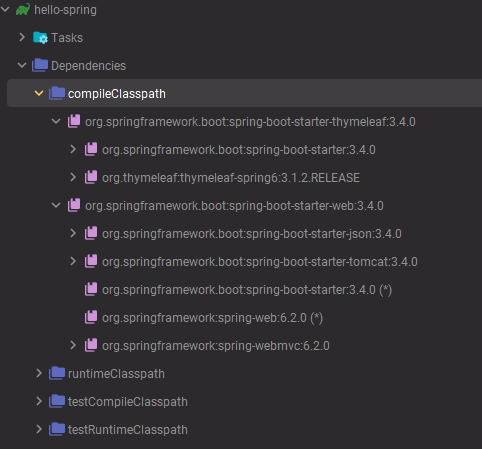
- 이런식으로
web에 필요한 라이브러리, 그 라이브러리에 필요한 라이브러리 ..
계속 땡겨오고 땡겨오고 땡겨오고 ..를gradle과maven이 한다구!
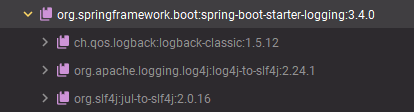
로그 관련 라이브러리
slf4j는 인터페이스, 실제 로그를 어떤 구현체로 출력할지는logback을 이용
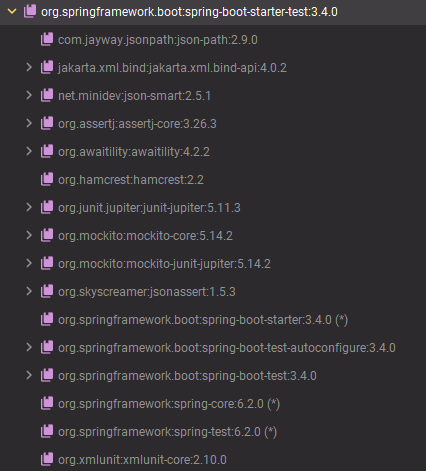
테스트 관련 라이브러리
JUnit,AssertJ,Mokito,Spring-Test(스프링 통합 테스트 지원)
🍀 라이브러리 정리
스프링 부트 라이브러리
spring-boot-starter-webspring-boot-starter-tomcat: 톰캣(웹 서버)spring-webmvc: 스프링 웹 MVC
spring-boot-starter-thymeleaf: 타임리프 템플릿 엔진(view)spring-boot-starter(공통) : 스프링 부트 + 스프링 코어 + 로깅spring-bootspring-core
spring-boot-stater-logginglogback,slf4j
테스트 라이브러리
spring-boot-starter-testjunit: 테스트 프레임워크mockito: 목 라이브러리assertj: 테스트 코드를 더 편리하게 작성하도록 도와주는 라이브러리spring-test: 스프링 통합 테스트 지원
05. View 환경설정
스프링 부트 Welcome Page
- 스프링 부트가 제공하는 Welcome Page 기능
static/index.html을 올려두면 Welcome Page 기능을 제공- 정적 페이지 - 프로그래밍적인 기능을 하지 못함
🌿 Thymeleaf
- 템플릿 엔진
템플릿 엔진과 스프링 부트 동작 환경
- 🪄 웹 애플리케이션에서 첫 번째 진입점이 컨트롤러(Controller)
@Controller
public class HelloController {
    @GetMapping("hello")
    public String hello(Model model){
        model.addAttribute("data", "hello!!");
        return "hello";
    }
    ...
}
<!DOCTYPE HTML>
<!--📌 템플릿 엔진으로 타임리프 선언 -->
<html xmlns:th="http://www.thymeleaf.org">
<head>
<title>Hello</title>
<meta http-equiv="Content-Type" content="text/html; charset=UTF-8" />
</head>
<body>
<!--📌 model에 담긴 key(data)의 value("hello!!")로 치환 -->
<p th:text="'안녕하세요. ' + ${data}">안녕하세요. 손님</p>
</body>
</html>
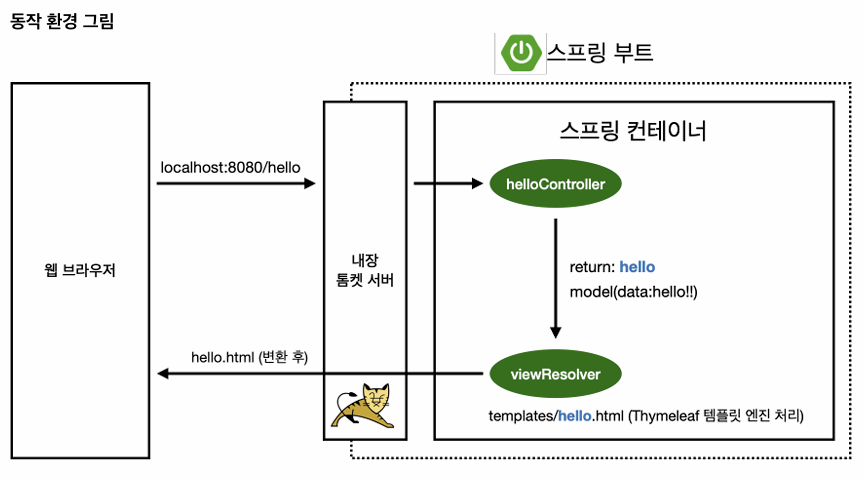
Controller에서 리턴값으로 문자열을 반환하면,View Resolver가 화면을 찾아서 처리- 스프링 부트 템플릿 엔진 기본 View Name 매핑
resources:templates/{ViewName}.html을 찾아서 렌더링
06. 빌드하고 실행하기

"개발자는 해결사이자 발견자이다✨" - Michael C. Feathers