큰 명절인 설날이 끝났다. 이제 음력으로도 2026년으로 들어왔다. 토,일,월,화,수 까지의 연휴가 끝나고 다시 일상으로 돌아왔다. 그렇다 난 오늘 다시 가서 리눅스를 배웠다.
우리 열심히 삽시다. 여러분...
TIL
배운 내용
1. 레포지토리(Repository)
- 설치하고 싶은 패키지가 있는 저장공간에 대한 정보이다. 쉽게 패키지가 책, 레포지토리는 책장, 레지스트리(registry)는 도서관이다.
ls /etc/yum.repos.d/ls : list
.d : 디렉토리
mirrorlist : 미러사이트들의 목록
미러사이트 : 패키지들이 복제되어 있는 저장공간. 영문주소로 되어있기 때문에 DNS 서버에 도움을 받아야한다.
baseurl : 단일 미러사이트
gpg : 대상 패키지가 무결성, 변조 여부를 확인 가능
gpgcheck=1 : 확인하겠다는 뜻이다.
gpgkey : 원본과 대조하여 다르면 차단 or 경고이다.
[root@testvm ~]# dnf install -y httpd2. centOS7
원래는 Rocky를 사용하였지만 이슈로 인해 일단 cent OS로 진행하기로 하였다.
- 패키지설치
[root@web ~]# yum install -y httpdyum : 패키지관리자
install : 설치
-y : 물음에 대해 전부 'yes'
httpd : 설치할 패키지명
cent OS7은 기술지원 만료로 미러사이트를 제공하지 않는다.
그래서 미러 사이트를 수동으로 추가해준다.
이 리눅스에서 복사 붙여넣기는 우리가 알고있는 단축키와 다르다.
복사 : Ctrl + Insert
붙여넣기 : Shift + Insert
수동으로 추가 후 다시 yum을 설치한다.
- 방화벽 제거
[root@web ~]# systemctl stop firewalld
[root@web ~]# systemctl disable firewalld
systemctl : 데몬(daemon) 컨트롤
deamon : 백그라운드에서 동작하는 프로세스
- DNS 서버 체크
- 패키지 설치하고 꼭한다.
[root@web ~]# cat /etc/resolv.conf- 외부(DNS서버)와 통신되는지 확인
[root@web ~]# ping 8.8.8.8- SElinux off
SElinux : Security Enhanced linux로 보안이 향상된 리눅스로 Redhat 계열 리눅스에 존재 한다.
[root@web ~]# vi /etc/selinux/configSELINUX=enforcing 이부분을
SELINUX=disabled로 변경[root@web ~]# init 6
재부팅 후
[root@web ~]# getenforce
Disabled
이후
[root@web ~]# yum install -y httpd
# 웹서버(정적인, 프론트페이지를 처리가능) 설치.
[root@web ~]# systemctl restart httpd
# 웹서버 재시작
[root@web ~]# systemctl enable httpd
# 재부팅 후에도 웹서버가 계속 동작했으면 좋겠다.
[root@web ~]# curl 211.183.3.80
# c - url : cli로 웹페이지 url을 확인하는 명령. cli 환경에서 웹페이지 테스트할때 많이 쓰임
3. 리눅스 기본
[root@testvm ~]#root : 사용자명
@ : ~에
testvm : 호스트네임
~ :사용자 홈디렉토리
"# : 관리자 권한
[root@testvm ~]# su user1
[user1@testvm root]$
su : 사용자 변경
user1 : 일반 사용자
$ : 관리자 권한 X
[user1@testvm root]$ cd ~
[user1@testvm ~]$ pwd
/home/user1
cd : change directory
pwd : present working dircetory로 현재 작업중인 디렉토리
/home : 사용자의 홈디렉토리
[root@testvm user1]# ip add내가 가지고있는 NIC 확인
[root@web ~]# ls / bin : 명령어, 실행파일
dev : device(장치관련)
home : 사용자의 홈 디렉토리
/ : 최상위 디렉토리
mnt : mount용도
var : 다양한 소프트웨어적 설정파일
boot : os 관련
etc : 물리적인 설정 파일
lib : 라이브러리
media : 플래시메모리, dvd와 같은 저장장치에 접근하기위한 경로
root : root라는 관리자의 홈디렉토리
usr : 사용자의 앱
ls : 해당 디렉토리의 list를 보여주세요
경로를 구분, 지정하는 방법
절대경로
- 절대 변하지 않는, 언제나 같은 경로.
- 최상위디렉토리(/)부터 시작하면 항상 절대경로.
상대경로
- 내가 어디에 있는지(pwd)에 따라 달라지는 경로.
- 최상위디렉토리(/)로 시작하지 않으면 상대경로.
mkdir : 폴더 생성 <-> rmdir : 폴더 삭제
[root@web /]# mkdir ./test
[root@web /]# ls

# [root@web /]# mkdir test 도 같은 의미
# mkdir = make directory
cat : 출력
[root@web /]# cat ~/anaconda-ks.cfgcp : 복사(copy)
리다이렉션(>, >>, <, <<)
- 입력이나 출력의 '방향을 바꿔줌'
">" 이나 ">>"은 출력을 방향을,
"<" 이나 "<<"은 입력의 방향을 바꿔준다.
">" : 덮어쓰기
">>" : 기존내용에 이어서 내용추가
echo : 뒤에 나오는 내용을 출력
[root@web /]# echo hello
hello
[root@web /]# echo HOME
HOME

[root@web /]# ls > /dev/null
결과를 출력 안하고 싶을때
[root@web /]# more ana.cfg
more : 한페이지씩 출력
tail :마지막 -n 번째까지 출력
화면을 점유하고 있다 = foreground , 반대의 개념 : background
파이프라인('|' , Shift + )
[root@web /]# cat ana.cfg | more
1. cat ana.cfg
2. more
1의 명령어에 대한 수행결과를 토대로 2 명령을 수행
grep : 특정 단어가 포함된 행을 보여달라.
[root@web /]# clear
[root@web /]# cat ana.cfg | grep services
# System services
services --enabled="chronyd"

# 출력을 하되(cat ana.cfg) services라는 단어가 포함된(grep) 행만 보여줘


[root@web /]# cat ana.cfg | grep services | tail -1
services --enabled="chronyd"

# 여러번 반복 가능하다.위 수행결과중에서도 마지막 한줄만 보여줘!

[root@web /]# cat ana.cfg | sort
# 출력결과를 정렬

[root@web /]# touch test.txt
[root@web /]# ls
ana.cfg  bin  boot  dev  etc  home  lib  lib64  media  mnt  opt  proc  redirect.txt  root  run  sbin  srv  srv.log  sys  test  test.txt  tmp  usr  var
4. 웹서버(정적)
- 프론트엔드로 만들어진 웹페이지(css,html,자바스크립트,…) 파일을 단순히 보내주는 서버
- 동적 웹 애플리케이션 서버와 가장 큰 차이는 데이터베이스와 연동 X
- ex) apach(httpd), nginx 같은 프로그램이 있다.
wget 명령이 없으므로 설치.
[root@web ~]# yum install -y wget
# wget = web에서 get하는 명령.

[root@web ~]# wget https://templatemo.com/download/templatemo_611_maison_doree

[root@web ~]# mv templatemo_611_maison_doree tem.zip
다운로드후에 zip파일로 이름을 바꿔준다.
[root@web ~]# yum install -y unzip
[root@web ~]# unzip tem.zip

[root@web ~]# ls
anaconda-ks.cfg ifcfg-ens32 templatemo_611_maison_doree tem.zip

[root@web ~]# rm -rf tem.zip
# 압축풀었으니까 압축파일은 삭제.

[root@web ~]# mv templatemo_611_maison_doree tem

[root@web ~]# mv tem /var/www/html/tem
현재 디렉토리의 tem이라는 경로를 /var/www/html/tem 으로 이동.


[root@web ~]# ls /var/www/html/tem
images  index.html  maison-templatemo.html  templatemo-maison-doree.js  templatemo-maison-style.css
/var/www/html/tem 이라는 경로에 내가 배포하고싶은 파일이 들어있다.
현재 디렉토리의 tem이라는 경로를 /var/www/html/tem 으로 이동.
http://211.183.3.80/tem/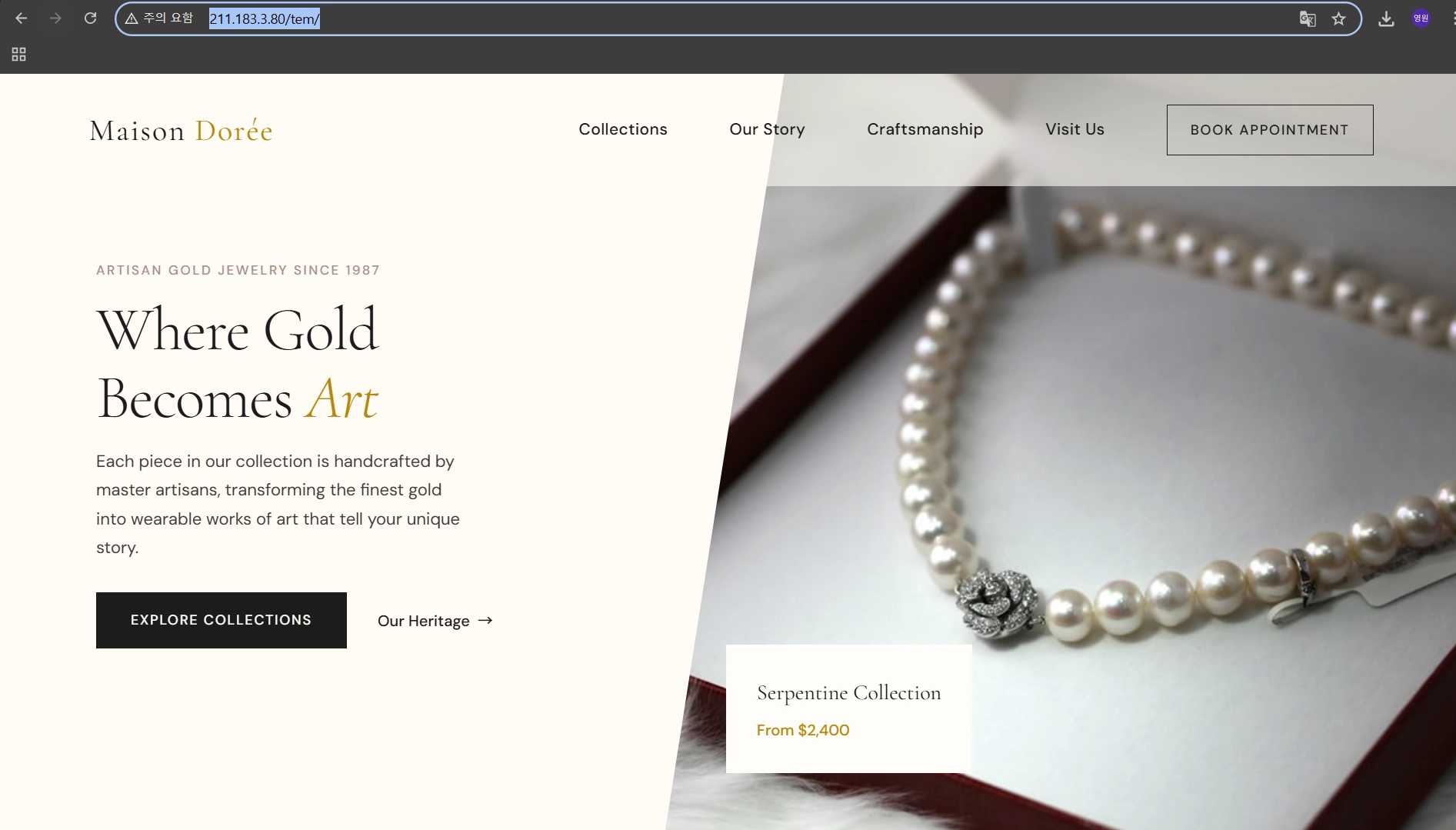
회고
긴 연휴가 지나고 오랜만에 공부를할려니 조금 힘들다. 그래도 내일이 금요일이라서 내일까지만 하면 다시 주말이 나를 기다리고 있다. 리눅스 재밌다. 리눅스 마스터 시험때문이라도 지금 수업이 매우 도움이 된다고 생각된다. 더 노력해서 진짜 마스터가 될 때까지 열심히 노력하겠다.
