Flutter 개발 환경 셋팅 및 초기 가이드
1. Flutter SDK 다운로드
https://docs.flutter.dev/release/archive?tab=windows
노트북 스펙 : MacBook Pro Apple M1
24.08.05 기준 최신 버전 arm 64 다운로드를 진행

2. 환경 변수 설정
$ open ~/.zshrc 또는
$ open ~/.bash_profile

#Flutter
export PATH="$PATH:/Users/${본인 Flutter SDK 경로}"

-> 예시: export PATH="$PATH:/Users/kkjang/flutter/bin"

환경변수 입력 완료 후 저장하고 닫기

$ source ~/.zshrc 또는
$ source ~/.bash_profile
3. flutter doctor
> $ flutter doctor 실행[v] 이미 Flutter 를 실행하기에 조건 충분합니다.
[x] Android Studio 에러
Android Studio 설치안한 것이므로 Android Studio 설치 !
[x] Android license status unknown 에러
그 밑에 나오는 flutter doctor --android-licenses 이걸 터미널에 입력하고 모두 동의하면 끝 !
[x] cmdline-tools component is missing 에러
위에서 Android Studio 에서 SDK Manager 설치 과정중 일부 설치가 누락된 것입니다.
[x] Chrome 에러
크롬 브라우저가 없으므로 크롬을 설치해주세요.
[x] xcode, cocoapods 에러
iOS 개발에 필요한 것이며, xcode 및 cocoapds 설치를 진행해야합니다.

4. Android Studio 셋팅
다른 IDE를 사용하고 싶어도 일단 Android Studio 셋팅은 해놓고 다른 에디터 사용해야 합니다.
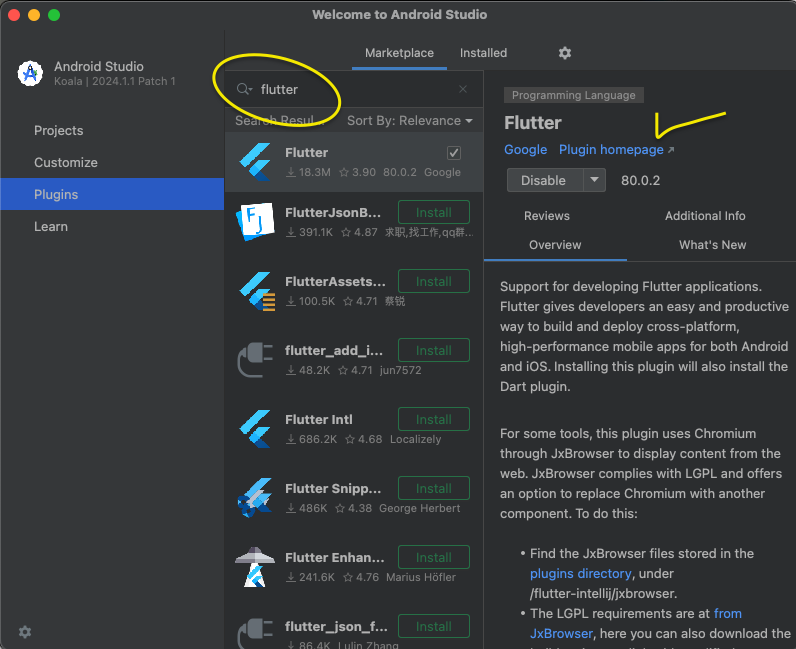
- flutter 검색
- flutter Install
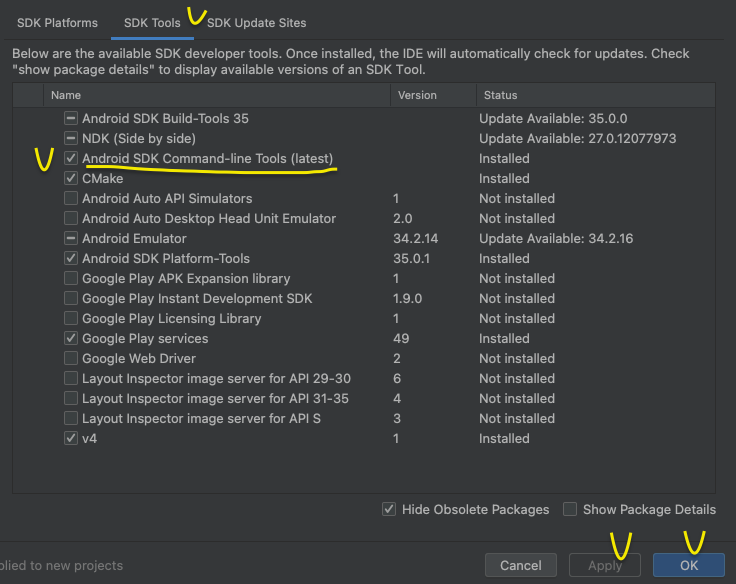
- SDK Tools
- Android SDK Command-line Tools (lastest) 체크
- Apply -> Ok
5. Xcode , Cocoapods Install
- AppStore - Xcode Install
- 아래 명령어 순서대로 입력
$ sudo xcode-select --switch /Applications/Xcode.app/Contents/Developer
$ sudo xcodebuild -runFirstLaunch- 완료 후 Xocde License 에 서명을 진행
$ sudo xcodebuild -license- Space 를 눌러 단락 이동을 한다. ( 최하단으로 이동 )
By typing 'agree' you are agreeing to the terms of the software license agreements. Type 'print' to print them or anything else to cancel, [agree, print, cancel]
- 위와 같은 메시지 출력시 agree 를 입력 후 Enter !
- cocoapods Install
$ sudo gem install cocoapods6. Flutter App Init


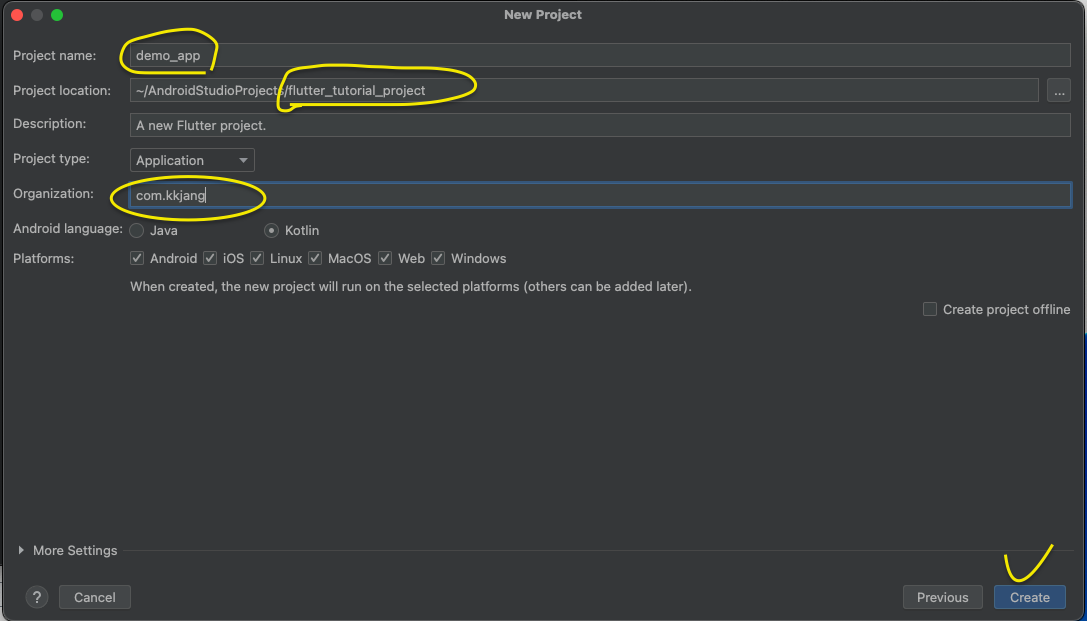
Flutter Tutorial App 만들기 종료 !
참고 & Docs
https://docs.flutter.dev/release/archive?tab=windows
https://codingapple.com/unit/flutter-install-on-windows-and-mac/
