1. RabbitMQ Download
$ brew update
$ brew install rabbitmq
$ ~/.zshrc

* path 입력 후 저장
$ export PATH=$PATH:/usr/local/sbin
$ source ~/.zsrhc

해당 경로로 진입하여 rabbitmq 서버를 로컬로 실행한다.
$ cd /opt/homebrew/opt/rabbitmq/sbin/
$ ./rabbitmq-server

서버 실행이 에러날 경우
ERROR: could not bind to distribution port 25672, it is in use by another node: rabbit@localhost

$ sudo lsof -i :25672 ( 해당 명령어 실행 후 pid 확인 )
$ sudo kill <PID>
$ ./rabbitmq-server

에러 발생시 서버를 죽이고 다시 실행한다.
아래 사진은 ./ rabbitmq-server 명령어 실행시 완료 화면

chrom 에서 해당 로컬서버로 http://localhost:15672 접속

id : guest
pw : guest
처음엔 default 인 guest / guest 으로 되어있음

추후 계정 생성시 아래 명령어 참고
./rabbitmqctl add_user rabbitmq {id} {pw} -- 계정 생성
./rabbitmqctl set_user_tags {id} administrator -- 계정 어드민 권한 부여

$ expo init client
$ npm install amqplib
$ cd client

* 테스트용 프로젝트
Project_Name : client

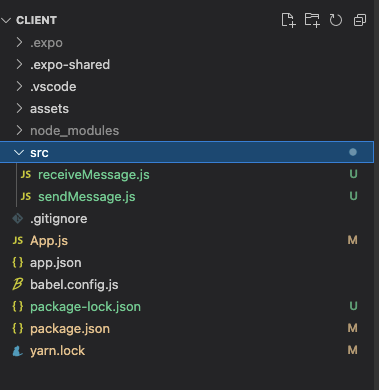
$ cd /Users/{name}/Desktop/client/src
$ ls
$ sendMessage.js / receiveMessage.js

메시지 보낼때
$ node sendMessage.js -- 실행

메시지 받을때
$ node receiveMessage.js -- 실행
해당 경로 참고
sendMessage.js

/*
 * npm install amqplib
 */

const { execSync } = require("child_process");
const amqp = require('amqplib/callback_api');

// amqp 예시
//amqp://admin:admin@localhost admin:admin = rabbitmq 계정:암호

const prod = 'amqp://{name}:vlTmRun1214!@101.79.9.43:5672';
const local = 'amqp://guest:guest@localhost';

amqp.connect(local, function (error0, connection) {
    if (error0) {
        throw error0;
    }

    connection.createChannel(function (error1, channel) {
        if (error1) {
            throw error1;
        }

        //queue name
        var queue = 'test';

        /*
        * queue가 없으면 만들어줌
        * durable : true -> queue 데이터를  rabbitmq가 재시작해도 가지고 있음(소비하기전까지)
        */
        channel.assertQueue(queue, {
            durable: false,
            exclusive: false,
            autoDelete: false,
            arguments: null,
        });
        setInterval(sendToQueue, 1000, channel, queue)
    });

    setTimeout(function () {
        connection.close();
        process.exit(0);
    }, 10000);
});

function sendToQueue(channel, queue) {
       var msg = 'Hello World! transDate:' + new Date();
       channel.sendToQueue(queue, Buffer.from(msg));

    //json 데이터 보내기 (receive 에서 아래 포맷형식으로 보내지 않으면 메시지를 받을 수 없다...)
    // var msg = '{"test":"테스트 입니다", "name":"테스트에용", "title":1111}';
    // channel.sendToQueue(queue, Buffer.from(JSON.stringify(msg)));

    console.log(" [x] Sent %s", msg);
}receiveMessage.js
/*
* npm install amqplib
*/
const { execSync } = require("child_process");
const amqp = require('amqplib/callback_api');
// amqp 예시
//amqp://admin:admin@localhost admin:admin = rabbitmq 계정:암호
const prod = 'amqp://piece:vlTmRun1214!@101.79.9.43:5672';
const local = 'amqp://guest:guest@localhost';
amqp.connect(local, function (error0, connection) {
if (error0) {
throw error0;
}
connection.createChannel(function (error1, channel) {
if (error1) {
throw error1;
}
//queue name
var queue = 'test';
/*
* queue가 없으면 만들어줌
* durable : true -> queue 데이터를 rabbitmq가 재시작해도 가지고 있음(소비하기전까지)
*/
channel.assertQueue(queue, {
durable: false,
exclusive: false,
autoDelete: false,
arguments: null,
});
console.log(" [*] Waiting for messages in %s. To exit press CTRL+C", queue);
//prefetch를 설정해두면 큐에서 최대 10개만 가져감.
channel.prefetch(10);
channel.consume(queue, function (msg) {
console.log(" [x] Received %s", msg.content.toString());
// json 데이터 받기
// var result = JSON.parse(msg.content.toString());
// console.log(result.testVal1, result.testVal2, result.testVal3);
//Ack 메세지를 보내야 큐에서 제거함
channel.ack(msg);
//channel.nack(msg);
}, {
//noAck: true 이면 queue에서 데이터를 가져간다음 Ack를 바로 반환함으로 가져가자마자 queue에서 지워버림, ack를 받았을 경우만 큐에서 제거하기 위해 false로 설정
noAck: false
});
});
setTimeout(function () {
connection.close();
process.exit(0);
}, 10000);
});
Developer