👉 하나하나 뜯어보며 복습하기
페이지 이름 변경하기
<head>
    <title>나영 페이지</title>
</head>
- head 안의 title 사이의 이름을 변경해주면 됨
- 결과

Head안에는
- CSS(꾸미기)
- JavaScript(움직이는 것)
페이지 안 즉, 내용물을 적고 싶을 때
<body>
    나의 첫번째 웹페이지!
</body>
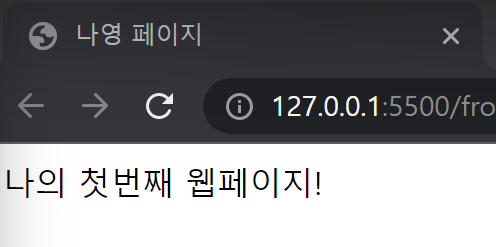
- body 안에 들어갈 내용을 적으면 됨
태그
- div : 문단을 나누는 태그(구역 나누기)
- ul-li : 불렛이 붙어서 나옴
- h1 : 제목을 나타내주는 태그, 페이지마다 하나씩은 무조건 았어야 함
- span : 특정 글자감쌀 때 사용
- a : 하이퍼링크 태그
로그인 페이지 만들기
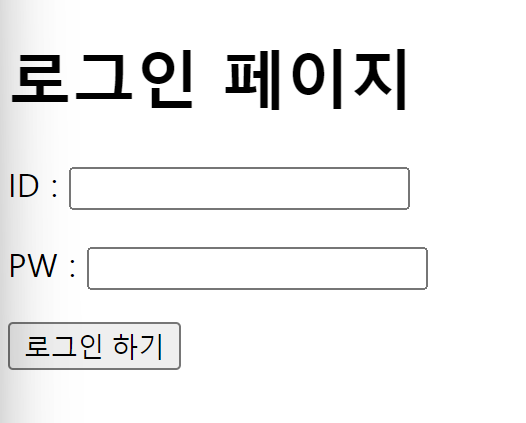
<body>
    <h1>로그인 페이지</h1>
    <p>ID : <input type="text" /></p>
    <p>PW : <input type="text" /></p>
    <button>로그인 하기</button>
</body>
h1 태그로 로그인 페이지라는 제목을 적어줌
- ID와 PW를 입력하는 칸이 있어야하기 때문에 input type="text"태그를 가져옴
- 로그인이 되도록 하는 버튼이 있어야 하기 때문에 button태그를 가져옴
- 이 때,
태그 없이 적어준다면 줄바꿈이 되지 않은 상태로 결과가 나오기 때문에 필수로 사용해야됨!!
- 결과
CSS
- 꾸밀 때는 꾸밀 대상이 있어야함
- 꾸미고 싶은 태그에 class 이름을 지정하면 됨
- ex) 로그인 페이지의 글씨 색깔을 바꾸고 싶다!
<h1 class="mytitle">로그인 페이지</h1>
- h1 class 이름을 mytitle이라고 지정해줌
<style>
        .mytitle {
            color : red;
        }
    </style>
- 안에
-
h1의 class 이름인 mytitle을 적어주는데 그 앞에 .을 꼭 붙여줘야함!!!
-
글자의 색을 빨간색으로 지정하고 싶다면
- 색깔을 뜻하는 color
- 원하는 색깔인 red;를 적어줌
- 이때, ;(세미콜론)을 빼먹으면 안됨!!!
-
결과

-
박스 나오면 무조건 div
-
구역은
-
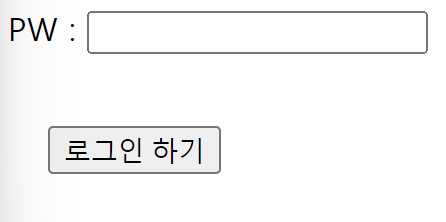
margin : 내 바깥쪽으로 여백을 줌(시계 방향으로 값을 지정)
- 예시)
-
margin : 20px 20px 20px 20px을 주면 아래와 같은 결과가 나옴
-
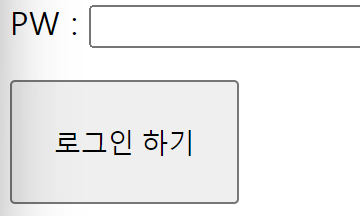
padding : 내 안쪽으로 여백을 줌(시계 방향으로 값을 지정)
- 예시)
-
padding : 20px 20px 20px 20px을 주면 아래와 같은 결과가 나옴
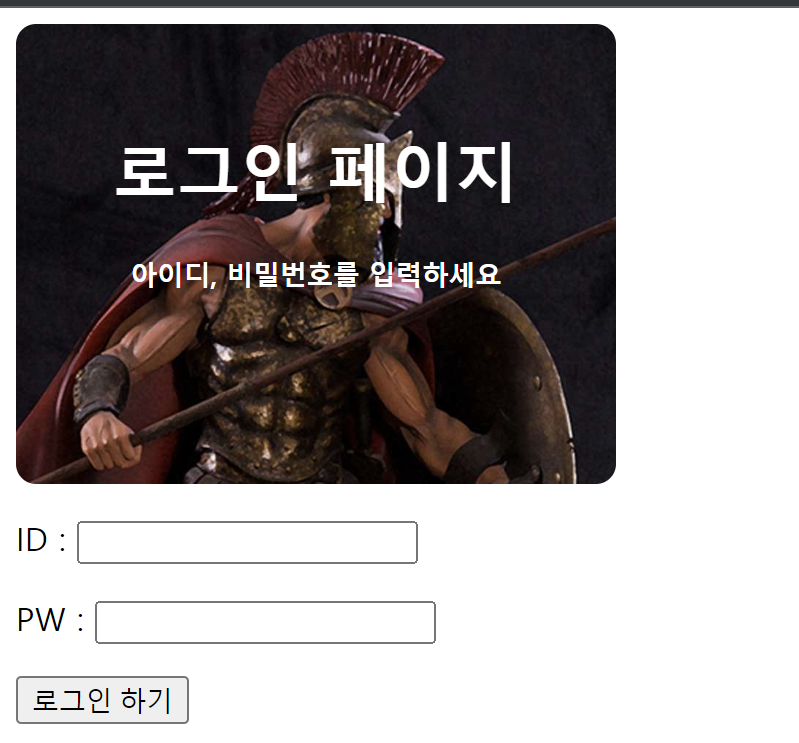
- background-image가 url일 때 : background-image: url('')
- '' 안에 url 삽입해주면 됨
- 만약 원하는 이미지가 나오지 않을 때는 background-position으로 지정해주면 됨
- 그런데 크기가 너무 크다? 그러면 background-size를 사용하여 조절해줌
- background-image, background-position, background-size는 한 세트라고 생각해주면 됨!!
전체 코드
<!DOCTYPE html>
<html lang="en">
<head>
    <meta charset="UTF-8">
    <meta http-equiv="X-UA-Compatible" content="IE=edge">
    <meta name="viewport" content="width=device-width, initial-scale=1.0">
    <title>Document</title>
    <style>
        .mytitle {
            background-color: green;
            width : 300px;
            height: 200px;
            border-radius: 10px;
            color : white;
            text-align: center;
            padding : 30px 0px 0px 0px;
            background-image: url('https://www.ancient-origins.net/sites/default/files/field/image/Agesilaus-II-cover.jpg');
            background-position: center;
            background-size: cover;
        }
    </style>
</head>
<body>
    <div class="mytitle">
        <h1>로그인 페이지</h1>
        <h5>아이디, 비밀번호를 입력하세요</h5>
    </div>
    <p>ID : <input type="text" /></p>
    <p>PW : <input type="text" /></p>
    <button class="mybtn">로그인 하기</button>
</body>
</html>
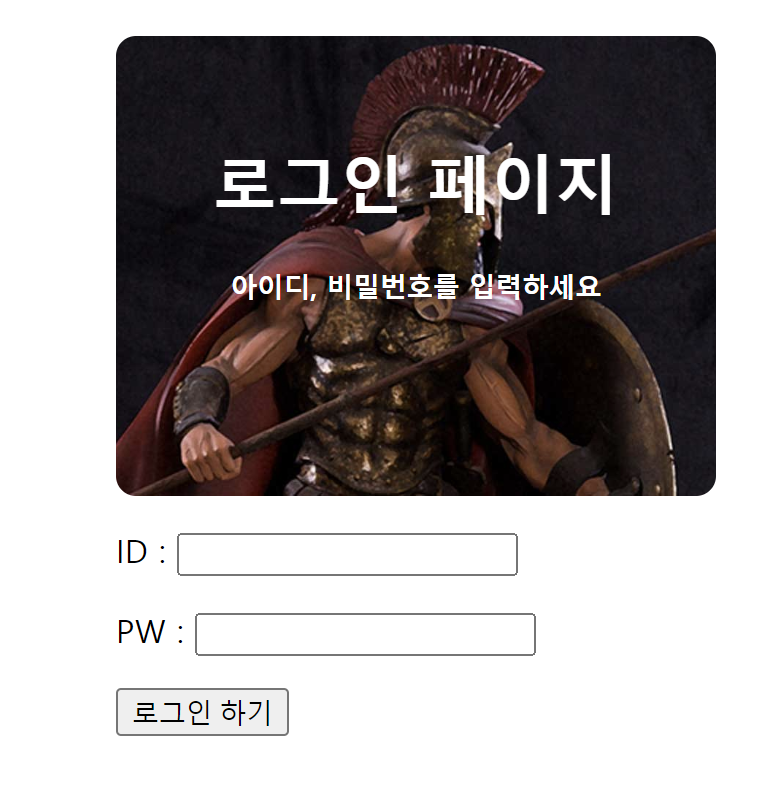
더 나아가 로그인 페이지를 가운데로 옮기고 싶다면??
- 로그인 페이즈를 박스로 씌운 다음 가운데로 움직여 주면 됨(div 사용)
- 즉, 양쪽 여백이 같아지면 됨(=내 바깥으로의 여백 margin 사용)
전체 코드
<!DOCTYPE html>
<html lang="en">
<head>
  <meta charset="UTF-8">
  <meta http-equiv="X-UA-Compatible" content="IE=edge">
  <meta name="viewport" content="width=device-width, initial-scale=1.0">
  <title>Document</title>
  <style>
      .mytitle {
          background-color: green;
          width: 300px;
          height: 200px;
          border-radius: 10px;
          color: white;
          text-align: center;
          padding: 30px 0px 0px 0px;
          background-image: url('https://www.ancient-origins.net/sites/default/files/field/image/Agesilaus-II-cover.jpg');
          background-position: center;
          background-size: cover;
      }
      .wrap {
          background-color: white;
          width : 300px;
          margin : 20px auto 0px auto;
      }
  </style>
</head>
<body>
  <div class="wrap">
      <div class="mytitle">
          <h1>로그인 페이지</h1>
          <h5>아이디, 비밀번호를 입력하세요</h5>
      </div>
      <p>ID : <input type="text" /></p>
      <p>PW : <input type="text" /></p>
      <button class="mybtn">로그인 하기</button>
  </div>
</body>
</html>
- 박스로 씌운 범위를 알기 위해 background-color로 확인
- 색깔이 있는 색을 지정해서 확인하는 것이 좋음
- 로그인 페이지의 크기에 맞춰 조절
- padding에 사용한 auto는 쭉 밀어라~~라는 뜻으로 알고 있으면 됨
- 0px auto 0px auto => 으로 오른쪽 쭉 밀어라
, 왼쪽으로 쭉 밀어라
- 0px auto 0px auto => 으로 오른쪽 쭉 밀어라
💡Tip‼
-
클래스를 이동하고 옮기고 하면 정렬이 깨질 수도 있는데 이때 shift + Alt + f 를 누르면 됨
-
폰트, 버튼, 기타 등을 이용하고 싶을 때 참고하면 좋음 : https://fonts.google.com/?subset=korean
-
주석 : Ctrl + /
-
css 파일 분리를 하고 싶다면??
-
style.css 파일을 같은 폴더에 만들고, head 태그에서 불러오면 됨
-
예시)
<link rel="stylesheet" type="text/css" href = "(css파일이름).css"> -
css 파일 이름이 style이므로 href = "style.css"라고 하면 됨
-
