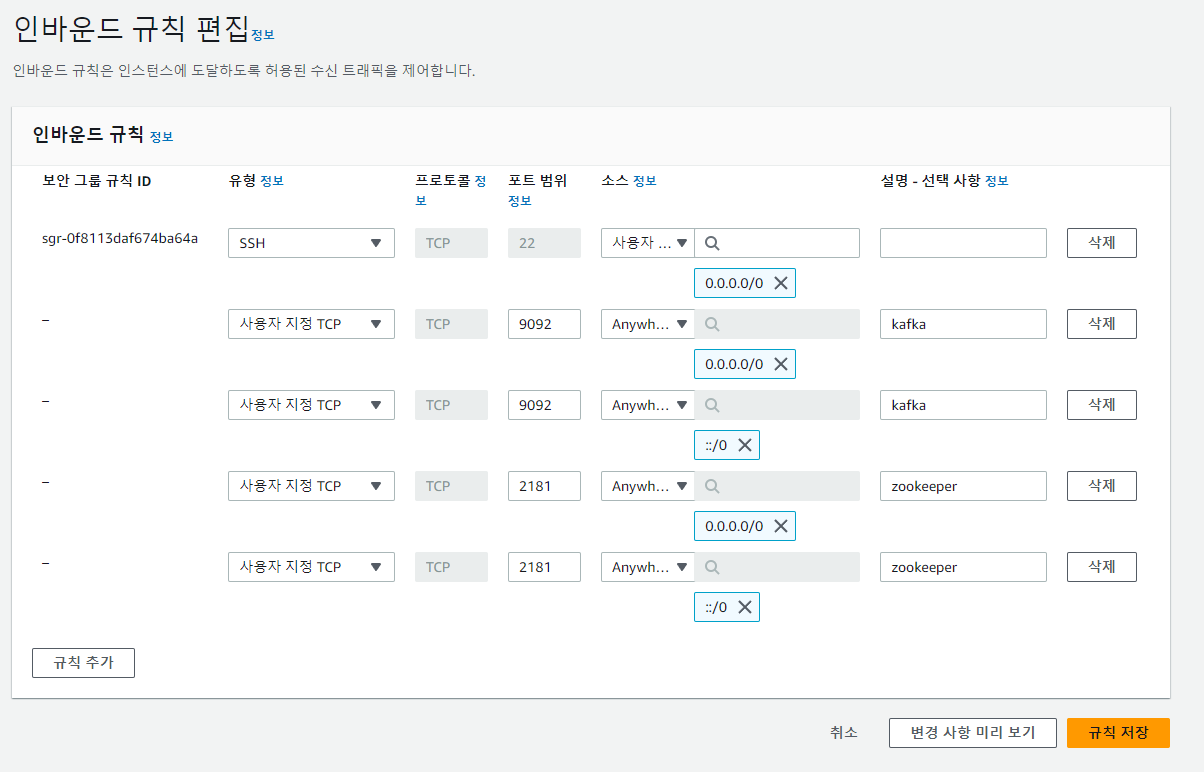
AWS EC2 인바운드 규칙 설정
SSH 접속
ssh -i {keyPair_Name}.pem ubuntu@{IP}
Update/upgrade
$ sudo apt-get updateAre you sure you want to continue connecting (yes/no/[fingerprint])? yes
Do you want to continue? [Y/n] y
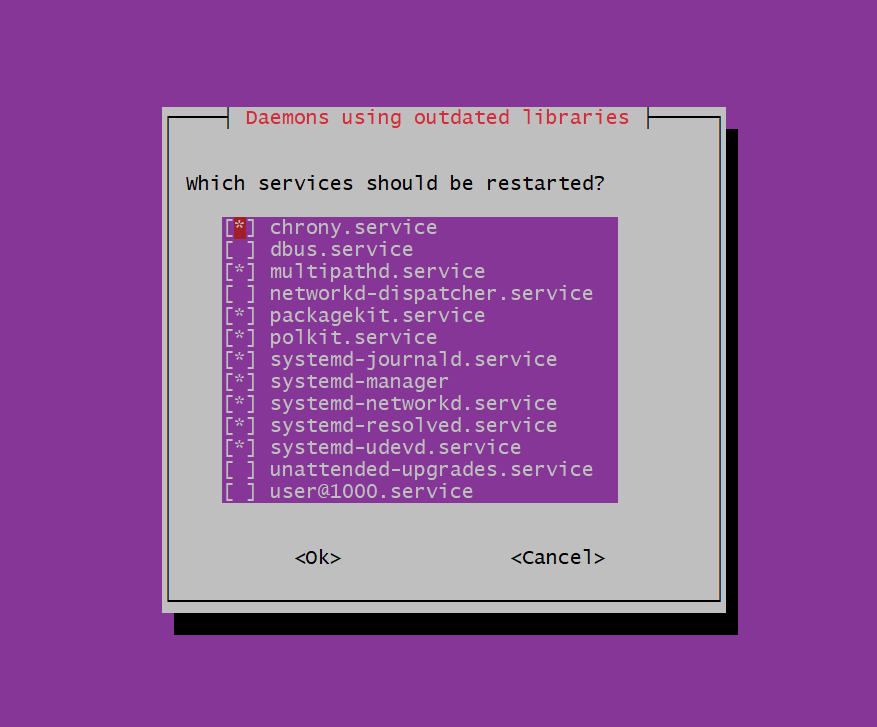
Daemons using outdated librarie 에서 tab으로 ok, enter
$ sudo apt-get upgradeOpenJDK 11 및 vim 설치
$ sudo apt-get install openjdk-11-jdkDo you want to continue? [Y/n] y
$ java -version

$ sudo apt install vim
환경 변수 설정
$ vim ./.bashrc$ vim ./.bashrc # 현재 Directory
$ vim ~/.bashrc # home Directory
방향키를 이용해서 맨 밑으로 이동 후 i 키 (Insert Mode)
export JAVA_HOME=/usr/lib/jvm/java-11-openjdk-amd64
export PATH=$PATH:$JAVA_HOME/bin
export KAFKA_HEAP_OPTS="-Xms300m -Xmx300m"
입력완료 후 esc (Insert Mode 해제)
:wq 나기기
$ cd ~ # 사용자의 홈 디렉터리로 이동

/home/ubuntu

$ source ./.bashrc # 환경변수 시스템에 등록

$ echo $JAVA_HOME
Kafka 설치
$ wget https://archive.apache.org/dist/kafka/2.5.0/kafka_2.12-2.5.0.tgz

# (Source File 말고 Binary File 다운받기)
$ tar xvf ./kafka_2.12-2.5.0.tgzserver.properties 수정
kafka_2.12-2.5.0/config/server.properties 내용중, 아래 빨간색 하이라트 부분을 수정
vim config/server.properties 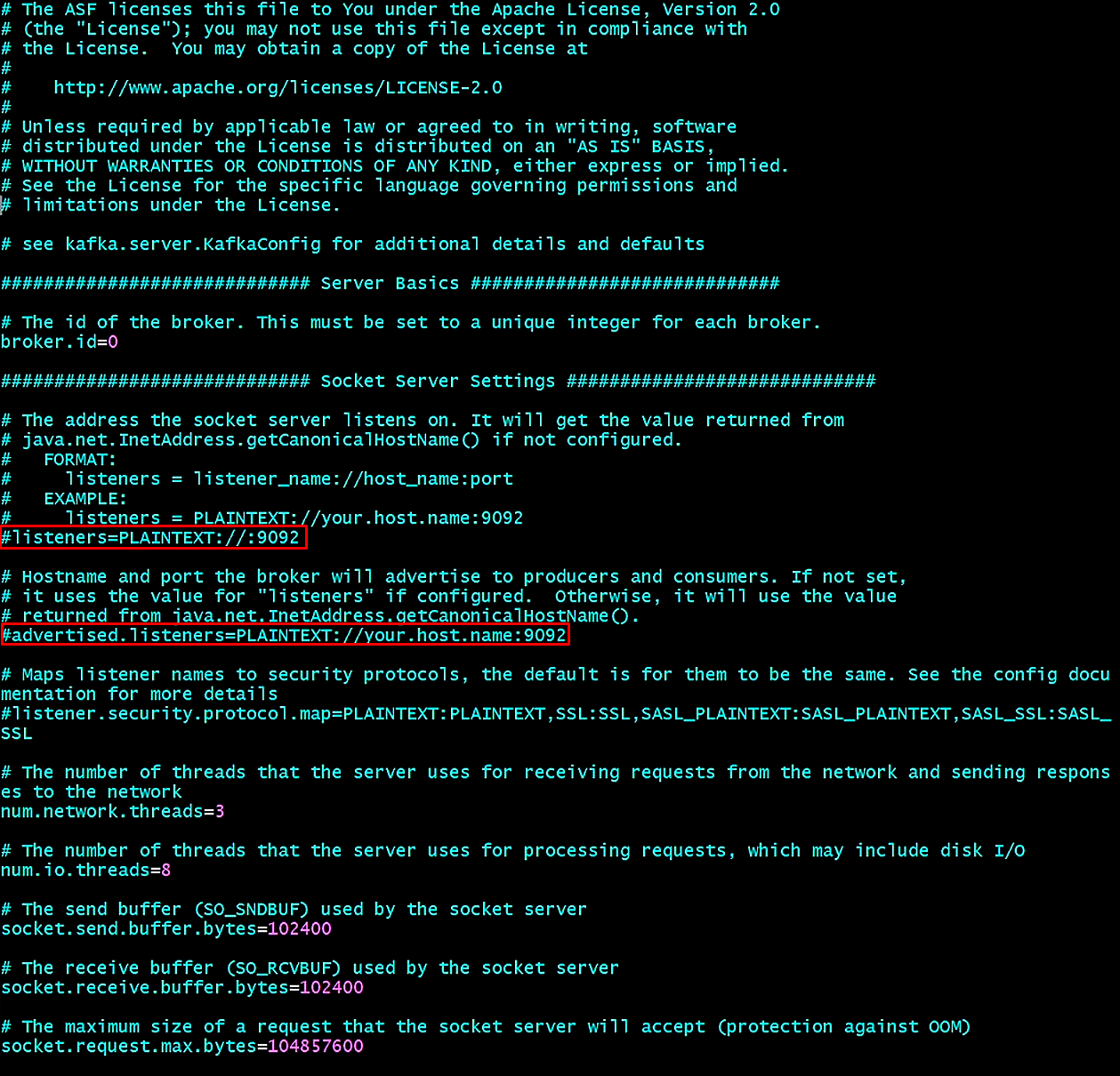
Zookeeper 실행
$ ./bin/zookeeper-server-start.sh -daemon /home/ubuntu/kafka_2.12-2.5.0/config/zookeeper.properties
Zookeeper 실행 확인
$ jps -vm --> or -m
Kafka 실행
$ ./bin/kafka-server-start.sh -daemon /home/ubuntu/kafka_2.12-2.5.0/config/server.properties
Kafka 실행 확인
$ jps -m
※ Kafka 실행 에러 발생
:~/kafka_2.12-2.5.0$ ./bin/kafka-server-start.sh ./config/server.properties OpenJDK 64-Bit Server VM warning: INFO: os::commit_memory(0x00000000c0000000, 1073741824, 0) failed; error='Not enough space' (errno=12)
There is insufficient memory for the Java Runtime Environment to continue.
# Native memory allocation (mmap) failed to map 1073741824 bytes for committing reserved memory.
# An error report file with more information is saved as:
# /home/ubuntu/kafka_2.12-2.5.0/hs_err_pid23888.log
Kafka의 heap memory는 디폴트로 Kafka = 1GByte, Zookeeper=512MByte입니다.이는 AWS EC2 프리티어 메모리가 1GByte 이기 때문에 위와 같은 에러가 발생합니다.
그래서 Kafka와 Zookeeper의 힙 메모리를 재설정해야 합니다.
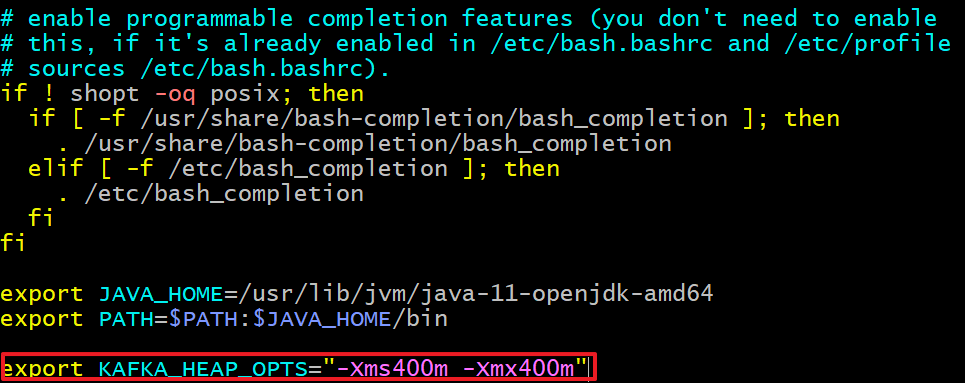
※ 300m(300Mbyte)로 모두 수정
KAFKA_HEAP_OPTS 환경 변수를 시스템에 등록합니다.
$ source ./.bashrc**Topic 생성(카프카 브로커를 실행 후, 토픽을 생성해야 함)**
$ bin/kafaka-topics.sh \
--create \
--bootstrap-server 54.180.100.188:9092 \
--topic tacocloud_orders
Topic 목록 확인하기
$ bin/kafka-topics.sh --bootstrap-server {ip}:9092 --list
Topic 정보 확인
$ bin/kafka-topics.sh --bootstrap-server {ip}:9092 --topic tacocloud_orders --describe