해싱
SHA, 암호화, 복호화, 해싱: 개념과 원리
1. SHA (Secure Hash Algorithm)
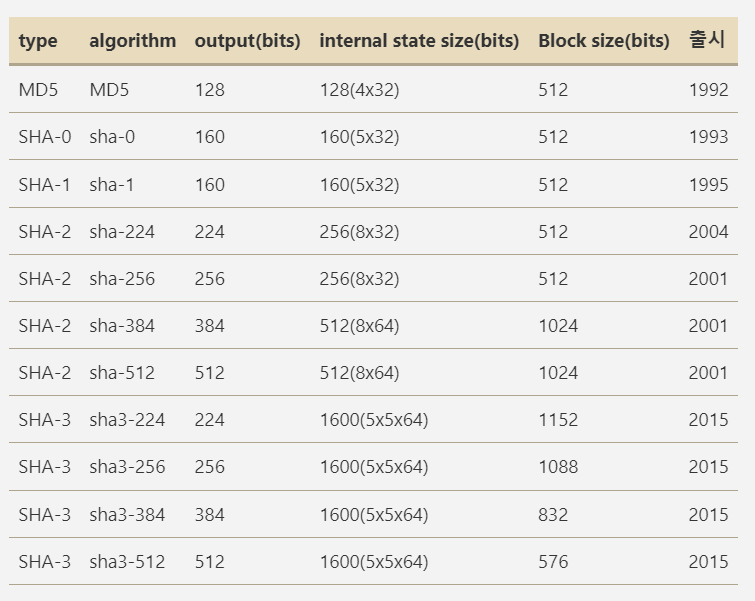
SHA는 미국 국립 표준 기술 연구소(NIST)에서 개발한 암호화 해시 함수입니다. SHA는 주로 데이터 무결성 검사와 암호화 응용 프로그램에서 사용됩니다. SHA 알고리즘은 다양한 버전이 있으며, 그 중 가장 널리 사용되는 버전은 SHA-1, SHA-2(SHA-224, SHA-256, SHA-384, SHA-512)입니다.
예제
다음은 SHA-1 해시값의 예제이다.SHA1("The quick brown fox jumps over the lazy dog") = 2fd4e1c67a2d28fced849ee1bb76e7391b93eb12해시값은 눈사태 효과 때문에 메시지가 조금만 바뀌어도 완전히 바뀔 수 있다. 다음 예시는 위의 예제 끝에 마침표(.)를 찍은 것이다.
SHA1("The quick brown fox jumps over the lazy dog.")
  = 408d94384216f890ff7a0c3528e8bed1e0b01621
빈 문자열의 해시는 다음과 같다.
SHA1("") = da39a3ee5e6b4b0d3255bfef95601890afd80709
- SHA-1: 160비트 해시 값을 생성하며, 메시지 다이제스트 알고리즘으로 사용됩니다. 하지만 SHA-1은 충돌 문제가 발견되어 보안이 약화되었습니다.
- SHA-2: SHA-1의 보안 문제를 개선한 버전으로, 224, 256, 384, 512비트 해시 값을 생성하는 여러 변형이 있습니다.
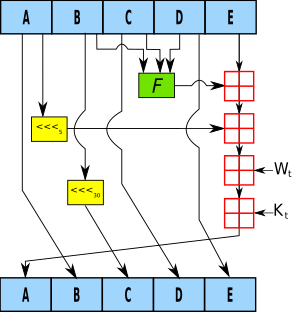
SHA 알고리즘의 기본 원리는 입력 데이터에 대해 고정된 길이의 해시 값을 생성하는 것입니다. 이 해시 값은 입력 데이터가 조금이라도 변경되면 완전히 다른 값으로 바뀝니다.
SHA-256 예제 (Java):
import java.security.MessageDigest;
import java.security.NoSuchAlgorithmException;

public class SHAExample {
    public static void main(String[] args) {
        String data = "Hello, World!";
        try {
            MessageDigest digest = MessageDigest.getInstance("SHA-256");
            byte[] hash = digest.digest(data.getBytes("UTF-8"));
            StringBuilder hexString = new StringBuilder();
            for (byte b : hash) {
                String hex = Integer.toHexString(0xff & b);
                if (hex.length() == 1) hexString.append('0');
                hexString.append(hex);
            }
            System.out.println(hexString.toString());
        } catch (Exception e) {
            e.printStackTrace();
        }
    }
}
2. 암호화 (Encryption)
암호화는 데이터를 인가되지 않은 접근으로부터 보호하기 위해 데이터를 변환하는 과정입니다. 암호화된 데이터는 복호화 키 없이는 읽을 수 없습니다. 암호화는 크게 두 가지 유형으로 나뉩니다: 대칭 키 암호화와 비대칭 키 암호화.
- 대칭 키 암호화: 암호화와 복호화에 동일한 키를 사용하는 방식입니다. 예로는 AES, DES, RC4 등이 있습니다.
- 비대칭 키 암호화: 공개 키와 개인 키라는 두 개의 키를 사용하는 방식입니다. 공개 키는 암호화에 사용되고, 개인 키는 복호화에 사용됩니다. 예로는 RSA, DSA 등이 있습니다.
대칭 키 암호화 예제 (Java - AES):
import javax.crypto.Cipher;
import javax.crypto.KeyGenerator;
import javax.crypto.SecretKey;
import javax.crypto.spec.SecretKeySpec;
import java.util.Base64;

public class AESEncryptionExample {
    public static void main(String[] args) throws Exception {
        String data = "Hello, World!";
        KeyGenerator keyGen = KeyGenerator.getInstance("AES");
        keyGen.init(128);
        SecretKey secretKey = keyGen.generateKey();

        Cipher cipher = Cipher.getInstance("AES");
        cipher.init(Cipher.ENCRYPT_MODE, secretKey);
        byte[] encryptedData = cipher.doFinal(data.getBytes());

        String encodedKey = Base64.getEncoder().encodeToString(secretKey.getEncoded());
        String encodedData = Base64.getEncoder().encodeToString(encryptedData);

        System.out.println("Encoded Key: " + encodedKey);
        System.out.println("Encrypted Data: " + encodedData);
    }
}
3. 복호화 (Decryption)
복호화는 암호화된 데이터를 원래의 형태로 되돌리는 과정입니다. 암호화 과정에서 사용된 키와 알고리즘이 필요합니다. 대칭 키 암호화의 경우, 동일한 키를 사용하여 암호화된 데이터를 복호화할 수 있습니다. 비대칭 키 암호화의 경우, 공개 키로 암호화된 데이터를 개인 키를 사용하여 복호화할 수 있습니다.
대칭 키 복호화 예제 (Java - AES):
import javax.crypto.Cipher;
import javax.crypto.spec.SecretKeySpec;
import java.util.Base64;

public class AESDecryptionExample {
    public static void main(String[] args) throws Exception {
        String encodedKey = "yourEncodedKeyHere";
        String encryptedData = "yourEncryptedDataHere";

        byte[] decodedKey = Base64.getDecoder().decode(encodedKey);
        SecretKeySpec secretKey = new SecretKeySpec(decodedKey, 0, decodedKey.length, "AES");

        Cipher cipher = Cipher.getInstance("AES");
        cipher.init(Cipher.DECRYPT_MODE, secretKey);
        byte[] decryptedData = cipher.doFinal(Base64.getDecoder().decode(encryptedData));

        System.out.println("Decrypted Data: " + new String(decryptedData));
    }
}
4. 해싱 (Hashing)
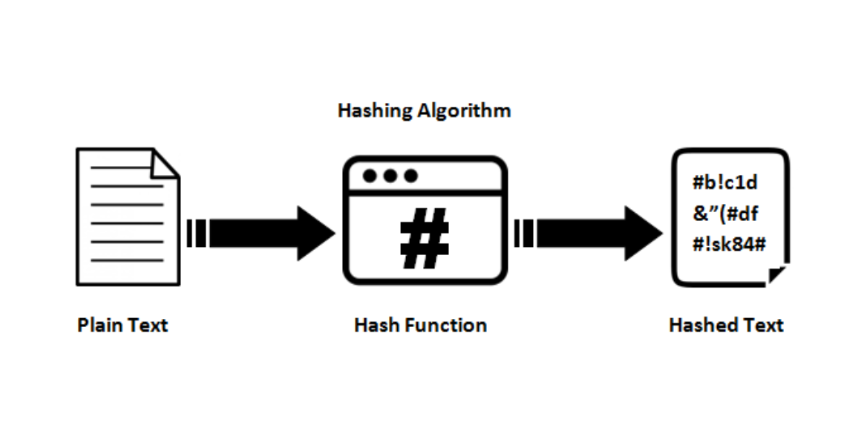
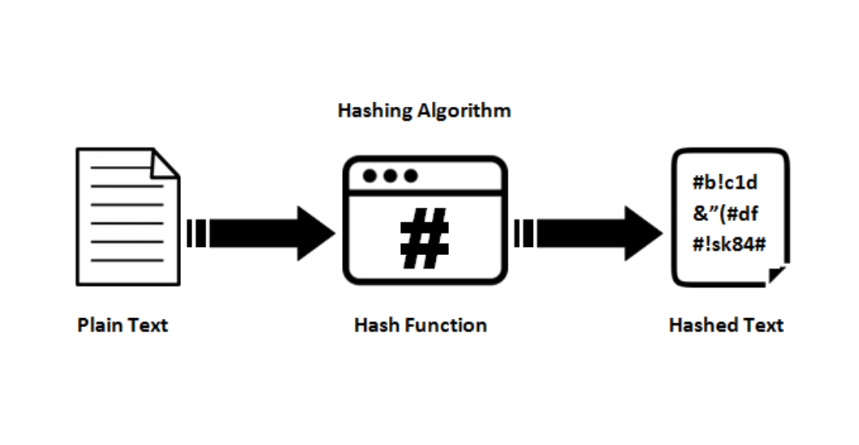
해싱은 임의의 크기의 데이터를 고정된 크기의 해시 값으로 변환하는 과정입니다. 해시 함수는 데이터의 무결성을 확인하는 데 주로 사용됩니다. 해시 값은 입력 데이터가 조금이라도 변경되면 완전히 다른 값으로 바뀝니다. 해싱은 암호화와 달리 데이터를 복호화할 수 없습니다. 즉, 해시 값으로 원래 데이터를 재구성할 수 없습니다.
해싱은 주로 데이터 검증, 비밀번호 저장, 디지털 서명 등에 사용됩니다. SHA-256, SHA-3, MD5 등이 널리 사용되는 해시 알고리즘입니다.
SHA-256 해싱 예제 (Java):
import java.security.MessageDigest;
import java.security.NoSuchAlgorithmException;

public class SHA256HashingExample {
    public static void main(String[] args) {
        String data = "Hello, World!";
        try {
            MessageDigest digest = MessageDigest.getInstance("SHA-256");
            byte[] hash = digest.digest(data.getBytes("UTF-8"));
            StringBuilder hexString = new StringBuilder();
            for (byte b : hash) {
                String hex = Integer.toHexString(0xff & b);
                if (hex.length() == 1) hexString.append('0');
                hexString.append(hex);
            }
            System.out.println(hexString.toString());
        } catch (Exception e) {
            e.printStackTrace();
        }
    }
}
5. Zlib
zlib은 C로 작성된 데이터 압축 라이브러리의 일종이다. 제작자는 Jean-Loup Gailly와 Mark Adler. 첫 공식 버전 0.9는 1995년 5월 1일에 출시하였으며 처음에는 libpng 이미지 라이브러리의 사용을 위해 고안되었다.
Zlib은 데이터 압축 라이브러리로, 데이터의 크기를 줄이기 위해 사용됩니다. 주로 PNG 파일 형식과 같은 데이터 포맷에서 사용됩니다. Zlib은 DEFLATE 압축 알고리즘을 사용하며, 빠르고 효율적인 압축 및 압축 해제를 제공합니다.
Zlib 압축 예제 (Java):
import java.io.ByteArrayOutputStream;
import java.io.IOException;
import java.util.zip.Deflater;
import java.util.zip.Inflater;

public class ZlibCompressionExample {
    public static void main(String[] args) {
        try {
            String data = "Hello, World!";
            byte[] input = data.getBytes("UTF-8");

            // Compress
            Deflater deflater = new Deflater();
            deflater.setInput(input);
            deflater.finish();
            ByteArrayOutputStream outputStream = new ByteArrayOutputStream(input.length);
            byte[] buffer = new byte[1024];
            while (!deflater.finished()) {
                int count = deflater.deflate(buffer);
                outputStream.write(buffer, 0, count);
            }
            byte[] output = outputStream.toByteArray();
            System.out.println("Compressed Data: " + new String(output, "ISO-8859-1"));

            // Decompress
            Inflater inflater = new Inflater();
            inflater.setInput(output);
            ByteArrayOutputStream outputStream2 = new ByteArrayOutputStream(input.length);
            byte[] buffer2 = new byte[1024];
            while (!inflater.finished()) {
                int count = inflater.inflate(buffer2);
                outputStream2.write(buffer2, 0, count);
            }
            byte[] output2 = outputStream2.toByteArray();
            System.out.println("Decompressed Data: " + new String(output2, "UTF-8"));
        } catch (Exception e) {
            e.printStackTrace();
        }
    }
}