
📓 java.lang패키지와 유용한 클래스
📔 Object클래스
모든 클래스의 최고 조상. 오직 11개의 메소드만을 가지고 있음
| Object클래스의 메소드 | 설 명 |
|---|---|
| protected Object clone() | 객체 자신의 복사본을 반환 (오버라이딩 필요) |
| public boolean equals(Object obj) | 객체 자신과 객체 obj가 같은 객체인지 알려준다 |
| protected void finalize() | 객체가 소멸될 때 가비지 컬렉터에 의해 자동적으로 호출. 이때 수행되어야하는 코드가 있을 때 오버라이딩. (거의 사용X) |
| public class getClass() | 객체 자신의 클래스 정보를 담고 있는 Class인스턴스 반환 |
| public int hashCode() | 객체 자신의 해시코드 반환 |
| public String toString() | 객체 자신의 정보를 문자열로 반환 |
| public void notify() | 객체 자신을 사용하려고 기다리는 쓰레드를 하나만 깨운다 |
| public void notifyAll() | 객체 자신을 사용하려고 기다리는 모든 쓰레드를 깨운다 |
| public void wait() public void wait(long timeout) public void wait(long timeout, int nanos) | 다른 쓰레드가 notify()나 notifyAll()을 호출할 때까지 현재 쓰레드를 무한히 또는 지정된 시간(timeout, nanos)동안 기다리게 한다. (timeout은 1/1000초, nanos는 1/10⁹초) |
🔷 equals (Object obj)
객체 자신과 주어진 객체를 비교. 같으면 true, 다르면 false.
- Object클래스의 equals()는 객체의 주소를 비교(참조변수 값 비교)
class Value{
	int value;

    Value(int value) {
    	this.value = value;
    }
}

class Ex9{
	public static void main (String[] args) {
    	Value v1 = new Value(10);
        Value v2 = new Value(10);

        System.out.println(v1.equals(v2)); // false.
        //v1의 주소값 = 0x1234 v2의 주소값 = 0x2345 (예시)
        //주소값이 다르므로 false.
    }
}
◼ 오버라이딩을 통해 값 비교로 바꾸기
class Value{
	int value;

    Value(int value) {
    	this.value = value;
    }

    //오버라이딩
    public boolean equals(Object obj){
 		//형변환 가능한지 확인 후 형변환하기
        //obj가 형변환 불가능하면 false 반환
    	if(!obj instanceof Value) return false;

    	Value v = (Value)obj; //형변환

        return this.value == v.value; //값비교 결과 반환
    }
}

class Ex9{
	public static void main (String[] args) {
    	Value v1 = new Value(10);
        Value v2 = new Value(10);

        System.out.println(v1.equals(v2)); // true.
    }
}
🔷 hashCode()
객체의 해시코드(hash code)를 반환하는 메소드
- Object클래스의 hashCode()는 객체의 주소를 int로 변환해서 반환
public class Object {
	...
    public native int hashCode();
}
equals()를 오버라이딩하면, hashCode()도 오버라이딩해야 한다.
equals()의 결과가 true인 두 객체의 해시코드는 같아야 하기 때문
String str1 = new String("abc");
String str2 = new String("abc");
System.out.println(str1.equals(str2)); //true -equals()가 true이면
System.out.println(str1.hashCode()); //96354
System.out.println(str2.hashCode()); //96354
//주소가 서로 같아야 한다.
🔷 toString()
객체를 문자열(String)으로 변환하기 위한 메소드
public String toString() {
	return getClass().getName() + "@" + Integer.toHexString(hashCode());
    //		설계도객체.클래스이름	  위치			16진수 객체주소
}
class Card {
String kind;
int number;
Card() {
this.kind = kind;
this.number = number;
}
}
class Ex9 {
public static void main(String[] args) {
System.out.println(new Card().toString());
System.out.println(new Card().toString());
}
}
/*출력
Card@1930bfd
Card@139a55
*/◼ 오버라이딩을 통해 다른 정보 출력하기
class Card {
	String kind;
    int number;

    Card() {
    	this.kind = kind;
        this.number = number;
    }

    //오버라이딩
    public String toString() {
    	// 카드의 무늬와 숫자 출력
    	return "kind : " + kind + "number : " + number;
    }
}

class Ex9 {
	public static void main(String[] args) {
    	System.out.println(new Card().toString());
        System.out.println(new Card().toString());
    }
}

/*출력
kind : SPADE, number : 1
kind : HEART, number : 10
*/
📔 String클래스
String클래스 = data(char[ ]) + 메소드(문자열 관련)
public final class String implements java.io.Serializable, Comparable {
	private char[] value;
    	...
}
- 내용을 변경할 수 없는 불변(immutable)클래스
- 덧셈을 이용한 문자열 결합은 성능이 떨어짐. (StringBuffer사용하기)
String a = "a";
String b = "b";
a = a + b;

// a의 주소값 - 0x100  b의 주소값 - 0x200
//a + b ("ab")의 주소값 - 0x300 (새로운 객체가 생성됨)
//a의 주소값이 0x100에서 0x300으로 변경되는 형태
🔷 문자열의 비교
String str = "abc"의 비교
String str1 = "abc";
String str2 = "abc";

// str1과 str2는 주소값이 같다!  (str1 == str2) == true
// str1.equals(str2) == true;
String str = new String("abc")의 비교
String str1 = new String("abc");
String str2 = new String("abc");

// str1과 str2는 주소값이 다르다!  (str1 == str2) == false
// str1.equals(str2) == true;
🔷 문자열 리터럴
프로그램 실행시 자동으로 생성 (constant pool(상수 저장소)에 저장)
같은 내용의 문자열 리터럴은 하나만 만들어진다.
String s1 = "AAA"; // 자동으로 new String("AAA")생성
String s2 = "AAA"; // "AAA" 가 존재하므로 주소값을 그대로 사용
String s3 = "AAA"; // "AAA" 가 존재하므로 주소값을 그대로 사용

// "AAA"는 하나만 만들어지고 s1,s2,s3가 같은 주소값을 가지고 있는 상태
🔷 빈 문자열 ("", empty string)
내용이 없는 문자열. 크기가 0인 char형 배열을 저장하는 문자열
String str = "";크기가 0인 배열을 생성하는 것은 어느 타입이나 가능
char[] chArr = new char[0]; //길이가 0인 char배열
int[] iArr = {}; //길이가 0인 int배열
◼ 문자와 문자열의 초기화
//권장하지 않는 초기화 방식
String s = null;
char c = '\u0000';

//권장하는 초기화 방식
String s = ""; //빈 문자열로 초기화 (new String("")은 사용하지 않기)
char c = ' '; //공백으로 초기화
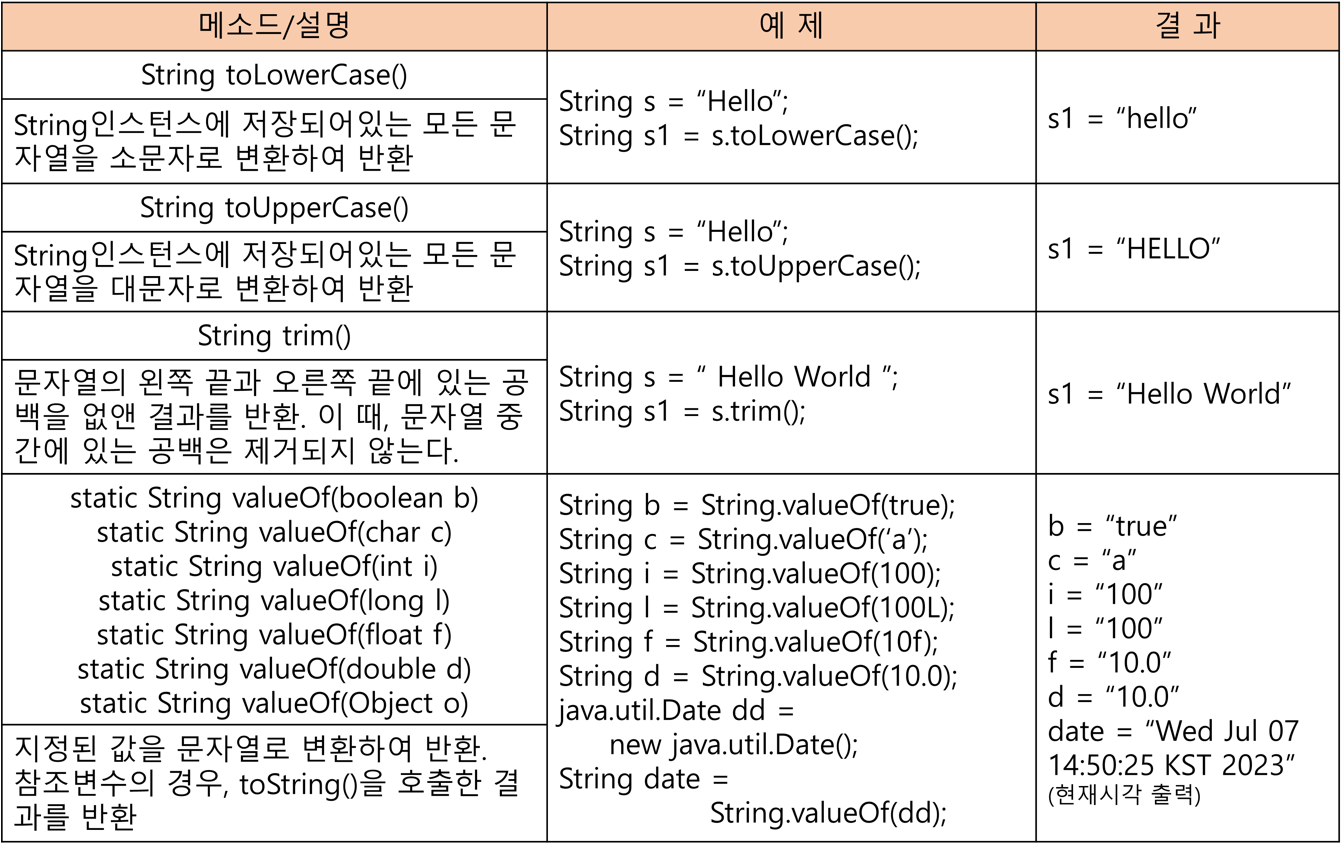
🔷 String의 생성자와 메소드
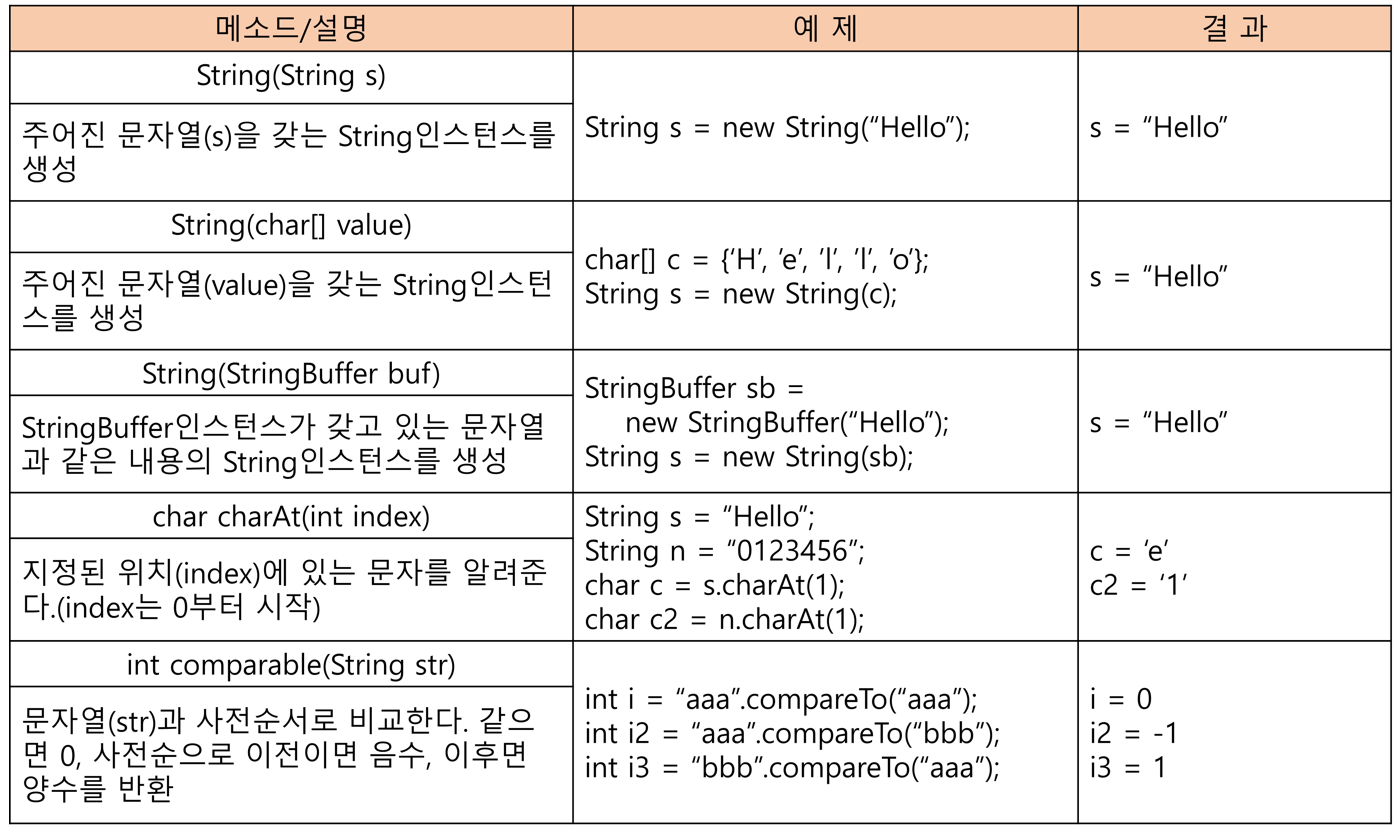
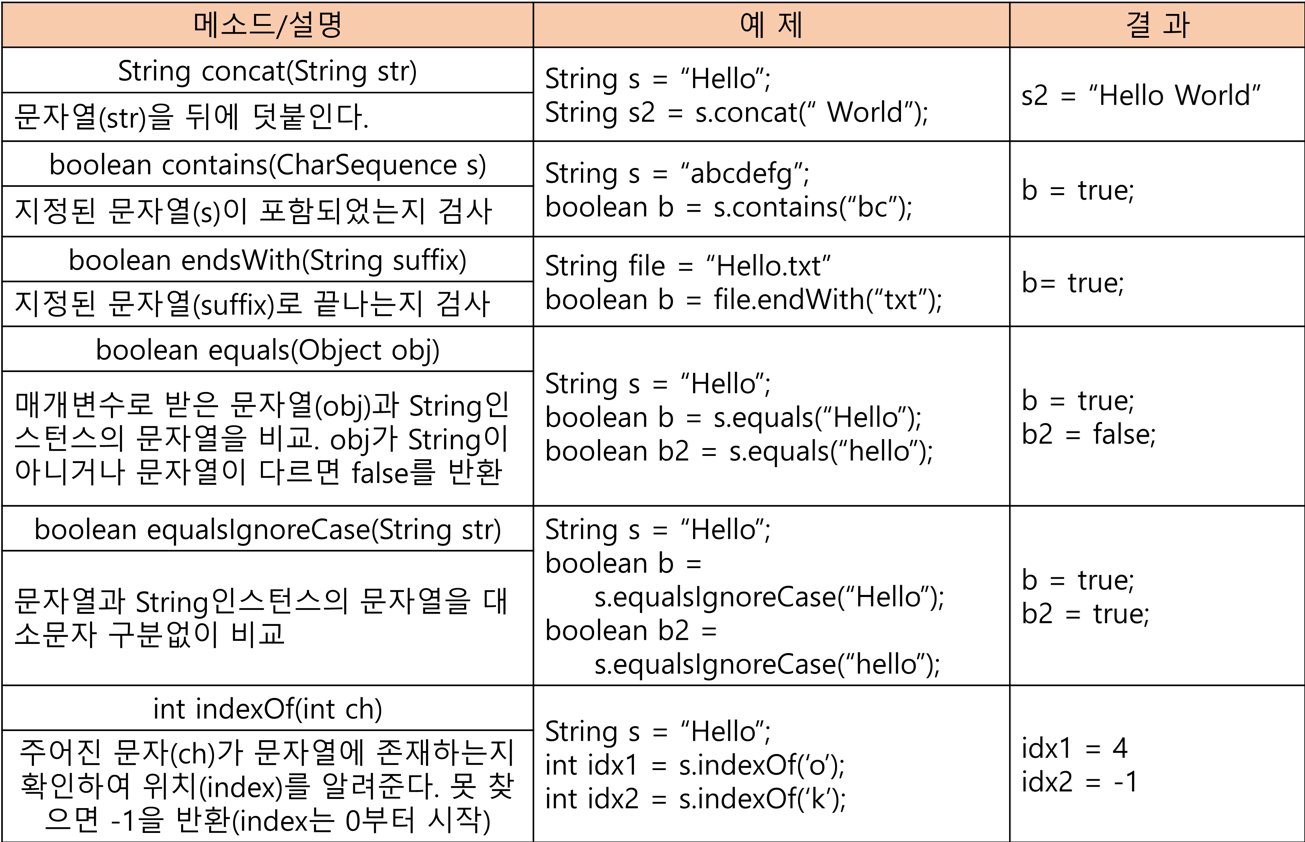
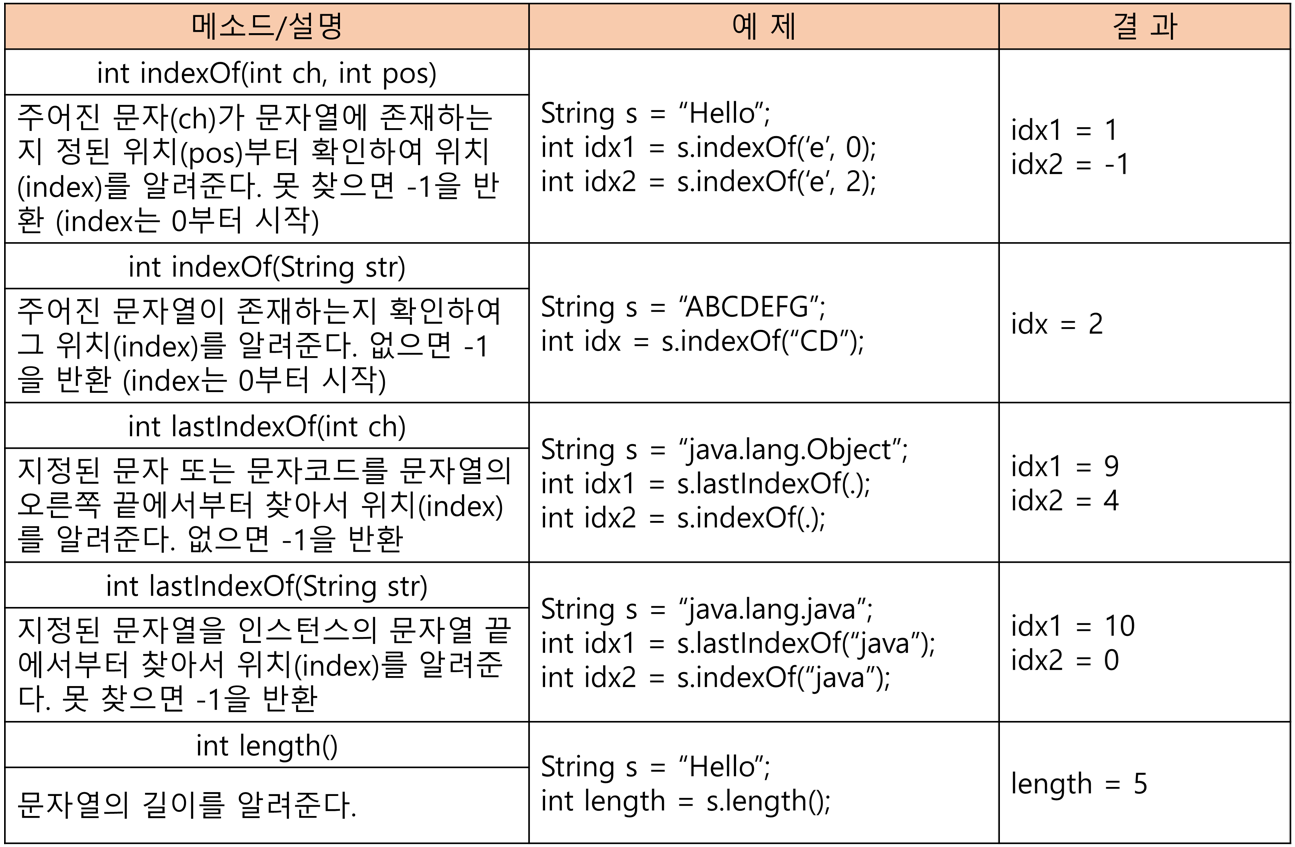
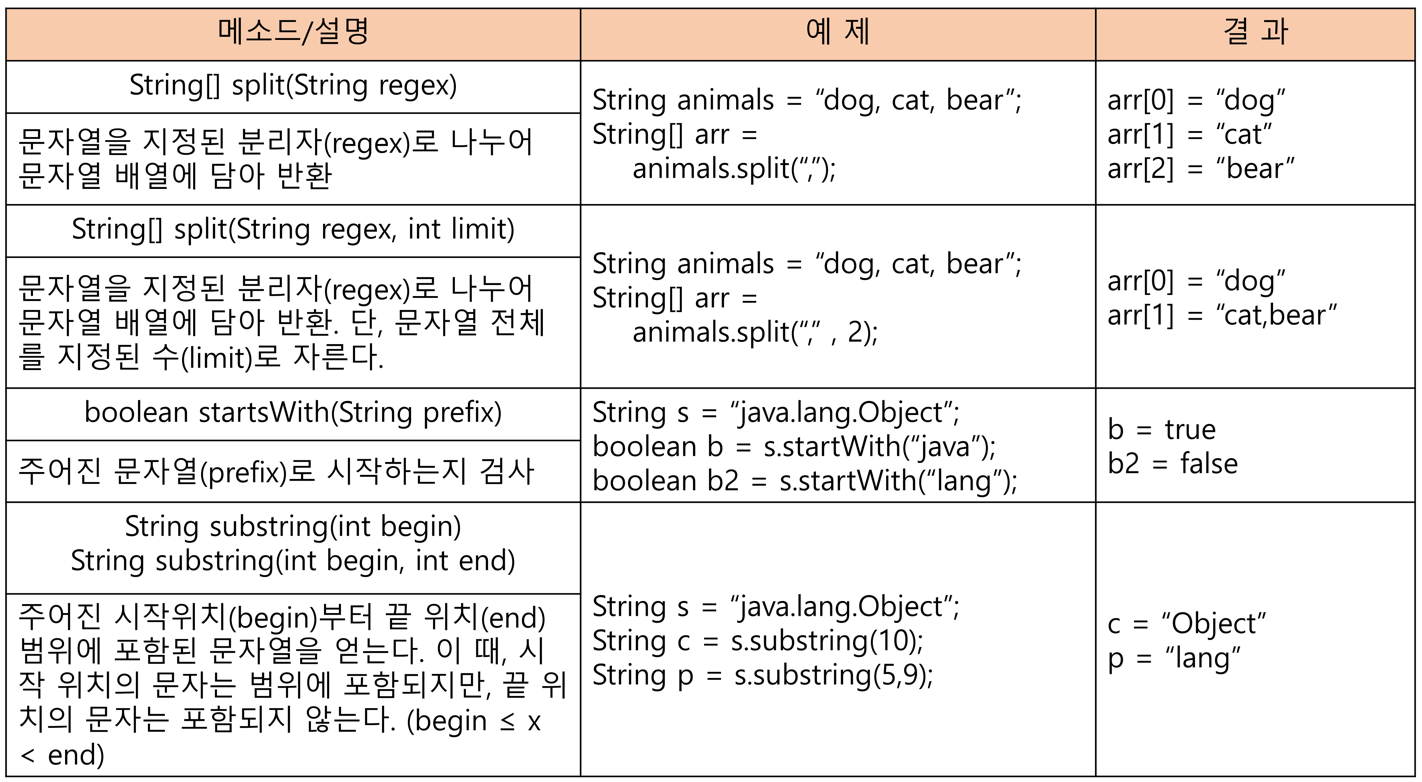
🔷 문자열 결합
◼ join()
여러 문자열 사이에 구분자를 넣어서 결합한다
String animals = "dog,cat,bear";
String[] arr = animals.split(","); // |dog|cat|bear|로 저장
Strng str = String.join("-", arr); // dog-cat-bear로 결합
System.out.println(str); //dog-cat-bear 출력
🔷 문자열 변환
◼ 숫자를 문자열로
//100을 "100"으로 변환
int i = 100; //숫자
String s1 = i + ""; //방법1
String s2 = valueOf(i); //방법2
◼ 문자열을 숫자로
//"100"을 100으로 변환
int i = Integer.parseInt("100"); //방법1
int i2 = Integer.valueOf("100"); //방법2
Integer i2 = Integer.valueOf("100"); //방법2는 원래 반환타입이 Integer| 기본형 → 문자열 | 문자열 → 기본형 |
|---|---|
| String String valueOf(boolean b) String String valueOf(char c) String String valueOf(int i) String String valueOf(long l) String String valueOf(float f) String String valueOf(double d) String String valueOf(Object o) | boolean Boolean.parseBoolean(String s) byte Byte.parseByte(String s) short Short.parseShort(String s) int Integer.parseInt(String s) long Long.parseLong(String s) float Float.parseFloat(String s) double Double.parseDouble(String s) |
byte, short를 문자열로 변경할 때는 String valueOf(int i)를 사용하면 된다.
📔 StringBuffer클래스
String처럼 문자열 배열(char[ ])을 내부적으로 가지고 있다.
public final class StringBuffer implements java.io.Serialable {
	private char[] value;
    	...
}
내용을 변경할 수 있다(mutable)
StringBuffer sb = new StringBuffer("abc"); //sb의 주소값 - 0x100

sb.append("123"); //sb의 주소값 - 0x100. 값 : "abc123"
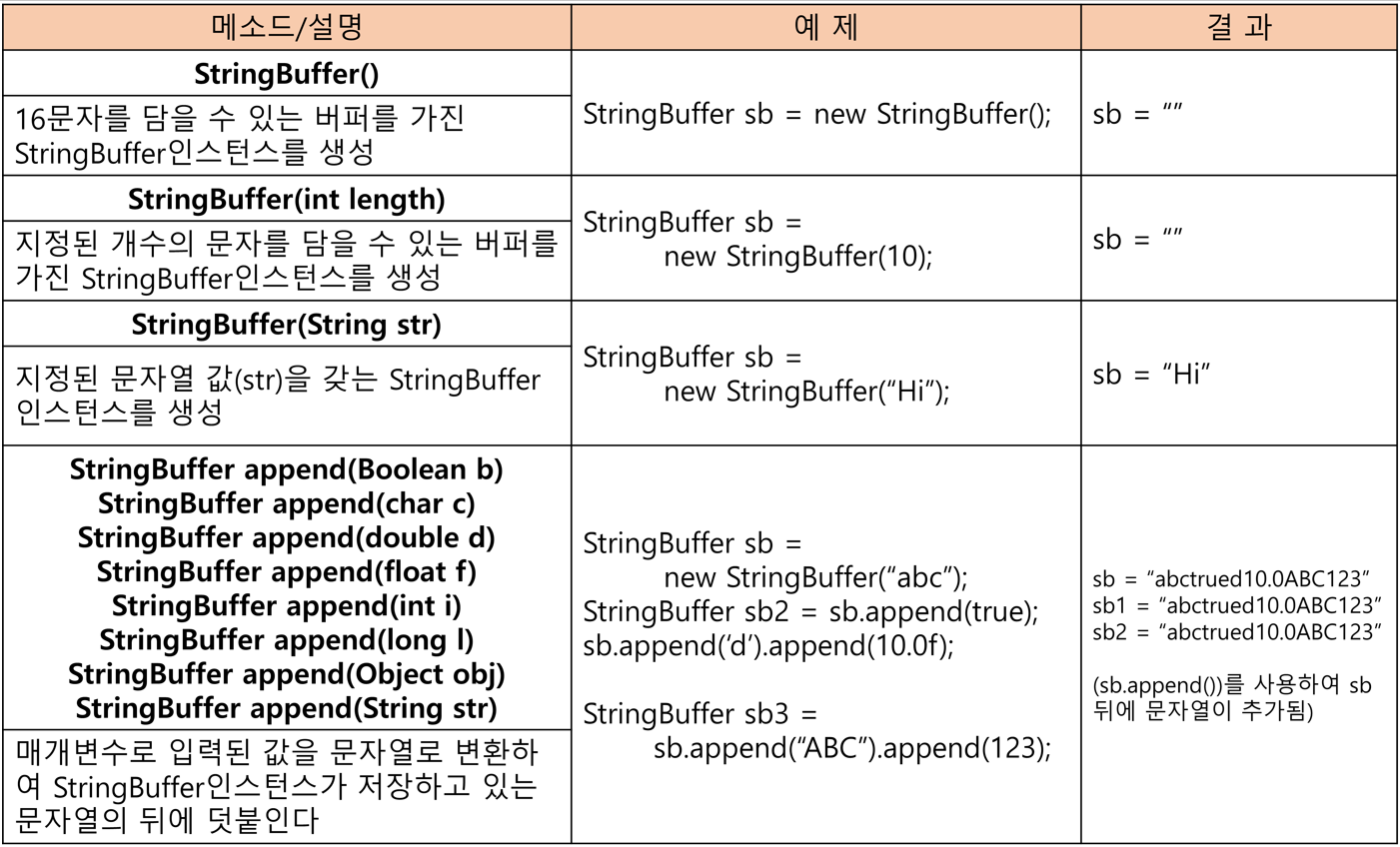
🔷 StringBuffer의 생성자
StringBuffer는 길이 변경이 불가한 배열과 같다.
저장할 문자열의 길이를 고려해서 적절한 크기로 생성해야 한다
public StringBuffer(int length) { // 적절한 길이를 매개변수로 받기
	value = new char[length];
    shared = false;
}

public StringBuffer() {
	this(16); //크기를 지정하지 않으면 16을 기본크기로 가짐
}

public StringBuffer(String str) {
	this(str.length()+16); // 지정된 문자열 길이보다 16 더 크게 생성
    append(str);
}
🔷 StringBuffer의 비교
StringBuffer는 equals()가 오버라이딩되어있지않다. (주소비교)
- StringBuffer를 String으로 변환 후에 equals로 비교해야 한다.
StringBuffer sb = new StringBuffer("abc");
StringBuffer sb2 = new StringBuffer("abc");

System.out.println(sb);
System.out.println(sb2);
//둘다 false 출력 - 주소값이 다르기 때문

//StringBuffer를 String으로 변환
String s = sb.toString();
STring s2 = sb2.toString();

System.out.println(s.equals(s2)); //true 출력
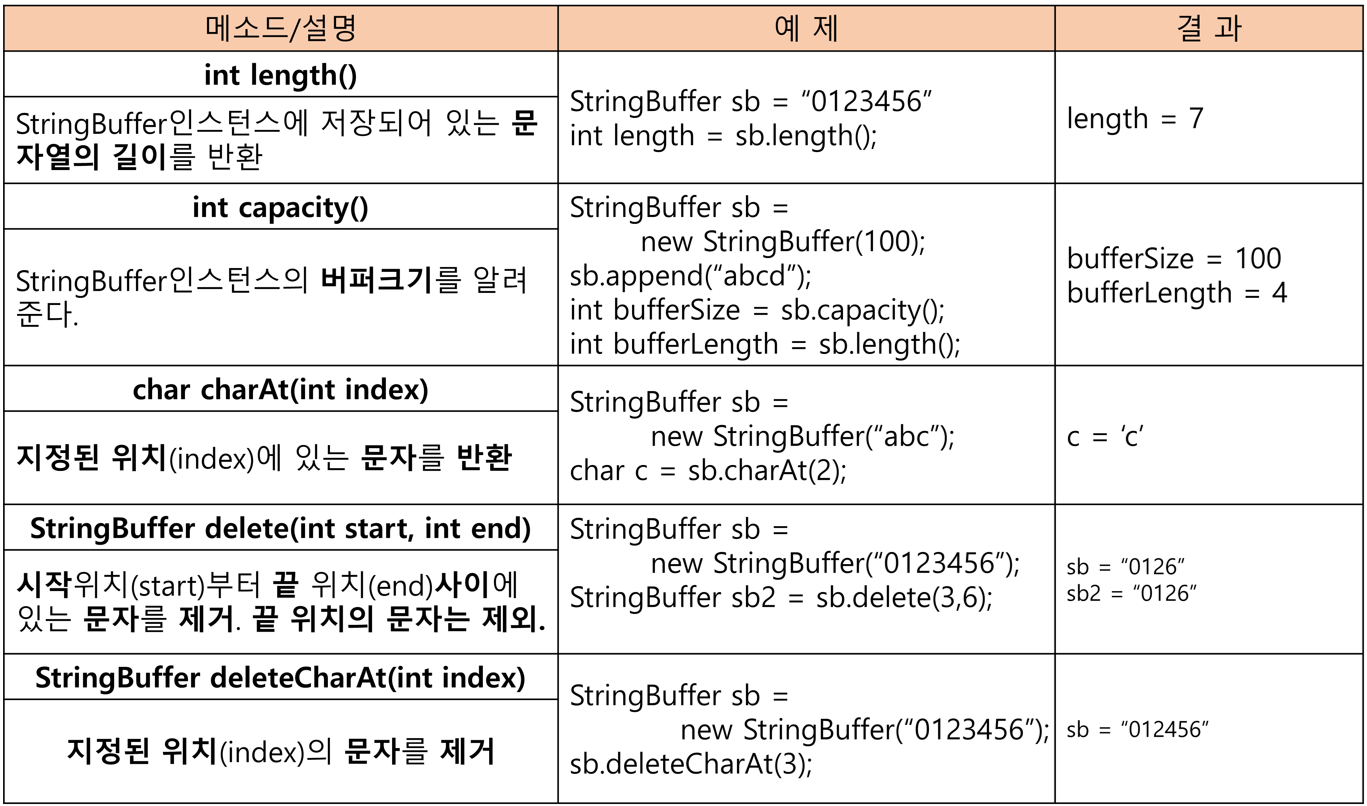
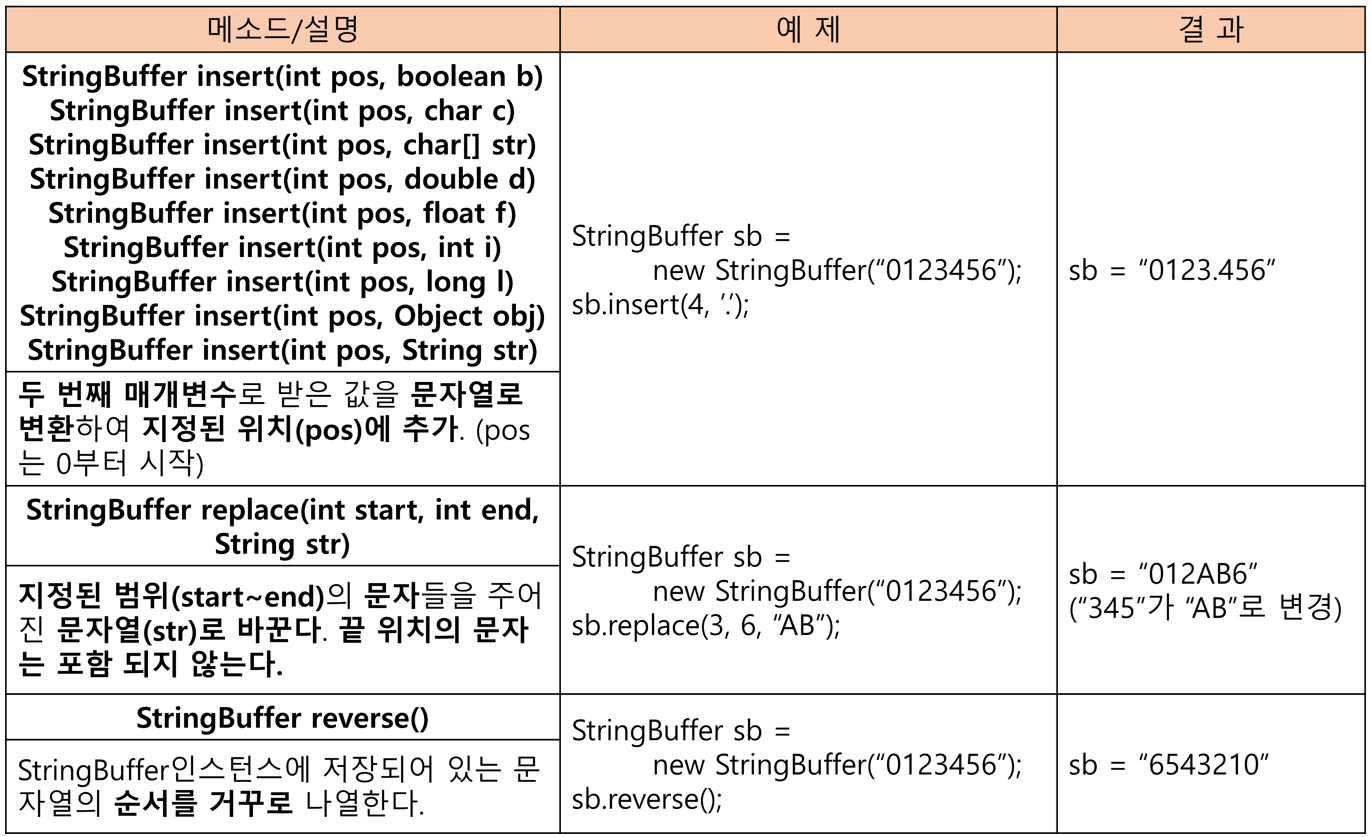
🔷 StringBuffer의 생성자와 메소드
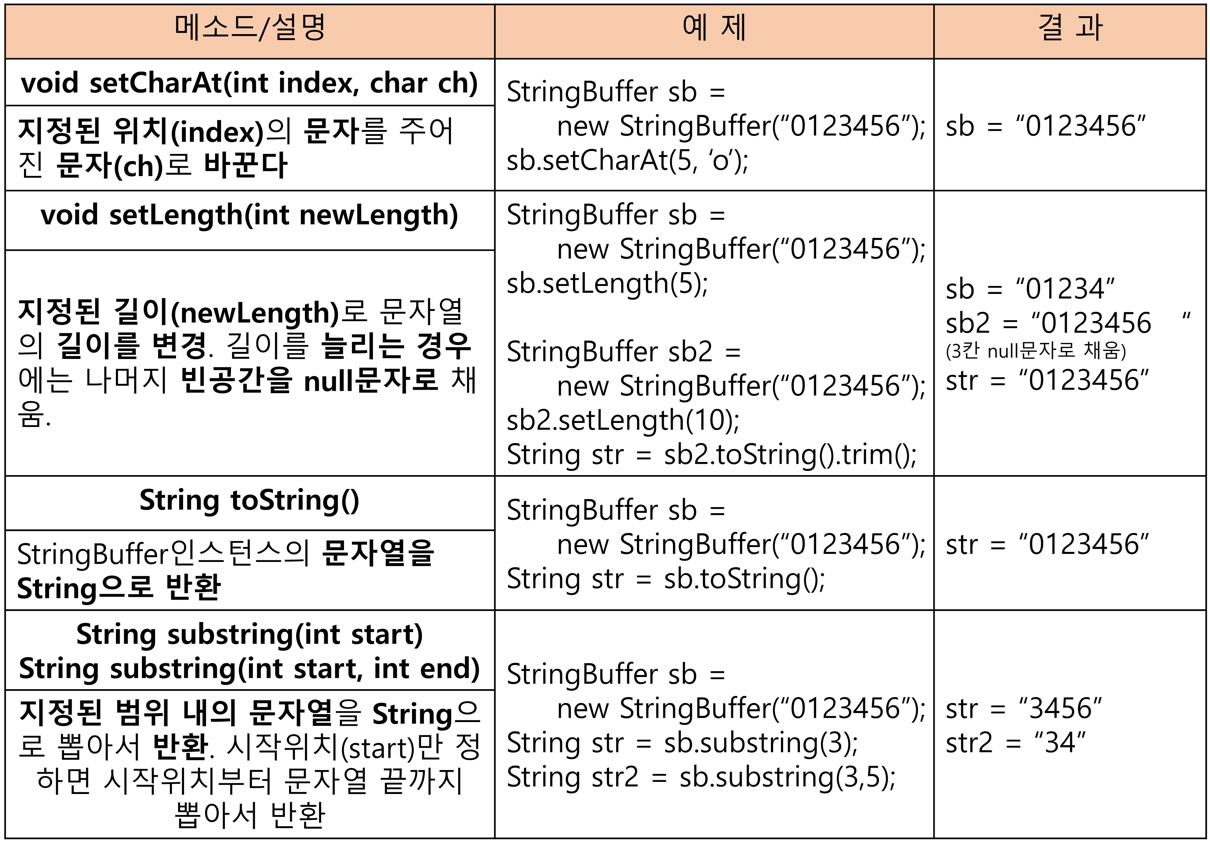
🔷 append()
StringBuffer에 저장된 문자열 끝에 문자열을 추가
StringBuffer sb = new StringBuffer("abc");

sb.append("123");

System.out.println(sb); // "abc123" 출력
지정된 내용을 StringBuffer에 추가 후, StringBuffer의 참조를 반환
StringBuffer sb2 = sb.append("ZZ"); //"abc123"뒤에 "ZZ"추가
System.out.println(sb); //"abc123ZZ"
System.out.println(sb2); //"abc123ZZ"

// append()의 반환타입이 StringBuffer이기 때문
📔 StringBuilder클래스
- StringBuffer는 동기화되어 있다. 멀티 쓰레드에 안전(thread-safe)
- 멀티 쓰레드 프로그램이 아닌 경우, 동기화는 불필요한 성능저하.
- 이럴땐 StringBuffer대신 StringBuilder를 사용하면 성능 향상
//멀티 쓰레드 프로그램일시
StringBuffer sb;
sb = new StringBuffer();
sb.append("abc");

//싱글 쓰레드 프로그램일시
StringBuilder sb;
sb = new StringBuilder();
sb.append("abc");
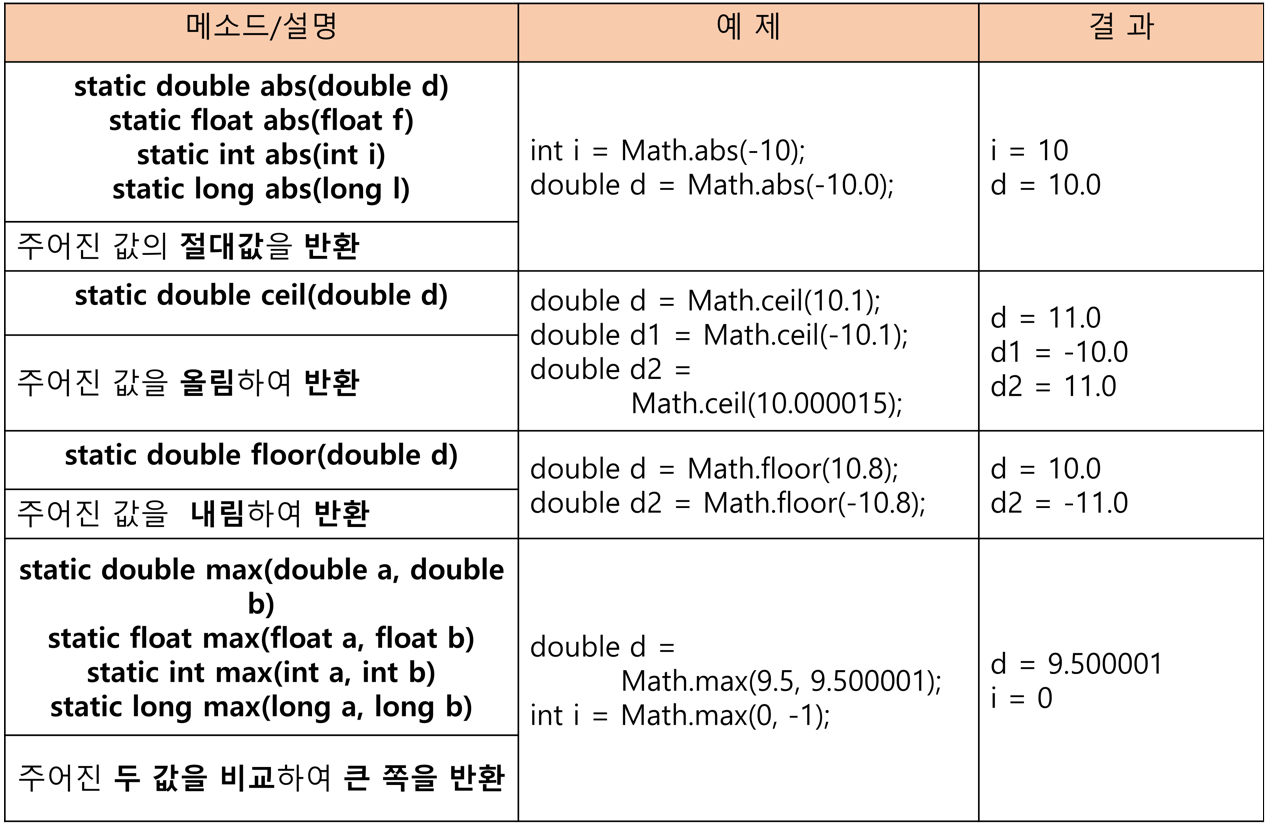
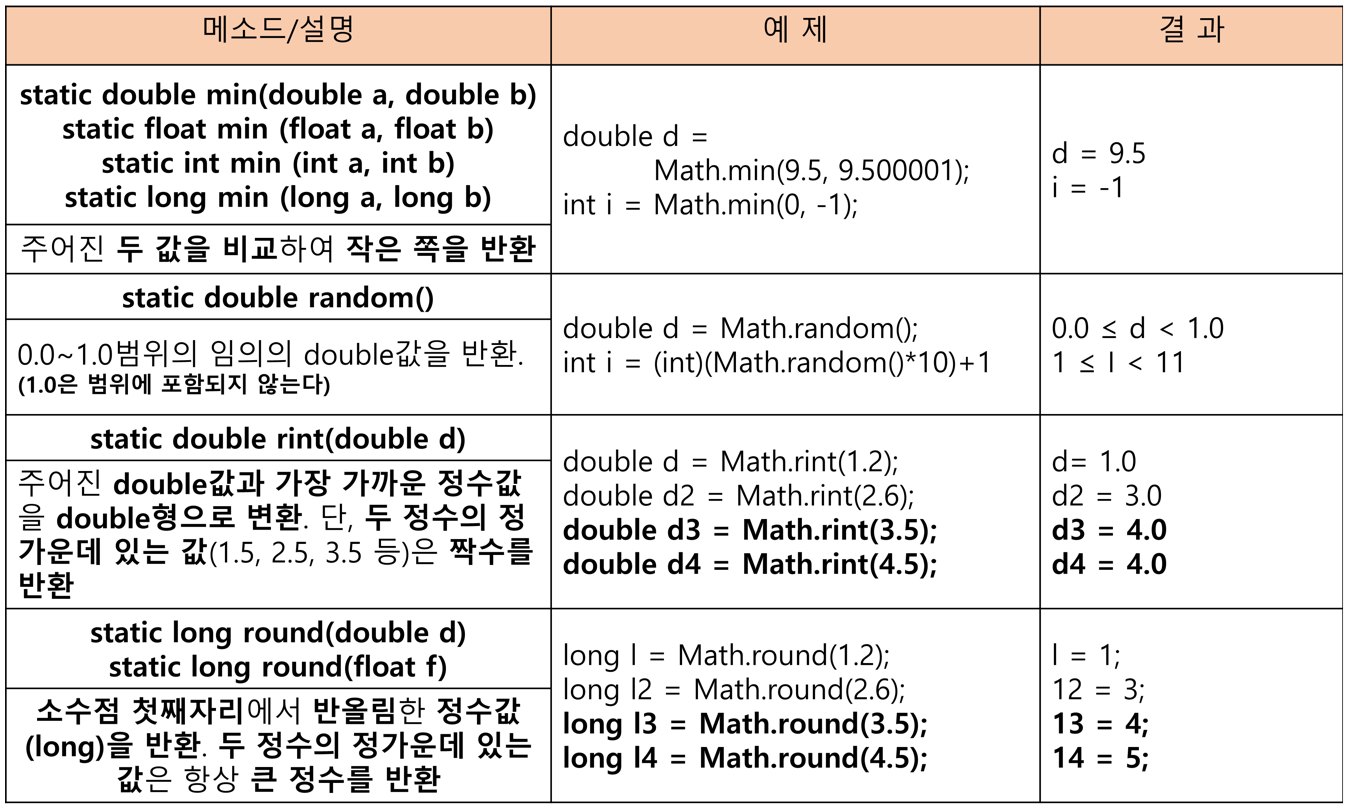
📔 Math클래스
수학관련 static메소드의 집합
public static final double E = 2.7182818284590452354; //자연로그 e
public static final double PI = 3.14159265358979323846; //π(파이)
🔷 Math클래스의 메소드
📔 Number클래스
모든 래퍼(wrapper)클래스의 조상
public abstract class Number implements java.io.Serializable {
	public abstract int intValue();
    public abstract long longValue();
    public abstract float floatValue();
    public abstract double doubleValue();

    public byte byteValue() {
    	return (byte)intValue();
    }

    public short shortValue() {
    	return (short)intValue();
    }
}
🔷 래퍼(wrapper)클래스
8개의 기본형을 객체로 다뤄야할 때 사용하는 클래스
| 기본형 | 래퍼클래스 | 생성자 | 활용예 |
|---|---|---|---|
| boolean | Boolean | Boolean(boolean value) Boolean(String s) | Boolean b = new Boolean(true); Boolean b2 = new Boolean("true";) |
| char | Character | Character(char value) | Character c = new Character('a'); |
| byte | Byte | Byte(byte value) Byte(String s) | Byte b = new Byte(10); Byte b2 = new Byte("10"); |
| short | Short | Short(short value) Short(String s) | Short s = new Short(10); Short s2 = new Short("10"); |
| int | Integer | Integer(int value) Integer(String s) | Integer i = new Integer(100); Integer i2 = new Short("100"); |
| long | Long | Long(long value) Long(String s) | Long l = new Long(100); Long l2 = new Long("100"); |
| float | Float | Float(double value) Float(float value) Float(String s) | Float l = new Float(10.0); Float l2 = new Float(10.0f); Float l3 = new Float("10.0f"); |
| double | Double | Double(double value) Double(String s) | Double l = new Double(100); Double l2 = new Double("100"); |
◼ 예제
public static void main(String[] args){
	Integer i = new Integer(100);
    Integer i2 = new Integer(100);

    System.out.println("i==i2 ? " + (i==i2));
    System.out.println("i.equals(i2) ? " + i.equals(i2));
    System.out.println("i.compareTo(i2) ?" + i.compareTo(i2));
    System.out.println("i.toString()=" + i.toString());

    System.out.println("MAX_VALUE=" + Integer.MAX_VALUE);
    System.out.println("MIN_VALUE=" + Integer.MIN_VALUE);
    System.out.println("SIZE=" + Integer.SIZE + " bits");
    System.out.println("BYTES=" + Integer.BYTES+"bytes");
    System.out.println("TYPE="+Integer.TYPE);
}

/* 출력
i==i2 ? false -Integer는 객체이므로 주소비교
i.equals(i2) ? true
i.compareTo(i2) ? 0 -String의 compareTo()와 동일
i.toString=100
MAX_VALUE = 2147483647
MIN_VALUE = -2147483648
SIZE=32 bits
BYTES=4bytes
TYPE=int
*/
🔷 오토박싱 & 언박싱 (JDK 1.5 이후)
기본형과 참조형간의 자동 형변환
◼ 오토박싱
기본형 → 객체로 자동변환
ArrayList<Integer> list = new ArrayList<Integer>();
list.add(10); //10은 int형 리터럴이지만 Integer로 자동 형변환되어 들어감
◼ 언박싱
객체 → 기본형으로 자동변환
int i = 5;
Integer iObj = new Integer(7);
int sum = i + iObj; //기본형으로 자동 형변환
// int sum = i + iObj.intValue();