
📓 쓰레드 (Thread)
📔 쓰레드
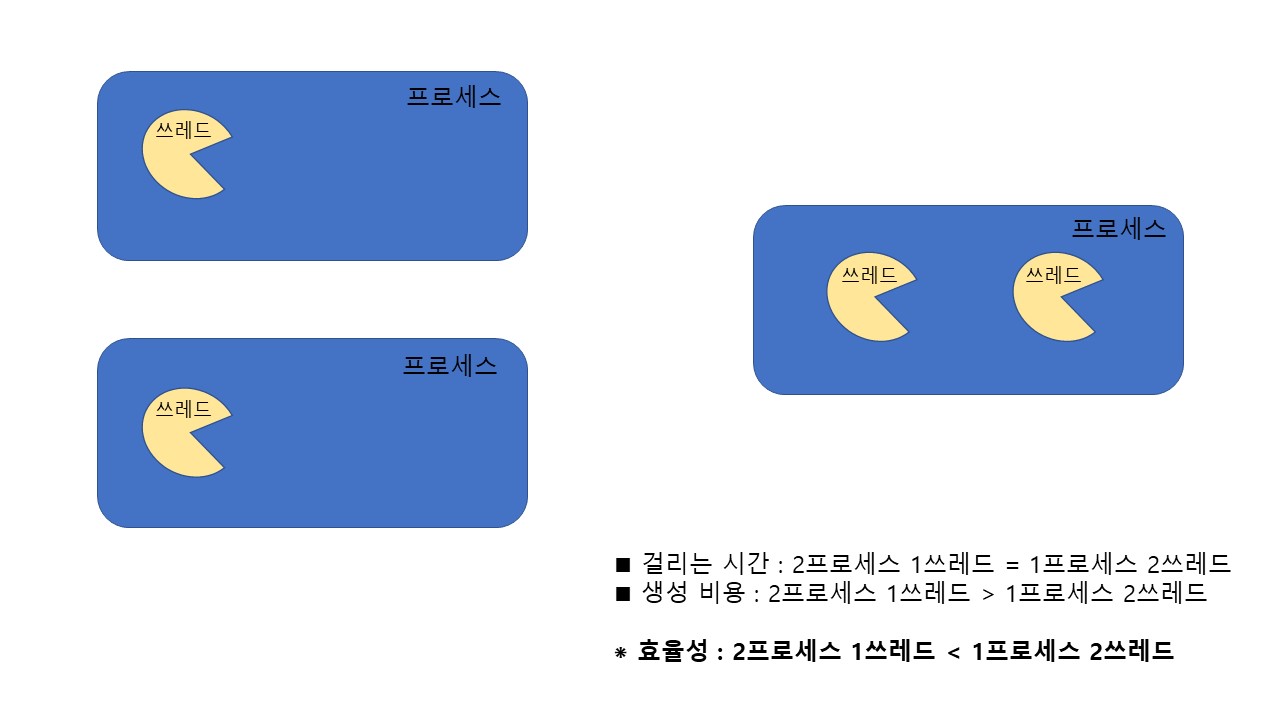
🔷 프로세스와 쓰레드
- 프로세스 : 실행 중인 프로그램. 자원과 쓰레드로 구성
- 쓰레드 : 프로세스 내에서 실제 작업을 수행.
모든 프로세스는 최소 하나의 쓰레드를 가짐
◼ 멀티프로세스 vs 멀티 쓰레드
- 멀티 태스킹 : 동시에 여러 프로세스 실행
- 멀티 쓰레드 : 동시에 여러 쓰레드 실행
- 같은 프로세스안의 쓰레드는 같은 자원을 공유
🔷 쓰레드의 구현과 실행
◼ 쓰레드의 구현
① Thread 클래스 상속
class MyThread extends Thread {
	public void run() { //Thread클래스의 run()을 오버라이딩
    	...
    }
}

MyThread t1 = new MyThread(); //쓰레드 생성
② Runnable 인터페이스 구현 - 권장
class MyThread implements Runnable {
	public void run() { //Runnable인터페이스의 추상메소드 run()을 구현
    	...
    }
}

Runnable r = new MyThread();
Thread t = new Thread(r); //쓰레드 생성
◼ 쓰레드의 실행
쓰레드를 생성한 후에 start()를 호출
//쓰레드 생성
MyThread t1 = new MyThread();

Runnable r = new MyThread();
Thread t2 = new Thread(r);

//쓰레드 실행
t1.start();
t2.start();
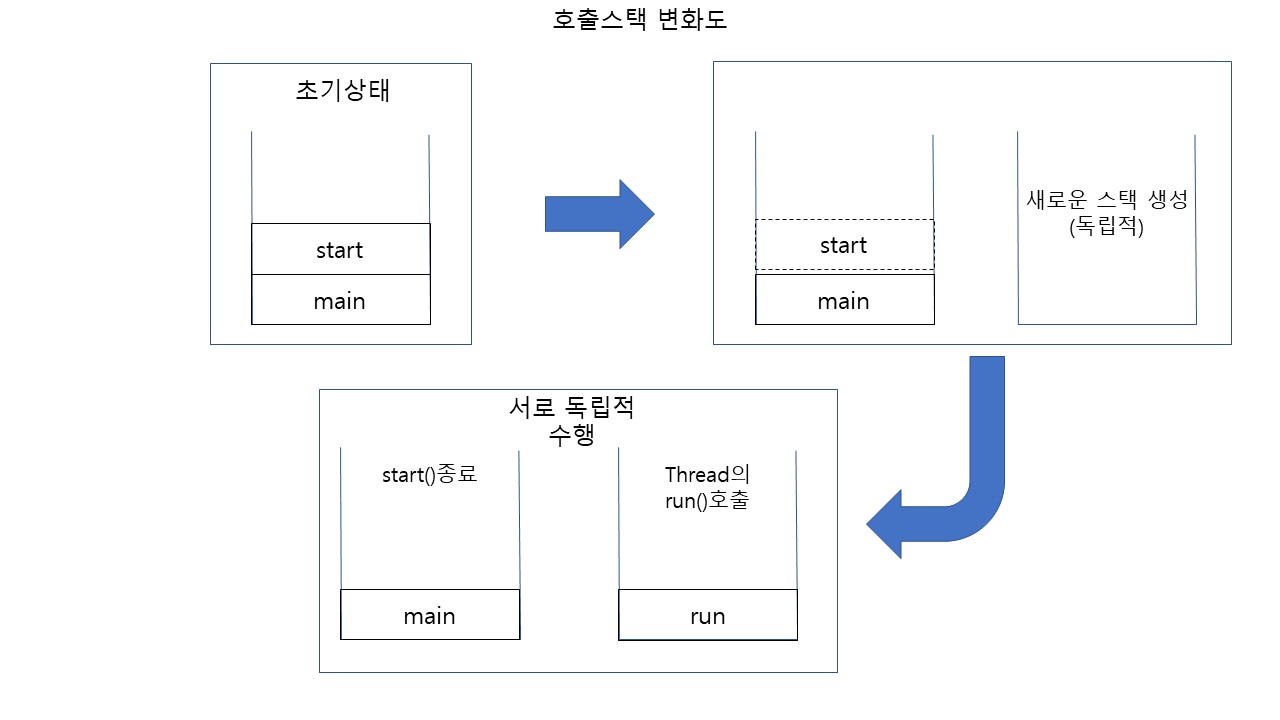
◼ start()와 run()
class MyThread extends Thread {
	public void run() {
    	...
    }
}

class ThreadTest {
	public static void main(String args[]) {
    	MyThread t1 = new MyThread();
        t1.start();
    }
}
🔷 쓰레드의 우선순위
작업의 중요도에 따라 쓰레드의 우선순위를 다르게 하여 특정 쓰레드가 더 많은 작업시간을 갖도록 함
void setPriority(int newPriority) //쓰레드의 우선순위를 지정한 값으로 변경.
int getPriority() //쓰레드의 우선순위를 반환

//쓰레드는 1~10단계의 우선순위. 수가 클수록 더 우선함.
public static final int MAX_PRIORITY = 10;
public static final int MIN_PRIORITY = 1;
public static final int NORM_PRIORITY = 5;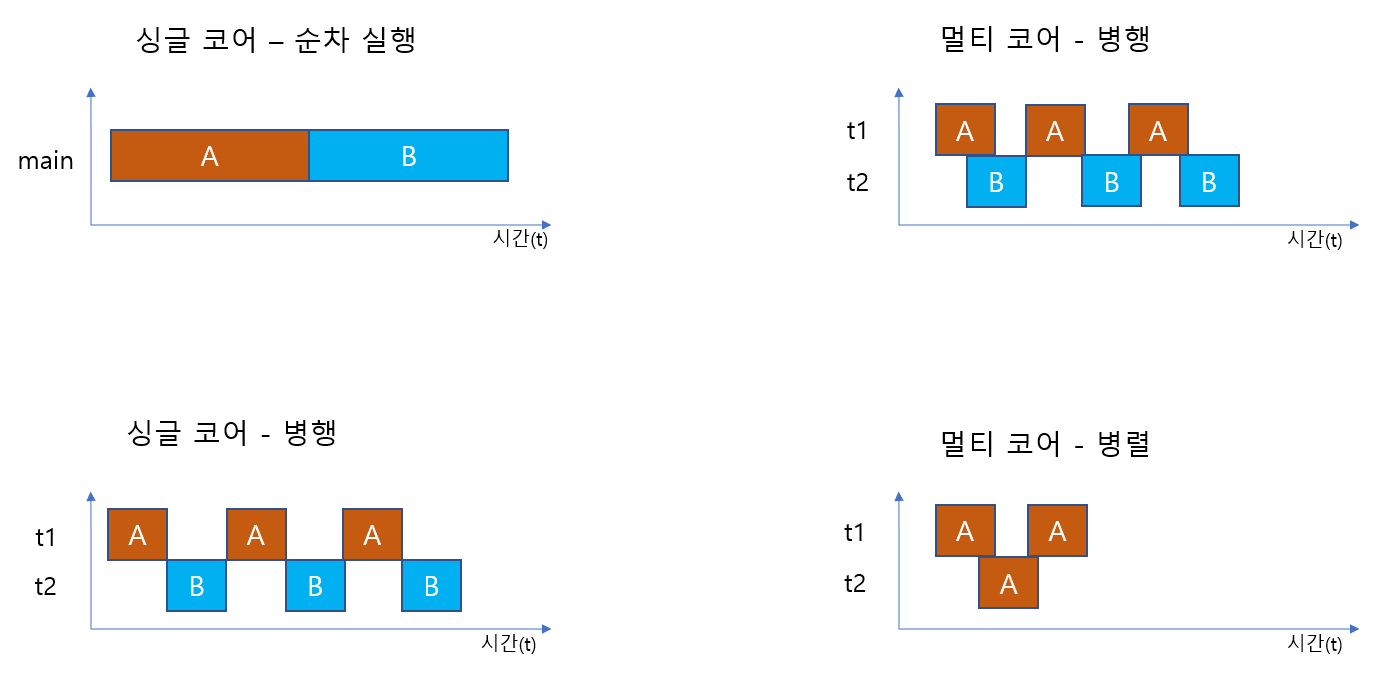
📕 쓰레드의 종류
🔷 싱글 쓰레드와 멀티 쓰레드
싱글 쓰레드 : 자원 + 쓰레드
멀티 쓰레드 : 자원 + 쓰레드 + 쓰레드 + 쓰레드 + ...
◼ 멀티 쓰레드의 장단점
| 장 점 | 단 점 |
|---|---|
| - 시스템 자원을 보다 효율적으로 사용 - 사용자에 대한 응답성(responseness) 향상 - 작업이 분리되어 코드 간결 | - 동기화(synchronization)에 주의해야 함 - 교착상태(dead-lock)가 발생하지 않도록 주의 - 각 쓰레드가 효율적으로 고르게 실행되도록 해야함 |
◼ 싱글 쓰레드 vs 멀티 쓰레드
🔸 병행과 병렬
//싱글 쓰레드
class ThreadTest {
	public static void main(String args[]) {
    	for(int i = 0; i<300; i++){
        	System.out.println("-");
        }

        for(int i = 0; i<300; i++){
        	System.out.println("|");
        }
    }
}


//멀티쓰레드
class ThreadTest {
	public static void main(String args[]) {
    	MyThread1 t1 = new MyThread();
        MyThread2 t2 = new MyThread();
        t1.start();
        t2.start();
    }
}

class MyThread1 extends Thread {
	public void run() {
    	for(int i = 0; i<300; i++){
        	System.out.println("-");
        }
    }
}

class MyThread2 extends Thread {
	public void run() {
    	for(int i = 0; i<300; i++){
        	System.out.println("|");
        }
    }
}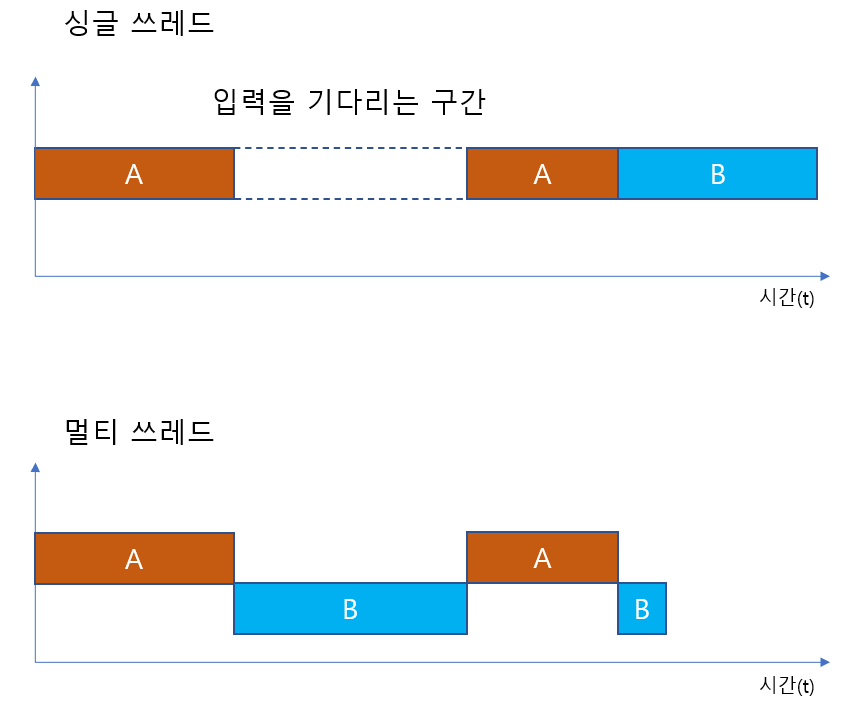
🔸 블락킹(blocking)
//싱글 쓰레드
class ThreadEX6{
	public static void main(String args[]) {
    	//A
    	String input = JOptionPane.showInputDialog("아무 값이나 입력하세요.");
        System.out.println("입력하신 값은 " + input + "입니다.");

        //B
        for(int i = 10; i>0; i--) {
        	System.out.println(i);
            try { Thread.sleep(1000); } catch(Exception e) {}
        }
    }
}

//멀티 쓰레드
class ThreadEX6_2 {
	public static void main(String args[]) {
   		MyThread t1 = new MyThread();
        t1.start();

        //A
        String input = JOptionPane.showInputDialog("아무 값이나 입력하세요.");
        System.out.println("입력하신 값은 " + input + "입니다.");
    }
}

class MyThread extends Thread {
	public void run() {
    	//B
   		for(int i = 10; i>0; i--) {
       		System.out.println(i);
            try { Thread.sleep(1000); } catch(Exception e) {}
        }
    }
}
🔷 데몬 쓰레드
일반 쓰레드의 작업을 돕는 보조적인 역할 수행
◼ 특징
- 일반 쓰레드가 모두 종료되면 자동적으로 종료
- 가비지컬렉터, 자동저장 등에 사용
- 무한루프와 조건문을 이용해 실행 후 대기하다가 특정조건이 만족되면 작업 수행 후 다시 대기하도록 작성
◼ 구현
//쓰레드가 데몬 쓰레드인지 확인. 데몬 쓰레드이면 true
boolean isDaemon()

//쓰레드를 데몬 쓰레드로 또는 사용자 쓰레드로 변경. Daemon이 true면 데몬 쓰레드
void setDaemon(boolean Daemon)
❗ setDaemon(boolean on)은 반드시 start()를 호출하기 전에 실행되어야 한다.
그렇지 않으면 IllegalThreadStateException이 발생한다.
MyThread t1 = new MyThread(); //쓰레드 생성
t1.start();
t1.setDaemon(true); //에러!!

//다음과 같이 수정
MyThread t1 = new MyThread(); //쓰레드 생성
t1.setDaemon(true); //반드시 start()호출 전에 실행
t1.start();
📒 쓰레드 관련 메소드
🔸 쓰레드 그룹
서로 관련된 쓰레드를 그룹으로 묶어서 다루기 위한 것(보안상의 이유)!
◼ 특징
- 모든 쓰레드는 반드시 하나의 쓰레드 그룹에 포함되어 있어야 한다!
- 쓰레드 그룹을 지정하지 않고 생성한 쓰레드는 ‘main쓰레드 그룹’에 속한다.
- 자신을 생성한 쓰레드(부모 쓰레드)의 그룹과 우선순위를 상속받는다.
Thread(ThreadGroup group, String name)
Thread(ThreadGroup group, Runnable target)
Thread(ThreadGroup group, Runnable target, String name)
Thread(ThreadGroup group, Runnable target, String name, long stackSize)
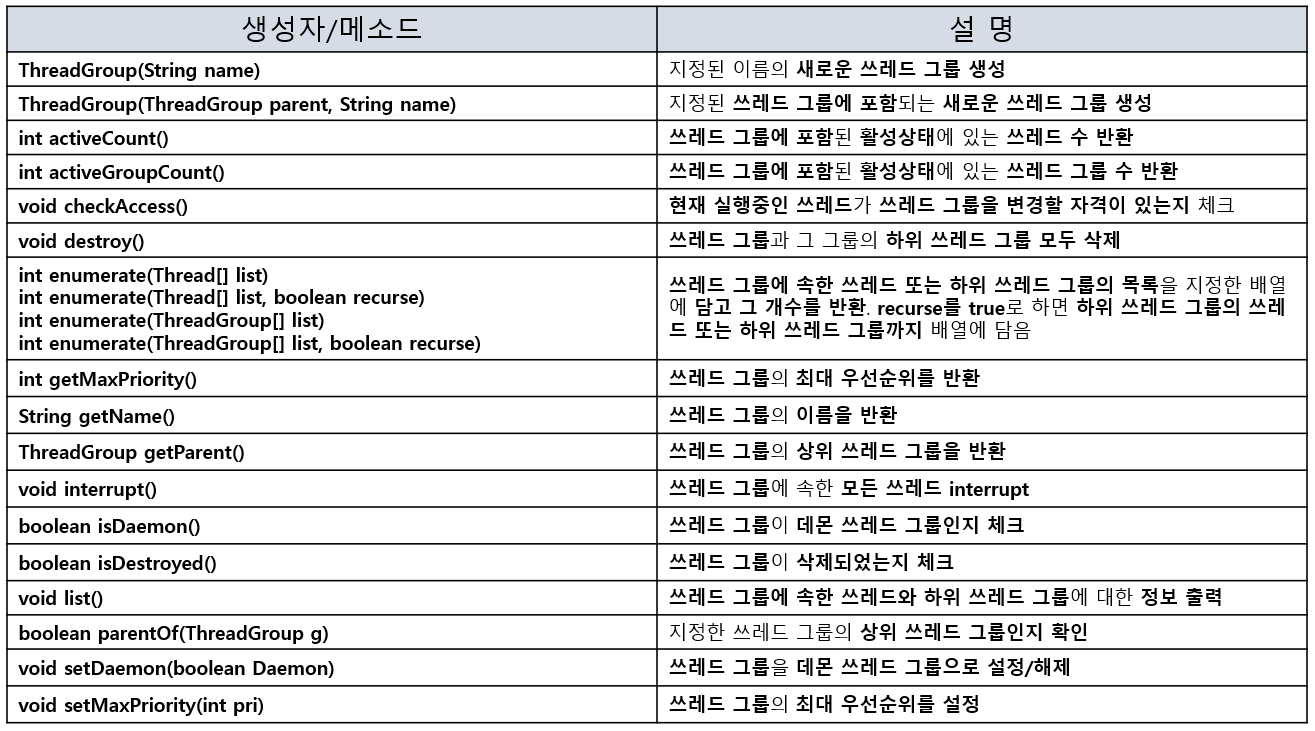
🔷 쓰레드 그룹 메소드
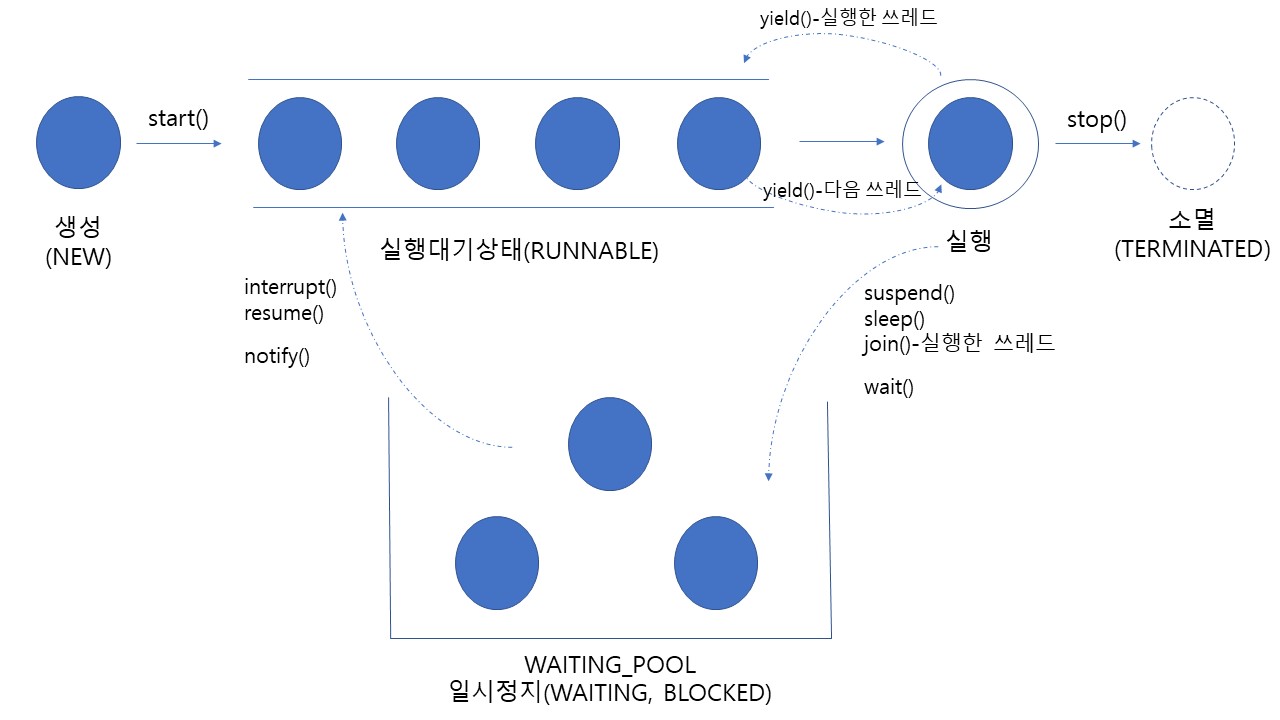
🔸 쓰레드의 상태
| 상태 | 설명** |
|---|---|
| NEW | 쓰레드가 생성되고 아직 start()가 호출되지 않은 상태 |
| RUNNABLE | 실행 중 또는 실행 가능한 상태 |
| BLOCKED | 동기화블럭에 의해 일시정지된 상태(lock이 풀릴 때 까지 기다리는 상태) |
| WAITING TIMED_WAITING | 쓰레드의 작업이 종료되지는 않았지만 실행가능하지 않은 일시정지 상태. TIMED_WAITING은 일시정지시간이 지정된 경우 |
| TERMINATED | 쓰레드의 작업이 종료된 상태 |
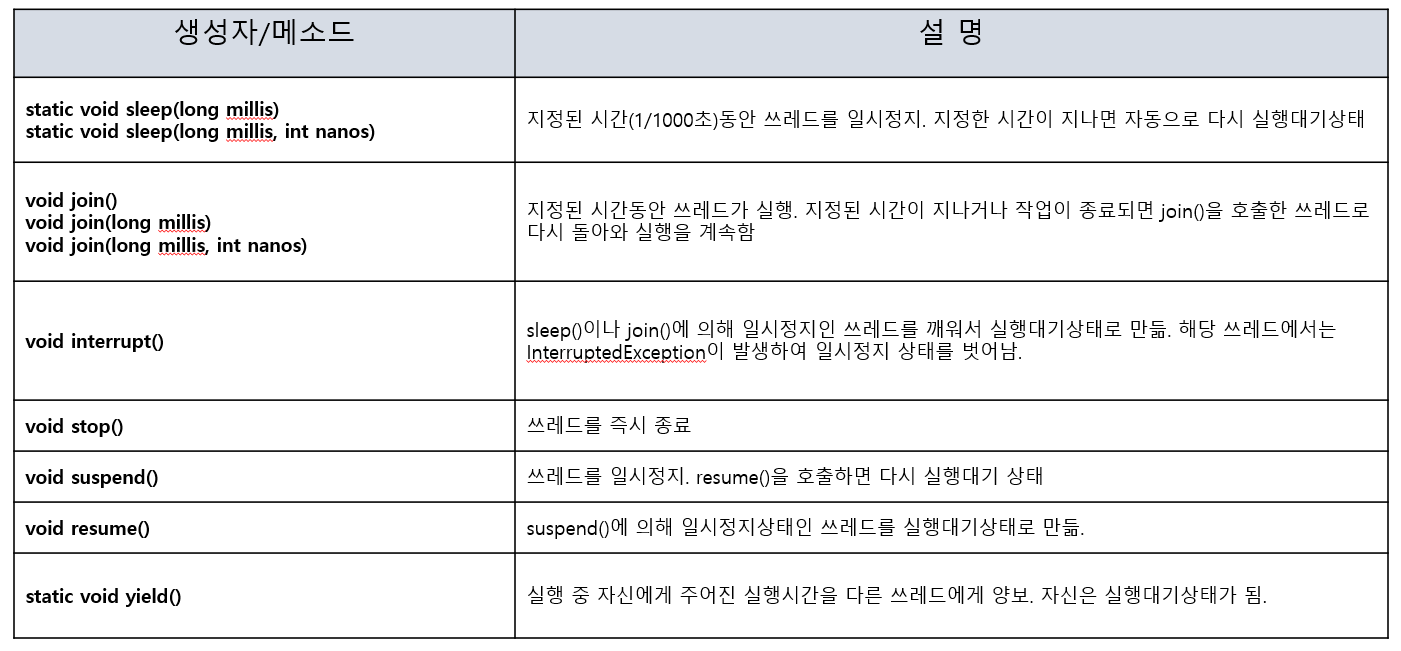
🔷 쓰레드의 실행제어 메소드
◼ sleep()
현재 쓰레드를 지정된 시간동안 멈춤
static void sleep(1ong millis) // 1/1000 단위
static void sleep(1ong millis, int nanos) // millis/1000 + 나노초
◻ 주의할 점
예외처리를 해야 한다.
- InterruptedException발생시 작업 재개
try{
	Thread.sleep(1,500000);
} catch(InterruptedException e) {} // 예외가 발생하여 깨어나는 원리임
특정 쓰레드를 지정해서 멈추는건 불가능
(무조건 메소드를 호출한 쓰레드가 멈춤)
//Thread의 run()
try{
	thl.sleep(1,500000);
} catch(InterruptedException e) {} //thl이 sleep()할거같지만 아님

try{
	Thread.sleep(1,500000); // = thl.sleep(1,500000);
} catch(InterruptedException e) {} //위의 sleep()과 결과 같음
◼ interrupt()
대기상태(WAITING)인 쓰레드를 실행대기 상태(RUNNABLE)로 만듦.
void interrupt() //쓰레드의 interrupt상태를 false에서 true로 변경
boolean isInterrupted() //쓰레드의 상태 반환
static boolean interrupted() //현재 쓰레드의 interrupted상태를 알려주고, false로 초기화
◻ 예제
public static void main(String[] args) {
	ThreadEX13 th1 = new ThreadEX13();
    th1.start();
    	...
    th1.interrupt(); //interrupted상태 true로 변경.

    System.out.println("isInterrupted() = " + isInterrupted()); //true출력
}
◼ suspend(), resume(), stop()
쓰레드의 실행을 일시정지, 재개, 완전정지 시킴
- 교착상태에 빠지기 쉬움
void suspend() //쓰레드를 일시정지
void resume() //suspend()로 일시정지된 쓰레드를 실행대기상태로 만듦
void stop() //쓰레드를 즉시 종료
suspend(),resume(),stop()은 deprecated되었음. 직접구현해야함
boolean suspended = false;
boolean stopped = false;

public void run(){
	while(!stopped) {
    	if(!suspended){
        	//수행코드
        }
    }
}

public void suspend() { suspended = true; }
public void resume() { suspended = false; }
public void stop() { stopped = true; }
◼ yield
남은 시간을 다음 쓰레드에 양보, 자신은 실행대기
void yield() ◻ 예제
boolean suspended = false;
boolean stopped = false;

public void run(){
	while(!stopped) {
    	if(!suspended){
        	try{
            	Thread.sleep(1000); //쓰레드 1초 멈춤
            } catch(InterruptedException e) {}
        } else {
        	Thread.yield() //시간 양보
        }
    }
}

public void suspend() { suspended = true; }
public void resume() { suspended = false; }
public void stop() { stopped = true; }
◼ join()
지정된 시간동안 특정 쓰레드 작업을 기다림
void join() //작업이 모두 끝날 때까지
void join(long millis) //millis/1000 동안
void join(long millis, int nanos) // millis/1000 + 나노초 동안
◻ 주의할 점
예외처리를 해야 한다.
- InterruptedException발생시 작업 재개
MyThread th1 = new MyThread();
MyThread th2 = new MyThread();

th1.start();
th2.start();

try{
	th1.join(); //main쓰레드가 th1의 작업이 끝날때를 기다림
    th2.join(); //main쓰레드가 th2의 작업이 끝날때를 기다림
} catch(InterruptedException e) {}

//th1,th2,모두 작업이 끝난뒤 실행
System.out.println("종료");
🔸 쓰레드 동기화
한 쓰레드가 진행중인 작업을 다른 쓰레드가 간섭하지 못하게 막는 것
- 간섭받지 않아야하는 문장들을 '임계영역'으로 설정
- 임계영역은 lock을 얻은 단 하나의 쓰레드만 출입 가능
◼ 동기화를 하지않을시 발생하는 문제
class Account2 {
	privaate int balanve = 1000;

	public int getBalance() {
    	return balance;
    }

    public void withdraw(int money) {
    	if(balance >= money){
        	try {
            	Thread.sleep(1000);
            } catch (InterruptedException e) {
            	balance -= money;
            }
        }
    }
}

class RunnableEX implements Runnable {
	Account2 acc = new Account2 ();

    public void run() {
    	while(acc.getBalance() > 0) {
        	// 100, 200, 300중 랜덤
        	int money = (int) (Math.random() * 3 + 1) * 100;
            acc.withdraw(money);
            System.out.println("balance : " + acc.getBalance());
        }
    }
}

class Main {
	public static void main(String[] args){
    	//멀티 쓰레드 구현
    	Runnable r = new RunnableEX();
        new Thread(r).start();
        new Thread(r).start();
    }
}

/* 출력
balance : 900
balance : 700
balance : 600
balance : 400
balance : 200
balance : -100  // ← 한 쓰레드가 인출 전 잠들어있을 때 if문이 참이되어 오류발생
*/

//위와 같이 다른 쓰레드가 간섭하여 오류가 발생하는 경우가 생김!! - 동기화 필요
🔷 쓰레드 동기화 메소드
◼ synchronized
락(lock)을 걸어 다른 쓰레드가 접근하지 못하게 막음 (임계영역 설정)
- 특정한 객체에 lock을 걸고자 할 때
synchronized(객체의 참조변수){ //객체 받기
	//...
}
- 메소드에 lock을 걸고자 할 때
public synchronized void calcSum() { //메소드 앞에 synchronized
	//...
}
◻ 예제
public synchronized void withdraw(int money) {
	if(balance >= money) {
    	try{
        	Thread.sleep(1000);
        } catch(Exception e) {}

        balance -= money;
    }
}

//위와 같은 코드
public void withdraw(int money) {
	synchronized(this) {
		if(balance >= money) {
    		try{
        		Thread.sleep(1000);
        	} catch(Exception e) {}

      	  	balance -= money;
    	}
    }
}
◼ wait(), notify(), notifyAll()
동기화 효율 높이기 위해 사용
- Object클래스에 정의되어 있으며, 동기화 블럭 내에서만 사용가능
void wait() //객체의 lock을 풀고 쓰레드를 해당 객체의 waiting pool에 넣음
void notify() //waiting pool에서 대기중인 쓰레드 중 하나를 깨움
void notifyAll() //waiting pool에서 대기중인 모든 쓰레드를 깨움
◻ 예제
class Account {
	int balance = 1000;

    public synchronized void withdraw(int money) {
    	while(balance < money) {
        	try {
            	wait(); //대기 - lock을 풀고 기다림. 통지받으면 lock재획득
            } catch(InterruptedException e) {}
        }

        balance -= money;
    }

    public synchronized void deposit (int money) {
    	balance += money;
        notify(); //통지 - 대기중인 쓰레드 중 하나에게 알림
    }
}