API Routes
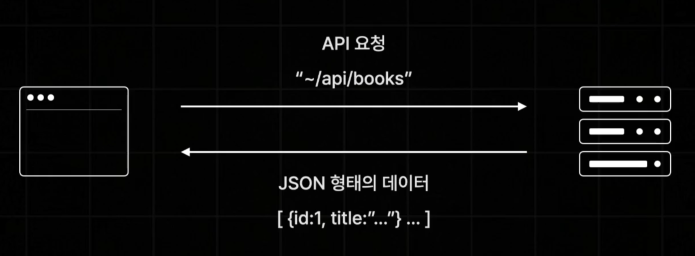
API Routes란 Next.js 앱에서 API를 구축할 수있도록 도와주는 기능입니다.
이 기능을 이용하면 마치 백엔드 API 서버가 하는 일과 동일하게 간단한 API를 구축해서 브라우저로부터 요청을 받아 데이터베이스에서 데이터를 꺼내오거나 하는 일련의 동작들을 직접 만들어 볼 수 있습니다.
참고로 이미 src/api 폴더가 있는 것을 확인할 수 있습니다.
안에는 hello.ts 파일이 있고 안에 내용을 살펴보면 API 응답 코드가 기초적으로 작성이 되어 있는 것을 확인할 수 있습니다.
// Next.js API route support: https://nextjs.org/docs/api-routes/introduction
import type { NextApiRequest, NextApiResponse } from "next";

type Data = {
  name: string;
};

export default function handler(
  req: NextApiRequest,
  res: NextApiResponse<Data>,
) {
  res.status(200).json({ name: "John Doe" });
}
Next는 pages/api/hello.ts로 파일을 만들어 배치해주면 해당하는 파일은 API Routes로서 자동으로 설정이 됩니다.
API 경로는 폴더 구조에 맞춰서 /api/hello의 경로를 가지게 됩니다.
http://localhost:3000/api/hello 경로로 들어가보면 위에서 설정한 객체가 나타난것을 확인할 수 있습니다.

현재 시간 Api Routes 만들어보기
현재 시간을 반환하는 API를 만들어보면
api/time.ts 경로로 파일을 만들어주고 req는 NextApiRequest, res는 NextApiResponse라는 타입으로 정의 해줍니다.
import type { NextApiRequest, NextApiResponse } from "next";

export default function handler(req: NextApiRequest, res: NextApiResponse) {
  const date = new Date();
  res.json({ time: date.toLocaleString() });
}
설정 후 http://localhost:3000/api/time 접속을 하면
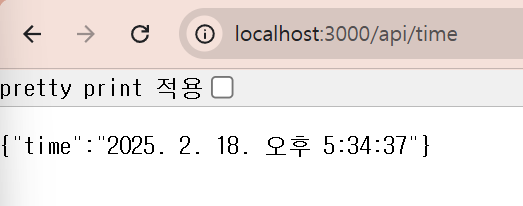
현재 시간이 잘 뜨는것을 확인할 수 있습니다.

개발자가 되고 싶은 정치학도생의 기술 블로그