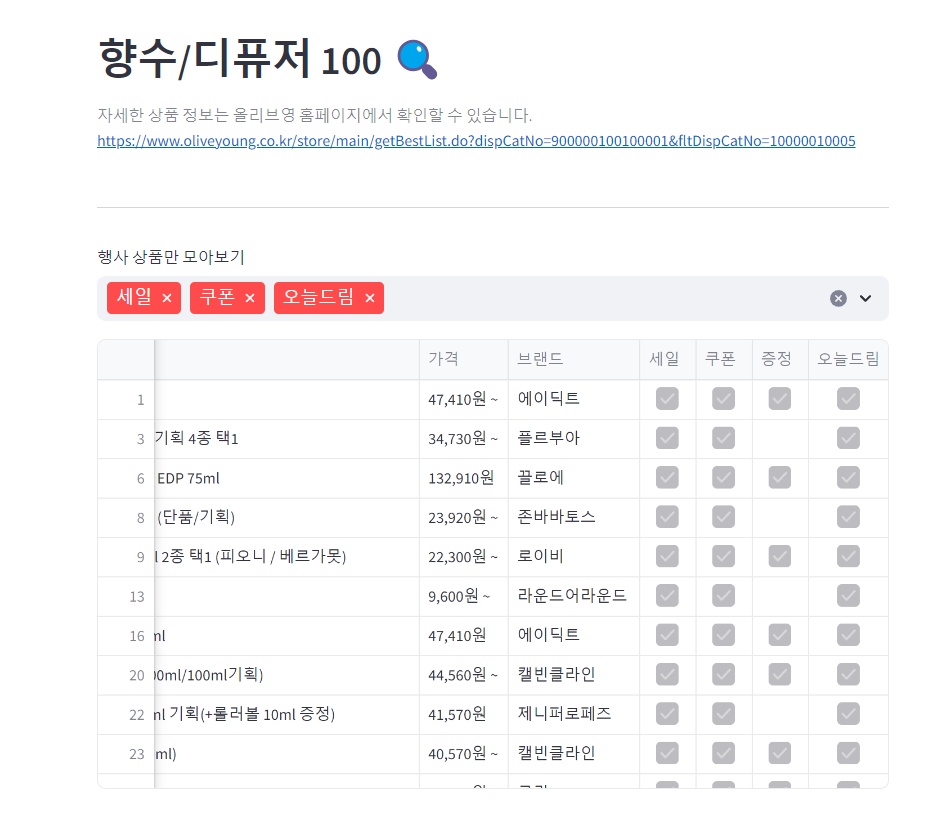
크롤링 연습을 한 번 더 해보고 싶어서 올리브영 랭킹 제품을 데이터베이스로 저장하는 것을 한 번 시도해보았다.
이 글에서는 mysql을 사용하지 않는다.
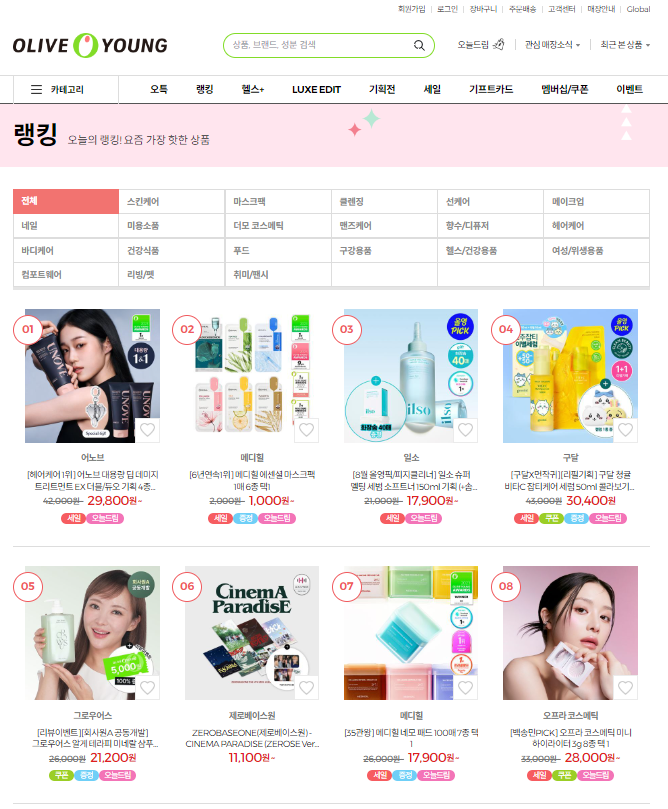
streamlit으로 만드는 웹페이지에서 구현하고 싶은 기능은 다음의 2가지이다.
- 카테고리 별로 페이지에 나오는 상품 나누기
- 세일 / 쿠폰 / 증정 / 오늘드림 별로 상품 나누기
streamlit 실행은 터미널창에 streamlit run 파일명.py를 실행시키면 된다.
데이터 뽑아오기
일단 전체 카테고리에서 상품의 이름, 가격, 브랜드, 세일/쿠폰/증정/오늘드림 여부를 뽑아오고 딕셔너리 타입으로 리스트에 저장하는 코드이다.
import requests
from bs4 import BeautifulSoup
import pymysql
import pandas as pd

menu_index= ["", "10001", "10009", "10010", "10011", "10002",
             "10012", "10006", "10008", "10007", "10005", "10004",
             "10003", "20001", "20002", "20003", "20005", "20004",
             "30007", "30005", "30006"]


# for i in range(len(menu)):

# 주소 받기
url = "https://www.oliveyoung.co.kr/store/main/getBestList.do?dispCatNo=900000100100001&fltDispCatNo="

# if i == 0:
#     pass
# else:
#     url = url + "100000" + menu_index[i]

# HTTP GET 요청
res = requests.get(url)

# BeautifulSoup 객체 생성
soup = BeautifulSoup(res.content, 'html.parser')

oliveyoung_list = []

info_boxes = soup.select('ul.cate_prd_list li')

for info in info_boxes:
    name = info.select_one('p.tx_name').string

    price_num = info.select_one('p.prd_price span.tx_cur span.tx_num').string
    price_won = str(info.select_one('p.prd_price span.tx_cur')).split(">")[3][:-6]
    price = price_num + price_won

    brand = info.select_one('span.tx_brand').string

    sale = info.select_one('p.prd_flag span.icon_flag.sale')
    coupon = info.select_one('p.prd_flag span.icon_flag.coupon')
    gift = info.select_one('p.prd_flag span.icon_flag.gift')
    delivery = info.select_one('p.prd_flag span.icon_flag.delivery')

    oliveyoung_list.append({
            'Name': name,
            'Price': price,
            'Brand': brand,
            'Sale': sale,
            'Coupon': coupon,
            'Gift': gift,
            'Delivery': delivery
        })

for item in oliveyoung_list:
    print("name: ", item['Name'], "price: ", item['Price'], "brand: ", item['Brand'], end = " <<")
    if item['Sale']:
        print("sale!", end = " ")
    if item['Coupon']:
        print("coupon!", end = " ")
    if item['Gift']:
        print("gift!", end = " ")
    if item['Delivery']:
        print("delivery!", end = "")
    print(">>")
세일/쿠폰/증정/오늘드림 여부는 각 로고가 없으면 None 값을 반환하는 것을 이용하였다.
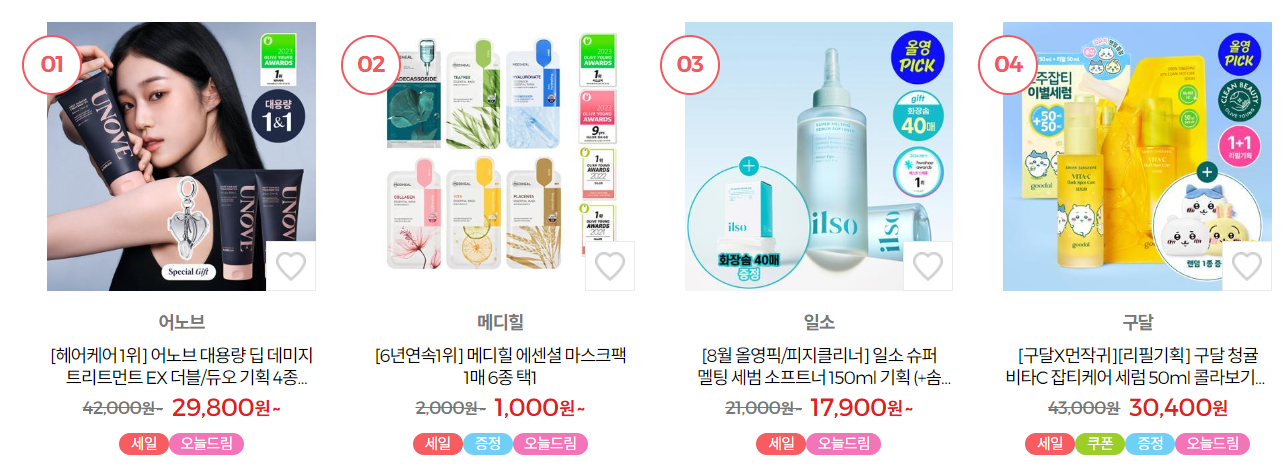


성공!!
streamlit 사용
streamlit 모듈을 사용하여 위에서 언급한 2가지 기능을 하는 웹페이지를 구현해보도록 하자.
카테고리 별로 상품 나누기
카테고리는 사이드바로 나누기로 하였다.
앞의 과정과 달리 추가된 과정은 사이드바로 메뉴 선택을 받고, 그에 해당하는 url에서만 데이터를 뽑아온다.
import requests
from bs4 import BeautifulSoup
import pymysql
import pandas as pd
import streamlit as st

menu = ["전체", "스킨케어", "마스크팩", "클렌징", "선케어", "메이크업", "네일", "미용소품", "더모 코스메틱", "맨즈케어",
        "향수/디퓨저", "헤어케어", "바디케어", "건강식품", "푸드", "구강용품", "헬스/건강용품", "여성/위생용품",
        "컴포트웨어", "리빙/펫", "취미/팬시"]

menu_url= ["", "10001", "10009", "10010", "10011", "10002",
             "10012", "10006", "10008", "10007", "10005", "10004",
             "10003", "20001", "20002", "20003", "20005", "20004",
             "30007", "30005", "30006"]

oliveyoung_list = []

# 사이드바
side_bar = st.sidebar

side_bar.header("Option")
menu_option = tuple(menu)

select = side_bar.selectbox(
    "보고 싶은 상품 종류를 선택하세요",
    menu_option
)

side_bar.write(f"{select} 상위 100개 상품을 정렬합니다.")

# 주소 받기
base_url = "https://www.oliveyoung.co.kr/store/main/getBestList.do?dispCatNo=900000100100001&fltDispCatNo="
select_url = base_url + "100000" + menu_url[menu.index(select)]

# HTTP GET 요청
res = requests.get(select_url)

# BeautifulSoup 객체 생성
soup = BeautifulSoup(res.content, 'html.parser')

# 상품 정보
info_boxes = soup.select('ul.cate_prd_list li')

category = select

for info in info_boxes:

    name = info.select_one('p.tx_name').string

    price_num = info.select_one('p.prd_price span.tx_cur span.tx_num').string
    price_won = str(info.select_one('p.prd_price span.tx_cur')).split(">")[3][:-6]
    price = price_num + price_won

    brand = info.select_one('span.tx_brand').string

    sale = info.select_one('p.prd_flag span.icon_flag.sale')
    coupon = info.select_one('p.prd_flag span.icon_flag.coupon')
    gift = info.select_one('p.prd_flag span.icon_flag.gift')
    delivery = info.select_one('p.prd_flag span.icon_flag.delivery')

    oliveyoung_list.append({
            'Category': category,
            'Name': name,
            'Price': price,
            'Brand': brand,
            'Sale': sale,
            'Coupon': coupon,
            'Gift': gift,
            'Delivery': delivery
        })

    # 세일/쿠폰/증정/오늘드림 정보가 있다면 True 반환
    for item in oliveyoung_list:
        if item['Sale']:
            item['Sale'] = True
        if item['Coupon']:
            item['Coupon'] = True
        if item['Gift']:
            item['Gift'] = True
        if item['Delivery']:
            item['Delivery'] = True

# 데이터프레임 만들기
df = pd.DataFrame(oliveyoung_list)

# streamlit 페이지 구성
st.header(f"{select} 100 🔍")
st.caption(f"자세한 상품 정보는 올리브영 홈페이지에서 확인할 수 있습니다: {select_url}")
st.table(data=df)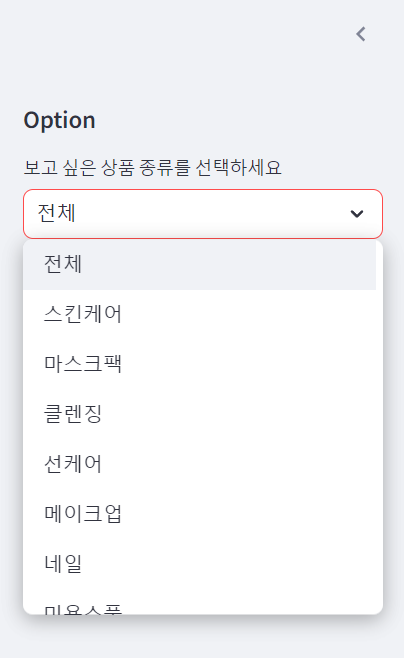
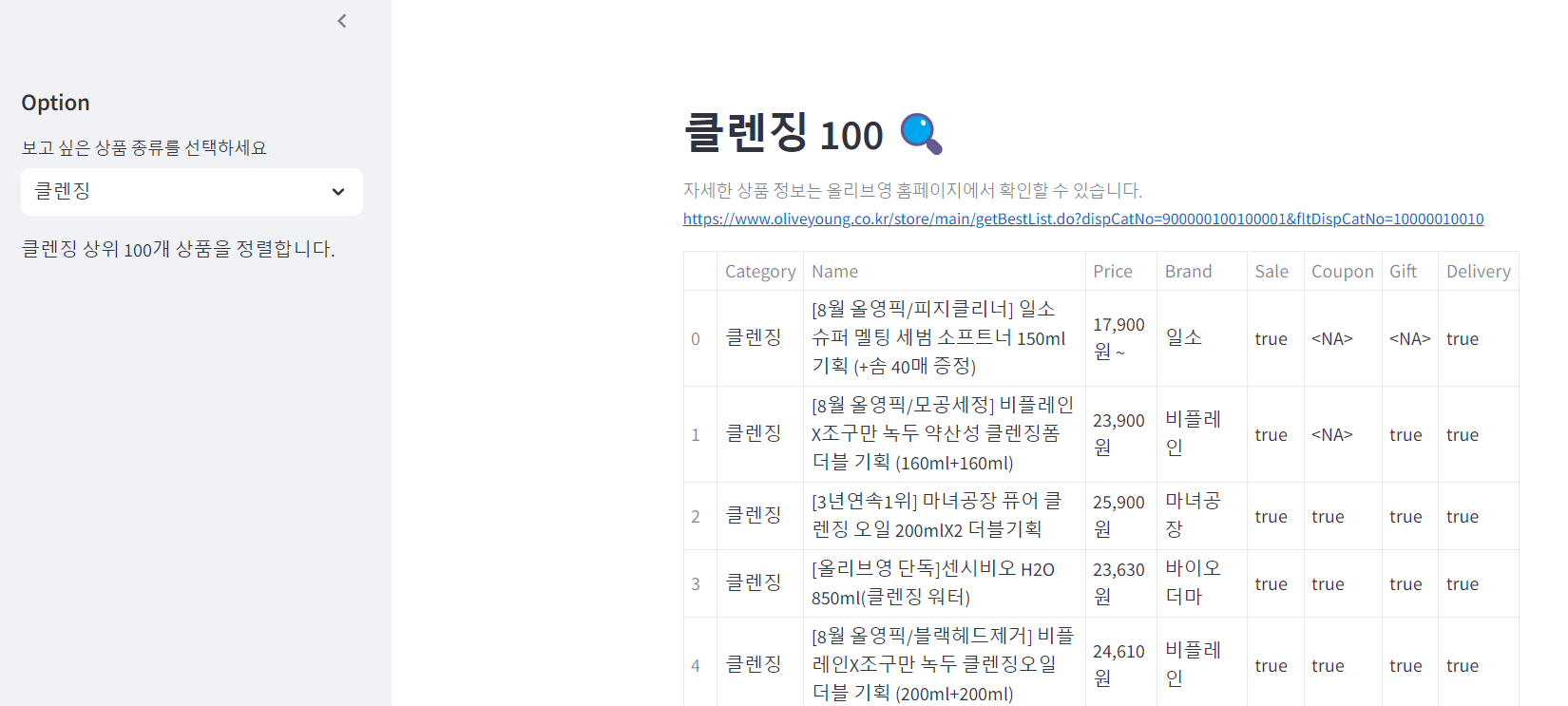
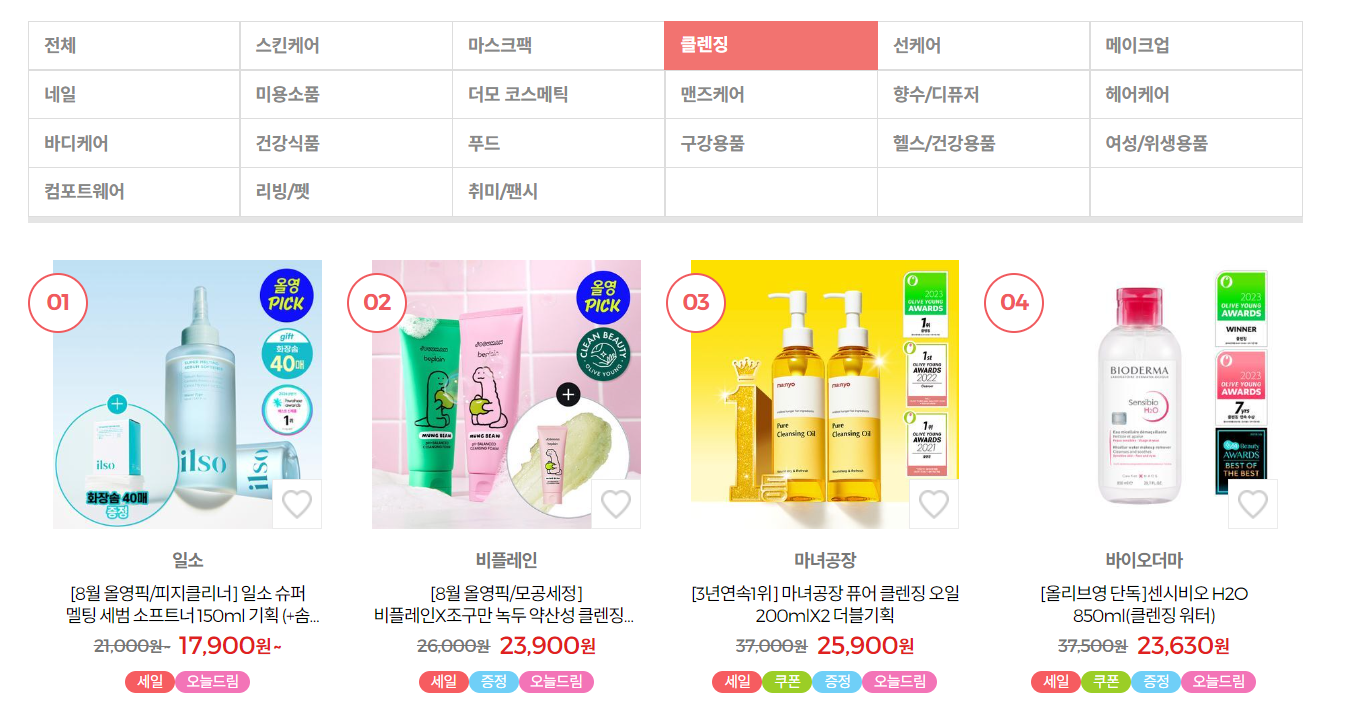

성공!!
세일 / 쿠폰 / 증정 / 오늘드림 별로 상품 나누기
앞에서 true / <NA>로 값을 저장했으니 이 값과 multiselect를 이용해서 상품을 나눠보도록 하자.
밑의 코드는 최종 코드이다.
import requests
from bs4 import BeautifulSoup
import pandas as pd
import streamlit as st

menu = ["전체", "스킨케어", "마스크팩", "클렌징", "선케어", "메이크업", "네일", "미용소품", "더모 코스메틱", "맨즈케어",
        "향수/디퓨저", "헤어케어", "바디케어", "건강식품", "푸드", "구강용품", "헬스/건강용품", "여성/위생용품",
        "컴포트웨어", "리빙/펫", "취미/팬시"]

menu_url= ["", "10001", "10009", "10010", "10011", "10002",
             "10012", "10006", "10008", "10007", "10005", "10004",
             "10003", "20001", "20002", "20003", "20005", "20004",
             "30007", "30005", "30006"]

oliveyoung_list = []

# 사이드바
side_bar = st.sidebar

side_bar.header("Option")
menu_option = tuple(menu)

select = side_bar.selectbox(
    "보고 싶은 상품 종류를 선택하세요",
    menu_option
)

side_bar.write(f"{select} 상위 100개 상품을 정렬합니다.")

# 주소 받기
base_url = "https://www.oliveyoung.co.kr/store/main/getBestList.do?dispCatNo=900000100100001&fltDispCatNo="
if select == "전체":
    select_url = base_url
else:
    select_url = base_url + "100000" + menu_url[menu.index(select)]

# HTTP GET 요청
res = requests.get(select_url)

# BeautifulSoup 객체 생성
soup = BeautifulSoup(res.content, 'html.parser')

# 상품 정보
info_boxes = soup.select('ul.cate_prd_list li')

for info in info_boxes:

    name = info.select_one('p.tx_name').string

    price_num = info.select_one('p.prd_price span.tx_cur span.tx_num').string
    price_won = str(info.select_one('p.prd_price span.tx_cur')).split(">")[3][:-6]
    price = price_num + price_won

    brand = info.select_one('span.tx_brand').string

    sale = info.select_one('p.prd_flag span.icon_flag.sale')
    coupon = info.select_one('p.prd_flag span.icon_flag.coupon')
    gift = info.select_one('p.prd_flag span.icon_flag.gift')
    delivery = info.select_one('p.prd_flag span.icon_flag.delivery')

    oliveyoung_list.append({
            '상품명': name,
            '가격': price,
            '브랜드': brand,
            '세일': sale,
            '쿠폰': coupon,
            '증정': gift,
            '오늘드림': delivery
        })

    # 세일/쿠폰/증정/오늘드림 정보가 있다면 True 반환
    for item in oliveyoung_list:
        if item['세일']:
            item['세일'] = True
        if item['쿠폰']:
            item['쿠폰'] = True
        if item['증정']:
            item['증정'] = True
        if item['오늘드림']:
            item['오늘드림'] = True

# 데이터프레임 만들기
df = pd.DataFrame(oliveyoung_list)

# streamlit 페이지 구성
st.header(f"{select} 100 🔍")
st.caption(f"자세한 상품 정보는 올리브영 홈페이지에서 확인할 수 있습니다. {select_url}")

# 행사 상품 옵션 선택
st.markdown("----")
select_option = ['세일', '쿠폰', '증정', '오늘드림']
column_list = df.columns
choice_list = st.multiselect('행사 상품만 모아보기', select_option)

if len(choice_list) == 0:
    st.dataframe(df)

if len(choice_list) != 0:
    select_df = df[df[choice_list[0]]==True]
    for option in choice_list:
        select_df = select_df[df[option]==True]
    st.dataframe(select_df)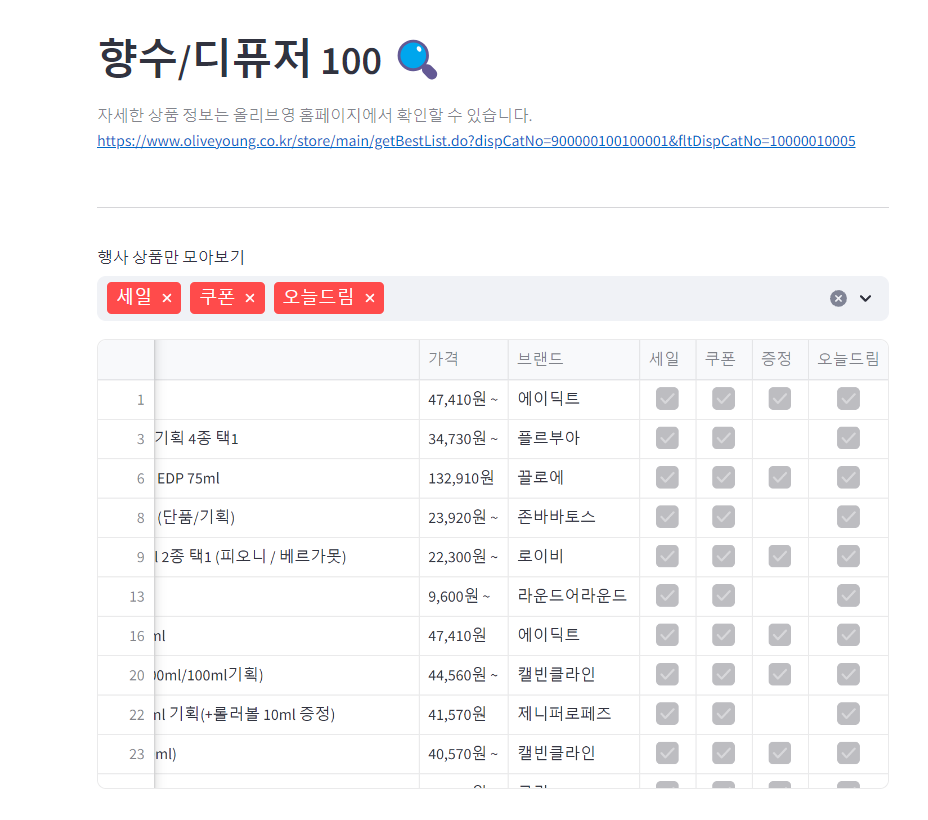
선택한 행사 옵션을 모두 만족하는 상품만 정렬된다.

최종 성공!!
어려웠던 부분
😭
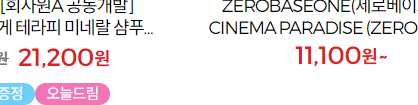
가격이 정해져 있으면 숫자만 뽑으면 되는데 11,100원~ 처럼 물결표시가 돼있는 경우에는 11,100 / 원~ 이렇게 둘 다 뽑아와 줘야 하는데

이렇게 태그가 따로 되어 있어서 이것들을 어떻게 붙이지 하다가..
	price_num = info.select_one('p.prd_price span.tx_num').string
    price_won = str(info.select_one('p.prd_price span.tx_cur')).split(">")[3][:-6]
    price = price_num + price_won
price_num → 숫자만 저장
price_won → '원' 또는 '원 ~'을 저장
2개의 문자열 변수를 따로 사용해서 price 변수에 이 2개를 이어 붙였다.

😭
처음에는 21개의 url을 전부 돌아 2100개의 데이터를 저장하고 그 중에서 선택한 메뉴의 행을 뽑아서 새로 데이터베이스를 만들었었는데 시간이 오래 걸린다는 단점이 있었다.
다음은 처음에 작성했던 코드다.
import requests
from bs4 import BeautifulSoup
import pymysql
import pandas as pd
import streamlit as st

menu = ["전체", "스킨케어", "마스크팩", "클렌징", "선케어", "메이크업", "네일", "미용소품", "더모 코스메틱", "맨즈케어",
        "향수/디퓨저", "헤어케어", "바디케어", "건강식품", "푸드", "구강용품", "헬스/건강용품", "여성/위생용품",
        "컴포트웨어", "리빙/펫", "취미/팬시"]

menu_url= ["", "10001", "10009", "10010", "10011", "10002",
             "10012", "10006", "10008", "10007", "10005", "10004",
             "10003", "20001", "20002", "20003", "20005", "20004",
             "30007", "30005", "30006"]

oliveyoung_list = []


for i in range(len(menu)):

    # 주소 받기
    url = "https://www.oliveyoung.co.kr/store/main/getBestList.do?dispCatNo=900000100100001&fltDispCatNo="

    if i == 0:
        pass
    else:
        url = url + "100000" + menu_url[i]

    # HTTP GET 요청
    res = requests.get(url)

    # BeautifulSoup 객체 생성
    soup = BeautifulSoup(res.content, 'html.parser')

    info_boxes = soup.select('ul.cate_prd_list li')

    category = menu[i]
    for info in info_boxes:

        name = info.select_one('p.tx_name').string

        price_num = info.select_one('p.prd_price span.tx_cur span.tx_num').string
        price_won = str(info.select_one('p.prd_price span.tx_cur')).split(">")[3][:-6]
        price = price_num + price_won

        brand = info.select_one('span.tx_brand').string

        sale = info.select_one('p.prd_flag span.icon_flag.sale')
        coupon = info.select_one('p.prd_flag span.icon_flag.coupon')
        gift = info.select_one('p.prd_flag span.icon_flag.gift')
        delivery = info.select_one('p.prd_flag span.icon_flag.delivery')

        oliveyoung_list.append({
                'Category': category,
                'Name': name,
                'Price': price,
                'Brand': brand,
                'Sale': sale,
                'Coupon': coupon,
                'Gift': gift,
                'Delivery': delivery
            })

    for item in oliveyoung_list:
        print("category: ", category, "name: ", item['Name'], "price: ", item['Price'], "brand: ", item['Brand'], end = " <<")
        if item['Sale']:
            item['Sale'] = True
        if item['Coupon']:
            item['Coupon'] = True
        if item['Gift']:
            item['Gift'] = True
        if item['Delivery']:
            item['Delivery'] = True
        print(">>")

df = pd.DataFrame(oliveyoung_list)

# 사이드바
side_bar = st.sidebar

side_bar.header("Option")
menu_option = tuple(menu)

select = side_bar.selectbox(
    "보고 싶은 상품 종류를 선택하세요",
    menu_option
)

side_bar.write("{} 상위 100개 상품을 정렬합니다.".format(select))

# 클릭한 상품 종류만 뜨게 필터링
for category in menu:
    if select == category:
        print(f"{select}을 선택했습니다.")
        df_select = df[df['Category'].str.contains(select)]


st.header(f"{select} 100 🔍")
st.table(data=df_select)
위의 코드를 실행시키면 db를 우선 만들고 그 중에서 선택한 메뉴의 행들로 db_select를 다시 만들기 때문에 시간이 훨씬 오래 걸렸다.
어떻게 해결할까 고민하다가 db를 만들기 전에 메뉴 선택을 먼저 받고 그에 해당하는 url 한 곳에서만 db를 만드는 방법으로 변경하니 시간이 훨씬 줄어들었다.
😭
행사 상품만 보게 하는 기능을 추가하려는데 선택한 checkbox 조건을 모두 만족하는 데이터만 뽑아오는 것에 어려움을 겪었다.
if sale_check:
    st.dataframe(df[df['Sale']==True])

if coupon_check:
    st.dataframe(df[df['Coupon']==True])

if gift_check:
    st.dataframe(df[df['Gift']==True])

if delivery_check:
    st.dataframe(df[df['Delivery']==True])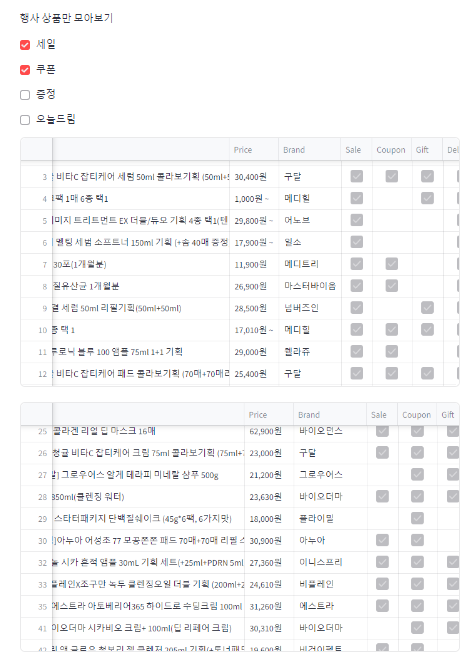
이런 식으로 하니까 체크할 때마다 표가 새로 생겨났다...
그래서 multiselect라는 기능을 알아내서 다음 코드를 실행시켰었다.
select_option = ['세일', '쿠폰', '증정', '오늘드림']
column_list = df.columns
choice_list = st.multiselect('행사 상품만 모아보기', select_option)

if len(choice_list) != 0:
    select_df = df[df.loc[:, choice_list]]
    st.dataframe(select_df)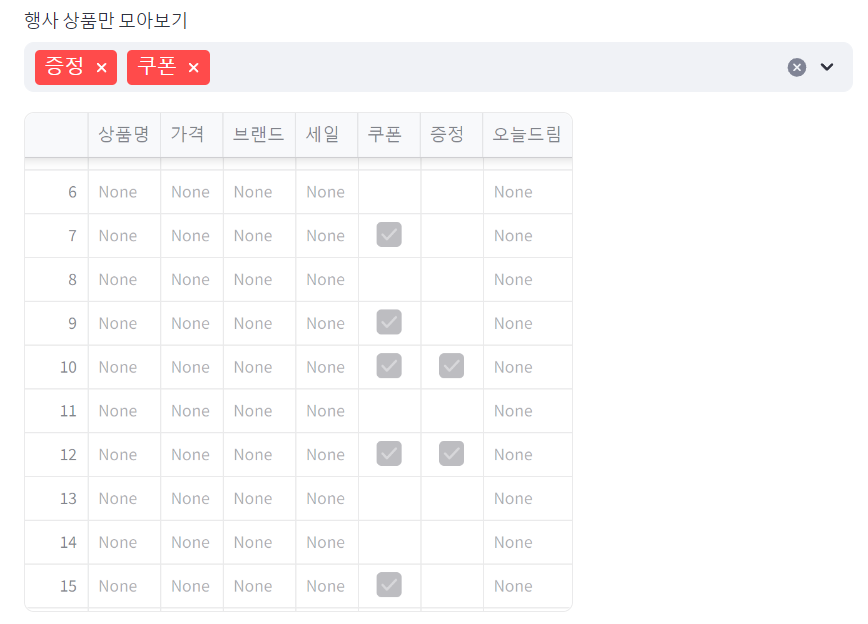
선택한 옵션들만 나오고 나머지는 전부 None으로 나오고 말았다.
그러다가 겨우 찾은 방법..!
# 행사 상품 옵션 선택
st.markdown("----")
select_option = ['세일', '쿠폰', '증정', '오늘드림']
column_list = df.columns
choice_list = st.multiselect('행사 상품만 모아보기', select_option)

if len(choice_list) == 0:
    st.dataframe(df)

if len(choice_list) != 0:
    select_df = df[df[choice_list[0]]==True]
    for option in choice_list:
        select_df = select_df[df[option]==True]
    st.dataframe(select_df)
select_df에 df 정보를 저장하는 방법을 찾는다고 애를 먹었다. 😂 (이 과정을 제대로 안 해서 상품명, 가격, ... 등등이 안 보였던 것 같다.)
위의 코드를 실행시키면 선택한 옵션들을 모두 만족하는 행만 select_df로 새로 만들어 보여준다.
글로벌소프트웨어캠퍼스와 교보DTS가 함께 진행하는 챌린지입니다.



올리브영 꿀템 추천해주세요