[Spring] Controller, Service를 만들어보자
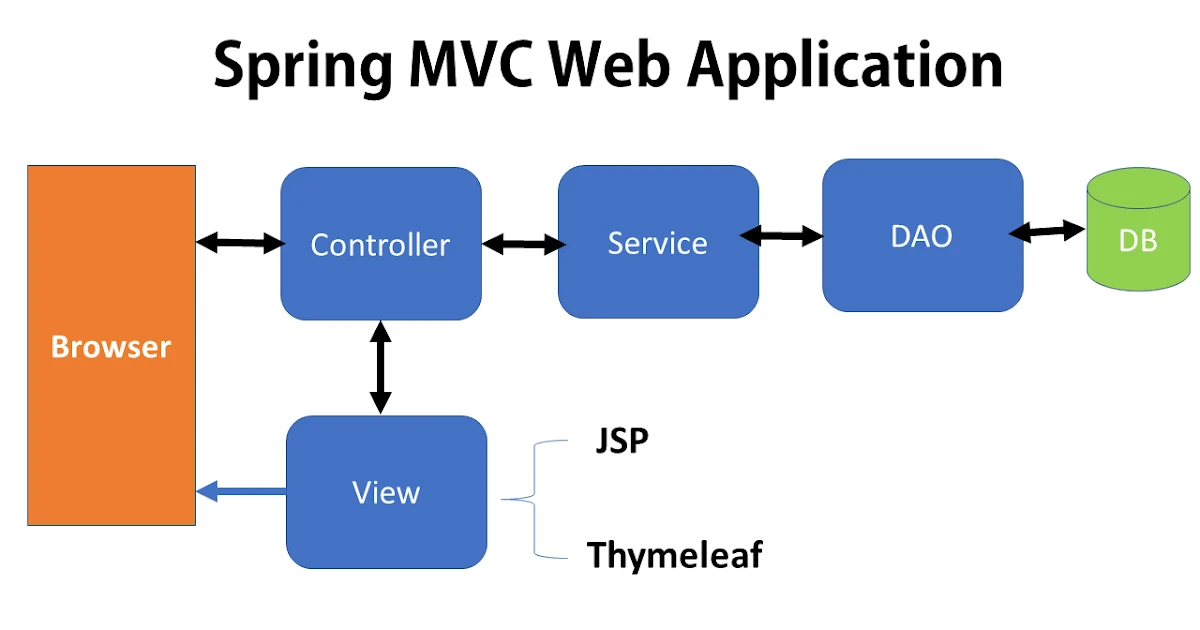
@Controller
해당 클래스에 컨트롤러 능력을 부여해주는 어노테이션 → View-Model 연결
- View 요청을 받아서 Service(Model)에 일을 시키고 결과를 받아 대응하는 것. →
@RequestMapping([요청])조합
@RestController
// @Controller로 하면 에러. 왜냐면 view를 반환하기 때문에
// @RestController는 데이터만 반환해준다.
public class TripController {

    @RequestMapping(value = "/test", method = RequestMethod.GET)
    public String test() {
        return "hi spring";
    }
}
💡
@RestControllervs@Controller
이전에는 Spring이 View도 담당을 하였지만 최근엔 React로 View를 나타내기에 새로운 어노테이션이 등장했다.
@RestController는 데이터만 반환하여 view를 리액트가 담당할 수 있다.@Controller는 자체적으로 View를 반환한다.
@PathVariable
@PathVariable(value=”id”) int id
@RequestMapping(value = "/products/{id}", method = RequestMethod.GET)
    public String getProduct(@PathVariable int id) {
        return String.valueOf(id);
    }
@RequestParam
@RequestParam(value=”name”) String name
- required 속성은 필수로 작성해야하는 속성
@RequestMapping(value = "/new/products", method = RequestMethod.GET)
    public String addProduct(@RequestParam String productName) {
        return tripService.addProduct(productName);
    }
@Service
Repository로 부터 데이터를 받아 데이터를 처리하는 로직을 수행한다.
Service 생성
@Service
public class TripService {
    public String testPrint() {
        return "this is service";
    }
}
Controller에 선언
public class TripController {
    private final TripService tripService;

    @Autowired //기본적으로 생략되어있다.
    public TripController(TripService tripService) {
        this.tripService = tripService;
    }
    ...
@Repository
@Repository
public class TripRepository {
    private Map<Integer, String> tripTable = new HashMap<>();
    private int idx = 0;

    public TripRepository(Map<Integer, String> tripTable) {
        this.tripTable = tripTable;
    }

    public String getProduct(int id) {
        return tripTable.get(id);
    }

    public String addProduct(String productName) {
        tripTable.put(idx++, productName);
        return (productName + " 이 정상적으로 추가되었습니다.");
    }
}
💡
@Component,@Service,@Repository의 차이는?
똑같은 역할을 하지만 가독성을 위해 이름이 다르다.
단!@Repository는 추가적인 기능이 있다.
→ 영속성 계층에서 발생한 uncheck 오류(runtime error 같은)를 데이터 엑세스 exception으로 바꿔준다.

선순환을 만드는 개발자