| 강의명 : 엑셀보다 쉽고 빠른 SQL
2강. 데이터 계산하기
- 숫자 연산해보기
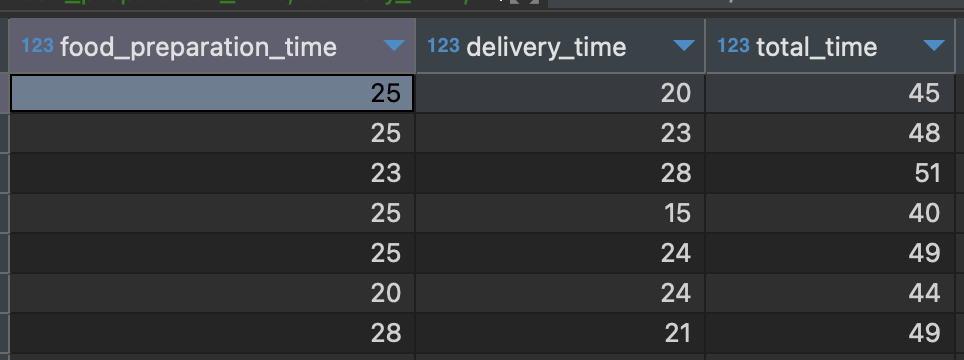
숫자 연산 예시
select food_preparation_time,
delivery_time,
food_preparation_time + delivery_time as total_time
from food_orders
- 기본 연산, 합계와 평균 구하기
SQL 에서는 합계와 평균 등 함수를 제공하고 있다.
사용방법은 엑셀과 유사하지만 데이터의 범위가 아닌 계산할 ‘컬럼’을 적어준다는 것이 유일한 다른 점이다.
함수 종류
합계 : SUM(컬럼)
평균 : AVG(컬럼)
ex)
select sum(food_preparation_time)
total_food_preparation_time,
avg(delivery_time)
avg_food_delivery_time
from food_orders

- 전체 데이터의 갯수 구하기
* distinct : a. 별개의, 고유한, 뚜렷한, 명확한
갯수 구하기
- 데이터 갯수 : COUNT(컬럼) 컬럼명 대신 1 혹은 * 사용 가능(=전체값)
- 몇개의 값을 가지고 있는지 구할 때 : DISTINCT
ex)
select count(1) count_of_orders,
count(distinct customer_id) count_of_customers
from food_orders
- 데이터의 범위, 최솟값과 최댓값 구하기
함수 종류
-최솟값 : MIN(컬럼)
-최댓값 : MAX(컬럼)
ex)
select min(price) min_price,
max(price) max_price
from food_orders
- 카테고리 컬럼 지정하여 일괄 작업하기
- Group by 기본 구조
ex) "음식 종류별 주문 금액 합계"
select cuisine_type,
sum(price) sum_of_price
from food_orders
group by cuisine_type
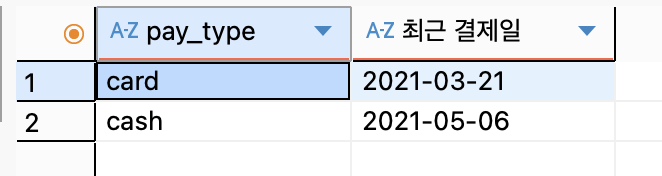
ex) "결제 타입별 가장 최근 결제일 조회하기"
select pay_type, max(date) as "최근 결제일"
from payments
group by pay_type
- SQL 로 조회한 결과를 원하는 순서대로 정렬하기
- 정렬문 Order by 의 기본구조
ex)"가격의 오름차순 정렬"
select cuisine_type,
sum(price) sum_of_price
from food_orders
group by cuisine_type
order by sum(price)
ex) "고객을 성별 및 이름을 오름차순으로 정렬"
select *
from customers
order by gender, name
* Descending : n. 내림차순
ex) _"가격의 내림차순 정렬"
select cuisine_type,
sum(price) sum_of_price
from food_orders
group by cuisine_type
order by sum(price) desc
>>>2강 실습 문제
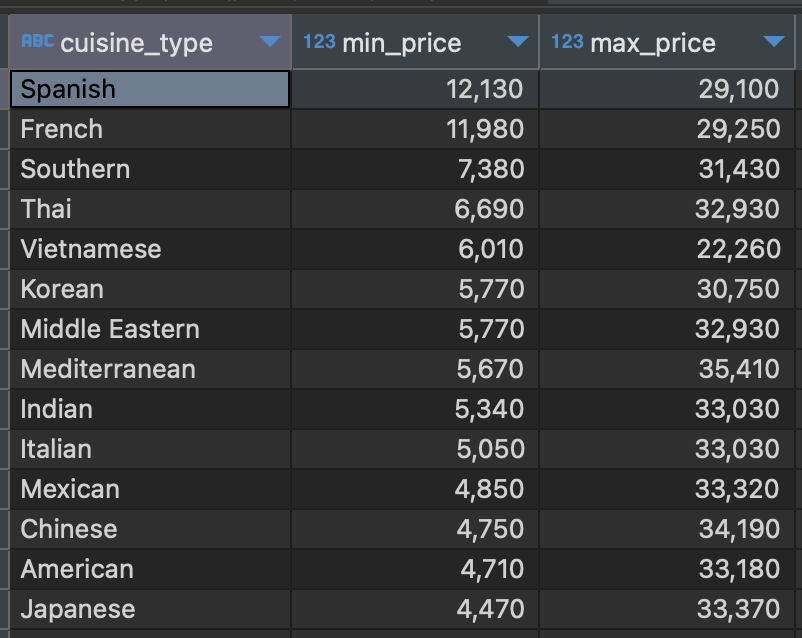
Q. 음식 종류별 가장 높은 주문 금액과 가장 낮은 주문금액을 조회하고, 가장 낮은 주문금액 순으로 (내림차순) 정렬하기
A1.
select cuisine_type,
min(price) as min_price,
max(price) as max_pirce
from food_orders
group by cuisine_type
order by min(price) desc