Github 라벨을 하나하나 설정하지 않고 템플릿을 사용해서 적용하는 방법
사전 작업
- Node.js 설치 여부
npx 명령어를 사용하기 위해 설치해야 됨 - Git Access Token 발급
토큰 생성시 repo권한 부여 후 발급 - 라벨 템플릿 준비
(해당 게시글 하단에 템플릿 존재)
적용 명령어
npx github-label-sync --access-token <Git Access Token> --labels ./labels.json <Git Name>/<Git Repository Name>- Git Access Token -> 발급 받은 토큰(repo 권한 O)
- Git Name -> 사용하는 깃허브 이름
- Git Repository Name -> 적용할 레포지토리
적용 결과
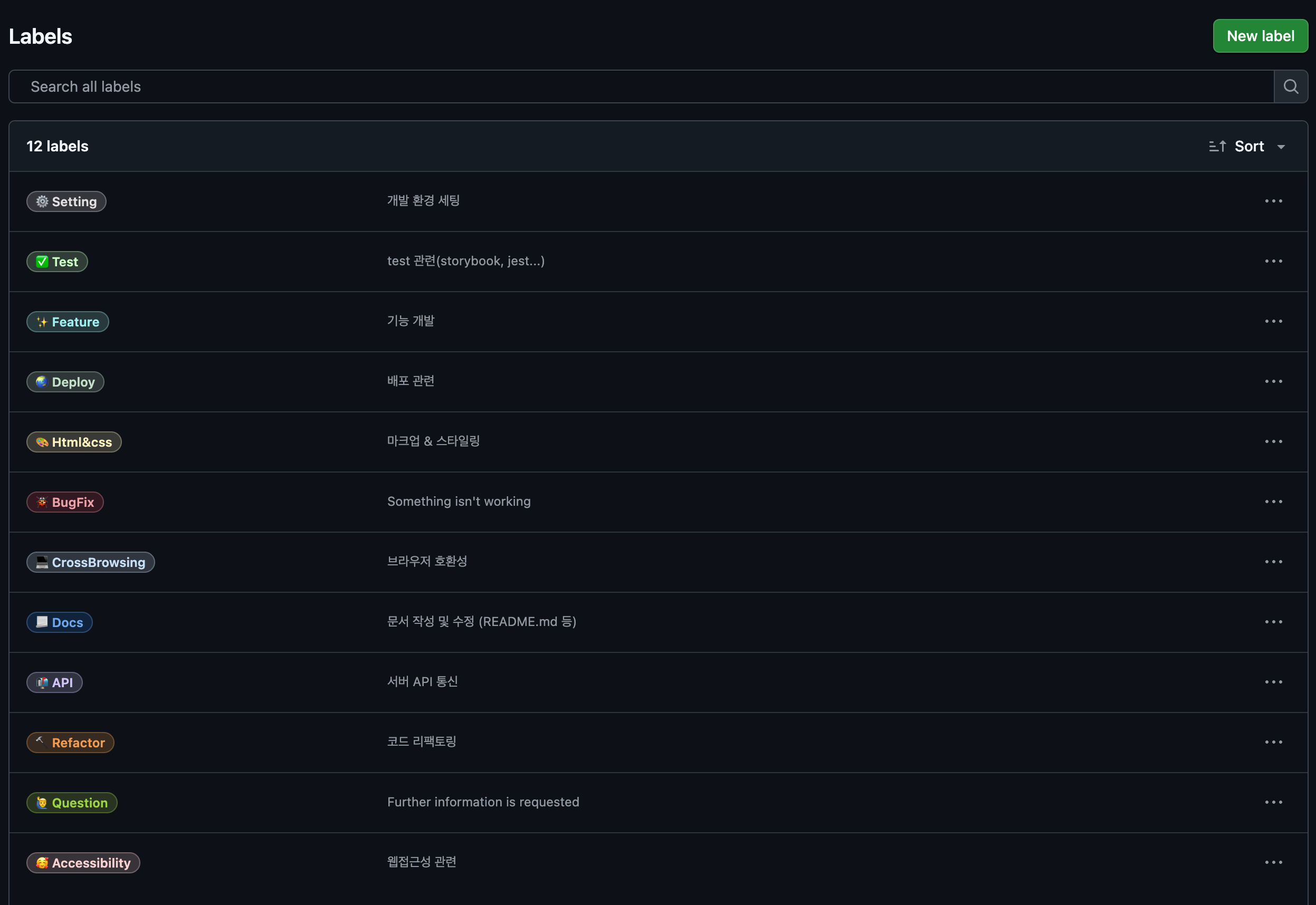
라벨 템플릿
[
{
"name": "⚙ Setting",
"color": "e3dede",
"description": "개발 환경 세팅"
},
{
"name": "✨ Feature",
"color": "a2eeef",
"description": "기능 개발"
},
{
"name": "🌏 Deploy",
"color": "C2E0C6",
"description": "배포 관련"
},
{
"name": "🎨 Html&css",
"color": "FEF2C0",
"description": "마크업 & 스타일링"
},
{
"name": "🐞 BugFix",
"color": "d73a4a",
"description": "Something isn't working"
},
{
"name": "💻 CrossBrowsing",
"color": "C5DEF5",
"description": "브라우저 호환성"
},
{
"name": "📃 Docs",
"color": "1D76DB",
"description": "문서 작성 및 수정 (README.md 등)"
},
{
"name": "📬 API",
"color": "D4C5F9",
"description": "서버 API 통신"
},
{
"name": "🔨 Refactor",
"color": "f29a4e",
"description": "코드 리팩토링"
},
{
"name": "🙋♂️ Question",
"color": "9ED447",
"description": "Further information is requested"
},
{
"name": "🥰 Accessibility",
"color": "facfcf",
"description": "웹접근성 관련"
},
{
"name": "✅ Test",
"color": "ccffc4",
"description": "test 관련(storybook, jest...)"
}
]

I'm kooks