fetch
fetch 함수는 HTTP 요청 전송 기능을 제공하는 Web API의 한 종류이다.
반환하는 데이터는 HTTP response 객체를 래핑한 Promise 객체를 반환하기에 Promise의 후속처리함수(then,catch)를 사용할 수 있다.
- 예제 code
// 1번 코드
fetch("https://jsonplaceholder.typicode.com/todos")
	.then(function(response){
		console.log(response);
	});

// 2번 코드
fetch("https://jsonplaceholder.typicode.com/todos")
	.then(function(response){
  		console.log(response.json());
	})

// 3번 코드
fetch("https://jsonplaceholder.typicode.com/todos")
	.then(function(response){
  		return response.json();
	})
	.catch(function(reason) {
    	console.log(reason);
    })
    .then(function(data) {
    	console.log(data);
    });
1번 코드 실행 시 아래와 같은 HTTP response 객체를 래핑한 Promise객체가 반환되는 것을 볼 수 있다.
- response
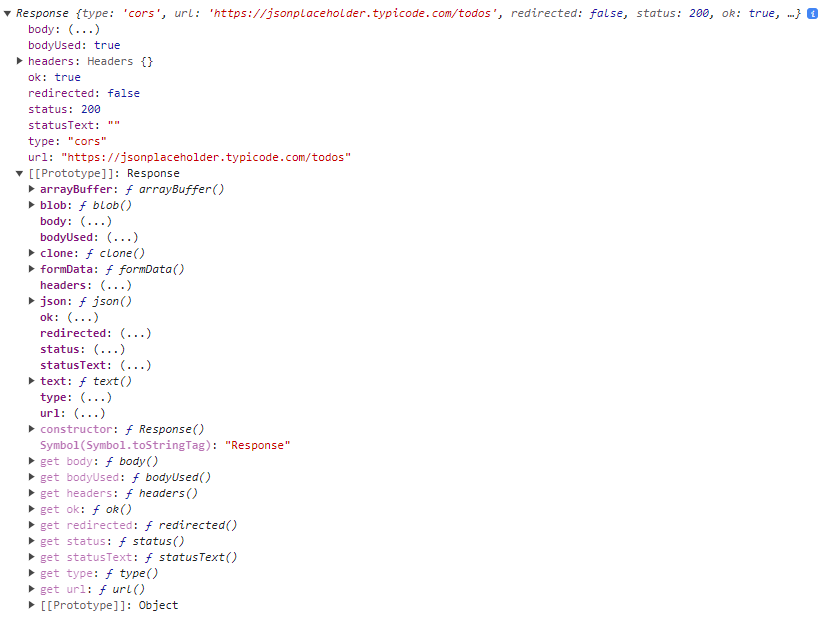
대부분의 REST API들이 JSON 형태의 데이터 타입을 응답하기에 프로퍼티를 자세히보면 JSON메서드가 존재한다. JSON메서드 사용하여 2번 코드처럼 작성해준다면 JSON 형식으로 바꾼 프로미스를 반환받는다. 이때 프로미스로 반환되는 이유는 아직 데이터를 다 받지 않은 상태여서 그렇다 그래서 프로미스 체이닝을 활용해 3번 코드처럼 작업하게 된다.
요약하자면
fetch함수를 활용하여 요청한 데이터를 HTTP response 객체를 래핑한 Promise 객체 형태로 받게된다.response받은 객체의 프로퍼티 중에는JSON메서드가 존재하고JSON메서드를 활용하여JSON형식으로 변환한 프로미스를 받는다.JSON형식의 프로미스를 체이닝을 활용하여 자바스크립트 객체로 변환받는다.
fetch 사용법
fetch(url, options)
  .then((response) => console.log("response:", response))
  .catch((error) => console.log("error:", error));
fetch 함수는 첫 번째 인자로 URL, 두 번째 인자로 옵션 객체를 전달받아 Promise 객체를 반환한다.
호출에 성공하였을 경우 response객체를 resolve, 실패했을 경우 error객체를 reject한다.
두번째 인자인 옵션(options)객체에는 HTTP method, headers, body 등을 설정해줄 수 있다.
GET 호출 (조회)
fetch(url)
  .then((response) => response.json())
  .then((data) => console.log(data))
  .catch((error) => console.log("error:", error));
fetch 함수는 디폴트로 GET 방식으로 작동하고 GET방식은 요청 전문을 받지 않기 때문에 옵션 인자(options)가 필요없다.
단순하게 보여주기 위한 데이터를 요청은 GET방식이 적절하다.
POST 호출 (생성)
fetch(url, {
	method: "POST",
  	headers: {
    	"Content-Type": "application/json",
  	},
  	body: JSON.stringify({
    	title: "Test",
    	body: "I am testing!",
    	userId: 1,
  	}),
})
  .then((response) => response.json())
  .then((data) => console.log(data))
  .catch((error) => console.log("error:", error));
POST 방식은 새로운 데이터를 추가하기 위해 사용된다.
PUT 호출 (수정)
fetch(url/1, {
	method: "PUT",
  	headers: {
    	"Content-Type": "application/json",
  	},
  	body: JSON.stringify({
    	title: "Test",
    	body: "I am testing!",
    	userId: 1,
  	}),
})
  .then((response) => response.json())
  .then((data) => console.log(data))
  .catch((error) => console.log("error:", error));
PUT 방식은 method 옵션만 PUT으로 설정한다는 점 빼놓고는 POST 방식과 비슷하다.
데이터의 수정하는데 주로 사용한다.
DELETE 호출 (삭제)
fetch(url/1, {
	method: "DELETE",
})
  .then((response) => response.json())
  .then((data) => console.log(data))
  .catch((error) => console.log("error:", error));
DELETE 방식에서는 보낼 데이터가 없기 때문에, headers와 body 옵션이 필요가 없다.
url 경로 매개변수를 지정하여 삭제하고싶은 데이터를 지정하여주면된다.
위에서 알아본 HTTP method를 완벽하고 올바른 예시는 아닐 수 있겠지만 간단한 예시로 요약해보자면
/- 자체 서버의 유저정보 데이터를 활용한다고 예시를 들어보자.
GET: 회원가입 과정에서 사용자가 입력한 데이터가 서버에 이미 존재하는지 유무를 확인하거나 로그인한 유저가 자신의 프로필 페이지를 보려할 때 등에서 사용한다.POST: 회원가입 과정에서 사용자가 입력한 데이터를 서버의 유저정보 데이터에 새롭게 추가 한다.PUT: 개인정보수정 페이지에서 사용자가 수정한 데이터를 서버의 유저정보 데이터에서 기존 데이터를 찾아 수정한다.DELET: 사용자가 회원탈퇴 버튼을 눌렀을 때 서버의 유저정보 데이터에서 요청한 사용자의 데이터를 삭제한다.
더 좋고 더 많은 예제가 있을 수 있겠지만 간단하게 이렇게 예시를 들어볼 수 있을 것 같다.
References