분명 저번글에서는 ESP32가 아닌 ESP8266과 연결이었다
왜 갑자기 ESP가 변경되었을까?
그건 바로 교수님께서 ESP32로 연결하라고 하셨기 때문이다
사실 걱정이 많았다 지금까지 ESP32를 사용하여서 Arduino.ide와 연결을 한 적이 없었기에.. 그래서 homeassistant를 통해서 하려고 했지만, 연결은 되어도 sensor 연결이 되지 않았었다....
결국 늘 그렇듯 우리는 답을 찾아낼 것이다
그리고 긴 시간이 지나고 나 역시 그 답을 찾아냈다
Board : ESP32 Dev Module
Upload Speed : 115200
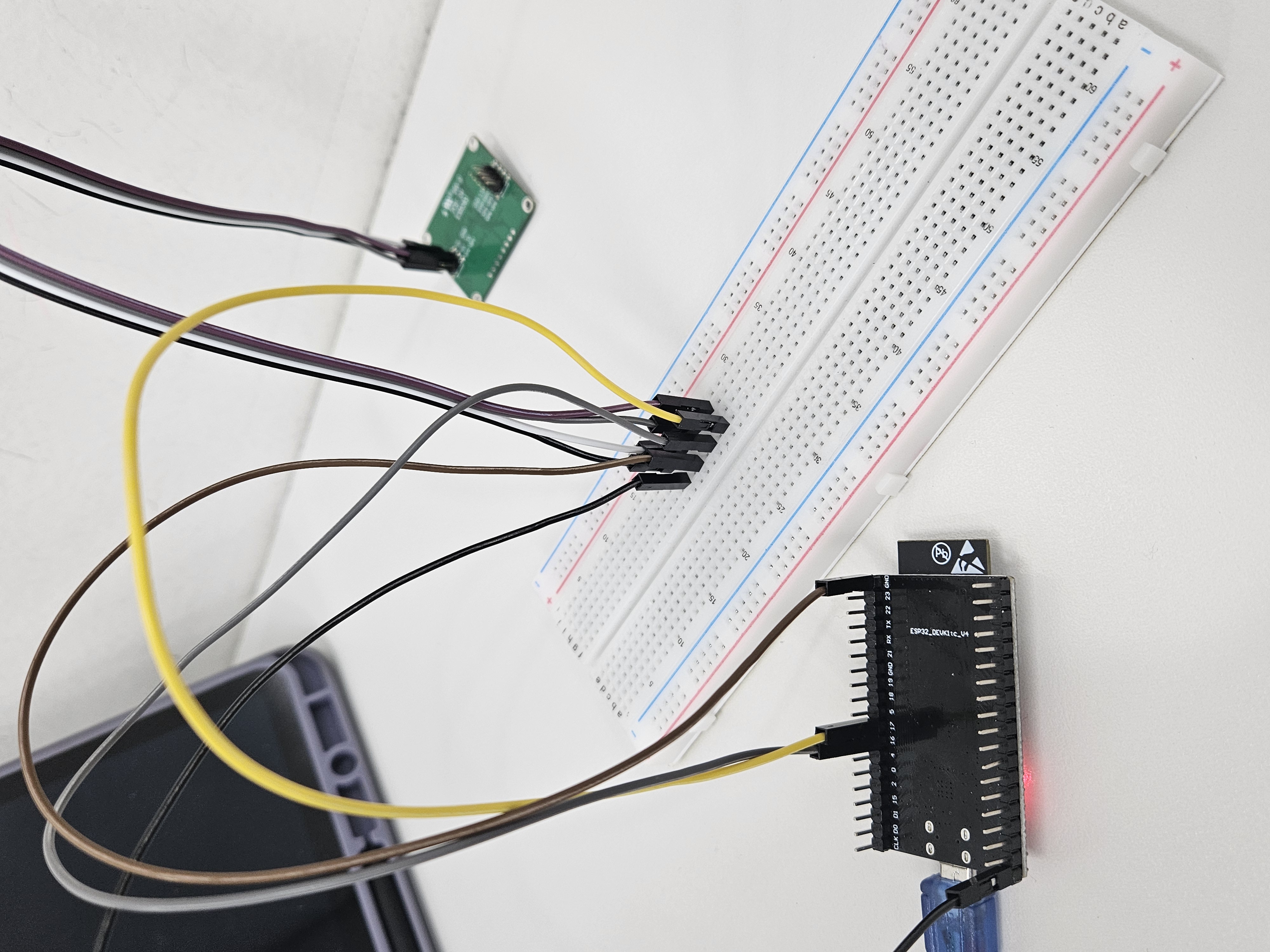
ESP32 Board 연결(16:TX , 17:RX)
이 글을 보고있는 어린양을 위해서 내가 친히 사진까지 첨부해드리겠소
감사하시오. TX RX 적혀있는거에 속지마시오 그거는 함정이오
Demo1.Raw Data export
#include "Arduino.h"
#include <60ghzbreathheart.h>

// can also try hardware serial with
BreathHeart_60GHz radar = BreathHeart_60GHz(&Serial1);

void setup() {
  // put your setup code here, to run once:
  Serial.begin(115200);
  Serial1.begin(115200, SERIAL_8N1, 17, 16);  // Serial1.begin(115200);

  //  mySerial.begin(115200);

  while(!Serial);   //When the serial port is opened, the program starts to execute.

  Serial.println("Readly");
}

void loop()
{
  // put your main code here, to run repeatedly:
  radar.recvRadarBytes();           //Receive radar data and start processing
  radar.showData();                 //Serial port prints a set of received data frames
  delay(200);                       //Add time delay to avoid program jam
}
Demo2. Use of human presence detection function
#include "Arduino.h"
#include <60ghzbreathheart.h>

// can also try hardware serial with
BreathHeart_60GHz radar = BreathHeart_60GHz(&Serial1);

void setup() {
  // put your setup code here, to run once:
  Serial.begin(115200);
  Serial1.begin(115200, SERIAL_8N1, 17, 16);

  //  mySerial.begin(115200);

  while(!Serial);   //When the serial port is opened, the program starts to execute.

  Serial.println("Readly");
}

void loop()
{
  // put your main code here, to run repeatedly:
  radar.HumanExis_Func();           //Human existence information output
  if(radar.sensor_report != 0x00){
    switch(radar.sensor_report){
      case NOONE:
        Serial.println("Nobody here.");
        Serial.println("----------------------------");
        break;
      case SOMEONE:
        Serial.println("Someone is here.");
        Serial.println("----------------------------");
        break;
      case NONEPSE:
        Serial.println("No human activity messages.");
        Serial.println("----------------------------");
        break;
      case STATION:
        Serial.println("Someone stop");
        Serial.println("----------------------------");
        break;
      case MOVE:
        Serial.println("Someone moving");
        Serial.println("----------------------------");
        break;
      case BODYVAL:
        Serial.print("The parameters of human body signs are: ");
        Serial.println(radar.bodysign_val, DEC);
        Serial.println("----------------------------");
        break;
      case DISVAL:
        Serial.print("The sensor judges the distance to the human body to be: ");
        Serial.print(radar.distance, DEC);
        Serial.println(" m");
        Serial.println("----------------------------");
        break;
      case DIREVAL:
        Serial.print("The sensor judges the orientation data with the human body as -- x: ");
        Serial.print(radar.Dir_x);
        Serial.print(" m, y: ");
        Serial.print(radar.Dir_y);
        Serial.print(" m, z: ");
        Serial.print(radar.Dir_z);
        Serial.println(" m");
        Serial.println("----------------------------");
        break;
    }
  }
  delay(200);                       //Add time delay to avoid program jam
}
Demo3. The use of respiratory and heartbeat functions in the resting people
#include "Arduino.h"
#include <60ghzbreathheart.h>

// can also try hardware serial with
BreathHeart_60GHz radar = BreathHeart_60GHz(&Serial1);

void setup() {
  // put your setup code here, to run once:
  Serial.begin(115200);
  Serial1.begin(115200, SERIAL_8N1, 17, 16);  // Serial1.begin(115200);

  while(!Serial);   //When the serial port is opened, the program starts to execute.

  Serial.println("Readly");
}


void loop()
{
  // put your main code here, to run repeatedly:
  radar.Breath_Heart();           //Breath and heartbeat information output
  if(radar.sensor_report != 0x00){
    switch(radar.sensor_report){
      case HEARTRATEVAL:
        Serial.print("Sensor monitored the current heart rate value is: ");
        Serial.println(radar.heart_rate, DEC);
        Serial.println("----------------------------");
        break;
      case HEARTRATEWAVE:  //Valid only when real-time data transfer mode is on
        Serial.print("The heart rate waveform(Sine wave) -- point 1: ");
        Serial.print(radar.heart_point_1);
        Serial.print(", point 2 : ");
        Serial.print(radar.heart_point_2);
        Serial.print(", point 3 : ");
        Serial.print(radar.heart_point_3);
        Serial.print(", point 4 : ");
        Serial.print(radar.heart_point_4);
        Serial.print(", point 5 : ");
        Serial.println(radar.heart_point_5);
        Serial.println("----------------------------");
        break;
      case BREATHNOR:
        Serial.println("Sensor detects current breath rate is normal.");
        Serial.println("----------------------------");
        break;
      case BREATHRAPID:
        Serial.println("Sensor detects current breath rate is too fast.");
        Serial.println("----------------------------");
        break;
      case BREATHSLOW:
        Serial.println("Sensor detects current breath rate is too slow.");
        Serial.println("----------------------------");
        break;
      case BREATHNONE:
        Serial.println("There is no breathing information yet, please wait...");
        Serial.println("----------------------------");
        break;
      case BREATHVAL:
        Serial.print("Sensor monitored the current breath rate value is: ");
        Serial.println(radar.breath_rate, DEC);
        Serial.println("----------------------------");
        break;
      case BREATHWAVE:  //Valid only when real-time data transfer mode is on
        Serial.print("The breath rate waveform(Sine wave) -- point 1: ");
        Serial.print(radar.breath_point_1);
        Serial.print(", point 2 : ");
        Serial.print(radar.breath_point_2);
        Serial.print(", point 3 : ");
        Serial.print(radar.breath_point_3);
        Serial.print(", point 4 : ");
        Serial.print(radar.breath_point_4);
        Serial.print(", point 5 : ");
        Serial.println(radar.breath_point_5);
        Serial.println("----------------------------");
        break;
    }
  }
  delay(200);                       //Add time delay to avoid program jam
}
3초 대기후 heart_rate_value 출력
#include "Arduino.h"
#include <60ghzbreathheart.h>

// can also try hardware serial with
BreathHeart_60GHz radar = BreathHeart_60GHz(&Serial1);

void setup() {
  // put your setup code here, to run once:
  Serial.begin(115200);
  Serial1.begin(115200, SERIAL_8N1, 17, 16);  // Serial1.begin(115200);

  while(!Serial);   //When the serial port is opened, the program starts to execute.

  Serial.println("Readly");
}


void loop()
{
  // put your main code here, to run repeatedly:
  radar.Breath_Heart();           //Breath and heartbeat information output
  if(radar.sensor_report != 0x00)
  {
    switch(radar.sensor_report){
      case HEARTRATEVAL:
        Serial.print("Sensor monitored the current heart rate value is: ");
        Serial.println(radar.heart_rate, DEC);
        Serial.println("----------------------------");
        break;
    }
  }
  delay(3000);                       //Add time delay to avoid program jam
}
Demo4. Use of the sleep function
#include "Arduino.h"
#include <60ghzbreathheart.h>

// can also try hardware serial with
BreathHeart_60GHz radar = BreathHeart_60GHz(&Serial1);

void setup() {
  // put your setup code here, to run once:
  Serial.begin(115200);
  Serial1.begin(115200, SERIAL_8N1, 17, 16);

  //  mySerial.begin(115200);

  while(!Serial);   //When the serial port is opened, the program starts to execute.

  Serial.println("Readly");
}

void loop()
{
  // put your main code here, to run repeatedly:
  radar.SleepInf_Decode();           //Sleep-related information output. Data output begins when the monitoring figure is in bed for five minutes.
  if(radar.sensor_report != 0x00){
    switch(radar.sensor_report){
      case OUTBED:
        Serial.println("Sensor detects someone currently leaving the bed.");
        Serial.println("----------------------------");
        break;
      case INBED:
        Serial.println("Sensor detects that someone is currently in bed.");
        Serial.println("----------------------------");
        break;
      case NOINOUT:
        Serial.println("No subject is detected leaving or going to bed.");
        Serial.println("----------------------------");
        break;
      case SLEEPAWAKE:
        Serial.println("Sensor detects that the monitoring people is awake.");
        Serial.println("----------------------------");
        break;
      case SLEEPLIGHT:
        Serial.println("Sensor detects that the monitoring people is in light sleeping.");
        Serial.println("----------------------------");
        break;
      case SLEEPDEEP:
        Serial.println("Sensor detects that the monitoring people is in deep sleeping.");
        Serial.println("----------------------------");
        break;
      case SLEEPNONE:
        Serial.println("Sleep state of the object is not detected.");
        Serial.println("----------------------------");
        break;
      case AWAKETIME:
        Serial.print("Sensor monitored the awake sleep time is: ");
        Serial.print(radar.awake_time);
        Serial.println(" min");
        Serial.println("----------------------------");
        break;
      case LIGHTTIME:
        Serial.print("Sensor monitored the light sleep time is: ");
        Serial.print(radar.light_time);
        Serial.println(" min");
        Serial.println("----------------------------");
        break;
      case DEEPTIME:
        Serial.print("Sensor monitored the deep sleep time is: ");
        Serial.print(radar.deep_time);
        Serial.println(" min");
        Serial.println("----------------------------");
        break;
      case SLEEPSCORE:
        Serial.print("Sensor judgment sleep score is: ");
        Serial.println(radar.sleep_score);
        Serial.println("----------------------------");
        break;
      case SLEEPSTATUE:
        Serial.println("Sleep integrated state information -- ");
        Serial.print("Human existence: ");
        if(radar.existence)Serial.println("human exis");
        else Serial.println("human non-existent");
        Serial.print("Sleep state: ");
        if(radar.sleep_status == SLEEPDEEP)Serial.println("sleeping soundly");
        else if(radar.sleep_status == SLEEPLIGHT)Serial.println("light sleep");
        else if(radar.sleep_status == SLEEPAWAKE)Serial.println("awake");
        else if(radar.sleep_status == SLEEPNONE)Serial.println("off the bed");
        Serial.print("Average breathing: ");
        Serial.println(radar.breath_rate);
        Serial.print("Average heart rate: ");
        Serial.println(radar.heart_rate);
        Serial.print("Number of turning over during sleep: ");
        Serial.println(radar.turn_num);
        Serial.print("Percentage of substantial exercise during sleep: ");
        Serial.println(radar.substantial_move_ratio);
        Serial.print("Percentage of small-amplitude movements during sleep: ");
        Serial.println(radar.samll_move_ratio);
        Serial.print("Number of apnea: ");
        Serial.println(radar.apnea_num);
        Serial.println("----------------------------");
        break;
      case SLEEPQUALITY:
        Serial.println("Quality of sleep information -- ");
        Serial.print("Sleep score: ");
        Serial.println(radar.sleep_score);
        Serial.print("Total time of sleep: ");
        Serial.print(radar.sleep_time);
        Serial.println(" min");
        Serial.print("Percentage of waking time: ");
        Serial.println(radar.awake_time_radio);
        Serial.print("Percentage of light sleep time: ");
        Serial.println(radar.light_time_radio);
        Serial.print("Percentage of deep sleep time: ");
        Serial.println(radar.deep_time_radio);
        Serial.print("Total time away from bed: ");
        Serial.print(radar.outbed_time);
        Serial.println(" min");
        Serial.print("Total number of times out of bed: ");
        Serial.println(radar.outbed_num);
        Serial.print("The number of turning over during sleep: ");
        Serial.println(radar.turn_num);
        Serial.print("Average breathing: ");
        Serial.println(radar.breath_rate);
        Serial.print("Average heart rate: ");
        Serial.println(radar.heart_rate);
        Serial.print("Number of apnea: ");
        Serial.println(radar.apnea_num);
        Serial.println("----------------------------");
        break;
      case SLEEPLESS4H:
        Serial.print("The monitored subjects slept for less than 4 hours.");
        Serial.println("----------------------------");
        break;
      case SLEEPOVER12H:
        Serial.print("The length of sleep of the monitored subjects exceeded 12 hours.");
        Serial.println("----------------------------");
        break;
      case LONGTIMENOONE:
        Serial.print("Abnormally unoccupied for long periods of time.");
        Serial.println("----------------------------");
        break;
      case ERRORNONE:
        Serial.print("No abnormal information.");
        Serial.println("----------------------------");
        break;
    }
  }
  delay(200);                       //Add time delay to avoid program jam
}
Demo5. Send data tp Sensor
#include "Arduino.h"
#include <60ghzbreathheart.h>

// can also try hardware serial with
BreathHeart_60GHz radar = BreathHeart_60GHz(&Serial1);

const unsigned char DevID_buff[10] = {0x53, 0x59, 0x02, 0xA1, 0x00, 0x01, 0x0F, 0x5F, 0x54, 0x43};

void setup() {
  // put your setup code here, to run once:
  Serial.begin(115200);
  Serial1.begin(115200, SERIAL_8N1, 17, 16);

  //  mySerial.begin(115200);

  while(!Serial);   //When the serial port is opened, the program starts to execute.

  Serial.println("Readly");
}

void loop()
{
  // put your main code here, to run repeatedly:
  radar.send_func(DevID_buff, 10, false);
  delay(50);                       //Do not set the delay time too long, as this may affect the reception of the data frames returned by the radar.
}
Demo6. Reset Sensor
#include "Arduino.h"
#include <60ghzbreathheart.h>

//#include <SoftwareSerial.h>
// Choose any two pins that can be used with SoftwareSerial to RX & TX
//#define RX_Pin A2
//#define TX_Pin A3

//SoftwareSerial mySerial = SoftwareSerial(RX_Pin, TX_Pin);

// we'll be using software serial
//BreathHeart_60GHz radar = BreathHeart_60GHz(&mySerial);

// can also try hardware serial with
BreathHeart_60GHz radar = BreathHeart_60GHz(&Serial1);

void setup() {
  // put your setup code here, to run once:
  Serial.begin(115200);
  Serial1.begin(115200, SERIAL_8N1, 17, 16);

  //  mySerial.begin(115200);

  while(!Serial);   //When the serial port is opened, the program starts to execute.

  Serial.println("Readly");

  radar.reset_func();
}

void loop()
{
  // put your main code here, to run repeatedly:
}
Arduino에서 측정한 데이터 옮기는 법
코드 업로드 이후 잘 측정이 되고 있음을 확인하고 잘 되고 있으면, serial monitor를 끄고 cmd 창에서 다음과 같이 입력한다.
type COM5 > output.txtCOM5 의 경우는 현재 내가 쓰고 있는 PORT NUMBER이며, output.txt 는 내가 저장하고 싶은 파일의 이름이다. 즉, 내가 현재 사용하는 port는 COM5이고 저장하고 싶은 파일의 이름은 output.txt 이다.
이렇게 하면 실행 시킨 이후부터 자동으로 output.txt 에 측정되고 있는 값들이 저장하게 된다. 끄는 방법은 cmd창에서 ctrl + c 키를 누르면 된다.
혹시나 '엑세스가 거부되었습니다' 라는 창이 뜨면 arduino.ide 에서 serial monitor 가 켜져있는지 확인하자
serial monitor가 꺼져있어야지 정상적으로 작동이 가능하다.