1. JavaScript는 HTML body 태그 안에 있는 script 태그에 작성한다.
<!DOCTYPE html>
<html lang="ko">
    <head>
        <meta charset="UTF-8">
        <title></title>
    </head>
    <body>

        <script>

			👉 여기가 자바스크립트 영역!

        </script>

    </body>
</html>
2. 자바스크립트의 기능
-
웹페이지의 3요소 중 동작 영역
- 구조(HTML) + 표현(CSS) + 동작(JavaScript 또는 웹프로그래밍언어)
- HTML문서를 역동적으로 동작시킬 수 있다. -
인터프리터(Interpreter) 방식으로 해석되는 프로그램언어
# 인터프리터(Interpreter):
고급언어로 작성된 프로그램을한 줄씩기계어로 번역한 후 즉시 실행하는 방식.
[장점] 수정사항이 바로 반영되며 오류가 있으면 실행 중 중단하기때문에 바로 잡을 수 있다.
[단점] 실행파일을 만들지 않아 매번 번역이 일어나 실행 속도가 느리다.
<-> # 컴파일러(Compiler):
고급언어로 작성된프로그램 전체를 한 번에기계어로 번역한 후 링킹 작업을 거쳐 컴퓨터에서 실행하는 방식.
[장점] 실행속도가 빠름
[단점] 프로그램 전체를 번역해야하기 때문에 과정이 복잡하고 시간이 많이 든다.
3. 자바스크립트의 기본문법
// 한줄 주석
/**/ 여러줄 주석

- 대소문자 구분
- 종결문자;
4. Data 데이터, Value 값 - 숫자형, 문자형, 논리형
1. 숫자형

document.write(123);
document.write(456);
document.write(789);


2. 문자형
// 반드시 ''또는 "" 기호로 감싼다.

document.write('KOREA');
document.write("SEOUL");


3. 논리형 (boolean)
// 맞다(참 true), 틀리다(거짓 false) / 2가지 값만 존재

document.write(true);
document.write(false);
document.write('true'); // 따옴표때문에 논리형이 아닌 문자형
5.출력
1. 자바스크립트에서 HTML태그를 사용하려면, 문자형으로 사용한다.
// script 태그 안에 그냥 <br>은 먹히지 않음. HTML 문법이기 때문

document.write("대한민국");
document.write("오필승 코리아");
document.write("개나리<br> <p>진달래</p>");
document.write("<img src='../../images/monkey.png'>");

// 결과값
대한민국오필승 코리아 개나리

진달래

(이미지파일)


2. 따옴표를 명령어가 아닌 단순 문자로 인식시키고 싶으면 \ (역슬래시)를 사용한다

document.write("\"");
document.write('\'');
document.write('\\');

//결과값
"'\


3. 다른 따옴표 단순 문자인식 " ' " or ' " '

document.write('"');
document.write("'");

//결과값
"'
5. 상수와 변수
1. 상수 constant
// 고정 불변의 값

document.write(3);
document.write(-5);
document.write('A');
document.write("가");
document.write(true);


2. 변수 varialble
// 변하는 값
// 변수 타입(자료형)의 타입 : var, let, const, nothing

  1) var
  var a=3;
  var b=5;
  var c=7;
  document.write(a);     //변수
  document.write(b);
  document.write(c);
  document.write(a+b+c);
  document.write("a");   //상수
  document.write("<hr>");


  2) nothing : 변수를 선언하지 않아도 사용할 수 있다.
  name="손흥민";
  age=25;
  height=178.5;
  document.write(name);
  document.write(age);
  document.write(height);


  // 변수는 새로운 값으로 대입하면서 사용한다.
  a=2;
  b=4;
  c=6;

  name="김연아"; // 위에있는 "손흥민" 값 없어짐 reset
  age=30;        // "25" 값 reset
  height=165.9;  // "178.5" 값 reset

  document.write(a);
  document.write(b);
  document.write(c);
  document.write(name);
  document.write(age);
  document.write(height);


  3) let
  // 반드시 변수를 선언하고 사용한다

  let i=2;
  let j=4;
  let k=i+j;
  document.write(k); //6

  // let i=8; 에러. let으로 선언한 i변수를 이중으로 선언할 수 없다
  // Uncaught SyntaxError: Identifier 'i' has already been declared
  	 => 이미 선언 되었다.


  4) const
  // 변수를 상수화

  const x=10; // 이렇게 선언하면 x는 죽었다 깨어나도 10!!
  // x=9; 에러. 변수값을 바꿀 수 없다.
6. document 객체
HTML페이지의 본문 < body > 가리키는 객체, 바디(본문)을 조절할 때 사용하는 객체.
document.write(123);
document.write("대한민국");
let name="손흥민";
let age=25;
let height=178.9;
document.write("이름:" + name + "<hr>");
document.write("나이:" + age + "<hr>");
document.write("키:" + height + "<hr>");
// 결과
이름: 손흥민
나이: 25
키: 178.9빈 문자열에 값 추가하기
let str="";         //빈문자열(글자갯수가 0개)
str=str+"ONE";      // str 변수는 비어있는데 비어있는 str 변수에 ONE이라는 문자열을 넣는 것.
					// 자주쓰이는 표현. 빈 값에 자기 변수+문자열(혹은 다른변수)를 넣어 값을 추가시키는 것.
document.write(str);

str=str+"TWO";
document.write(str);

str=str+"THREE";
document.write(str);


// 결과
ONETWOTHREE
본문 < body >에 있는 id 속성 접근
<div id="demo"></div>


1. 순수 JavaScript 접근
document.getElementById("demo")
document.getElementById("demo").innerHTML="";

2. jQuery 접근 (jQurey라이브러리)
$ ("#demo")
$ ("#demo").val("")
연습문제) 이름, 나이, 키 값들을 표작성을 해서 id=demo에 출력하시오
name="김연아";
age=30;
height=165.7;

let result=""; //결과값
result=result + "<table border='1'>";
result=result + "<tr>";
result=result + "    <th>이름</th>";
result=result + "    <td>" + name + "</td>";
result=result + "</tr>";
result=result + "<tr>";
result=result + "    <th>나이</th>";
result=result + "    <td>" + age + "</td>";
result=result + "</tr>";
result=result + "<tr>";
result=result + "    <th>키</th>";
result=result + "    <td>" + height + "</td>";
result=result + "</tr>";
result=result + "</table>";

document.getElementById("demo").innerHTML=result;  //결과값을 HTML tag형식으로 출력
document.getElementById("demo").innerText=result;  //태그가 적용되지않고 문자열(텍스트)이 나온다.
document.getElementById("demo").innerHTML=result;
- HTML태그형식으로 출력
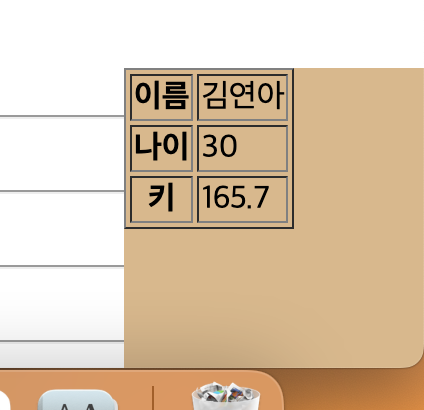
document.getElementById("demo").innerText=result;
- 문자열(텍스트) 그대로 출력
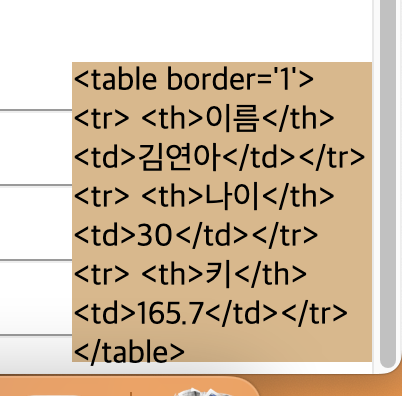
7. 연산자
1. 산술연산자

+	더하기
-	빼기
*	곱하기
/	나누기
%	나머지 값


2. 비교연산자 -> 논리형(boolean)값으로 반환된다
<
>
>=
<=
==
!=

==> **true / false**


3. 논리연산자
- 조건이 2개이상일 경우 전체적으로 판단
- 결과값은 boolean값으로 반환
- 그리고, 또는, 부정

    1) && 연산자
    - 그리고, and연산자, 논리곱
    - 모든 조건이 true일때만 true
    - ~이면서

    document.write(5<3 && 2<4);
    		//    false  true
    		//    false
    ex) 로그인할 때 아이디 비번 둘다 맞아야하므로 and 조건을 준다.


    2) || 연산자, 논리합
    - 또는, or연산자
    - 조건들 중에서 하나만이라도 true이면 true
    - ~이거나

    document.write(5<3 || 2<4);
    		//    false  true
    		//    true


    3) ! 연산자
    - 논리 부정 연산자, not연산자
    - ~아니라면

    let flag=true;
    document.write(!flag);
    // flag(true)가 아니라면 --> false
[연산자 우선순위]
- 최우선 연산자 : ()
- 산술 -> 비교 -> 판단
- 후순위 연산자 : =
1. 결합연산자(괄호)
document.write(3+4+5/2); // 나누기부터. 값 출력 9.5
document.write((3+4+5)/2); // 괄호부터. 값 출력 6
2. 대입연산자
let num=3;
num=num+2; //나의 값을 나의 변수에 대입시킬 수 있다.
document.write(num+"<hr>"); //5
num+=2; //==num=num+2;
document.write(num+"<hr>"); //7
num=num-3;
document.write(num+"<hr>"); //4
num-=3;
document.write(num+"<hr>"); //1
num*=10; // num=num*10
document.write(num+"<hr>") //10
num/=2; // num=num/2
document.write(num+"<hr>") //5
num%=4; //num=num%4
document.write(num+"<hr>") //1
3. 1증감 연산자 (1씩만 증가,감소)
let a=3;
a=a+1; //4
document.write(a+"<hr>");
a+=1; //5
document.write(a+"<hr>");
a++; //6
document.write(a+"<hr>");
++a; //7
document.write(a+"<hr>");
let b=3;
b=b-1; //2
document.write(b+"<hr>");
b-=1; //1
document.write(b+"<hr>");
b--; //0
document.write(b+"<hr>");
--b; //-1
document.write(b+"<hr>");
※ 1증감연산자는 다른 계산식과 같이 사용할 경우 주의 ※
let c=10;
let d=20;
let i=c++; // i=c
// c=c+1
let j=--d; // j=d-1
// j=d
document.write((c+d+i+j)); //11+19+10+19
document.write("<hr>");
연습문제
문1) 임의의 정수가 짝수(배수)인지 확인하시오
// -> 짝수란? 2로 나누어서 나머지가 0
let a=4;
document.write(a%2==0);
		 //    4%2
		 //    0  ==0
		 //    true

document.write(a%2!=1);
		 //    4%2
		 //    0  !=1


문2) 임의의 정수가 3의 배수인지 확인하시오
let b=7;
document.write(b%3==0);
		 //    7%3
		 //    1  ==0
		 //    false


문3) 임의의 정수가 4의 배수인지 확인하시오
let c=4;
document.write(c%4==0);


//문4) 해당 년도가 윤년인지 확인하시오
// -> 윤년 : 4년마다 한번씩 2월 29일에 속해 있는 년도
// (==문3과 같은말 == 4번에 한 번씩 ==4의 배수)
let year=2022;
document.write(year%4==0);


문5) 임의의 정수가 2의 배수이면서 5의 배수인지 확인하시오
// -> 10의배수도 같은 말
let d=5;
document.write(d%2==0 && d%5==0);
         //    5%2       5%5
         //    1  ==0     0 ==0
         //    false     true
         //    false


문6) 임의의 정수가 1 또는 3인지 확인하시오
// -> 1또는 3 홀수 (주민등록번호 1,3-남자, 2,4-여자 = 홀수는 남자, 짝수는 여자)
let code=1;
document.write(code==1 || code==3);
         //    1   ==1    1   ==3
         //    true       false
         //    true
코딩 공부 💻