앱을 만들면서 4대컴포넌트인 액티비티, 서비스, 브로드 케스트 리시버, 컨텐츠 프로바이더가 있습니다. 오늘은 그중 컨텐츠 프로바이더에 관하여 말해 볼까합니다.
컨테츠 프로바이더는 무었일까요? 컨텐츠 프로바이더는 컨텐츠 제공자라 불리기도합니다. 공식문서에서는 이렇게 정의합니다.
콘텐츠 제공자는 애플리케이션이 단독으로 저장되었거나 다른 앱에 의해 저장된 데이터에 대한 액세스를 관리하도록 돕고 다른 앱과 데이터를 공유하는 방법을 제공할 수 있습니다. 데이터를 캡슐화하고 데이터 보안을 정의하는 메커니즘을 제공합니다. 콘텐츠 제공자는 한 프로세스의 데이터를 다른 프로세스에서 실행 중인 코드와 연결하는 표준 인터페이스입니다.
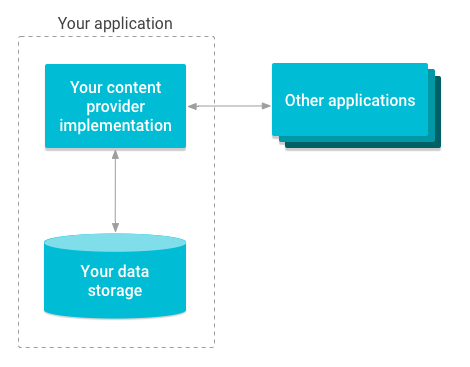
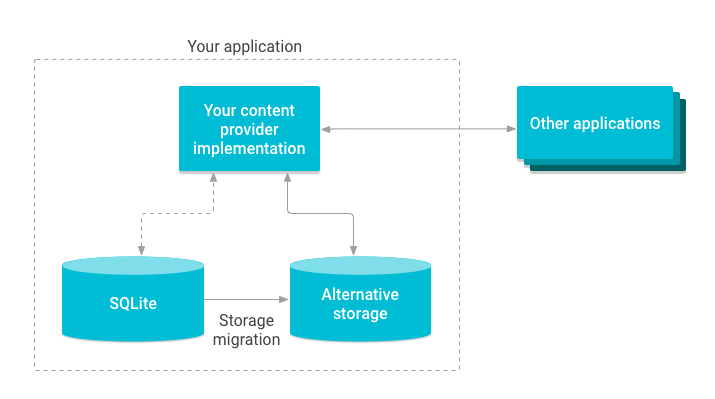
이런식으로 A앱에서 B앱의 데이터를 받아올수있습니다.
왜 이런 방식을 사용할까요? 앱의 데이터가 저장되는 위치를 안다면 컨텐츠 프로바이더를 사용하지않고도 접근할수있지 않을까요?
컨텐츠 프로바이더를 사용하지 않고 다른 앱의 데이터에 접근하는 것은 안드로이드의 보안 정책에 위배되는 행위이며, 안드로이드 앱 개발자로서 이를 권장하지 않습니다. 저장되는 위치를 안다고 하더라도 접근은 해당앱의 컨텐츠 프로바이더에서 파일프로바이더를 이용해야하기때문에 컨텐츠 프로바이더가 필수적을로 있어야합니다.
동작원리가 뭘까요?
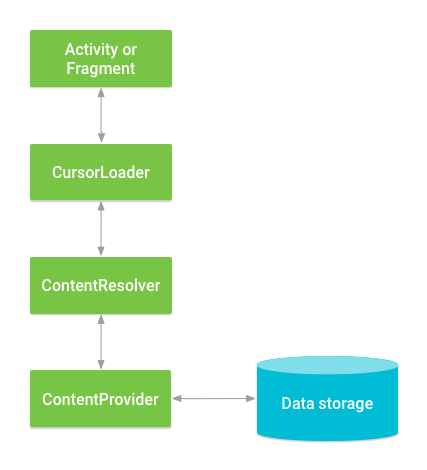
콘텐츠 제공자 내의 데이터에 액세스하고자 하는 경우, 애플리케이션의 Context에 있는 ContentResolver 객체를 사용하여 클라이언트로서 제공자와 통신을 주고받으면 됩니다. ContentResolver 객체가 제공자 객체와 통신하며, 이 객체는 ContentProvider를 구현하는 클래스의 인스턴스입니다.
제공자 객체가 클라이언트로부터 데이터 요청을 받아 요청된 작업을 실행하고 결과를 반환합니다. 이 객체에는 제공자 객체에서 이름이 같은 메서드를 호출하는 메서드(ContentProvider의 구체적인 서브클래스 중 하나의 인스턴스)가 있습니다. ContentResolver 메서드는 영구 저장소의 기본적인 'CRUD' (만들기, 검색, 업데이트, 삭제) 기능을 제공합니다.
구현
앱A(com.potatomeme.example_a) manifest
<?xml version="1.0" encoding="utf-8"?>
<manifest xmlns:android="http://schemas.android.com/apk/res/android"
    xmlns:tools="http://schemas.android.com/tools"
    package="com.potatomeme.example_a"
    >

    <application
        android:name=".MyApplication"
        android:allowBackup="true"
        android:dataExtractionRules="@xml/data_extraction_rules"
        android:fullBackupContent="@xml/backup_rules"
        android:icon="@mipmap/ic_launcher"
        android:label="@string/app_name"
        android:roundIcon="@mipmap/ic_launcher_round"
        android:supportsRtl="true"
        android:theme="@style/Theme.ExampleA"
        tools:targetApi="31">
        <activity
            android:name=".MainActivity"
            android:exported="true">
            <intent-filter>
                <action android:name="android.intent.action.MAIN" />

                <category android:name="android.intent.category.LAUNCHER" />
            </intent-filter>
        </activity>
        <provider
            android:name=".MyContentProvider"
            android:authorities="com.potatomeme.example_a.provider"
            android:exported="true"/>
    </application>

</manifest>
앱A(com.potatomeme.example_a) MyContentProvider
class MyContentProvider : ContentProvider() {
    override fun onCreate(): Boolean {
        return true
    }

    override fun query(
        p0: Uri,
        p1: Array<out String>?,
        p2: String?,
        p3: Array<out String>?,
        p4: String?,
    ): Cursor? {
        Log.e("******", "query: uri : $p0", )
        return MatrixCursor(arrayOf("sample","sample")).apply {
            addRow(arrayOf("정보","A앱의 정보입니다."))
            addRow(arrayOf("int",Preferences.sampleDataInt.toString()))
            addRow(arrayOf("float",Preferences.sampleDataFloat.toString()))
            addRow(arrayOf("str", Preferences.sampleDataStr))
            addRow(arrayOf("boolean",Preferences.sampleDataBoolean.toString()))
        }
    }

    override fun getType(p0: Uri): String? {
        return ""
    }

    override fun insert(p0: Uri, p1: ContentValues?): Uri? {
        return Uri.parse("")
    }

    override fun delete(p0: Uri, p1: String?, p2: Array<out String>?): Int {
        return 0
    }

    override fun update(p0: Uri, p1: ContentValues?, p2: String?, p3: Array<out String>?): Int {
        return 0
    }
}
앱B(com.potatomeme.example_b) manifest
<?xml version="1.0" encoding="utf-8"?>
<manifest xmlns:android="http://schemas.android.com/apk/res/android"
    xmlns:tools="http://schemas.android.com/tools">
    <queries>
        <provider android:authorities="com.potatomeme.example_a.provider"/>
    </queries>
    <application
        android:allowBackup="true"
        android:dataExtractionRules="@xml/data_extraction_rules"
        android:fullBackupContent="@xml/backup_rules"
        android:icon="@mipmap/ic_launcher"
        android:label="@string/app_name"
        android:roundIcon="@mipmap/ic_launcher_round"
        android:supportsRtl="true"
        android:theme="@style/Theme.ExampleB"
        tools:targetApi="31">
        <activity
            android:name=".MainActivity"
            android:exported="true">
            <intent-filter>
                <action android:name="android.intent.action.MAIN" />

                <category android:name="android.intent.category.LAUNCHER" />
            </intent-filter>
        </activity>

    </application>

</manifest>
앱B(com.potatomeme.example_b) MainActivity
class MainActivity : AppCompatActivity() {
    override fun onCreate(savedInstanceState: Bundle?) {
        super.onCreate(savedInstanceState)
        enableEdgeToEdge()
        setContentView(R.layout.activity_main)
        ViewCompat.setOnApplyWindowInsetsListener(findViewById(R.id.main)) { v, insets ->
            val systemBars = insets.getInsets(WindowInsetsCompat.Type.systemBars())
            v.setPadding(systemBars.left, systemBars.top, systemBars.right, systemBars.bottom)
            insets
        }
        val resolver = contentResolver
        val uri = Uri.parse("content://com.potatomeme.example_a.provider/data")
        val cursor = resolver.query(uri,null,null,null,null)
        Log.e(TAG, "onCreate: ${cursor}")
        if (cursor != null) {
            // Cursor가 데이터를 포함하는지 확인
            if (cursor.moveToFirst()) {
                do {
                    val a: String? = cursor.getString(0)
                    val b: String? = cursor.getString(1)
                    Log.e(TAG, "$a : $b")
                } while (cursor.moveToNext()) // 다음 데이터로 이동
            }
            cursor.close() // Cursor 사용이 끝난 후 꼭 닫아주어야 합니다.
        }
    }

    companion object{
        private const val TAG = "MainActivity"
    }
}
reference
https://developer.android.com/guide/topics/providers/content-providers?hl=ko
https://velog.io/@ows3090/Android-ContentProvider-%EA%B5%AC%ED%98%84-%EB%B0%8F-%EC%82%AC%EC%9A%A9%EB%B2%95
https://jroomstudio.tistory.com/15