앱을 만들면서 4대컴포넌트인 액티비티, 서비스, 브로드 케스트 리시버, 컨텐츠 프로바이더가 있습니다. 오늘은 그중 서비스에 관하여 말해 볼까합니다.
안드로이드에서 4대 컴포넌트는 독립성을 가집니다. 액티비티가 죽어도 서비스는 살아있을수있습니다. 그요소가 가장 큰것이 서비스입니다. 서비스는 사용자와 상호작용하지 않고도 백그라운드에서 음악을 재생하거나 파일을 다운로드하는 등의 작업을 수행할 수 있는 애플리케이션 구성 요소입니다.
서비스는 Foreground Service, Background Service, Bound Service 3가지로 나눌수있습니다.
Foreground Service
- 사용자가 직접 인식할 수 있는 작업을 수행하는 서비스입니다.
- 사용자에게 알림을 통해 서비스가 실행 중임을 표시해야 합니다.
- 예를 들어, 음악 재생, 다운로드 등의 작업을 수행하는 경우 Foreground Service를 사용하여 작업이 계속되는 동안 사용자에게 알림을 표시할 수 있습니다.
- Foreground Service는 활성화된 액티비티와 동일한 우선순위를 가지므로 시스템에 메모리가 부족하더라도 강제 종료될 확률이 낮습니다.
Background Service
- 사용자에게 직접적으로 인식되지 않는 서비스입니다.
- Foreground Service와 달리 사용자에게 알림을 표시할 필요가 없습니다.
- 일반적으로 사용자가 애플리케이션과 상호작용하지 않는 동안 지속되는 작업을 처리하는 데 사용됩니다.
- 시스템 리소스가 부족할 경우 강제 종료될 수 있습니다.
- API 25 이상부터는 앱이 Foreground에 있지 않을 때 백그라운드 서비스를 강제로 종료됩니다.
Bound Service
- 다른 애플리케이션 구성 요소(예: 액티비티)와 바인딩하여 상호 작용하는 서비스입니다.
- 클라이언트-서버 인터페이스를 통해 서비스에 연결되며, 클라이언트는 서비스의 메서드를 호출하여 작업을 수행할 수 있습니다.
- 일반적으로 애플리케이션 간 통신이나 데이터 공유를 위해 사용됩니다.
- Bound Service는 바인딩된 컴포넌트들이 전부 바인딩 해제되면 서비스가 소멸 됩니다.
Service 의 생명주기
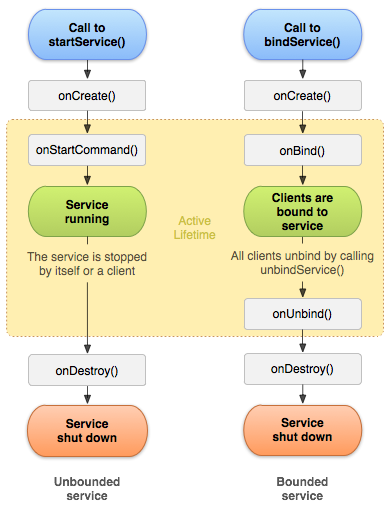
서비스도 액티비티처럼 생명주기가 있습니다. 이 생명주기는 startService와 bindService중 어떤 함수로 서비스가 실행되는냐에따라 생명주기가 달라집니다.
onCreate
@Override
public void onCreate() {
    super.onCreate();
    // 서비스의 초기화 작업 수행
    // 예: 리소스 초기화, 백그라운드 스레드 생성 등
}- onCreate() 메서드는 서비스가 생성될 때 호출되는 메서드입니다.
- 서비스의 초기화 작업을 수행하는 데 사용됩니다. 주로 한 번만 호출되는 초기 설정 및 자원 할당 등의 작업을 수행합니다.
- 예를 들어, 서비스가 필요한 리소스를 초기화하거나 백그라운드 스레드를 생성하는 등의 작업을 이 메서드에서 수행할 수 있습니다.
onStartCommand
@Override
public int onStartCommand(Intent intent, int flags, int startId) {
    // 서비스가 시작될 때 호출되는 메서드
    // intent: 서비스를 시작하는 Intent
    // flags: 서비스 실행에 대한 추가 정보 플래그
    // startId: 서비스 시작 요청을 식별하는 고유 ID
    // 실제 작업을 수행하고 동작 방식을 나타내는 정수 값을 반환
    return START_STICKY; // 예: 서비스가 종료되더라도 자동으로 재시작하는 동작
}-
onStartCommand() 메서드는 startService() 메서드를 호출하여 서비스를 시작할 때 호출되는 메서드입니다.
-
서비스가 시작될 때마다 호출되며, 각 호출은 서비스를 시작하는 Intent에 대한 정보를 받습니다.
-
이 메서드에서는 실제로 수행할 작업을 구현하고, 서비스가 시작되는 이유에 따라 다양한 동작을 수행할 수 있습니다.
-
메서드는 정수 값을 반환하며, 이 값은 시스템에게 서비스의 동작 방식을 알려줍니다.
-
onStartCommand() 메서드는 반환하는 정수 값에 따라 서비스의 동작을 지정할 수 있습니다. 일반적으로 사용되는 반환 값은 다음과 같습니다
-
START_STICKY: 서비스가 종료되더라도 시스템이 자동으로 서비스를 다시 시작시킵니다.
-
START_NOT_STICKY: 서비스가 종료되면 다시 시작되지 않습니다.
-
START_REDELIVER_INTENT: 서비스가 종료되면 마지막 Intent를 다시 전달하여 서비스를 다시 시작합니다.
onBind
@Override
public IBinder onBind(Intent intent) {
    // 다른 구성 요소가 서비스에 바인딩될 때 호출되는 메서드
    // 서비스와 상호 작용하는 데 사용될 IBinder 반환
    return null; // 바인딩되지 않은 경우 null 반환
}- 다른 구성 요소(예: 액티비티)가 서비스에 바인딩될 때 호출되는 메서드입니다.
- 바인딩된 서비스에 대한 인터페이스를 제공하고 클라이언트와의 통신을 설정하는 데 사용됩니다.
onUnbind
@Override
public boolean onUnbind(Intent intent) {
    // 다른 구성 요소가 서비스와의 바인딩을 해제할 때 호출되는 메서드
    // 추가적인 정리 작업 수행
    return true; // true를 반환하여 재바인딩 허용, false를 반환하여 재바인딩 금지
}- 다른 구성 요소(예: 액티비티)가 서비스의 바인딩을 해제할 때 호출되는 메서드입니다.
- 서비스와의 연결이 해제되었을 때 추가적인 정리 작업을 수행하는 데 사용됩니다.
onRebind
@Override
public void onRebind(Intent intent) {
    // 이미 바인딩된 서비스와 새로운 클라이언트가 바인딩될 때 호출되는 메서드
}- 이미 바인딩된 서비스와 새로운 클라이언트가 바인딩되었을 때 호출되는 메서드입니다.
- 서비스가 이미 바인딩된 상태에서 새로운 클라이언트가 바인딩되면 호출됩니다.
onDestroy
@Override
public void onDestroy() {
    // 서비스가 종료될 때 호출되는 메서드
    // 리소스 해제 및 정리 작업 수행
    super.onDestroy();
}- 서비스가 소멸될 때 호출되는 메서드입니다.
- 서비스가 더 이상 필요하지 않을 때 자원을 해제하고 정리하는 데 사용됩니다.
- 예를 들어, 백그라운드 스레드를 종료하거나 리소스를 해제하는 등의 작업을 수행할 수 있습니다.
구현
Foreground && Background Service
MainActivity.kt
class MainActivity : AppCompatActivity() {

    override fun onCreate(savedInstanceState: Bundle?) {
        super.onCreate(savedInstanceState)
        setContentView(R.layout.activity_main)

        btnStartService.setOnClickListener {
            if (!isServiceRunning(MyForegroundService::class.java)) {
                val serviceIntent = Intent(this, MyService::class.java)
                startService(serviceIntent)
            }
        }

        btnStopService.setOnClickListener {
            val serviceIntent = Intent(this, MyService::class.java)
            stopService(serviceIntent)
        }
    }

    private fun isServiceRunning(serviceClass: Class<*>): Boolean {
        val manager = getSystemService(Context.ACTIVITY_SERVICE) as ActivityManager
        for (service in manager.getRunningServices(Integer.MAX_VALUE)) {
            if (serviceClass.name == service.service.className) {
                return true
            }
        }
        return false
    }
}
MyService.kt
class MyService : Service() {

    companion object {
        private const val NOTIFICATION_ID = 1
        private const val CHANNEL_ID = "MyServiceChannel"
    }

    override fun onCreate() {
        super.onCreate()
    }

    override fun onStartCommand(intent: Intent?, flags: Int, startId: Int): Int {
        createNotificationChannel()
        val notification = buildNotification()

        // Foreground 서비스로 설정
        startForeground(NOTIFICATION_ID, notification)

        // 여기서 백그라운드 작업 수행

        return START_STICKY
    }

    override fun onBind(intent: Intent?): IBinder? {
        return null
    }

    private fun createNotificationChannel() {
        if (Build.VERSION.SDK_INT >= Build.VERSION_CODES.O) {
            val channel = NotificationChannel(
                CHANNEL_ID,
                "My Service Channel",
                NotificationManager.IMPORTANCE_DEFAULT
            )
            val manager = getSystemService(Context.NOTIFICATION_SERVICE) as NotificationManager
            manager.createNotificationChannel(channel)
        }
    }

    private fun buildNotification(): Notification {
        val builder = if (Build.VERSION.SDK_INT >= Build.VERSION_CODES.O) {
            NotificationCompat.Builder(this, CHANNEL_ID)
        } else {
            // 안드로이드 Oreo 이하 버전에서는 채널 ID가 필요하지 않음
            NotificationCompat.Builder(this)
        }

        builder.setContentTitle("MyService")
            .setContentText("MyService is running")
            .setSmallIcon(R.mipmap.ic_launcher)

        return builder.build()
    }
}
manifest
<service android:name=".MyService" />BoundService
MainActivity.kt
class MainActivity : AppCompatActivity() {

    private var boundService: MyBoundService? = null
    private var isBound: Boolean = false

    private val connection = object : ServiceConnection {
        override fun onServiceConnected(name: ComponentName?, service: IBinder?) {
            val binder = service as MyBoundService.MyBinder
            boundService = binder.getService()
            isBound = true
            Toast.makeText(this@MainActivity, "Service Bound", Toast.LENGTH_SHORT).show()
        }

        override fun onServiceDisconnected(name: ComponentName?) {
            isBound = false
        }
    }

    override fun onCreate(savedInstanceState: Bundle?) {
        super.onCreate(savedInstanceState)
        setContentView(R.layout.activity_main)

        btnBindService.setOnClickListener {
            bindService()
        }

        btnUnbindService.setOnClickListener {
            unbindService()
        }

        btnGetTimestamp.setOnClickListener {
            if (isBound) {
                val timestamp = boundService?.getTimestamp()
                Toast.makeText(this, "Timestamp: $timestamp", Toast.LENGTH_SHORT).show()
            } else {
                Toast.makeText(this, "Service is not bound", Toast.LENGTH_SHORT).show()
            }
        }
    }

    private fun bindService() {
        val intent = Intent(this, MyBoundService::class.java)
        bindService(intent, connection, Context.BIND_AUTO_CREATE)
    }

    private fun unbindService() {
        if (isBound) {
            unbindService(connection)
            isBound = false
            Toast.makeText(this, "Service Unbound", Toast.LENGTH_SHORT).show()
        }
    }

    override fun onDestroy() {
        super.onDestroy()
        unbindService()
    }
}
MyBoundService.kt
class MyBoundService : Service() {

    // Binder 인스턴스 생성
    private val binder = MyBinder()

    inner class MyBinder : Binder() {
        fun getService(): MyBoundService = this@MyBoundService
    }

    override fun onBind(intent: Intent?): IBinder? {
        // Binder를 반환하여 클라이언트가 서비스와 상호 작용할 수 있도록 함
        return binder
    }

    // 클라이언트에게 제공할 메서드
    fun getTimestamp(): String {
        return System.currentTimeMillis().toString()
    }

    override fun onDestroy() {
        super.onDestroy()
        Log.d("MyBoundService", "Service destroyed")
    }
}- Bound Service는 Manifest 파일에 등록하지 않습니다. Bound Service는 다른 구성 요소(예: 액티비티)에 의해 동적으로 바인딩되기 때문에 정적인 방식으로 Manifest에 등록할 필요가 없습니다.
reference
https://developer.android.com/develop/background-work/services?hl=ko
https://velog.io/@kingdo/Android-Service%EB%9E%80
https://medium.com/mj-studio/%EC%95%88%EB%93%9C%EB%A1%9C%EC%9D%B4%EB%93%9C-%EC%96%B4%EB%94%94%EA%B9%8C%EC%A7%80-%EC%95%84%EC%84%B8%EC%9A%94-2-2-bound-service-ipc-87237c4a38ca