안드로이드에서 애니메이션을 사용하려면 여러가지 방법이있습니다. lottie난 glide를 이용해 움직이는 이미지를 보여주거나 코드에서 canvas를 이용하여 그림을 그리는 방법이 있습니다. 오늘 포스팅할 MotionLayout으로도 애니메이션을 구현할수있습니다.
MotionLayout은 ConstraintLayout의 하위 클래스로, UI 위젯 간의 애니메이션 및 전환을 쉽게 구현할 수 있도록 도와주는 라이브러리입니다. XML 파일을 사용하여 상대적인 위치나 크기, 회전 등을 정의하여 애니메이션을 만들 수 있습니다. 사용자 인터랙션에 반응하는 동적 애니메이션도 구현할 수 있습니다.
이 MotionLayout을 이용하여 애니메이션을 구현하는 방법은 크게 3가지로 나눌수 있습니다.
-
MotionLayout으로 감싸기
-
MotionScene(애니메이션) 정의하기
-
MotionScene을 MotionLayout에 적용하기
MotionLayout은 ConstraintLayout의 하위 클래스이므로 ConstraintLayout을 대체하여 사용할수있습니다. 똑같은 하위의 View들이 ConstraintLayout의 constraint 속성들을 사용할수있다는 말이죠 그러므로 똑같이 하되 layoutDescription에 애니메이션인 MotionScene을 등록해줘야합니다.
1번과 3번에서 해야하는 작업은 별로 없습니다. Layout바꾸고 정의한거 layoutDescription에 넣어주기만 하면 되니까요 결과적으로는 MotionScene이 중용합니다.
MotionScene은 MotionLayout에서 모든 애니메이션 및 전환 정보를 정의하는 상위 요소입니다. MotionScene은 XML 파일로 정의되며, MotionLayout에 대한 모든 애니메이션 및 상태 전환을 설명합니다.
MotionScene에서 사용하는 태그
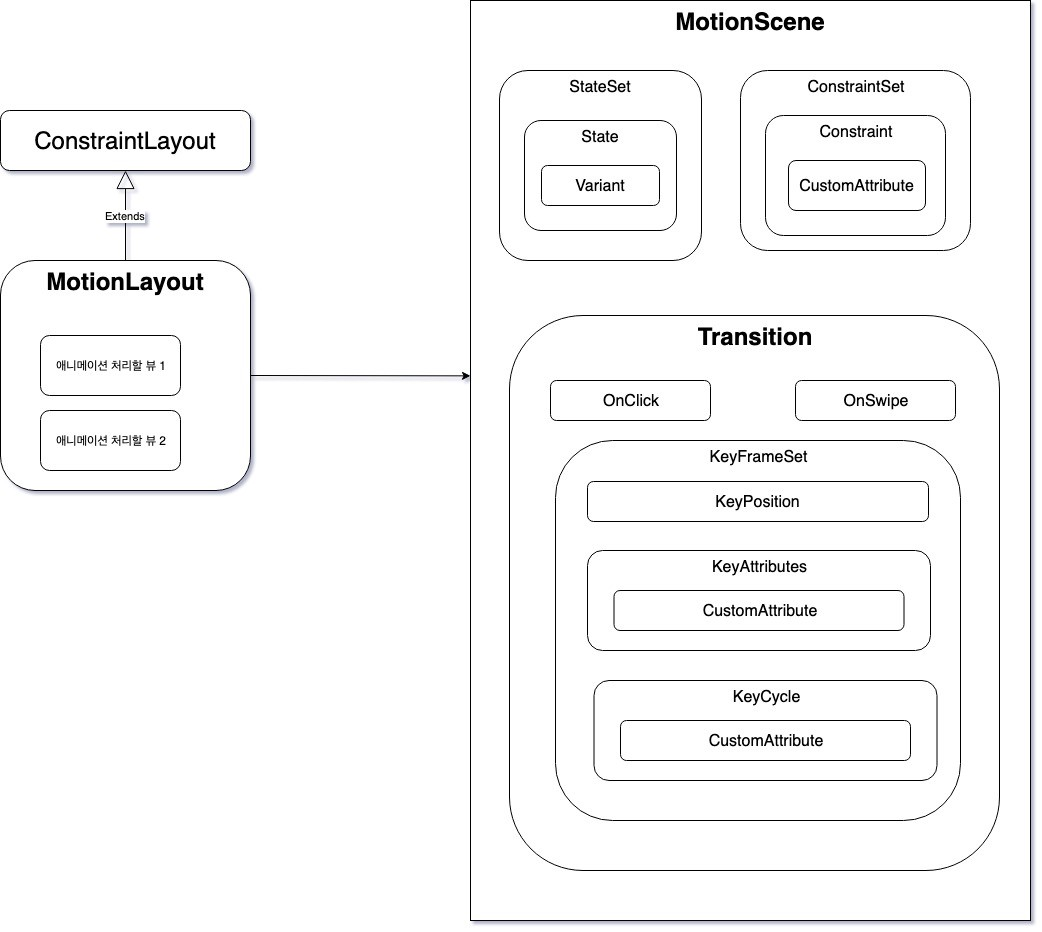
MotionScene
전체 애니메이션 시나리오를 정의하는 가장 상위 레벨 요소입니다. 이 태그는 모든 애니메이션 구성 요소를 포함합니다.
ConstraintSet
뷰의 제약 조건 세트를 정의합니다. 시작 상태와 종료 상태 각각에 대한 제약 조건을 지정합니다. 즉, 뷰의 위치, 크기, 여백 등을 결정합니다.
Transition
시작 상태와 종료 상태 간의 전환을 정의합니다. 애니메이션의 지속 시간, 이징, 이벤트 처리 등을 설정합니다.
KeyFrameSet
전환 중간에 발생하는 특정 시점의 속성 변경을 정의합니다. 시간에 따른 속성의 변경을 설정할 수 있습니다. 이를 통해 복잡한 애니메이션을 만들 수 있습니다.
OnClick
클릭 이벤트를 처리하는 동작을 정의합니다. 사용자가 뷰를 클릭했을 때 실행되는 작업을 지정할 수 있습니다.
OnSwipe
스와이프 이벤트를 처리하는 동작을 정의합니다. 사용자가 화면을 스와이프했을 때 실행되는 작업을 지정할 수 있습니다.
CustomAttribute
사용자가 정의한 사용자 지정 속성을 정의할 수 있는 요소입니다. 이를 사용하여 특정 뷰 속성에 사용자 지정 애니메이션을 적용할 수 있습니다.
KeyCycle
뷰의 속성을 주기적으로 변화시키는 동작을 정의합니다. 예를 들어, 특정 시간 동안 뷰의 크기나 회전 속성을 주기적으로 변화시키는 것이 가능합니다.
KeyAttribute
특정 시간에 뷰의 속성을 변경하는 동작을 정의합니다. 애니메이션 중간에 뷰의 특정 속성을 변경하고자 할 때 사용됩니다.
구현
activity_main.xml
<?xml version="1.0" encoding="utf-8"?>
<androidx.coordinatorlayout.widget.CoordinatorLayout xmlns:android="http://schemas.android.com/apk/res/android"
    xmlns:app="http://schemas.android.com/apk/res-auto"
    android:id="@+id/coordinatorLayout"
    android:layout_width="match_parent"
    android:layout_height="match_parent">

    <androidx.recyclerview.widget.RecyclerView
        android:id="@+id/recyclerView"
        android:layout_width="match_parent"
        android:layout_height="match_parent"
        android:background="#F3F3F3"
        android:nestedScrollingEnabled="true"
        app:layout_behavior="@string/appbar_scrolling_view_behavior" />


    <com.google.android.material.appbar.AppBarLayout
        android:id="@+id/appbarLayout"
        android:layout_width="match_parent"
        android:layout_height="100dp"
        android:background="@color/white">

        <androidx.constraintlayout.motion.widget.MotionLayout
            android:id="@+id/motionLayout"
            android:layout_width="match_parent"
            android:layout_height="match_parent"
            android:minHeight="?attr/actionBarSize"
            app:layoutDescription="@xml/toolbar_scene"
            app:layout_scrollFlags="scroll|exitUntilCollapsed">

            <ImageView
                android:id="@+id/button"
                android:layout_width="24dp"
                android:layout_height="24dp"
                android:background="@drawable/ic_android_black_24dp"
                app:layout_constraintEnd_toEndOf="parent"
                app:layout_constraintTop_toTopOf="parent" />

            <View
                android:id="@+id/dummy"
                android:layout_width="0dp"
                android:layout_height="?attr/actionBarSize"
                app:layout_constraintBottom_toBottomOf="parent"
                app:layout_constraintEnd_toEndOf="parent"
                app:layout_constraintStart_toStartOf="parent" />

            <TextView
                android:id="@+id/title"
                android:layout_width="wrap_content"
                android:layout_height="wrap_content"
                android:layout_marginStart="20dp"
                android:layout_marginBottom="10dp"
                android:text="TEST"
                android:textColor="@color/black"
                android:textSize="35sp"
                app:layout_constraintBottom_toBottomOf="parent"
                app:layout_constraintStart_toStartOf="parent" />
        </androidx.constraintlayout.motion.widget.MotionLayout>
    </com.google.android.material.appbar.AppBarLayout>
</androidx.coordinatorlayout.widget.CoordinatorLayout>
toolbar_scene.xml
<?xml version="1.0" encoding="utf-8"?>
<MotionScene xmlns:android="http://schemas.android.com/apk/res/android"
    xmlns:app="http://schemas.android.com/apk/res-auto">

    <ConstraintSet android:id="@+id/start">
        <Constraint
            android:id="@+id/title"
            android:layout_width="wrap_content"
            android:layout_height="wrap_content"
            android:layout_marginStart="20dp"
            android:layout_marginBottom="10dp"
            android:scaleX="1.0"
            android:scaleY="1.0"
            app:layout_constraintBottom_toBottomOf="parent"
            app:layout_constraintStart_toStartOf="parent" />
        <Constraint
            android:id="@+id/button"
            android:layout_width="24dp"
            android:layout_height="24dp"
            android:layout_marginTop="16dp"
            android:layout_marginEnd="16dp"
            app:layout_constraintEnd_toEndOf="parent"
            app:layout_constraintTop_toTopOf="parent" />
    </ConstraintSet>
    <ConstraintSet android:id="@+id/end">
        <Constraint
            android:id="@+id/title"
            android:layout_width="wrap_content"
            android:layout_height="wrap_content"
            android:scaleX="0.5"
            android:scaleY="0.5"
            app:layout_constraintBottom_toBottomOf="@id/dummy"
            app:layout_constraintEnd_toEndOf="parent"
            app:layout_constraintStart_toStartOf="parent"
            app:layout_constraintTop_toTopOf="@id/dummy" />
        <Constraint
            android:id="@+id/button"
            android:layout_width="24dp"
            android:layout_height="24dp"
            android:layout_marginEnd="16dp"
            app:layout_constraintBottom_toBottomOf="parent"
            app:layout_constraintEnd_toEndOf="parent"
            app:layout_constraintTop_toTopOf="@id/dummy" />
    </ConstraintSet>
    <Transition
        app:constraintSetEnd="@+id/end"
        app:constraintSetStart="@+id/start" />
</MotionScene>
MainActivity.kt
class MainActivity : AppCompatActivity() {
    override fun onCreate(savedInstanceState: Bundle?) {
        super.onCreate(savedInstanceState)
        setContentView(R.layout.activity_main)
        findViewById<RecyclerView>(R.id.recyclerView)?.apply {
            layoutManager = LinearLayoutManager(this@MainActivity)
            adapter = object : RecyclerView.Adapter<ViewHolder>() {
                private val dataSet = Array<String>(30) { "no.$it" }

                override fun onCreateViewHolder(parent: ViewGroup, viewType: Int): ViewHolder {
                    val view = LayoutInflater.from(parent.context)
                        .inflate(R.layout.item_layout, parent, false)
                    return ViewHolder(view)
                }

                override fun onBindViewHolder(holder: ViewHolder, position: Int) {
                    holder.textView.text = dataSet[position]
                }

                override fun getItemCount(): Int {
                    return dataSet.size
                }

            }
        }
        val motionLayout = findViewById<MotionLayout>(R.id.motionLayout)
        findViewById<AppBarLayout>(R.id.appbarLayout).addOnOffsetChangedListener { appBarLayout, verticalOffset ->
            val seekPosition = abs(verticalOffset) / appBarLayout.totalScrollRange.toFloat()
            motionLayout.progress = seekPosition
        }
    }

    class ViewHolder(view: View) : RecyclerView.ViewHolder(view) {
        val textView: TextView = view.findViewById(R.id.textView)
    }
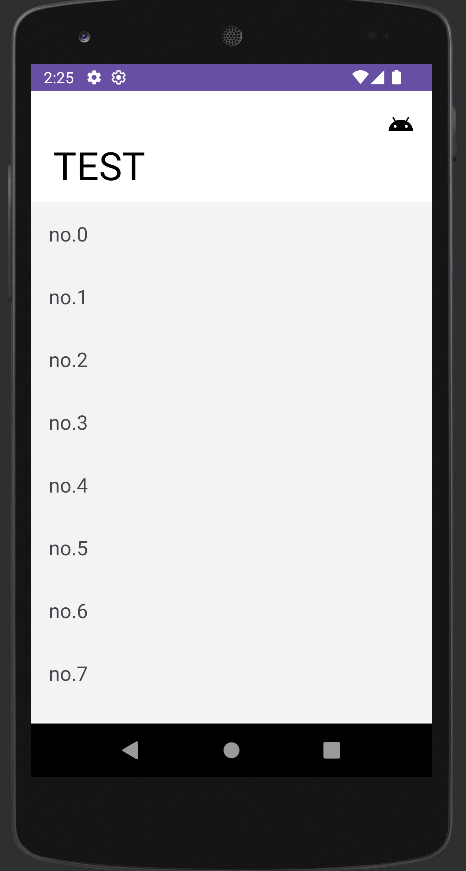
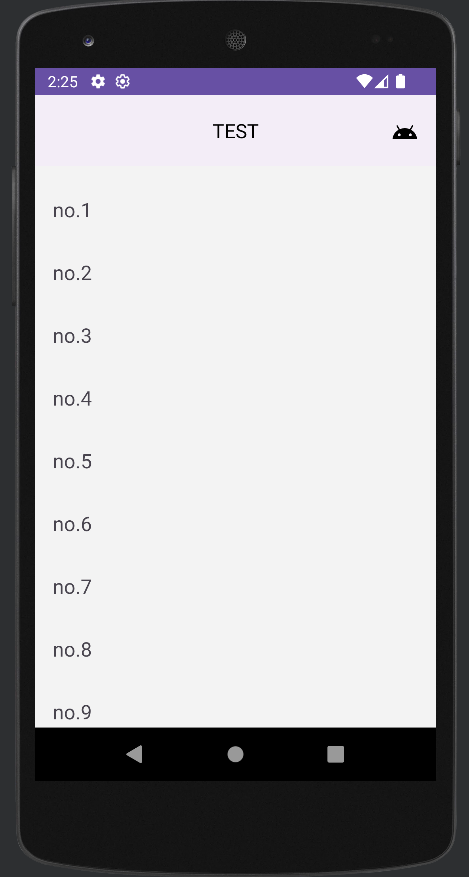
}
reference
https://developer.android.com/develop/ui/views/animations/motionlayout?hl=ko
https://developer.android.com/training/constraint-layout/motionlayout/ref/motionscene
https://codelabs.developers.google.com/codelabs/motion-layout
https://medium.com/@zzanzu/%EC%95%88%EB%93%9C%EB%A1%9C%EC%9D%B4%EB%93%9C-%EC%95%A0%EB%8B%88%EB%A9%94%EC%9D%B4%EC%85%98-%EA%B5%AC%ED%98%84%EC%9D%84-%EC%9C%84%ED%95%9C-motionlayout-%EC%9D%B4%ED%95%B4%ED%95%98%EA%B8%B0-9592d6d524eb
https://blog.gangnamunni.com/post/MotionLayout/