안드로이드 앱에서 버튼을 눌렀다면 터치이벤트는 어떻게될까요?
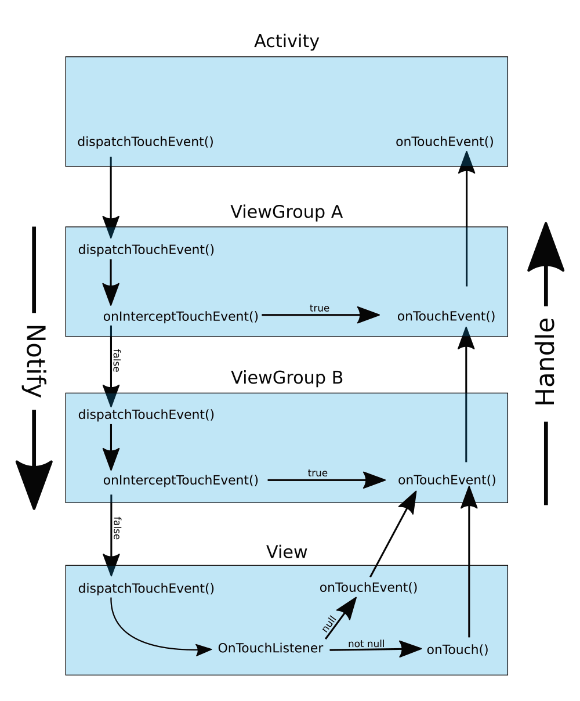
위 그림처럼 액티비티부터시작해서 ViewGroup으로 이동해서 그안에있는 View나 ViewGroup에 계속 접근합니다. 이때 ViewGroup의 onInterceptTouchEvent가 false일때 만 다음 View나 ViewGroup에 접근할수 있게 되는것 입니다.
그렇다면 이때 onInterceptTouchEvent 가 True라면 다음 View로 가지않고 해당View에서 onTouchEvenet를 수행할수있게됩니다.
여기서 의문이 들수있습니다.
위 그림대로 Event가 흘러간다면 onTouchEvenet가 차례대로 호출이 될껀데 onInterceptTouchEvent 가 True면 뭐가 좋을까?
만약 여러 개의 자식 뷰 중 하나에서 특정 동작(예: 스와이프, 드래그 등)을 하나만 허용하고 싶은 경우, 해당 동작을 감지하여 다른 자식 뷰의 터치 이벤트를 차단해야 할 수 있습니다. 이런 경우에는 onInterceptTouchEvent에서 특정 조건을 검사하여 해당 동작을 허용하고 나머지 자식 뷰의 터치 이벤트를 차단할 수 있습니다. 그러때 GestureDetector를 이용하여 해당 이벤트에따라 처리를할수있습니다.
class SampleMotionLayout
@JvmOverloads constructor(
    context: Context,
    attributeSet: AttributeSet? = null,
    defStyleAttr: Int = 0
) : MotionLayout(context, attributeSet, defStyleAttr) {

    var targetView: View? = null
    private val gestureDetector by lazy {
        GestureDetector(context, object : GestureDetector.SimpleOnGestureListener() {
            override fun onScroll(
                e1: MotionEvent,
                e2: MotionEvent,
                distanceX: Float,
                distanceY: Float
            ): Boolean {
                return targetView?.containTouchArea(e1.x.toInt(), e1.y.toInt()) ?: false
            }

        })
    }

    override fun onInterceptTouchEvent(event: MotionEvent?): Boolean {
        event?.let {
            return gestureDetector.onTouchEvent(event)
        } ?: return false


    }

    override fun onTouchEvent(event: MotionEvent?): Boolean {
        return super.onTouchEvent(event)
    }

    private fun View.containTouchArea(x: Int, y: Int): Boolean {
        return (x in this.left..this.right && y in this.top..this.bottom)
    }
}
이런식으로 MotionLayout에서 onInterceptTouchEvent를 처리할수도 있습니다.
refernece
https://developer.android.com/develop/ui/views/touch-and-input/gestures/viewgroup
https://readystory.tistory.com/185